
Skip to content
← SEO Infographics
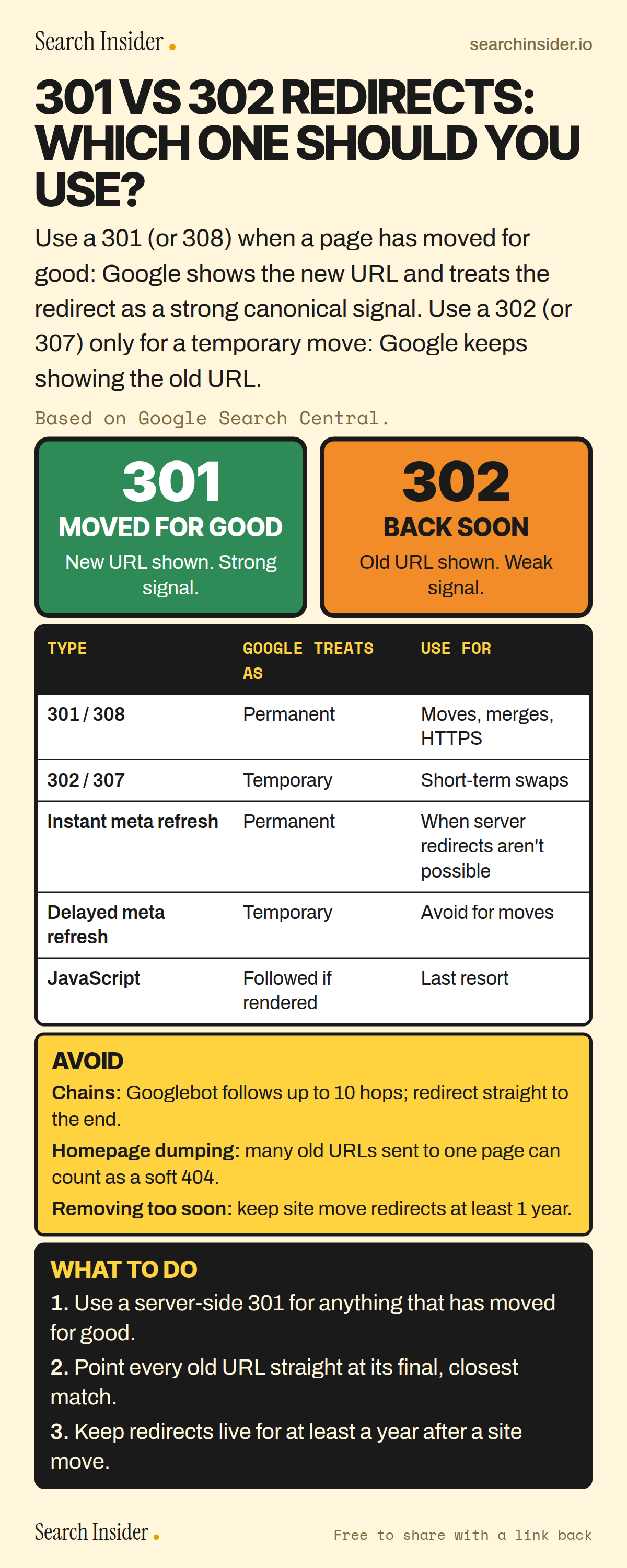
301 vs 302 redirects infographic: a green 301 sign for moved for good and an orange 302 sign for back soon, a table of redirect types and how Google treats them, an avoid box covering chains, homepage redirects and removing redirects too soon, and three steps on what to do.

Oct 5, 2026

301 vs 302 Redirects: Which to Use? (Infographic)

301 vs 302 redirects explained: how Google treats permanent and temporary redirects, meta refresh and JavaScript redirects, chains, and how long to keep redirects after a site move.

Embed this infographic

Every infographic here is free to republish, on any site, with a link back to the study it comes from. Paste this code and the credit is done for you.

<a href="https://searchinsider.io/infographics/301-vs-302-redirects"><img src="https://searchinsider.io/research/301-vs-302-redirects/301-vs-302-redirects-infographic.png" alt="301 vs 302 redirects infographic: a green 301 sign for moved for good and an orange 302 sign for back soon, a table of redirect types and how Google treats them, an avoid box covering chains, homepage redirects and removing redirects too soon, and three steps on what to do." style="max-width:680px;width:100%;height:auto;" /></a><p>Source: <a href="https://searchinsider.io/infographics/301-vs-302-redirects">301 vs 302 redirects infographic</a> by Search Insider.</p>

301 vs 302 redirects: which one should you use?

The short answer: Use a 301 (or 308) when a page has moved for good: Google shows the new URL and treats the redirect as a strong canonical signal. Use a 302 (or 307) only for a temporary move: Google keeps showing the old URL.

Based on Google Search Central.

What it shows

  • Permanent redirects (301, 308) tell Google to show the new URL in search results.
  • Temporary redirects (302, 303, 307) tell Google to keep showing the source page.
  • Google treats a 301 as a strong canonical signal and a 302 as a weak one.
  • Instant meta refresh redirects count as permanent; delayed ones count as temporary.
  • Use JavaScript redirects only as a last resort, because Google may miss them if rendering fails.
  • Googlebot follows up to 10 redirect hops, but Google advises redirecting straight to the final URL.
  • Keep site move redirects for as long as possible, generally at least 1 year.

What to do

  • Moved for good: Use a server-side 301.
  • Mapping: Point each old URL at its final, closest match.
  • Site moves: Keep redirects live for at least a year.

The walkthrough

What is the difference between a 301 and a 302 redirect?

A 301 is a permanent redirect and a 302 is a temporary one. With a permanent redirect, Google shows the new redirect target in search results; with a temporary redirect, it shows the source page [1]. Google says 301 and 308 mean a page has permanently moved, while 302, 303 and 307 are temporary [1].

Do 301 and 302 redirects affect canonicalization?

Yes. Google's systems use a 301 as a strong signal that the redirect target should be canonical, and a 302 as a weak signal [2]. A 308 is treated the same as a 301, and a 307 the same as a 302 [2].

Which redirect should you use?

Google recommends a permanent server-side redirect whenever possible [1]. Use a temporary redirect only when the original URL will come back, such as a short-term swap.

How does Google treat meta refresh and JavaScript redirects?

Google interprets instant meta refresh redirects as permanent and delayed ones as temporary [1]. Use JavaScript redirects only if you can't use server-side or meta refresh redirects, because Google might never see a JavaScript redirect if rendering fails [1].

How many redirects in a chain will Google follow?

By default, Google's crawlers follow up to 10 redirect hops [2]. Google still advises avoiding chains and redirecting to the final destination directly [3].

Can you redirect old pages to the homepage?

Google advises against redirecting many old URLs to one irrelevant destination such as the homepage, because it can confuse users and might be treated as a soft 404 [3]. Map each old URL to its closest new equivalent instead [3].

How long should you keep redirects after a site move?

Keep them for as long as possible, generally at least 1 year [3].

More digital marketing infographics

404 errors infographic: a 404 banner with Google's view that 404s are normal, which status to return in four cases, three facts on how Google treats 4xx and soft 404s, a checklist for a good custom 404 page, and three steps on what to do.

SEO · Oct 6, 2026

Do 404 errors hurt your SEO?

Do 404 errors hurt SEO? How Google treats 404s, why soft 404s are the real problem, which status code to return, and how to build a good custom 404 page.

Embed code
<a href="https://searchinsider.io/infographics/404-errors"><img src="https://searchinsider.io/research/404-errors/404-errors-infographic.png" alt="404 errors infographic: a 404 banner with Google's view that 404s are normal, which status to return in four cases, three facts on how Google treats 4xx and soft 404s, a checklist for a good custom 404 page, and three steps on what to do." style="max-width:680px;width:100%;height:auto;" /></a><p>Source: <a href="https://searchinsider.io/infographics/404-errors">404 errors infographic</a> by Search Insider.</p>

AI-generated content infographic: a quality not method banner, a split of fine uses versus uses against Google's rules, a pre-publish checklist (accuracy, metadata, who, how, why), a Merchant Center note on labeling AI images and product data, and three steps on what to do.

AI search · Oct 6, 2026

Does Google penalize AI-generated content?

Google's stance on AI-generated content: quality over production method, what breaks the scaled content abuse policy, and a checklist before publishing AI-assisted content.

Embed code
<a href="https://searchinsider.io/infographics/ai-generated-content"><img src="https://searchinsider.io/research/ai-generated-content/ai-generated-content-infographic.png" alt="AI-generated content infographic: a quality not method banner, a split of fine uses versus uses against Google's rules, a pre-publish checklist (accuracy, metadata, who, how, why), a Merchant Center note on labeling AI images and product data, and three steps on what to do." style="max-width:680px;width:100%;height:auto;" /></a><p>Source: <a href="https://searchinsider.io/infographics/ai-generated-content">AI-generated content infographic</a> by Search Insider.</p>

Anchor text infographic: an example link with the anchor text underlined, four vague or stuffed anchors swapped for descriptive ones, four rules on image links, internal links, length and keyword stuffing, a note on Google's link spam examples, and three steps on what to do.

SEO · Oct 6, 2026

What is anchor text, and what should it say?

What anchor text is, what Google says it should say, good and bad examples, image link alt text, and which anchor practices Google lists as link spam.

Embed code
<a href="https://searchinsider.io/infographics/anchor-text"><img src="https://searchinsider.io/research/anchor-text/anchor-text-infographic.png" alt="Anchor text infographic: an example link with the anchor text underlined, four vague or stuffed anchors swapped for descriptive ones, four rules on image links, internal links, length and keyword stuffing, a note on Google's link spam examples, and three steps on what to do." style="max-width:680px;width:100%;height:auto;" /></a><p>Source: <a href="https://searchinsider.io/infographics/anchor-text">Anchor text infographic</a> by Search Insider.</p>


