
Skip to content
← Marketing Analytics Infographics
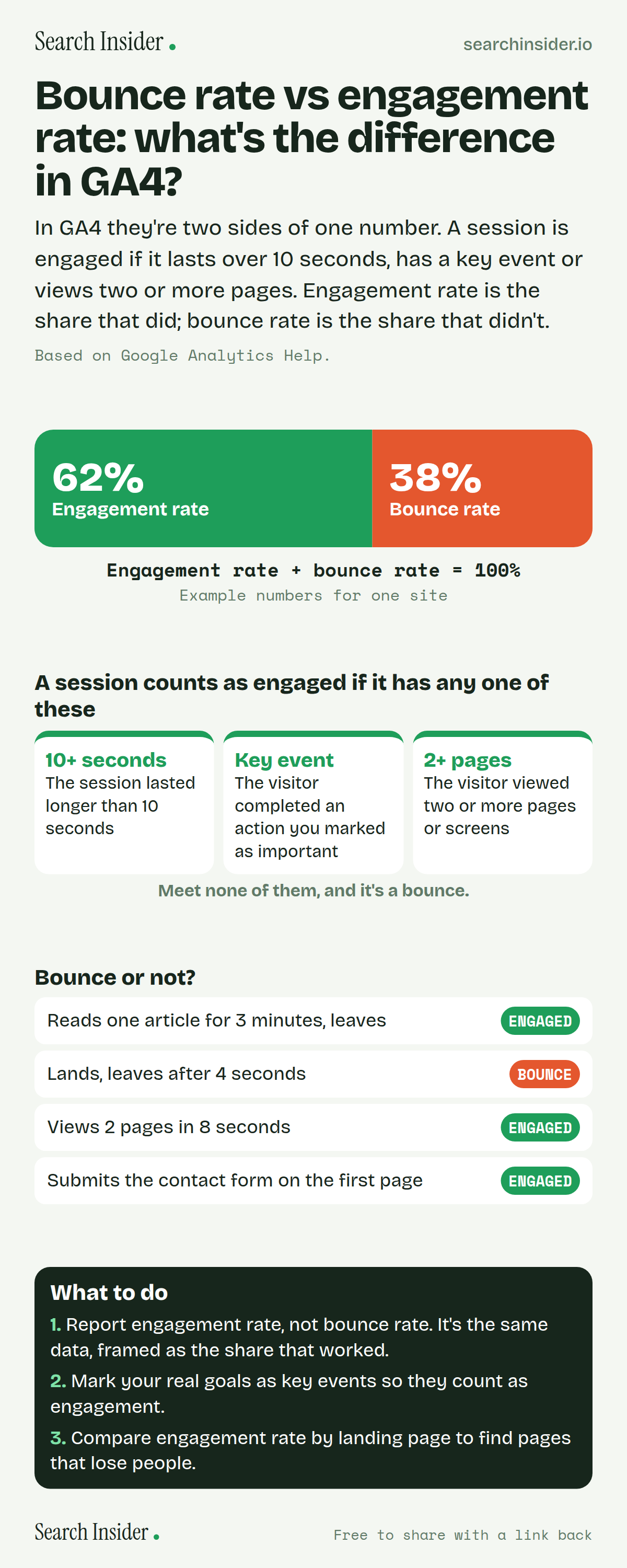
Bounce rate vs engagement rate infographic: a bar split into engagement rate and bounce rate adding to 100%, the three ways a session counts as engaged, four example visits labeled engaged or bounce, and three steps on what to do.

Oct 5, 2026

Bounce Rate vs Engagement Rate in GA4 (Infographic)

Bounce rate vs engagement rate in GA4: what makes a session engaged, why the two always add up to 100%, examples, and which one to report.

Embed this infographic

Every infographic here is free to republish, on any site, with a link back to the study it comes from. Paste this code and the credit is done for you.

<a href="https://searchinsider.io/infographics/bounce-rate-vs-engagement-rate"><img src="https://searchinsider.io/research/bounce-rate-vs-engagement-rate/bounce-rate-vs-engagement-rate-infographic.png" alt="Bounce rate vs engagement rate infographic: a bar split into engagement rate and bounce rate adding to 100%, the three ways a session counts as engaged, four example visits labeled engaged or bounce, and three steps on what to do." style="max-width:680px;width:100%;height:auto;" /></a><p>Source: <a href="https://searchinsider.io/infographics/bounce-rate-vs-engagement-rate">Bounce rate vs engagement rate infographic</a> by Search Insider.</p>

Bounce rate vs engagement rate: what's the difference in GA4?

The short answer: In GA4 they're two sides of one number. A session is engaged if it lasts over 10 seconds, has a key event or views two or more pages. Engagement rate is the share that did; bounce rate is the share that didn't.

Based on Google Analytics Help.

What it shows

  • An engaged session lasts over 10 seconds, has a key event, or has 2+ page or screen views.
  • Engagement rate is the percentage of sessions that were engaged.
  • Bounce rate is the percentage of sessions that were not engaged.
  • Engagement rate + bounce rate = 100%.

What to do

  • Reporting: Use engagement rate.
  • Setup: Mark real goals as key events.
  • Analysis: Compare engagement rate by landing page.

The walkthrough

What is an engaged session in GA4?

A session counts as engaged if it lasts longer than 10 seconds, has a key event, or has two or more screen or page views [1]. Meeting any one of the three is enough.

What is engagement rate?

Engagement rate is the percentage of engaged sessions on your website or app [1].

What is bounce rate in GA4?

Bounce rate is the percentage of sessions that were not engaged [1]. That makes it the inverse of engagement rate: the two always add up to 100%.

Is a single-page visit always a bounce in GA4?

No. A visit to one page counts as engaged if it lasts longer than 10 seconds or includes a key event, such as a form submission [1].

Should you report bounce rate or engagement rate?

They carry the same information. Engagement rate frames it as the share of visits that worked, and marking your real goals as key events makes it more meaningful [1].

More digital marketing infographics

404 errors infographic: a 404 banner with Google's view that 404s are normal, which status to return in four cases, three facts on how Google treats 4xx and soft 404s, a checklist for a good custom 404 page, and three steps on what to do.

SEO · Oct 6, 2026

Do 404 errors hurt your SEO?

Do 404 errors hurt SEO? How Google treats 404s, why soft 404s are the real problem, which status code to return, and how to build a good custom 404 page.

Embed code
<a href="https://searchinsider.io/infographics/404-errors"><img src="https://searchinsider.io/research/404-errors/404-errors-infographic.png" alt="404 errors infographic: a 404 banner with Google's view that 404s are normal, which status to return in four cases, three facts on how Google treats 4xx and soft 404s, a checklist for a good custom 404 page, and three steps on what to do." style="max-width:680px;width:100%;height:auto;" /></a><p>Source: <a href="https://searchinsider.io/infographics/404-errors">404 errors infographic</a> by Search Insider.</p>

AI-generated content infographic: a quality not method banner, a split of fine uses versus uses against Google's rules, a pre-publish checklist (accuracy, metadata, who, how, why), a Merchant Center note on labeling AI images and product data, and three steps on what to do.

AI search · Oct 6, 2026

Does Google penalize AI-generated content?

Google's stance on AI-generated content: quality over production method, what breaks the scaled content abuse policy, and a checklist before publishing AI-assisted content.

Embed code
<a href="https://searchinsider.io/infographics/ai-generated-content"><img src="https://searchinsider.io/research/ai-generated-content/ai-generated-content-infographic.png" alt="AI-generated content infographic: a quality not method banner, a split of fine uses versus uses against Google's rules, a pre-publish checklist (accuracy, metadata, who, how, why), a Merchant Center note on labeling AI images and product data, and three steps on what to do." style="max-width:680px;width:100%;height:auto;" /></a><p>Source: <a href="https://searchinsider.io/infographics/ai-generated-content">AI-generated content infographic</a> by Search Insider.</p>

Anchor text infographic: an example link with the anchor text underlined, four vague or stuffed anchors swapped for descriptive ones, four rules on image links, internal links, length and keyword stuffing, a note on Google's link spam examples, and three steps on what to do.

SEO · Oct 6, 2026

What is anchor text, and what should it say?

What anchor text is, what Google says it should say, good and bad examples, image link alt text, and which anchor practices Google lists as link spam.

Embed code
<a href="https://searchinsider.io/infographics/anchor-text"><img src="https://searchinsider.io/research/anchor-text/anchor-text-infographic.png" alt="Anchor text infographic: an example link with the anchor text underlined, four vague or stuffed anchors swapped for descriptive ones, four rules on image links, internal links, length and keyword stuffing, a note on Google's link spam examples, and three steps on what to do." style="max-width:680px;width:100%;height:auto;" /></a><p>Source: <a href="https://searchinsider.io/infographics/anchor-text">Anchor text infographic</a> by Search Insider.</p>


