Skip to content
← All digital marketing infographics

Marketing Analytics Infographics

Free marketing analytics infographics built from original research. Every infographic here is free to republish, on any site, with a link back to the study it comes from.

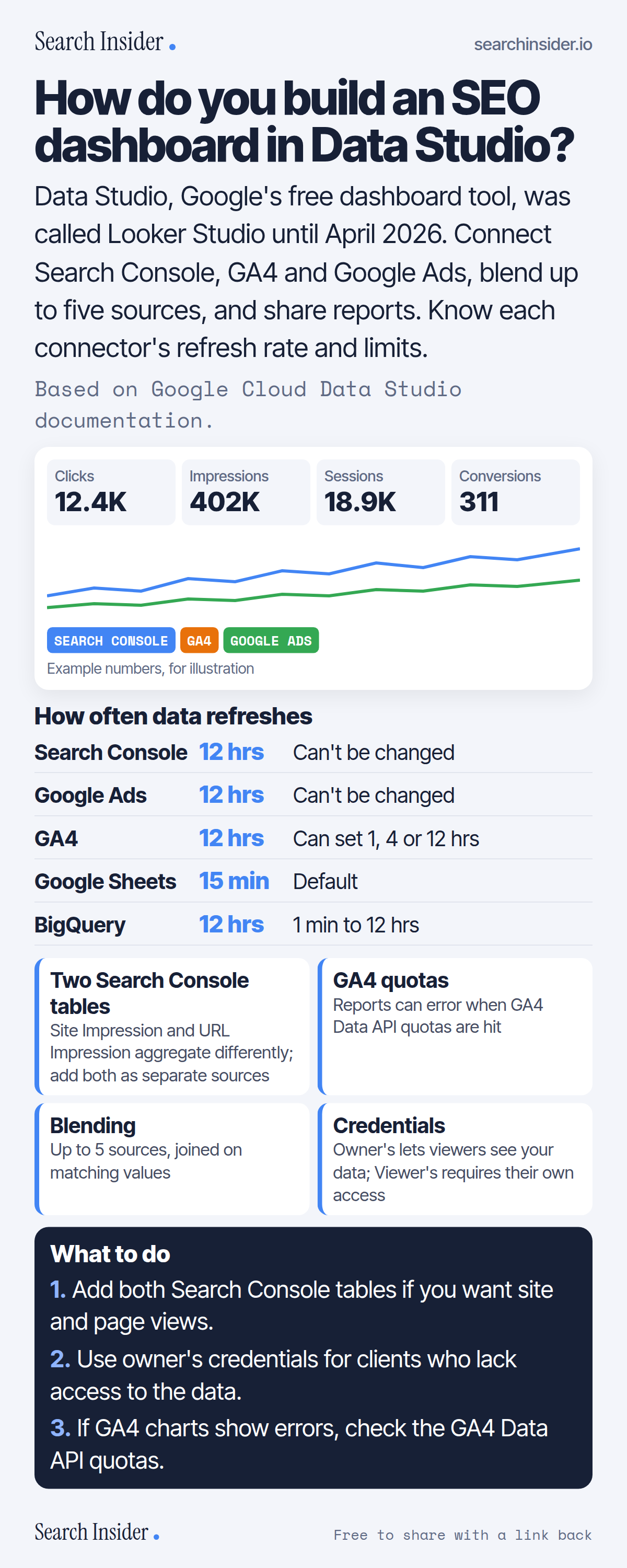
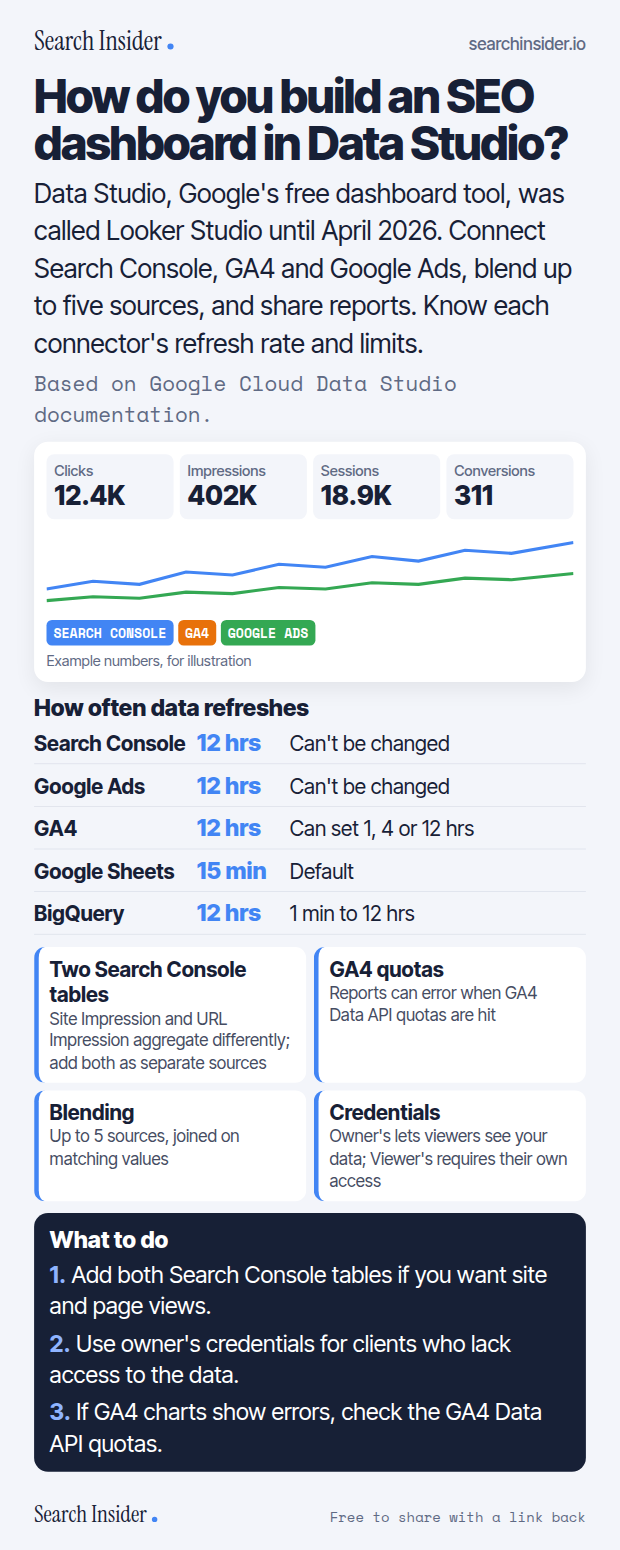
Data Studio SEO dashboard infographic: a mock dashboard with clicks, impressions, sessions and conversions from Search Console, GA4 and Google Ads, a refresh-rate table by connector, four tips on Search Console tables, GA4 quotas, blending and credentials, and three steps on what to do.

Analytics · Oct 6, 2026

How do you build an SEO dashboard in Data Studio?

How to build an SEO dashboard in Data Studio, formerly Looker Studio: connectors, refresh rates, Search Console tables, GA4 quotas, blending and sharing.

Embed code
<a href="https://searchinsider.io/infographics/data-studio-seo-dashboard"><img src="https://searchinsider.io/research/data-studio-seo-dashboard/data-studio-seo-dashboard-infographic.png" alt="Data Studio SEO dashboard infographic: a mock dashboard with clicks, impressions, sessions and conversions from Search Console, GA4 and Google Ads, a refresh-rate table by connector, four tips on Search Console tables, GA4 quotas, blending and credentials, and three steps on what to do." style="max-width:680px;width:100%;height:auto;" /></a><p>Source: <a href="https://searchinsider.io/infographics/data-studio-seo-dashboard">Data Studio SEO dashboard infographic</a> by Search Insider.</p>
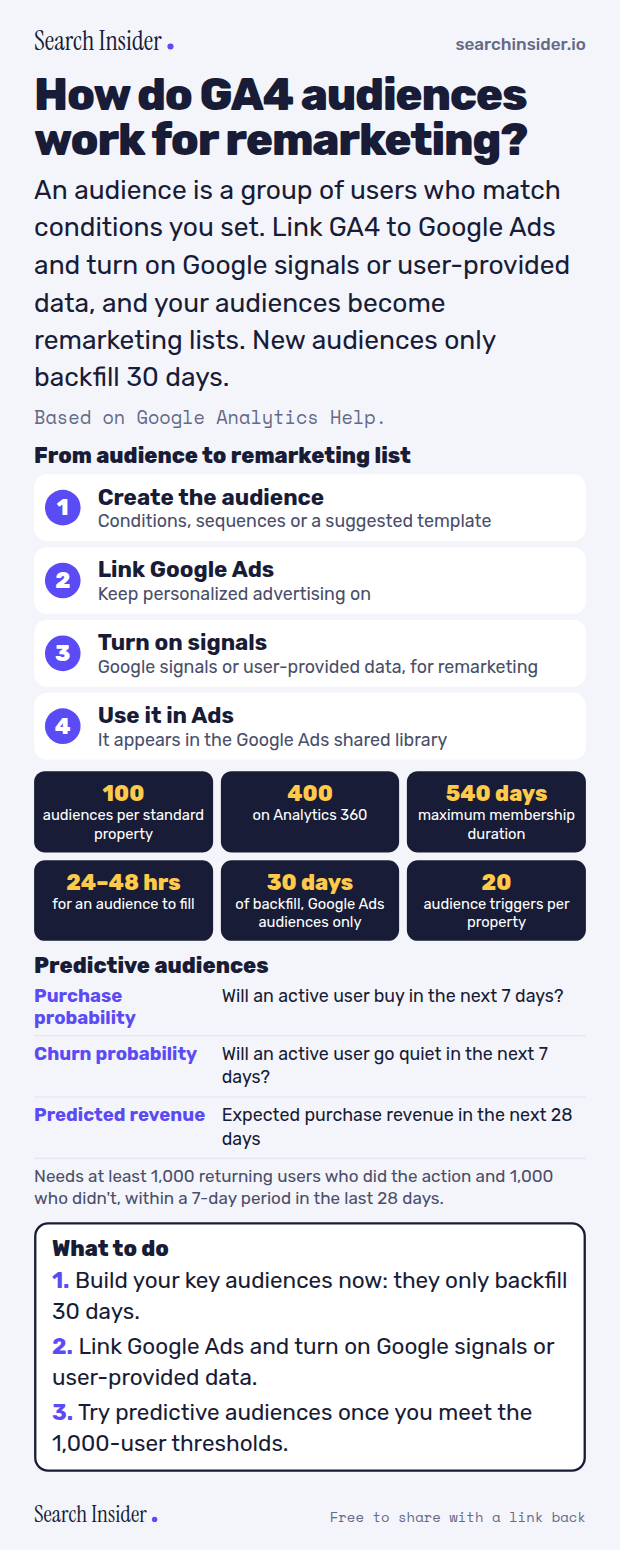
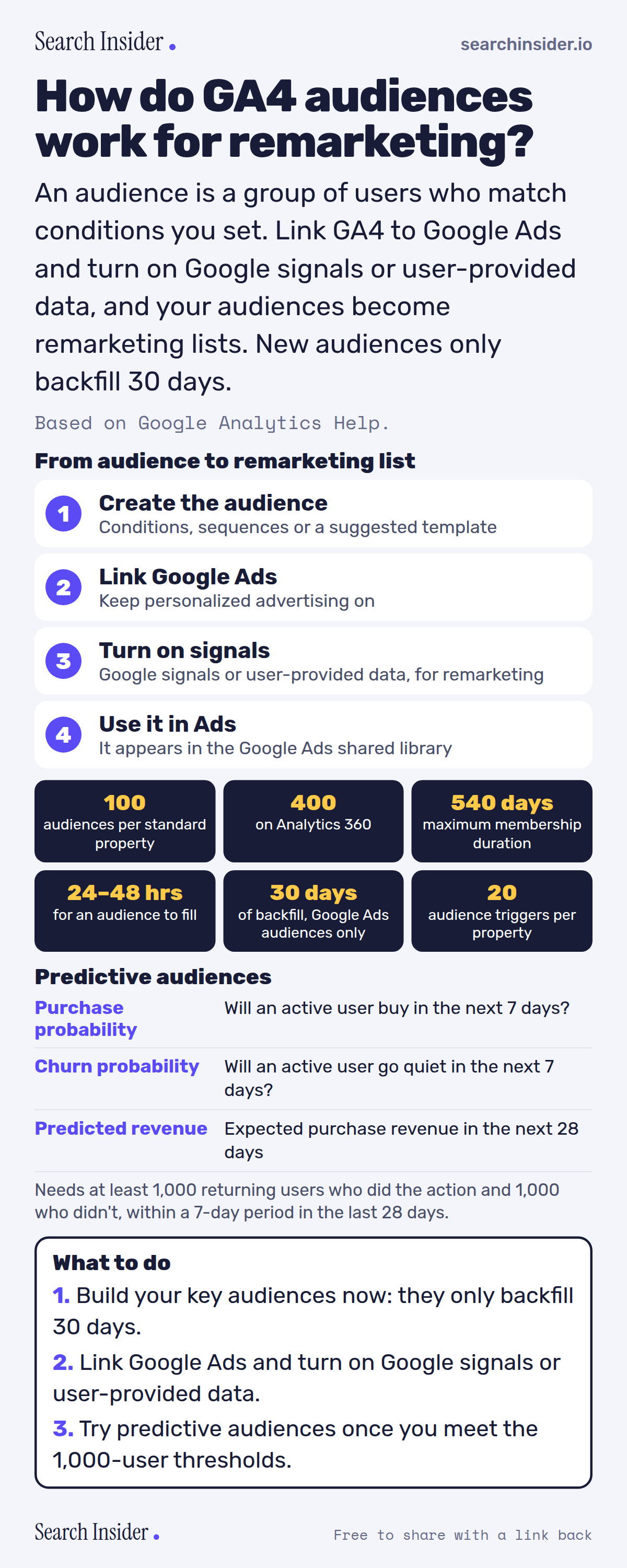
GA4 audiences infographic: four steps from creating an audience to using it in Google Ads, six limits (100 audiences, 400 on 360, 540 days, 24 to 48 hours, 30 days backfill, 20 triggers), three predictive metrics with eligibility thresholds, and three steps on what to do.

Analytics · Oct 6, 2026

How do GA4 audiences work for remarketing?

How GA4 audiences work: limits, membership duration, the 30-day backfill, predictive audiences, and what you need to use them for Google Ads remarketing.

Embed code
<a href="https://searchinsider.io/infographics/ga4-audiences"><img src="https://searchinsider.io/research/ga4-audiences/ga4-audiences-infographic.png" alt="GA4 audiences infographic: four steps from creating an audience to using it in Google Ads, six limits (100 audiences, 400 on 360, 540 days, 24 to 48 hours, 30 days backfill, 20 triggers), three predictive metrics with eligibility thresholds, and three steps on what to do." style="max-width:680px;width:100%;height:auto;" /></a><p>Source: <a href="https://searchinsider.io/infographics/ga4-audiences">GA4 audiences infographic</a> by Search Insider.</p>
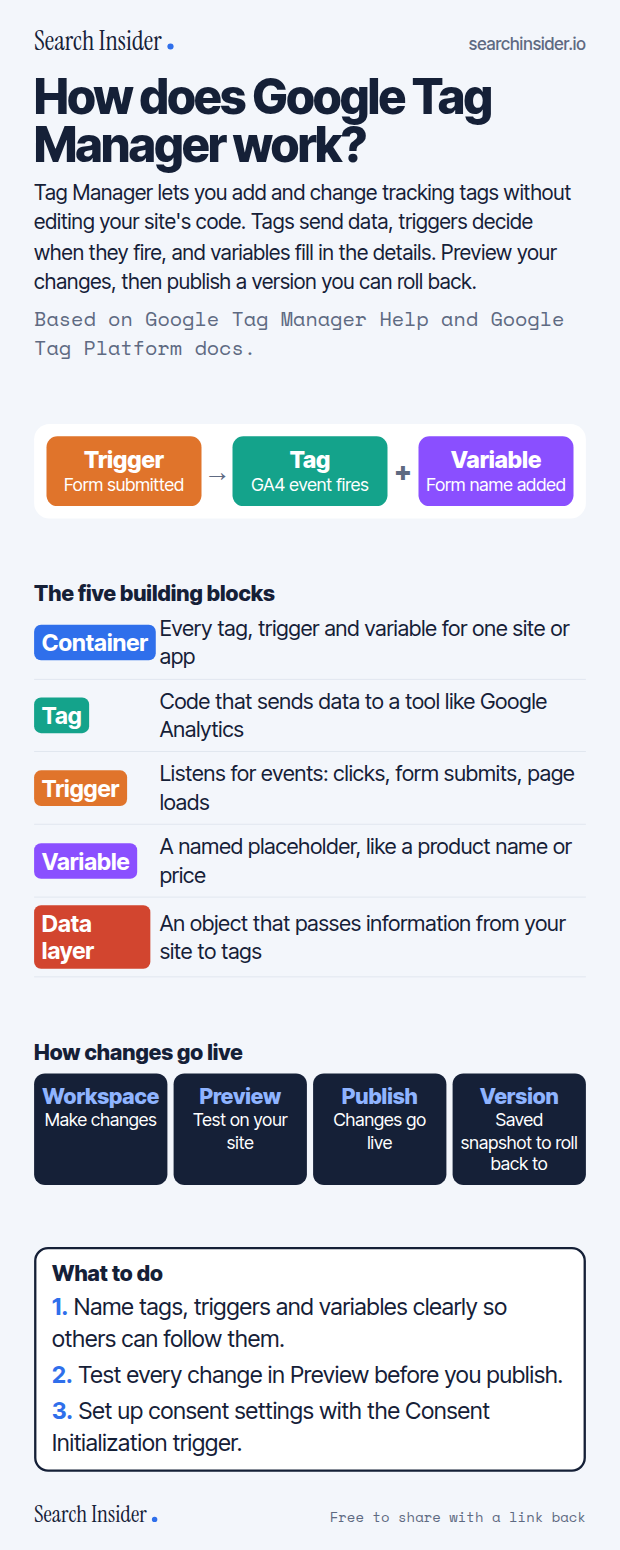
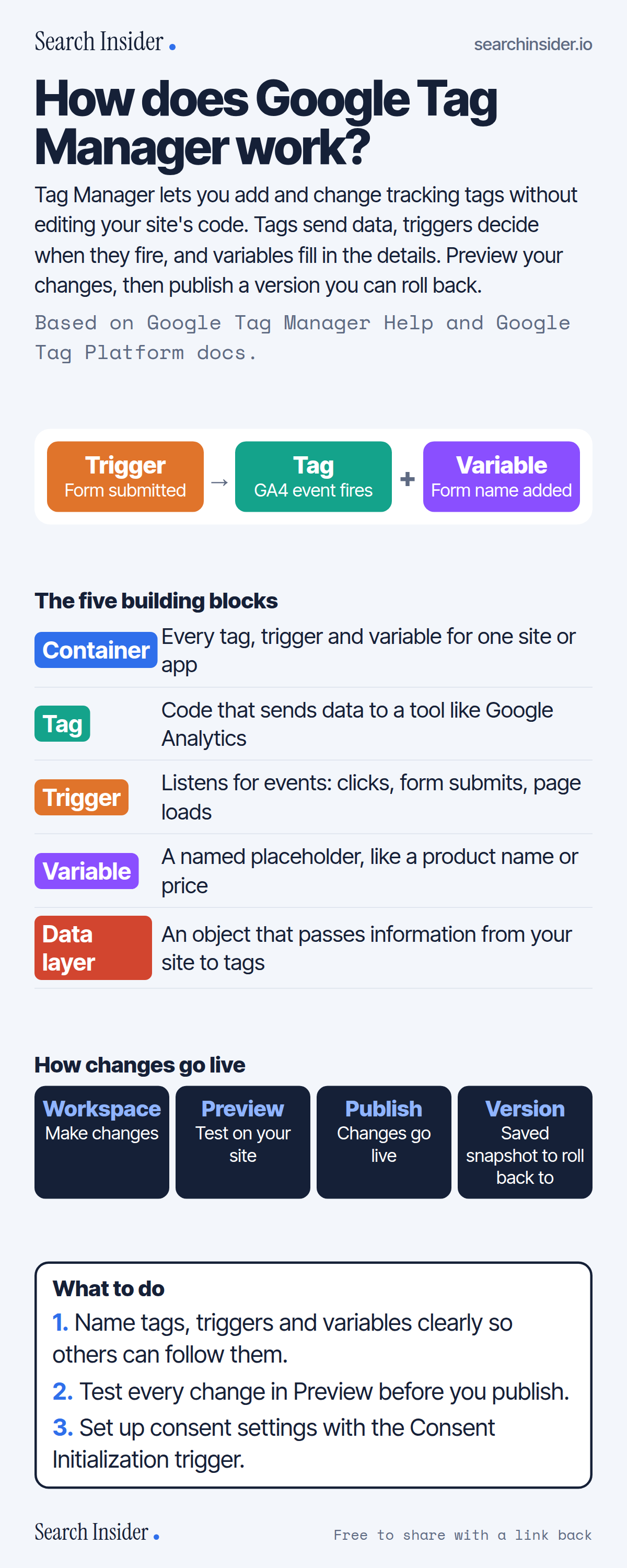
Google Tag Manager infographic: an example of a trigger firing a tag with a variable, the five building blocks (container, tag, trigger, variable, data layer), the workspace to preview to publish to version flow, and three steps on what to do.

Analytics · Oct 6, 2026

How does Google Tag Manager work?

How Google Tag Manager works: containers, tags, triggers, variables and the data layer, plus workspaces, preview, publishing and versions.

Embed code
<a href="https://searchinsider.io/infographics/google-tag-manager"><img src="https://searchinsider.io/research/google-tag-manager/google-tag-manager-infographic.png" alt="Google Tag Manager infographic: an example of a trigger firing a tag with a variable, the five building blocks (container, tag, trigger, variable, data layer), the workspace to preview to publish to version flow, and three steps on what to do." style="max-width:680px;width:100%;height:auto;" /></a><p>Source: <a href="https://searchinsider.io/infographics/google-tag-manager">Google Tag Manager infographic</a> by Search Insider.</p>
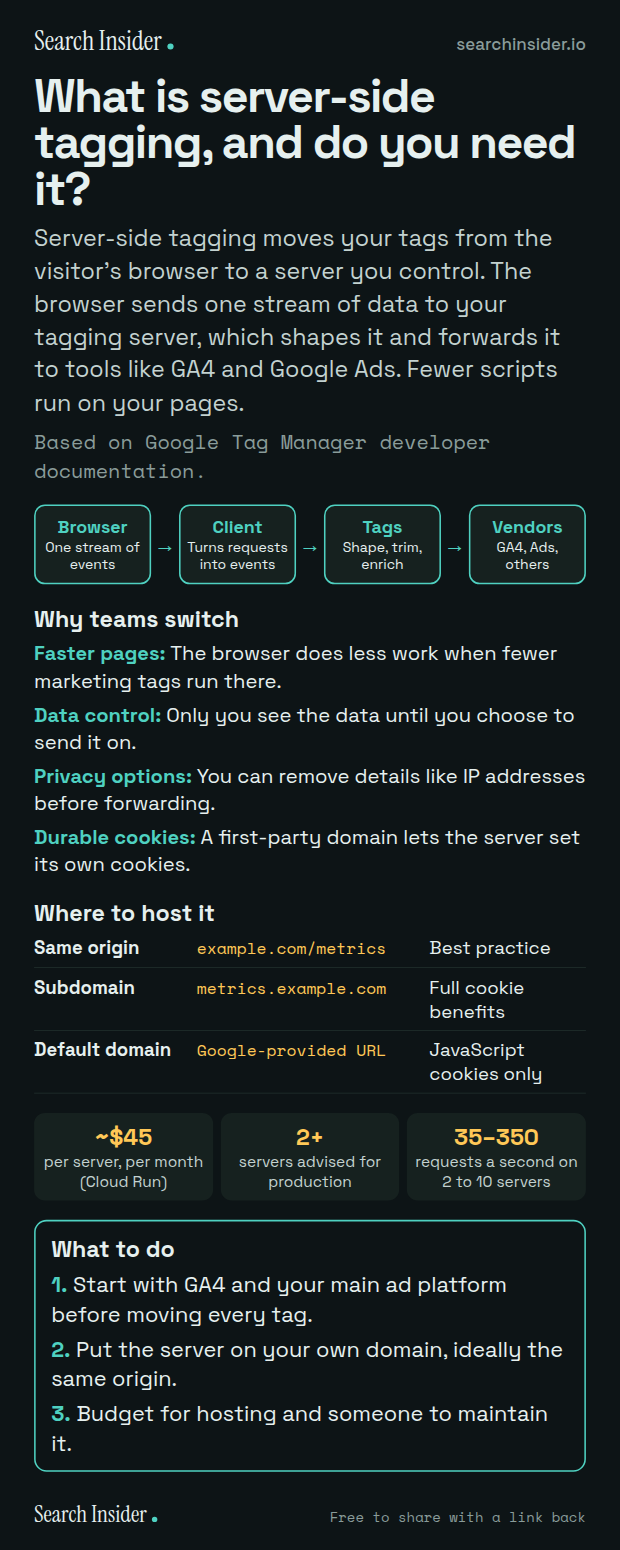
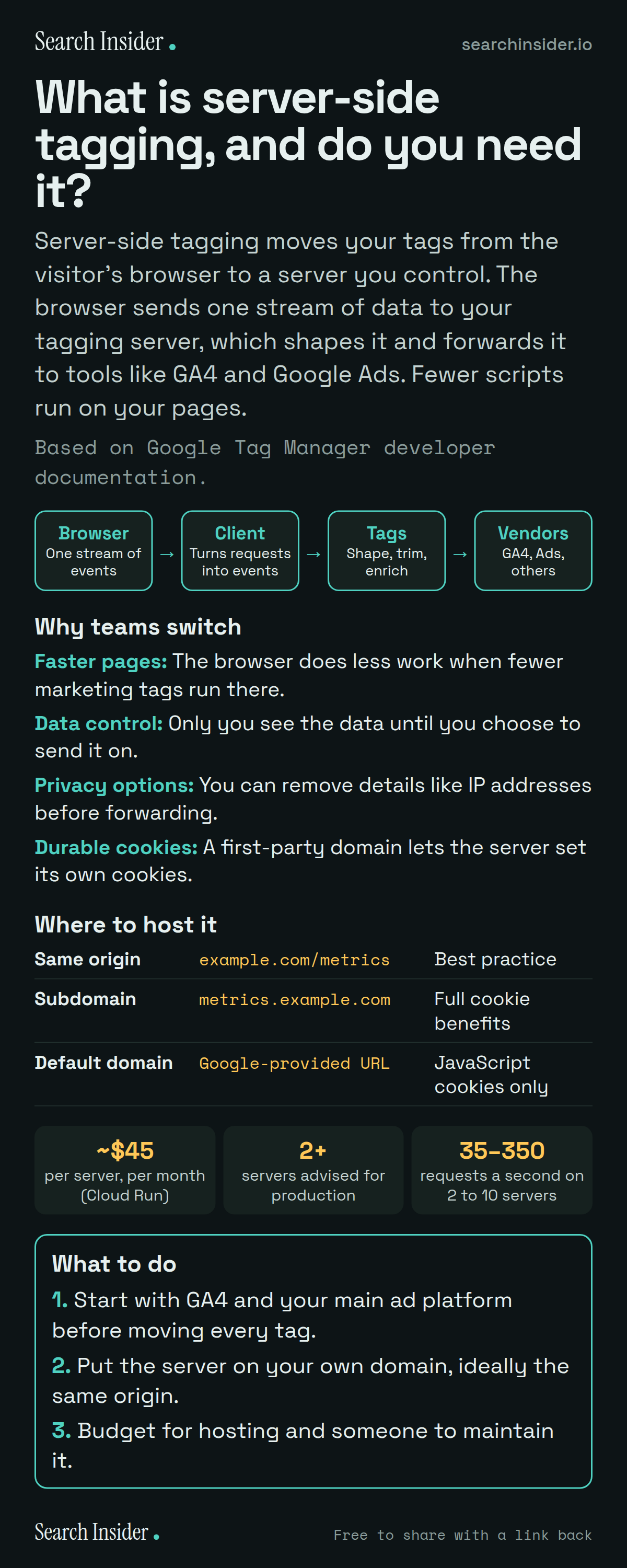
Server-side tagging infographic: a pipeline from browser to client to tags to vendors, four reasons teams switch (faster pages, data control, privacy options, durable cookies), a table of hosting domain options, cost figures of about 45 dollars per server a month, at least 2 servers and 35 to 350 requests a second, and three steps on what to do.

Analytics · Oct 6, 2026

What is server-side tagging, and do you need it?

What server-side tagging in Google Tag Manager is, how it works, why teams switch, which domain to host it on, and what Google says it costs on Cloud Run.

Embed code
<a href="https://searchinsider.io/infographics/server-side-tagging"><img src="https://searchinsider.io/research/server-side-tagging/server-side-tagging-infographic.png" alt="Server-side tagging infographic: a pipeline from browser to client to tags to vendors, four reasons teams switch (faster pages, data control, privacy options, durable cookies), a table of hosting domain options, cost figures of about 45 dollars per server a month, at least 2 servers and 35 to 350 requests a second, and three steps on what to do." style="max-width:680px;width:100%;height:auto;" /></a><p>Source: <a href="https://searchinsider.io/infographics/server-side-tagging">Server-side tagging infographic</a> by Search Insider.</p>
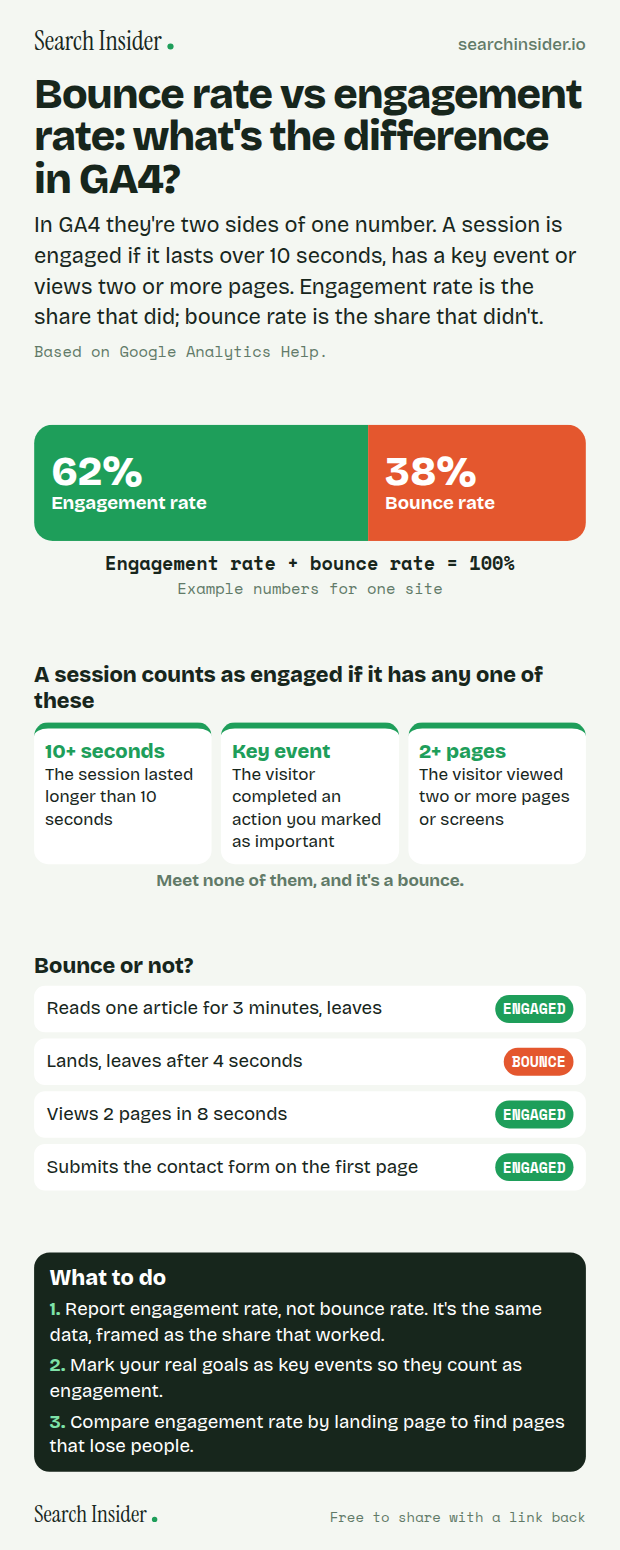
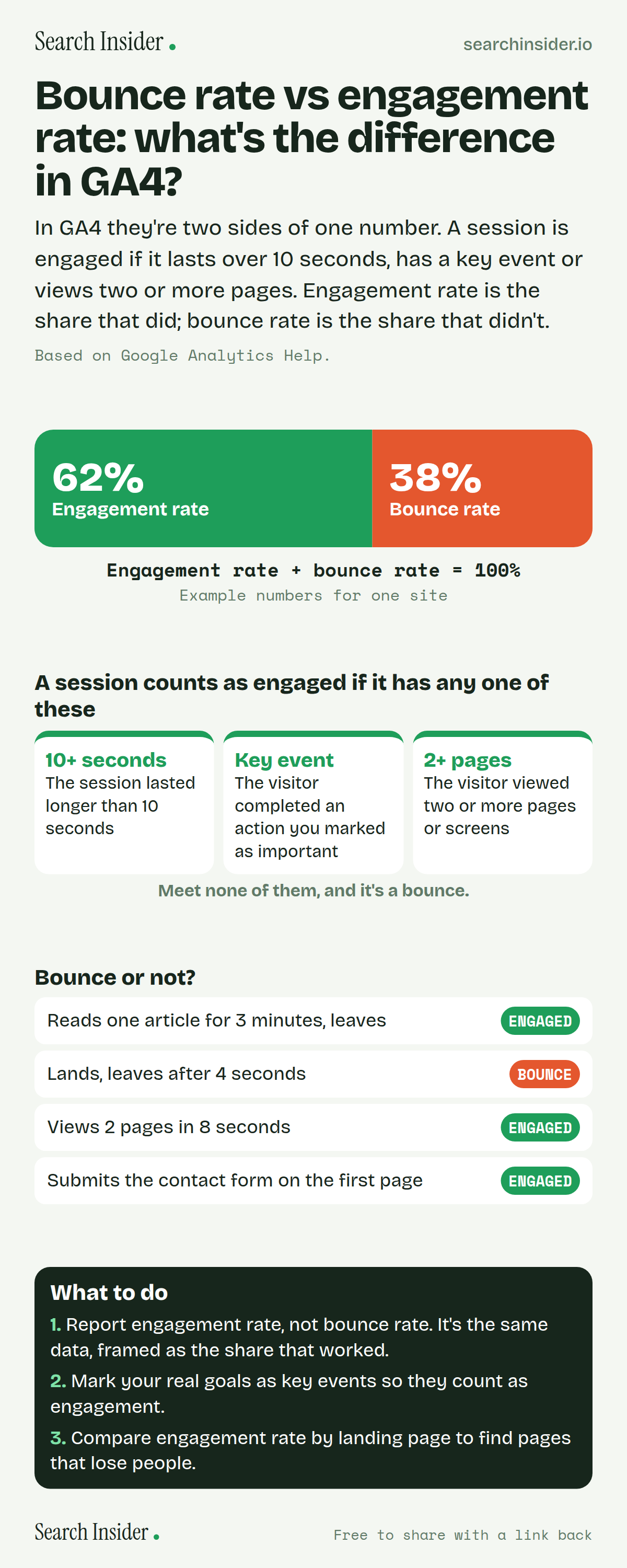
Bounce rate vs engagement rate infographic: a bar split into engagement rate and bounce rate adding to 100%, the three ways a session counts as engaged, four example visits labeled engaged or bounce, and three steps on what to do.

Analytics · Oct 5, 2026

Bounce rate vs engagement rate: what's the difference in GA4?

Bounce rate vs engagement rate in GA4: what makes a session engaged, why the two always add up to 100%, examples, and which one to report.

Embed code
<a href="https://searchinsider.io/infographics/bounce-rate-vs-engagement-rate"><img src="https://searchinsider.io/research/bounce-rate-vs-engagement-rate/bounce-rate-vs-engagement-rate-infographic.png" alt="Bounce rate vs engagement rate infographic: a bar split into engagement rate and bounce rate adding to 100%, the three ways a session counts as engaged, four example visits labeled engaged or bounce, and three steps on what to do." style="max-width:680px;width:100%;height:auto;" /></a><p>Source: <a href="https://searchinsider.io/infographics/bounce-rate-vs-engagement-rate">Bounce rate vs engagement rate infographic</a> by Search Insider.</p>
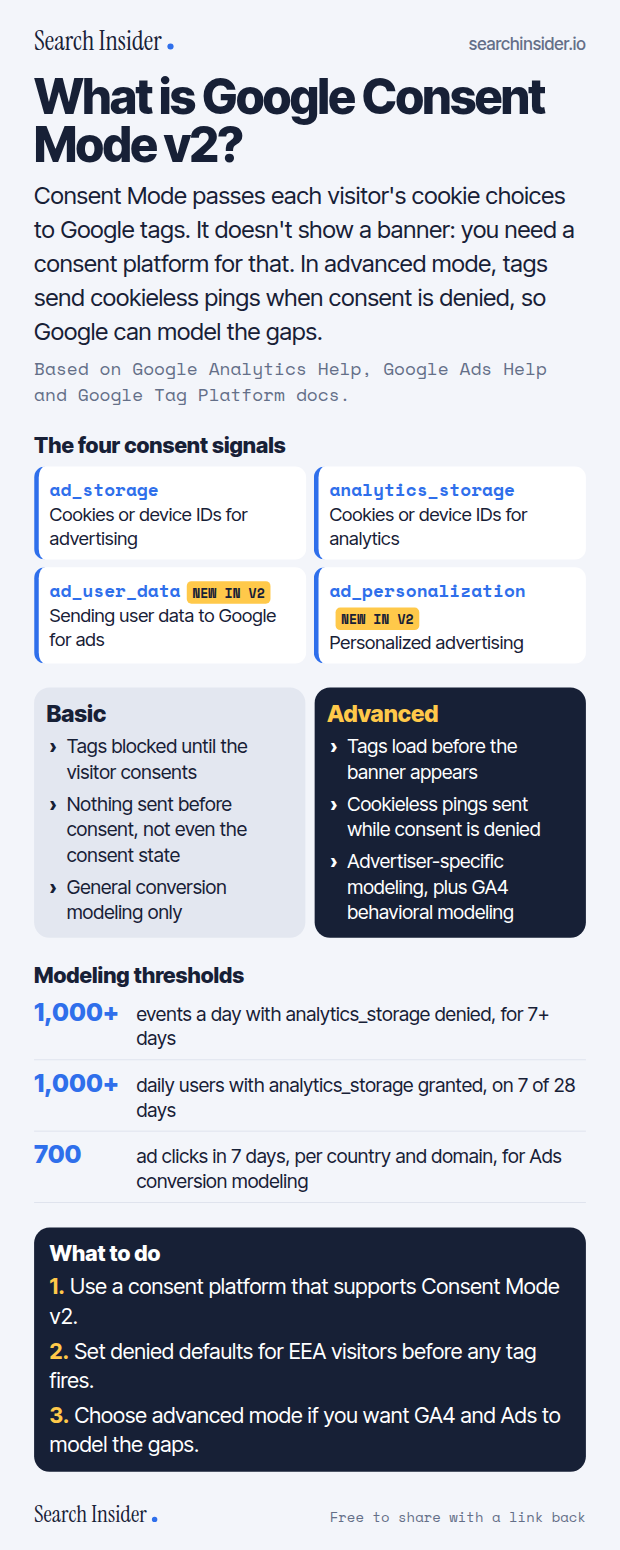
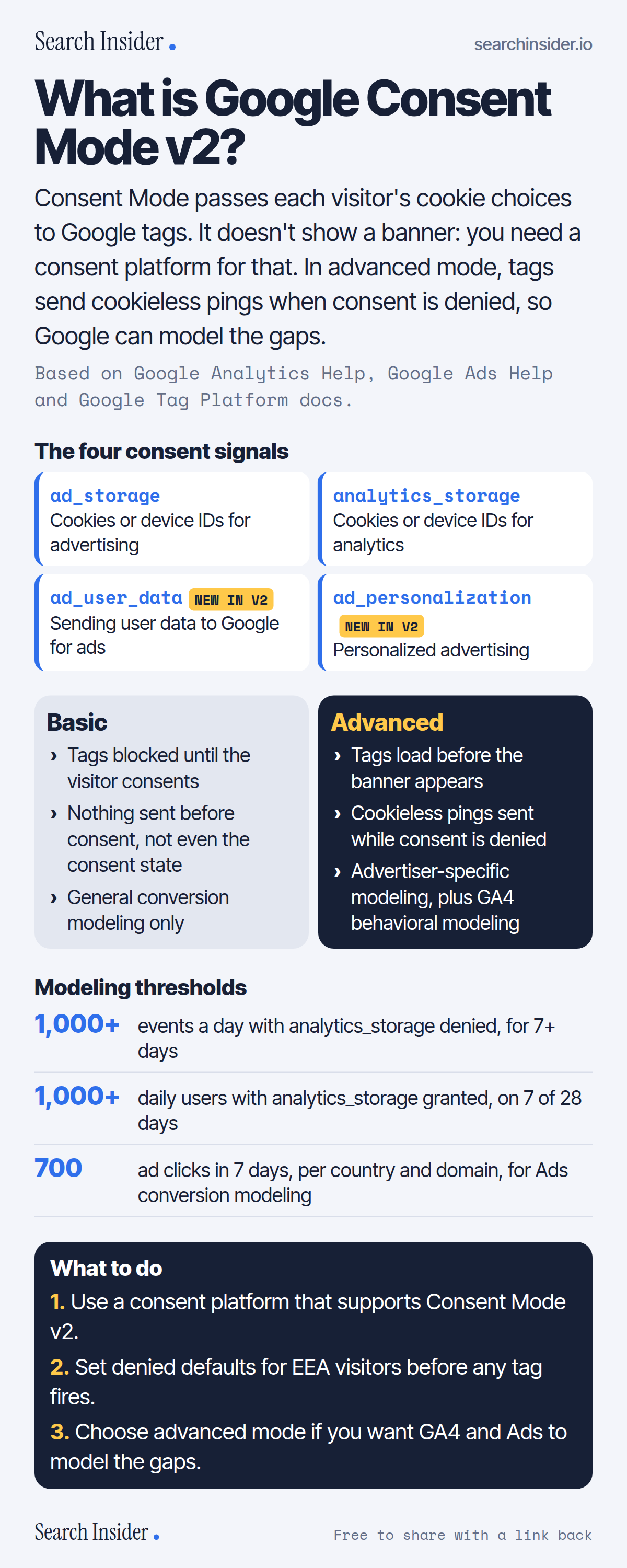
Consent Mode v2 infographic: the four consent signals ad_storage, analytics_storage, ad_user_data and ad_personalization, basic vs advanced implementation side by side, modeling thresholds for GA4 and Google Ads, and three steps on what to do.

Analytics · Oct 5, 2026

What is Google Consent Mode v2?

Google Consent Mode v2 explained: the four consent signals, basic vs advanced implementation, what cookieless pings are, and the thresholds for modeling in GA4 and Google Ads.

Embed code
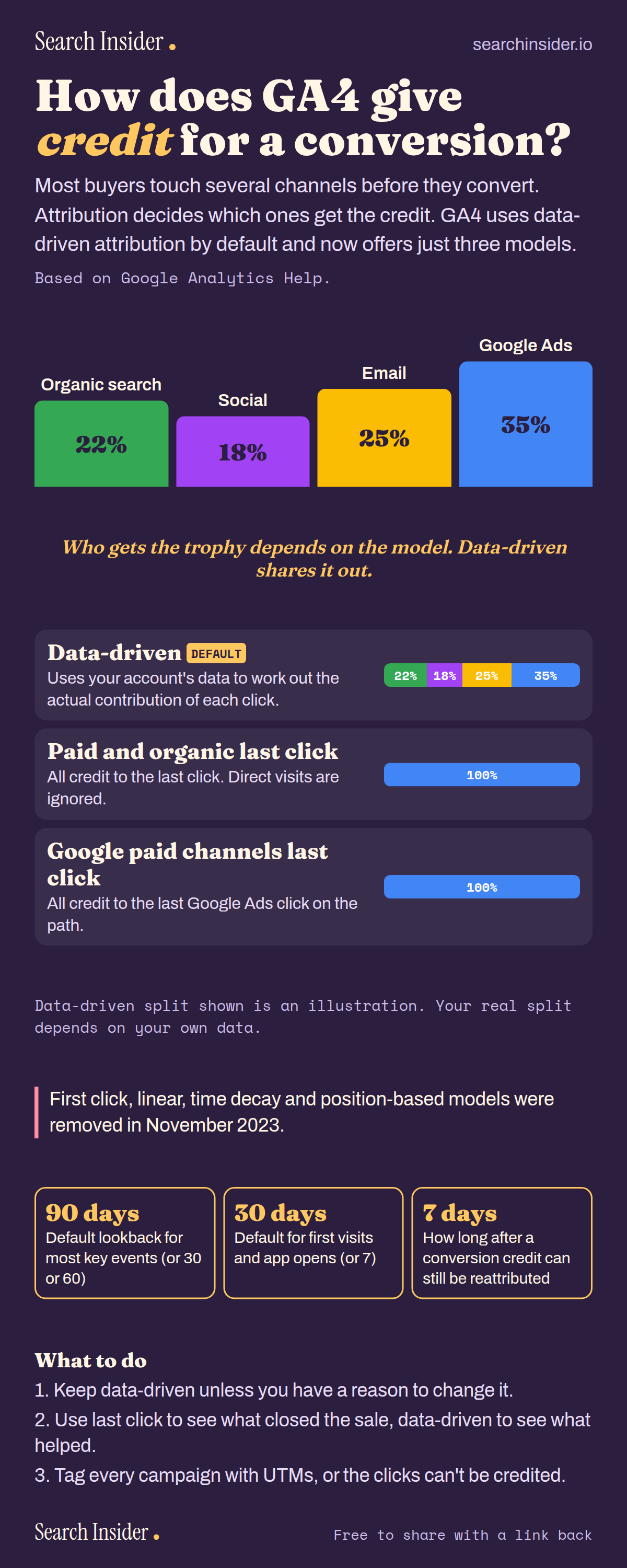
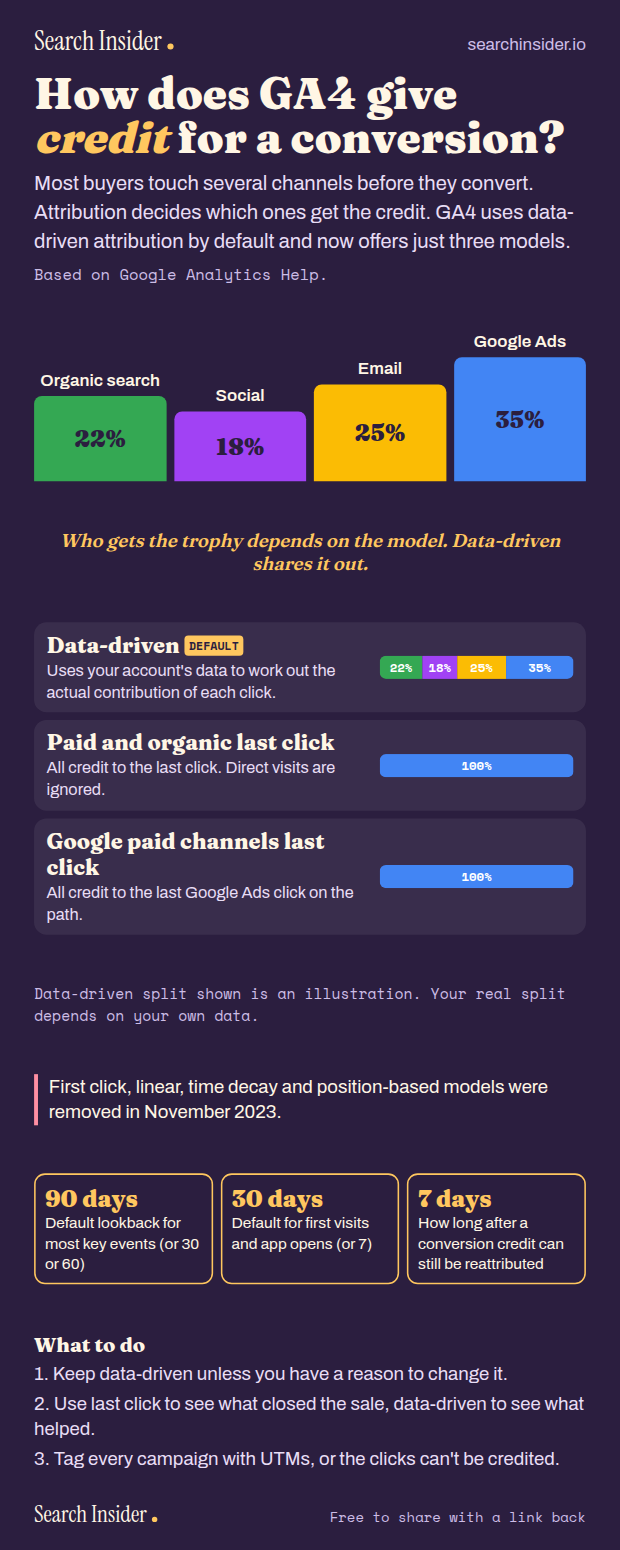
GA4 attribution infographic: a podium splitting conversion credit across organic search, social, email and Google Ads, bars comparing data-driven and last-click models, a note on retired models, three lookback window figures and three steps.

Analytics · Oct 5, 2026

How does GA4 give credit for a conversion?

GA4 attribution explained: data-driven, paid and organic last click and Google paid channels last click, the retired models, and the lookback windows.

Embed code
<a href="https://searchinsider.io/infographics/ga4-attribution"><img src="https://searchinsider.io/research/ga4-attribution/ga4-attribution-infographic.png" alt="GA4 attribution infographic: a podium splitting conversion credit across organic search, social, email and Google Ads, bars comparing data-driven and last-click models, a note on retired models, three lookback window figures and three steps." style="max-width:680px;width:100%;height:auto;" /></a><p>Source: <a href="https://searchinsider.io/infographics/ga4-attribution">GA4 attribution models infographic</a> by Search Insider.</p>
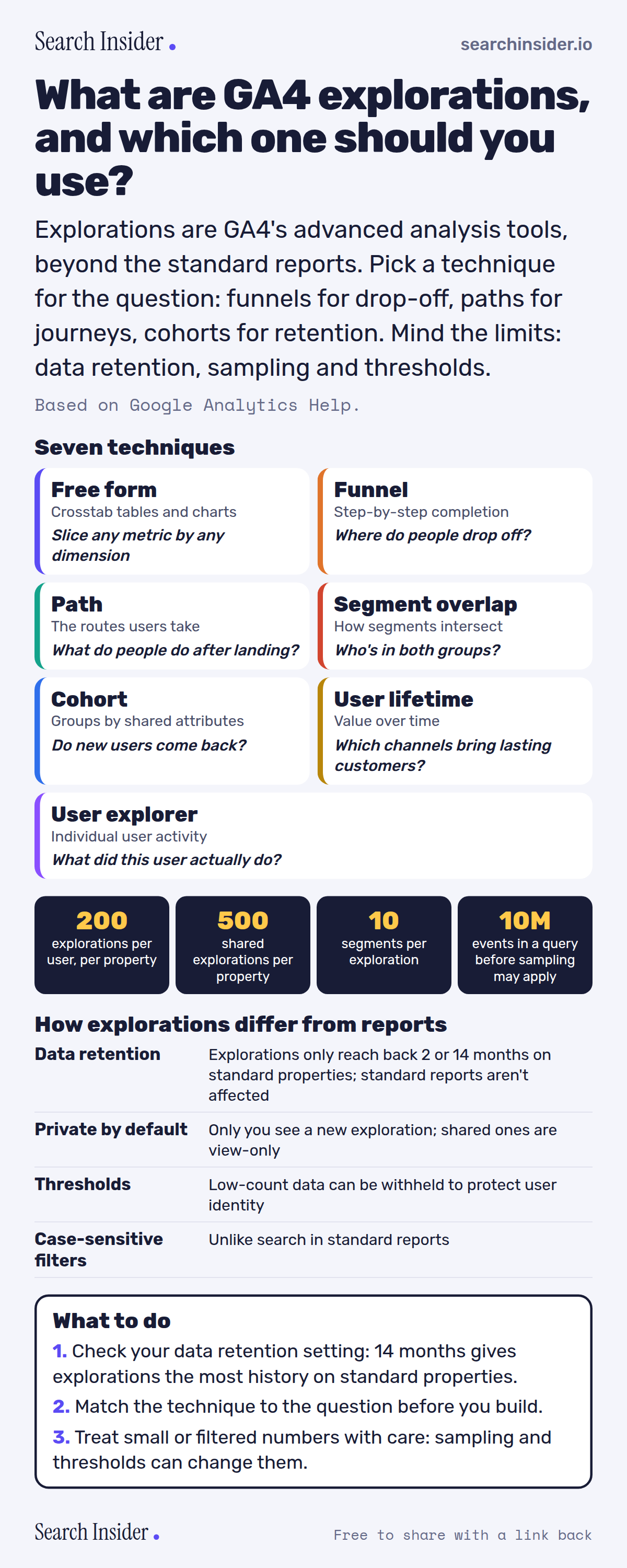
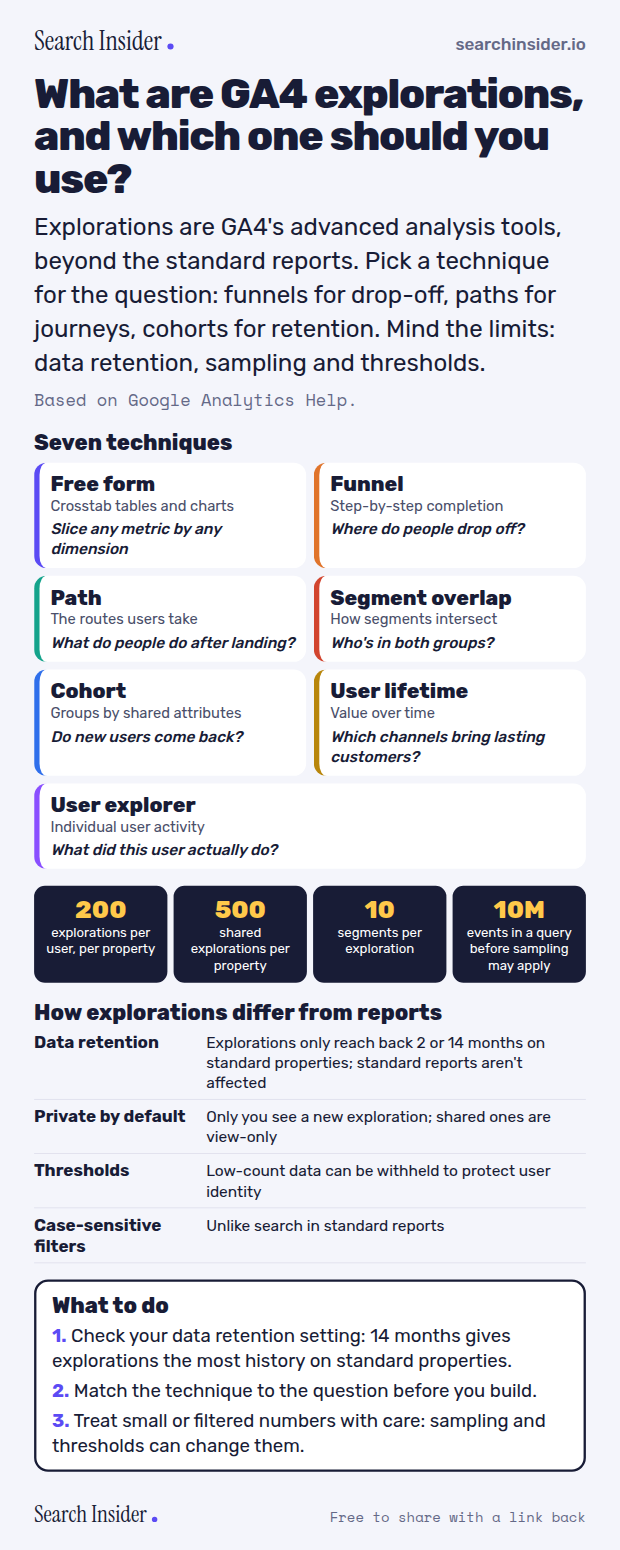
GA4 explorations infographic: seven technique cards (free form, funnel, path, segment overlap, cohort, user lifetime, user explorer) each with the question it answers, limits of 200 explorations, 500 shared, 10 segments and 10 million events before sampling, how explorations differ from reports, and three steps on what to do.

Analytics · Oct 5, 2026

What are GA4 explorations, and which one should you use?

GA4 explorations explained: the seven techniques and what each answers, the limits, and how explorations differ from standard reports.

Embed code
<a href="https://searchinsider.io/infographics/ga4-explorations"><img src="https://searchinsider.io/research/ga4-explorations/ga4-explorations-infographic.png" alt="GA4 explorations infographic: seven technique cards (free form, funnel, path, segment overlap, cohort, user lifetime, user explorer) each with the question it answers, limits of 200 explorations, 500 shared, 10 segments and 10 million events before sampling, how explorations differ from reports, and three steps on what to do." style="max-width:680px;width:100%;height:auto;" /></a><p>Source: <a href="https://searchinsider.io/infographics/ga4-explorations">GA4 explorations infographic</a> by Search Insider.</p>
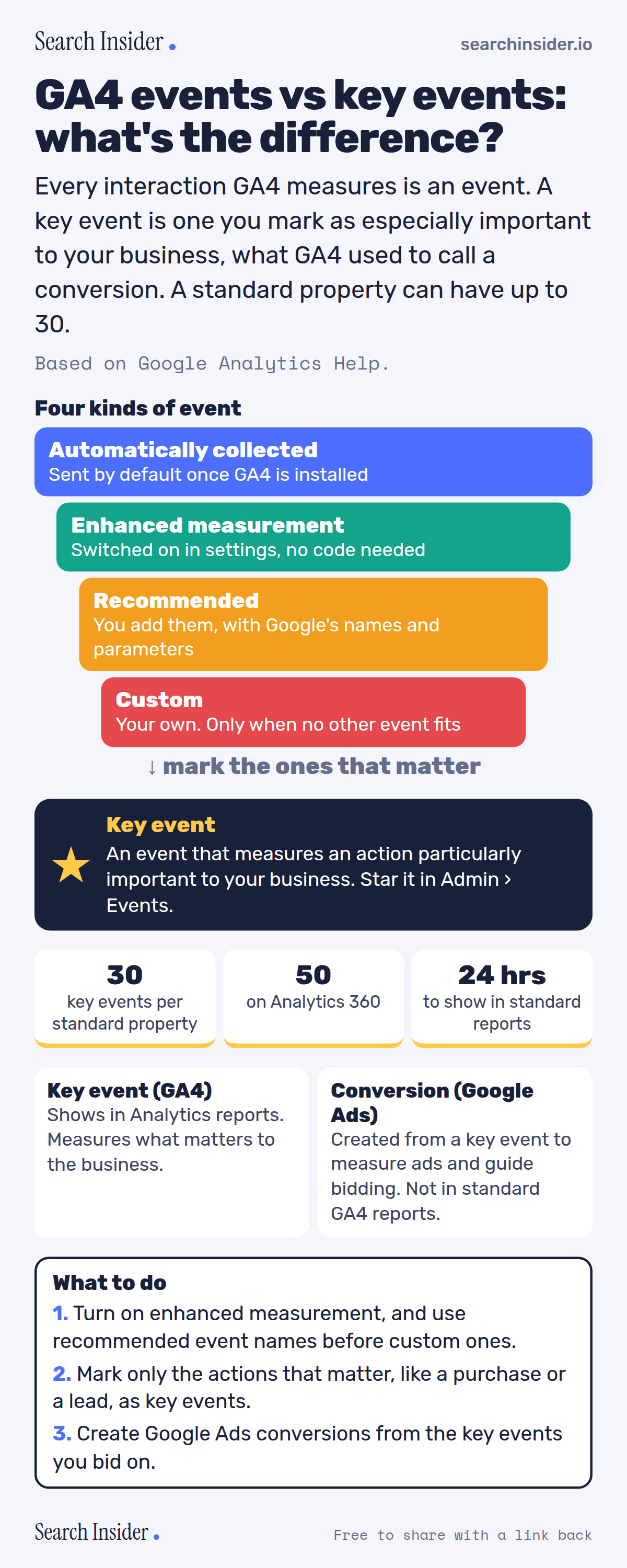
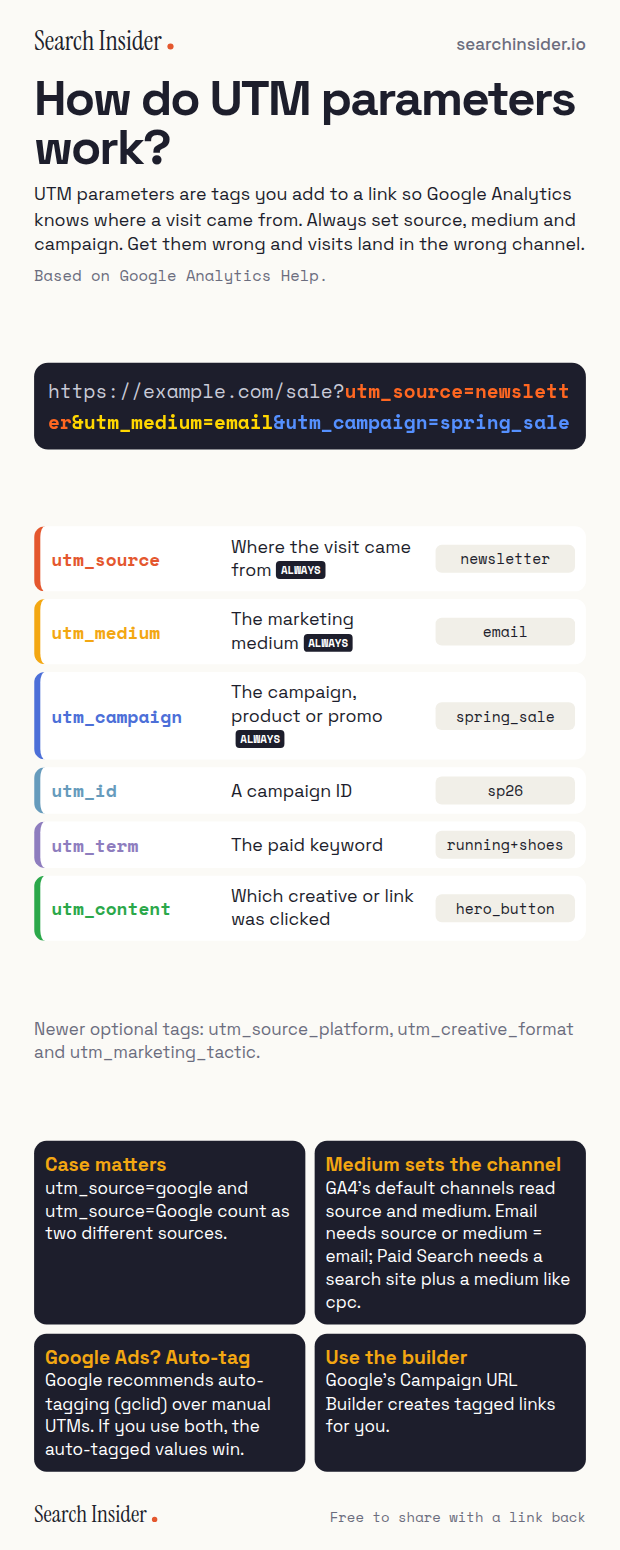
GA4 events vs key events infographic: four kinds of event stacked (automatically collected, enhanced measurement, recommended, custom), a key event star, limits of 30 key events per standard property and 50 on Analytics 360, key events vs Google Ads conversions, and three steps on what to do.

Analytics · Oct 5, 2026

GA4 events vs key events: what's the difference?

GA4 events vs key events: the four kinds of event, what a key event is, the 30 key event limit, and how key events relate to Google Ads conversions.

Embed code
<a href="https://searchinsider.io/infographics/ga4-key-events"><img src="https://searchinsider.io/research/ga4-key-events/ga4-key-events-infographic.png" alt="GA4 events vs key events infographic: four kinds of event stacked (automatically collected, enhanced measurement, recommended, custom), a key event star, limits of 30 key events per standard property and 50 on Analytics 360, key events vs Google Ads conversions, and three steps on what to do." style="max-width:680px;width:100%;height:auto;" /></a><p>Source: <a href="https://searchinsider.io/infographics/ga4-key-events">GA4 events vs key events infographic</a> by Search Insider.</p>
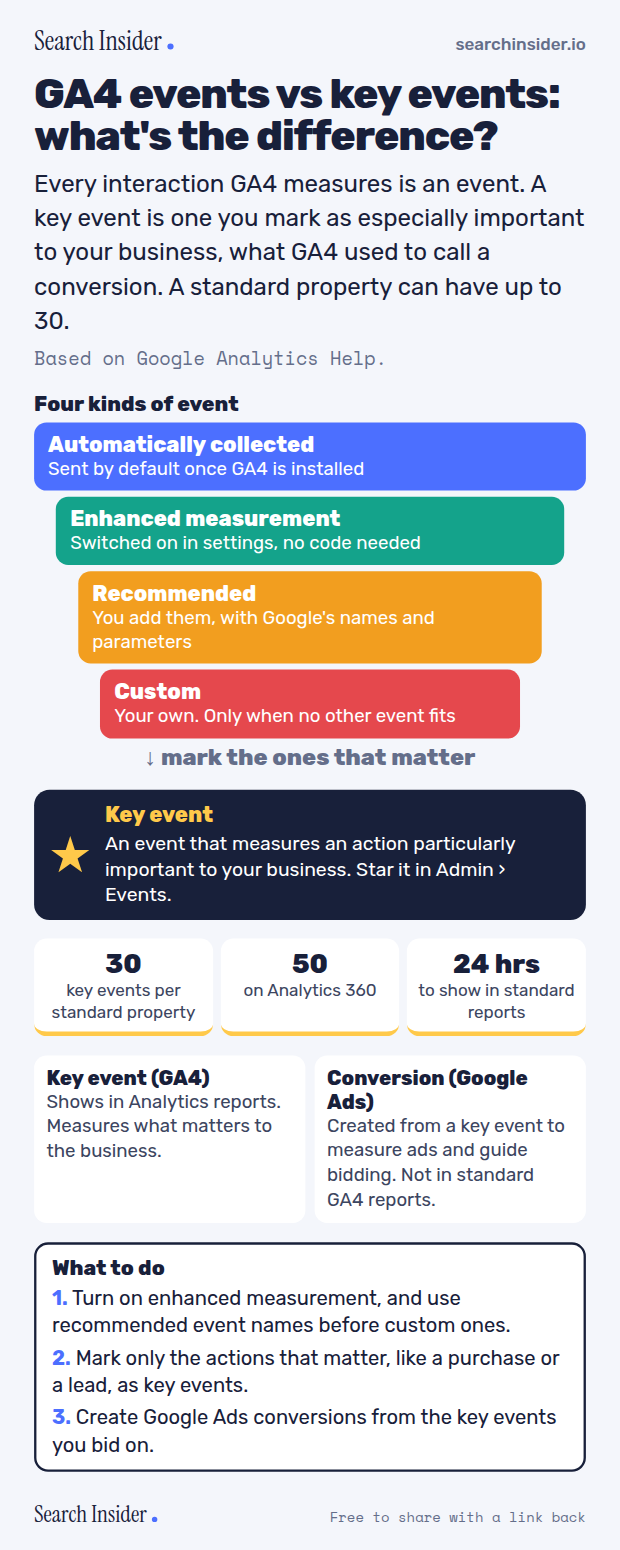
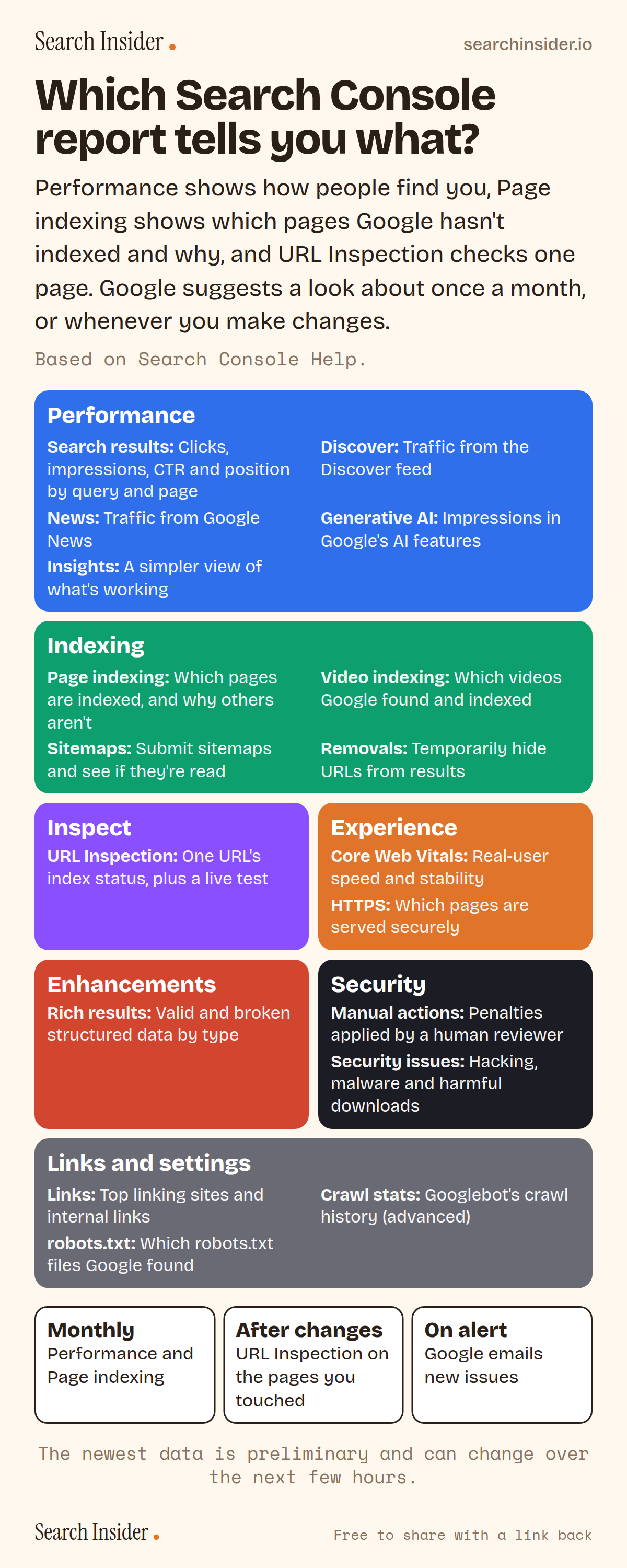
Search Console reports infographic: colored blocks for performance, indexing, inspection, experience, enhancements, security, and links and settings reports with a line on what each shows, plus when to check: monthly, after changes and on alert.

Analytics · Oct 5, 2026

Which Search Console report tells you what?

Every Google Search Console report and what it tells you, from Performance and Page indexing to Generative AI, Crawl stats and the robots.txt report, plus how often to check.

Embed code
<a href="https://searchinsider.io/infographics/search-console-reports"><img src="https://searchinsider.io/research/search-console-reports/search-console-reports-infographic.png" alt="Search Console reports infographic: colored blocks for performance, indexing, inspection, experience, enhancements, security, and links and settings reports with a line on what each shows, plus when to check: monthly, after changes and on alert." style="max-width:680px;width:100%;height:auto;" /></a><p>Source: <a href="https://searchinsider.io/infographics/search-console-reports">Search Console reports infographic</a> by Search Insider.</p>
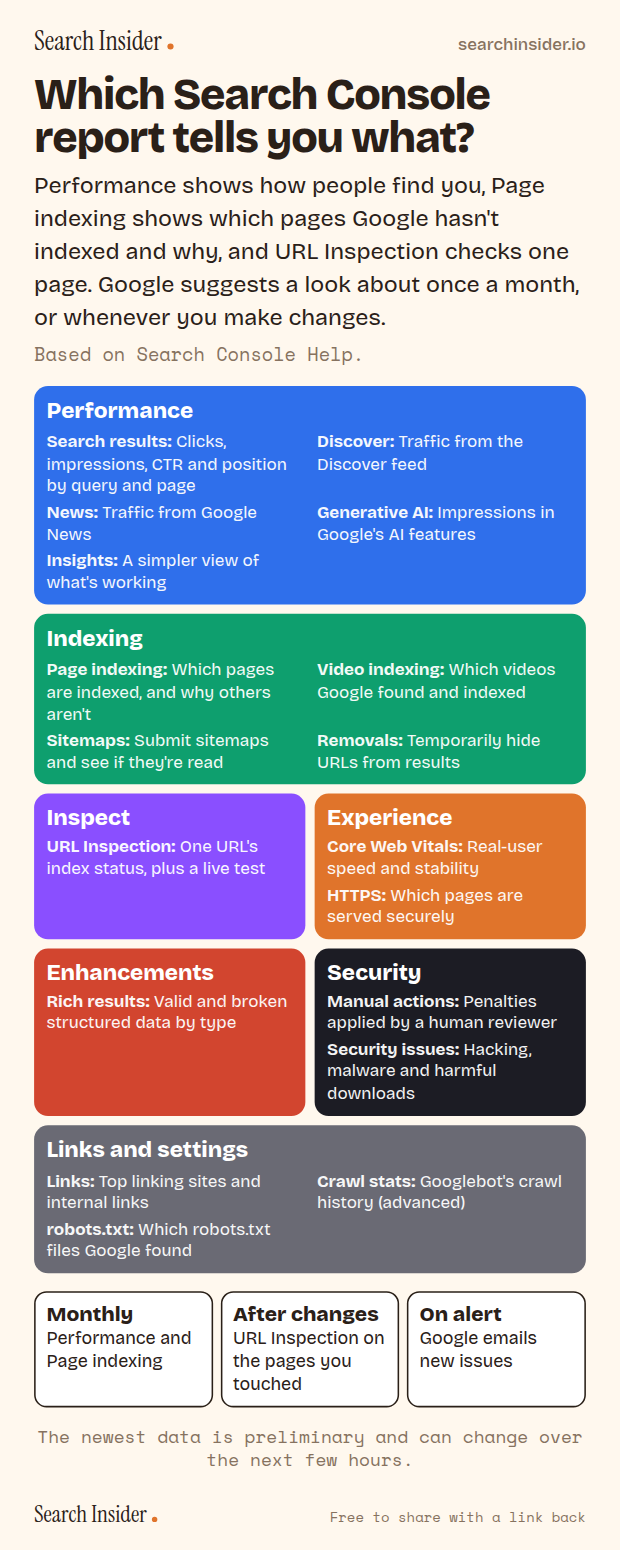
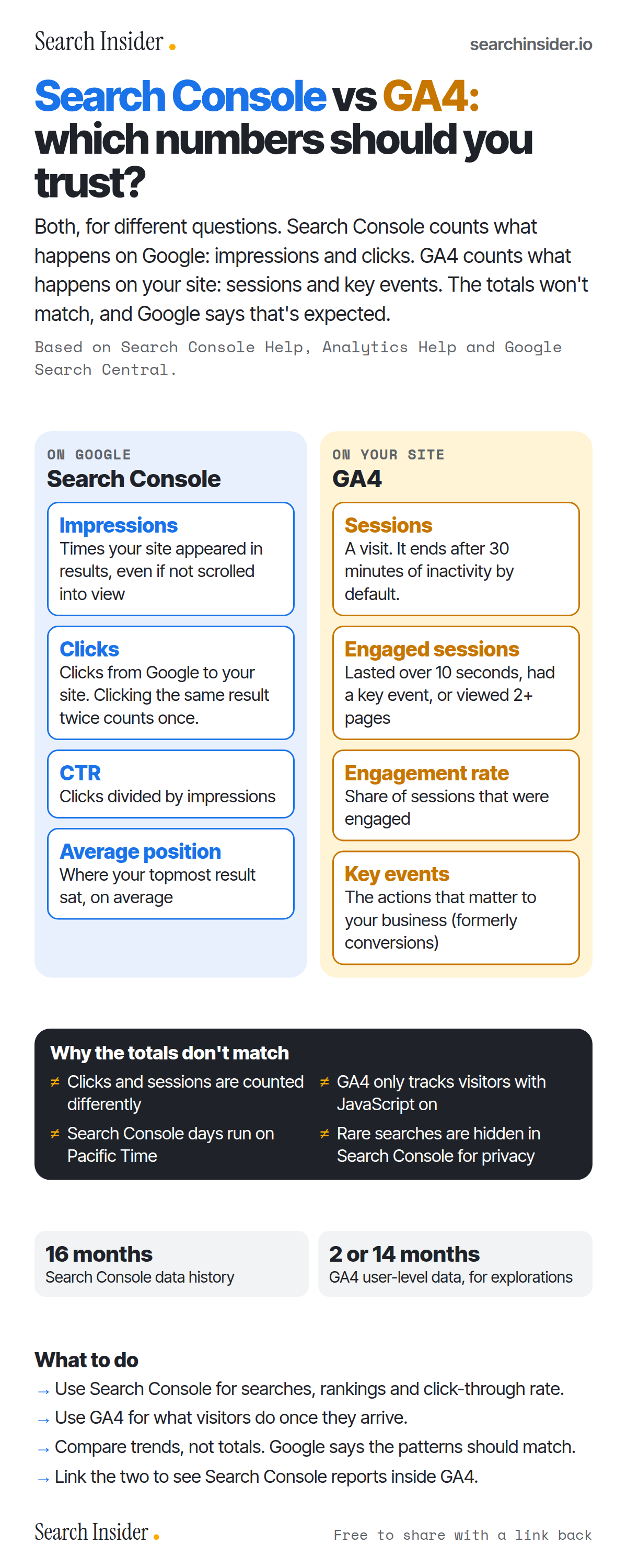
Search Console vs GA4 infographic: side-by-side columns defining Search Console's impressions, clicks, CTR and average position and GA4's sessions, engaged sessions, engagement rate and key events, then why the totals don't match, data retention and what to do.

Analytics · Oct 5, 2026

Search Console vs GA4: which numbers should you trust?

Search Console vs GA4 for SEO: what each metric means, why clicks and sessions never match, how long each keeps data, and what to use each tool for.

Embed code
<a href="https://searchinsider.io/infographics/search-console-vs-ga4"><img src="https://searchinsider.io/research/search-console-vs-ga4/search-console-vs-ga4-infographic.png" alt="Search Console vs GA4 infographic: side-by-side columns defining Search Console's impressions, clicks, CTR and average position and GA4's sessions, engaged sessions, engagement rate and key events, then why the totals don't match, data retention and what to do." style="max-width:680px;width:100%;height:auto;" /></a><p>Source: <a href="https://searchinsider.io/infographics/search-console-vs-ga4">Search Console vs GA4 infographic</a> by Search Insider.</p>
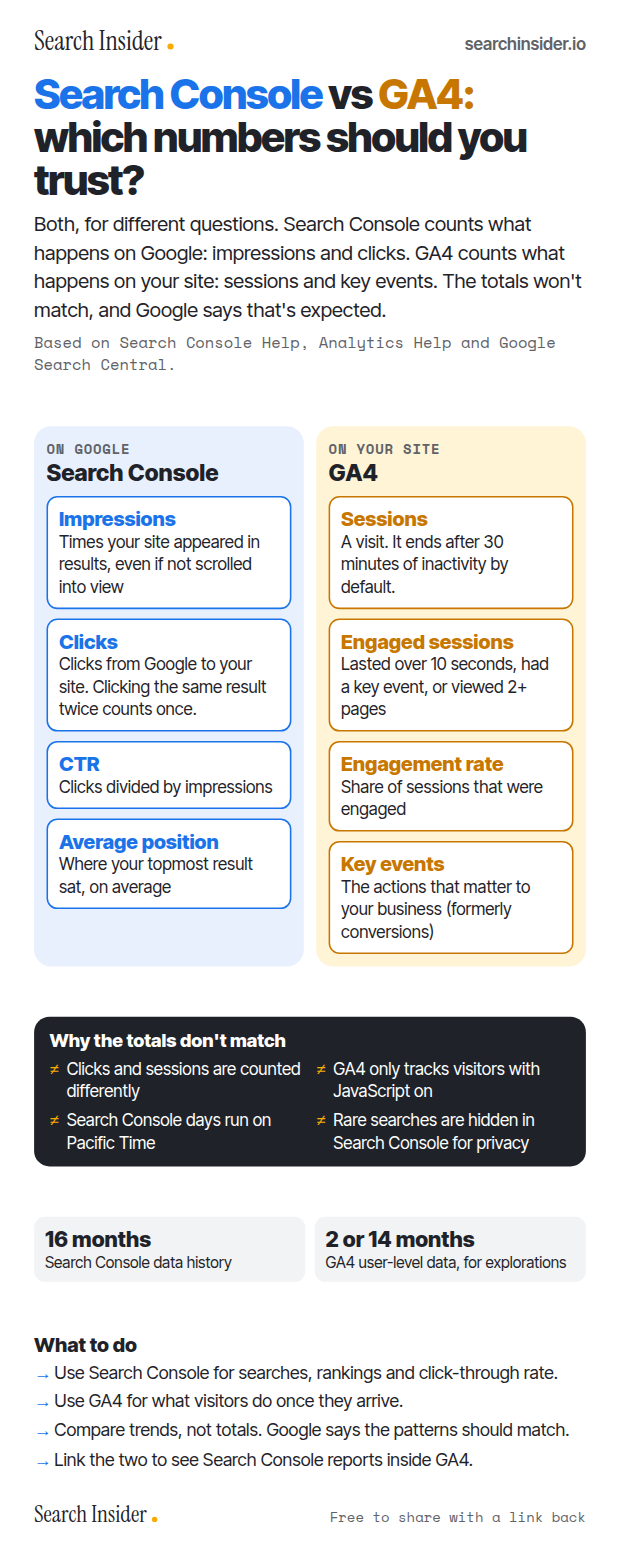
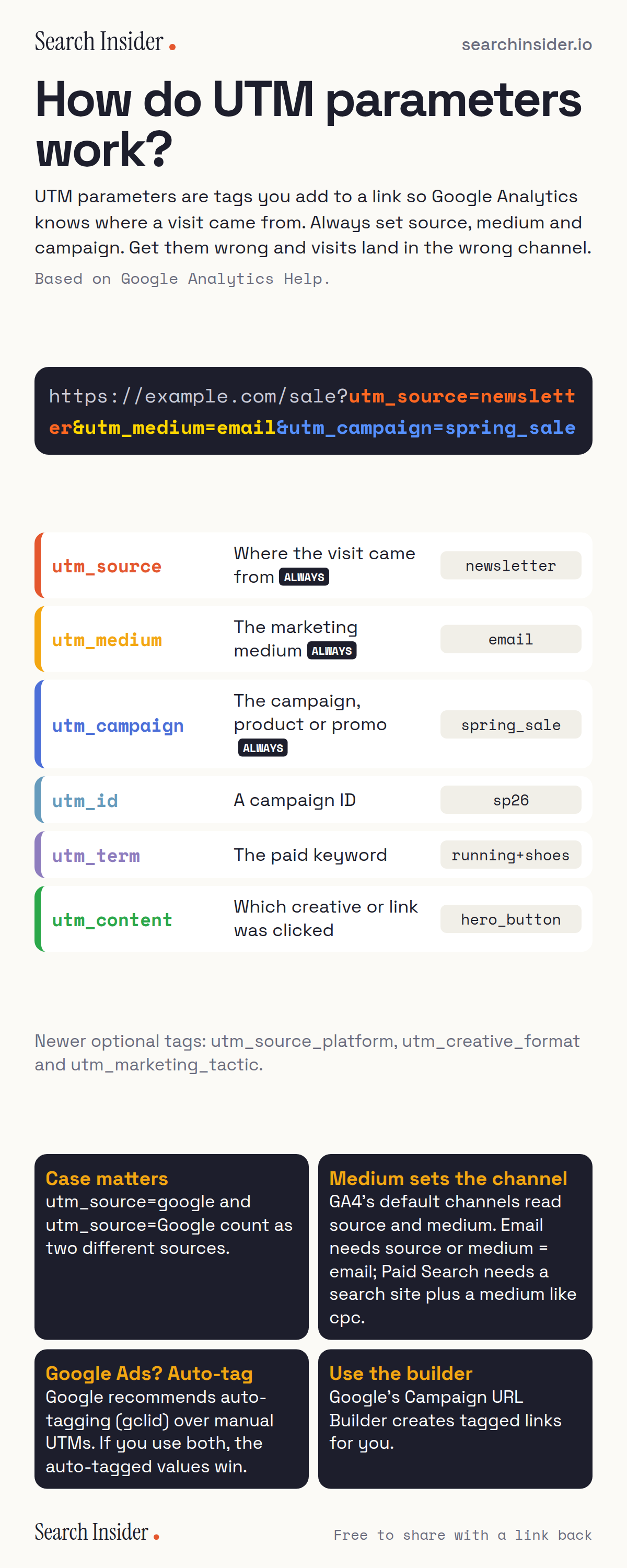
UTM parameters infographic: a tagged URL split into utm_source, utm_medium and utm_campaign, a table of six UTM parameters with descriptions and example values, and four rules about case, channels, Google Ads auto-tagging and the URL builder.

Analytics · Oct 5, 2026

How do UTM parameters work?

UTM parameters explained: what each tag does, the three to always set, why case matters, how they decide your GA4 channels, and when to use auto-tagging.

Embed code
<a href="https://searchinsider.io/infographics/utm-parameters"><img src="https://searchinsider.io/research/utm-parameters/utm-parameters-infographic.png" alt="UTM parameters infographic: a tagged URL split into utm_source, utm_medium and utm_campaign, a table of six UTM parameters with descriptions and example values, and four rules about case, channels, Google Ads auto-tagging and the URL builder." style="max-width:680px;width:100%;height:auto;" /></a><p>Source: <a href="https://searchinsider.io/infographics/utm-parameters">UTM parameters explained infographic</a> by Search Insider.</p>
How to use and credit these infographics