
Skip to content
← Marketing Analytics Infographics
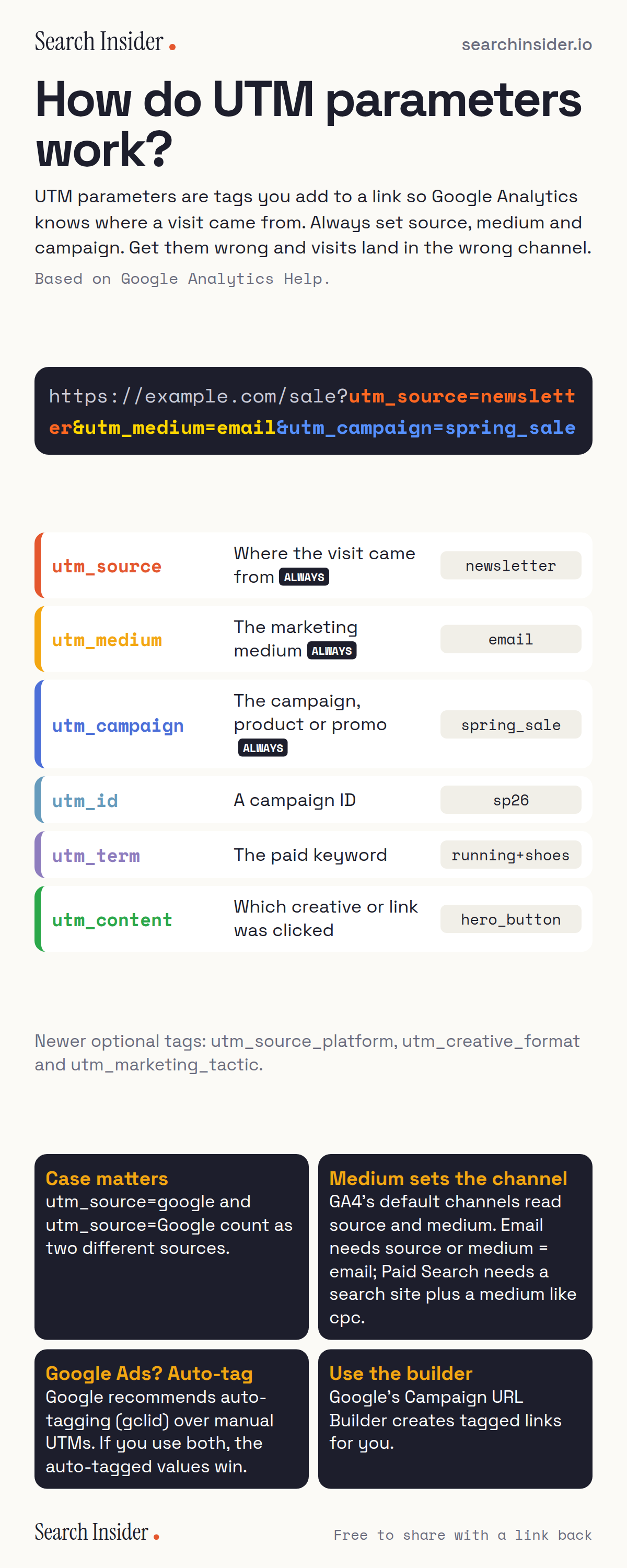
UTM parameters infographic: a tagged URL split into utm_source, utm_medium and utm_campaign, a table of six UTM parameters with descriptions and example values, and four rules about case, channels, Google Ads auto-tagging and the URL builder.

Oct 5, 2026

UTM Parameters Infographic: How to Tag Links for GA4

UTM parameters explained: what each tag does, the three to always set, why case matters, how they decide your GA4 channels, and when to use auto-tagging.

Embed this infographic

Every infographic here is free to republish, on any site, with a link back to the study it comes from. Paste this code and the credit is done for you.

<a href="https://searchinsider.io/infographics/utm-parameters"><img src="https://searchinsider.io/research/utm-parameters/utm-parameters-infographic.png" alt="UTM parameters infographic: a tagged URL split into utm_source, utm_medium and utm_campaign, a table of six UTM parameters with descriptions and example values, and four rules about case, channels, Google Ads auto-tagging and the URL builder." style="max-width:680px;width:100%;height:auto;" /></a><p>Source: <a href="https://searchinsider.io/infographics/utm-parameters">UTM parameters explained infographic</a> by Search Insider.</p>

How do UTM parameters work?

The short answer: UTM parameters are tags you add to a link so Google Analytics knows where a visit came from. Always set source, medium and campaign. Get them wrong and visits land in the wrong channel.

Based on Google Analytics Help.

What it shows

  • utm_source, utm_medium and utm_campaign: always set these three.
  • utm_id, utm_term and utm_content are optional.
  • Values are case sensitive.
  • GA4's default channels are decided by source and medium.
  • For Google Ads, use auto-tagging; auto-tagged values win over manual tags.

What to do

  • Every campaign link: Set source, medium and campaign in lowercase.
  • Google Ads: Use auto-tagging.

The walkthrough

What are UTM parameters?

UTM parameters are tags added to a URL so Google Analytics can collect campaign data about where visits come from [1]. Google says you should always use utm_source, utm_medium and utm_campaign [1].

What does each UTM parameter mean?

utm_source is the referrer, such as newsletter; utm_medium is the marketing medium, such as email or cpc; utm_campaign is the product, slogan or promo; utm_id is a campaign ID; utm_term is the paid keyword; utm_content differentiates creatives [1]. GA4 also supports utm_source_platform, utm_creative_format and utm_marketing_tactic [1].

Are UTM parameters case sensitive?

Yes. Google gives the example that utm_source=google is different from utm_source=Google [1].

How do UTMs decide the channel in GA4?

GA4's default channel group uses source and medium. Email traffic needs a source or medium of email, while Paid Search needs a known search site as the source and a paid medium such as cpc [2].

Should you use UTMs on Google Ads links?

Google recommends Google Ads auto-tagging, which adds a GCLID parameter, over manual tagging [3]. If both are used, the auto-tagged values are used for source and medium [4].

How do you build a UTM link?

Google's Campaign URL Builder creates tagged links for websites [1].

More digital marketing infographics

404 errors infographic: a 404 banner with Google's view that 404s are normal, which status to return in four cases, three facts on how Google treats 4xx and soft 404s, a checklist for a good custom 404 page, and three steps on what to do.

SEO · Oct 6, 2026

Do 404 errors hurt your SEO?

Do 404 errors hurt SEO? How Google treats 404s, why soft 404s are the real problem, which status code to return, and how to build a good custom 404 page.

Embed code
<a href="https://searchinsider.io/infographics/404-errors"><img src="https://searchinsider.io/research/404-errors/404-errors-infographic.png" alt="404 errors infographic: a 404 banner with Google's view that 404s are normal, which status to return in four cases, three facts on how Google treats 4xx and soft 404s, a checklist for a good custom 404 page, and three steps on what to do." style="max-width:680px;width:100%;height:auto;" /></a><p>Source: <a href="https://searchinsider.io/infographics/404-errors">404 errors infographic</a> by Search Insider.</p>

AI-generated content infographic: a quality not method banner, a split of fine uses versus uses against Google's rules, a pre-publish checklist (accuracy, metadata, who, how, why), a Merchant Center note on labeling AI images and product data, and three steps on what to do.

AI search · Oct 6, 2026

Does Google penalize AI-generated content?

Google's stance on AI-generated content: quality over production method, what breaks the scaled content abuse policy, and a checklist before publishing AI-assisted content.

Embed code
<a href="https://searchinsider.io/infographics/ai-generated-content"><img src="https://searchinsider.io/research/ai-generated-content/ai-generated-content-infographic.png" alt="AI-generated content infographic: a quality not method banner, a split of fine uses versus uses against Google's rules, a pre-publish checklist (accuracy, metadata, who, how, why), a Merchant Center note on labeling AI images and product data, and three steps on what to do." style="max-width:680px;width:100%;height:auto;" /></a><p>Source: <a href="https://searchinsider.io/infographics/ai-generated-content">AI-generated content infographic</a> by Search Insider.</p>

Anchor text infographic: an example link with the anchor text underlined, four vague or stuffed anchors swapped for descriptive ones, four rules on image links, internal links, length and keyword stuffing, a note on Google's link spam examples, and three steps on what to do.

SEO · Oct 6, 2026

What is anchor text, and what should it say?

What anchor text is, what Google says it should say, good and bad examples, image link alt text, and which anchor practices Google lists as link spam.

Embed code
<a href="https://searchinsider.io/infographics/anchor-text"><img src="https://searchinsider.io/research/anchor-text/anchor-text-infographic.png" alt="Anchor text infographic: an example link with the anchor text underlined, four vague or stuffed anchors swapped for descriptive ones, four rules on image links, internal links, length and keyword stuffing, a note on Google's link spam examples, and three steps on what to do." style="max-width:680px;width:100%;height:auto;" /></a><p>Source: <a href="https://searchinsider.io/infographics/anchor-text">Anchor text infographic</a> by Search Insider.</p>


