
Skip to content
← Marketing Analytics Infographics
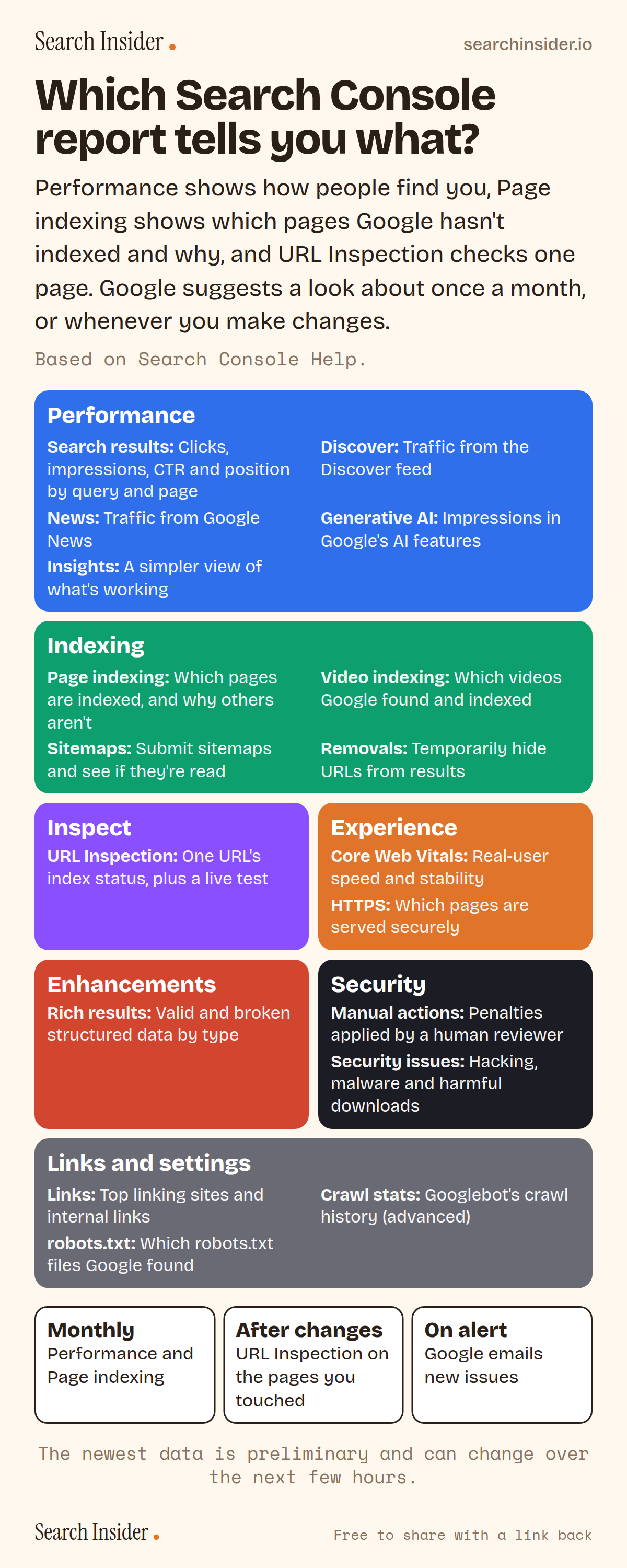
Search Console reports infographic: colored blocks for performance, indexing, inspection, experience, enhancements, security, and links and settings reports with a line on what each shows, plus when to check: monthly, after changes and on alert.

Oct 5, 2026

Google Search Console Reports Explained (Infographic)

Every Google Search Console report and what it tells you, from Performance and Page indexing to Generative AI, Crawl stats and the robots.txt report, plus how often to check.

Embed this infographic

Every infographic here is free to republish, on any site, with a link back to the study it comes from. Paste this code and the credit is done for you.

<a href="https://searchinsider.io/infographics/search-console-reports"><img src="https://searchinsider.io/research/search-console-reports/search-console-reports-infographic.png" alt="Search Console reports infographic: colored blocks for performance, indexing, inspection, experience, enhancements, security, and links and settings reports with a line on what each shows, plus when to check: monthly, after changes and on alert." style="max-width:680px;width:100%;height:auto;" /></a><p>Source: <a href="https://searchinsider.io/infographics/search-console-reports">Search Console reports infographic</a> by Search Insider.</p>

Which Search Console report tells you what?

The short answer: Performance shows how people find you, Page indexing shows which pages Google hasn't indexed and why, and URL Inspection checks one page. Google suggests a look about once a month, or whenever you make changes.

Based on Search Console Help and Google Search Central.

What it shows

  • Performance reports cover Search results, Discover and News, with clicks, impressions, CTR and average position.
  • The Generative AI performance report shows impressions in Google's AI features and is now available to all sites.
  • Page indexing shows which pages are indexed and why others aren't. URL Inspection checks a single URL.
  • Core Web Vitals, HTTPS and Rich results reports show experience and structured data issues.
  • Manual actions and Security issues reports show penalties and hacking.
  • Google suggests checking around once a month, or when you change the site, and emails you when new issues appear.

What to do

  • Monthly: Check Performance and Page indexing.
  • After changes: Use URL Inspection on the pages you touched.
  • Always: Keep email alerts on for new issues.

The walkthrough

What reports are in Google Search Console?

Search Console's main reports include the Insights report, Performance reports for Search results, Discover and News, the URL Inspection tool, Page indexing, Video indexing, Sitemaps, Removals, Core Web Vitals, rich result reports, Manual actions, Security issues and Links [1].

What does the Performance report show?

The Performance report shows clicks, impressions, click-through rate and average position for your site in Google Search, broken down by query, page, country and device [2]. The newest data can be preliminary and might change in the next few hours [2].

What is the Generative AI performance report?

It shows how often URLs from your site appeared in Google's generative AI features in Search and Discover. It reports impressions only, without clicks or queries [4][5]. Google introduced it in June 2026 and rolled it out to all sites over the following months [4][5].

Which report shows why a page isn't indexed?

The Page indexing report shows how many of your pages are indexed and the reasons others aren't [1]. To check one URL, use the URL Inspection tool, which shows its index status and can run a live test [1].

What do the Crawl stats and robots.txt reports show?

The Crawl Stats report shows statistics about Google's crawling history on your site, and Google says it's aimed at advanced users [6]. The robots.txt report shows which robots.txt files Google found for the top 20 hosts on your site, when they were last crawled and any errors [7].

Which reports show penalties and security problems?

The Manual actions report shows penalties applied after human review, and the Security issues report flags problems such as hacked content and malware [1]. The HTTPS report shows which of your pages are served over HTTPS [8].

How often should you check Search Console?

Google says there's no need to sign in every day. Check around once every month, or when you make changes to the site's content [3]. If Google finds new issues on your site, Search Console sends you an email [3].

More digital marketing infographics

404 errors infographic: a 404 banner with Google's view that 404s are normal, which status to return in four cases, three facts on how Google treats 4xx and soft 404s, a checklist for a good custom 404 page, and three steps on what to do.

SEO · Oct 6, 2026

Do 404 errors hurt your SEO?

Do 404 errors hurt SEO? How Google treats 404s, why soft 404s are the real problem, which status code to return, and how to build a good custom 404 page.

Embed code
<a href="https://searchinsider.io/infographics/404-errors"><img src="https://searchinsider.io/research/404-errors/404-errors-infographic.png" alt="404 errors infographic: a 404 banner with Google's view that 404s are normal, which status to return in four cases, three facts on how Google treats 4xx and soft 404s, a checklist for a good custom 404 page, and three steps on what to do." style="max-width:680px;width:100%;height:auto;" /></a><p>Source: <a href="https://searchinsider.io/infographics/404-errors">404 errors infographic</a> by Search Insider.</p>

AI-generated content infographic: a quality not method banner, a split of fine uses versus uses against Google's rules, a pre-publish checklist (accuracy, metadata, who, how, why), a Merchant Center note on labeling AI images and product data, and three steps on what to do.

AI search · Oct 6, 2026

Does Google penalize AI-generated content?

Google's stance on AI-generated content: quality over production method, what breaks the scaled content abuse policy, and a checklist before publishing AI-assisted content.

Embed code
<a href="https://searchinsider.io/infographics/ai-generated-content"><img src="https://searchinsider.io/research/ai-generated-content/ai-generated-content-infographic.png" alt="AI-generated content infographic: a quality not method banner, a split of fine uses versus uses against Google's rules, a pre-publish checklist (accuracy, metadata, who, how, why), a Merchant Center note on labeling AI images and product data, and three steps on what to do." style="max-width:680px;width:100%;height:auto;" /></a><p>Source: <a href="https://searchinsider.io/infographics/ai-generated-content">AI-generated content infographic</a> by Search Insider.</p>

Anchor text infographic: an example link with the anchor text underlined, four vague or stuffed anchors swapped for descriptive ones, four rules on image links, internal links, length and keyword stuffing, a note on Google's link spam examples, and three steps on what to do.

SEO · Oct 6, 2026

What is anchor text, and what should it say?

What anchor text is, what Google says it should say, good and bad examples, image link alt text, and which anchor practices Google lists as link spam.

Embed code
<a href="https://searchinsider.io/infographics/anchor-text"><img src="https://searchinsider.io/research/anchor-text/anchor-text-infographic.png" alt="Anchor text infographic: an example link with the anchor text underlined, four vague or stuffed anchors swapped for descriptive ones, four rules on image links, internal links, length and keyword stuffing, a note on Google's link spam examples, and three steps on what to do." style="max-width:680px;width:100%;height:auto;" /></a><p>Source: <a href="https://searchinsider.io/infographics/anchor-text">Anchor text infographic</a> by Search Insider.</p>


