
Skip to content
← Marketing Analytics Infographics
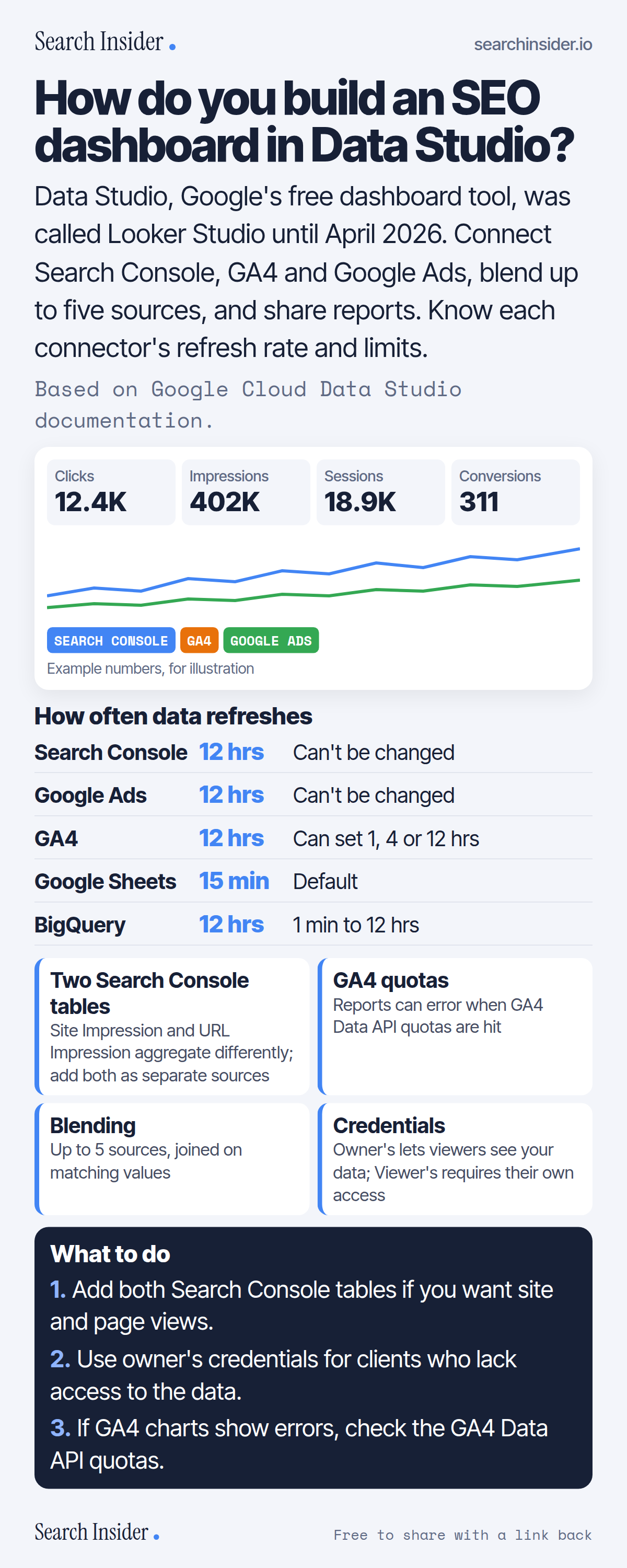
Data Studio SEO dashboard infographic: a mock dashboard with clicks, impressions, sessions and conversions from Search Console, GA4 and Google Ads, a refresh-rate table by connector, four tips on Search Console tables, GA4 quotas, blending and credentials, and three steps on what to do.

Oct 6, 2026

Build an SEO Dashboard in Data Studio (Infographic)

How to build an SEO dashboard in Data Studio, formerly Looker Studio: connectors, refresh rates, Search Console tables, GA4 quotas, blending and sharing.

Embed this infographic

Every infographic here is free to republish, on any site, with a link back to the study it comes from. Paste this code and the credit is done for you.

<a href="https://searchinsider.io/infographics/data-studio-seo-dashboard"><img src="https://searchinsider.io/research/data-studio-seo-dashboard/data-studio-seo-dashboard-infographic.png" alt="Data Studio SEO dashboard infographic: a mock dashboard with clicks, impressions, sessions and conversions from Search Console, GA4 and Google Ads, a refresh-rate table by connector, four tips on Search Console tables, GA4 quotas, blending and credentials, and three steps on what to do." style="max-width:680px;width:100%;height:auto;" /></a><p>Source: <a href="https://searchinsider.io/infographics/data-studio-seo-dashboard">Data Studio SEO dashboard infographic</a> by Search Insider.</p>

How do you build an SEO dashboard in Data Studio?

The short answer: Data Studio, Google's free dashboard tool, was called Looker Studio until April 2026. Connect Search Console, GA4 and Google Ads, blend up to five sources, and share reports. Know each connector's refresh rate and limits.

Based on Google Cloud Data Studio documentation.

What it shows

  • Google rebranded Looker Studio as Data Studio in April 2026.
  • Data Studio is a no-cost tool; Data Studio Pro is the paid version.
  • Search Console and Google Ads data refreshes every 12 hours and can't be changed.
  • Search Console has two tables, Site Impression and URL Impression, that aggregate differently.
  • GA4 reports are subject to GA4 Data API quotas and may show errors when exceeded.
  • You can blend data from up to five sources.

What to do

  • Search Console: Add both tables for site and page views.
  • Sharing: Use owner's credentials for clients without access.
  • Errors: Check GA4 Data API quotas.

The walkthrough

What happened to Looker Studio?

Google rebranded Looker Studio as Data Studio in April 2026, and Looker Studio Pro is now Data Studio Pro [1]. Data Studio is a no-cost tool for building dashboards and reports [2].

How often does Data Studio refresh data?

Search Console and Google Ads data refreshes every 12 hours and that rate can't be changed [3]. Google Analytics defaults to 12 hours and can be set to 1, 4 or 12 hours, Google Sheets defaults to 15 minutes, and BigQuery defaults to 12 hours, adjustable from 1 minute to 12 hours [3].

Why are there two Search Console tables?

Search Console uses two aggregation methods for search performance: site impressions and URL impressions [4]. To compare both, add each as a separate data source, and note that Search Console doesn't show all data, for privacy reasons [4].

Why do GA4 charts in Data Studio show errors?

Reports that connect to GA4 are subject to Google Analytics Data API quotas, and reports that exceed them may show an error [5].

How many data sources can you blend?

Up to five, joined on matching field values with inner, left, right, full outer or cross joins [6]. Calculated fields let you create new metrics from existing fields [7].

How does sharing work in Data Studio?

Reports can be shared with view or edit access [8]. Owner's credentials let viewers see data using the owner's authorization, while viewer's credentials require each viewer to have their own access [9].

More digital marketing infographics

404 errors infographic: a 404 banner with Google's view that 404s are normal, which status to return in four cases, three facts on how Google treats 4xx and soft 404s, a checklist for a good custom 404 page, and three steps on what to do.

SEO · Oct 6, 2026

Do 404 errors hurt your SEO?

Do 404 errors hurt SEO? How Google treats 404s, why soft 404s are the real problem, which status code to return, and how to build a good custom 404 page.

Embed code
<a href="https://searchinsider.io/infographics/404-errors"><img src="https://searchinsider.io/research/404-errors/404-errors-infographic.png" alt="404 errors infographic: a 404 banner with Google's view that 404s are normal, which status to return in four cases, three facts on how Google treats 4xx and soft 404s, a checklist for a good custom 404 page, and three steps on what to do." style="max-width:680px;width:100%;height:auto;" /></a><p>Source: <a href="https://searchinsider.io/infographics/404-errors">404 errors infographic</a> by Search Insider.</p>

AI-generated content infographic: a quality not method banner, a split of fine uses versus uses against Google's rules, a pre-publish checklist (accuracy, metadata, who, how, why), a Merchant Center note on labeling AI images and product data, and three steps on what to do.

AI search · Oct 6, 2026

Does Google penalize AI-generated content?

Google's stance on AI-generated content: quality over production method, what breaks the scaled content abuse policy, and a checklist before publishing AI-assisted content.

Embed code
<a href="https://searchinsider.io/infographics/ai-generated-content"><img src="https://searchinsider.io/research/ai-generated-content/ai-generated-content-infographic.png" alt="AI-generated content infographic: a quality not method banner, a split of fine uses versus uses against Google's rules, a pre-publish checklist (accuracy, metadata, who, how, why), a Merchant Center note on labeling AI images and product data, and three steps on what to do." style="max-width:680px;width:100%;height:auto;" /></a><p>Source: <a href="https://searchinsider.io/infographics/ai-generated-content">AI-generated content infographic</a> by Search Insider.</p>

Anchor text infographic: an example link with the anchor text underlined, four vague or stuffed anchors swapped for descriptive ones, four rules on image links, internal links, length and keyword stuffing, a note on Google's link spam examples, and three steps on what to do.

SEO · Oct 6, 2026

What is anchor text, and what should it say?

What anchor text is, what Google says it should say, good and bad examples, image link alt text, and which anchor practices Google lists as link spam.

Embed code
<a href="https://searchinsider.io/infographics/anchor-text"><img src="https://searchinsider.io/research/anchor-text/anchor-text-infographic.png" alt="Anchor text infographic: an example link with the anchor text underlined, four vague or stuffed anchors swapped for descriptive ones, four rules on image links, internal links, length and keyword stuffing, a note on Google's link spam examples, and three steps on what to do." style="max-width:680px;width:100%;height:auto;" /></a><p>Source: <a href="https://searchinsider.io/infographics/anchor-text">Anchor text infographic</a> by Search Insider.</p>


