
Skip to content
← Marketing Analytics Infographics
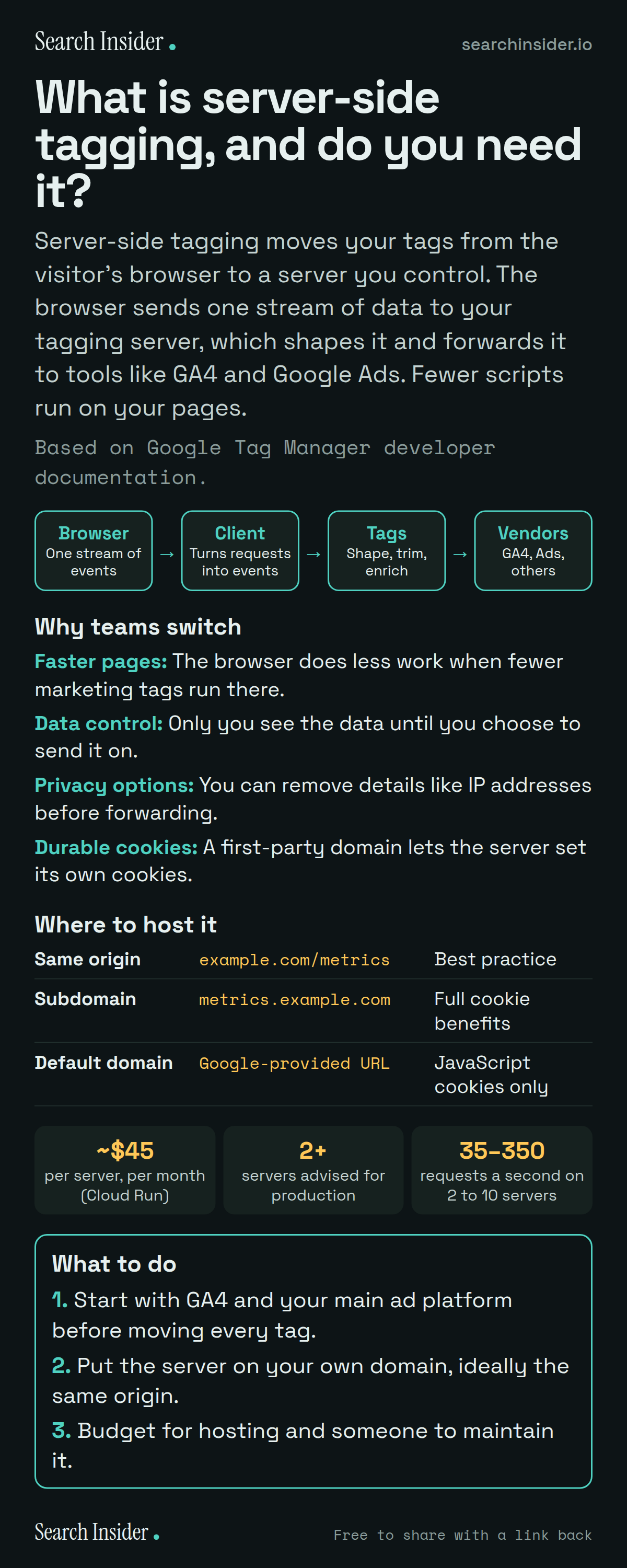
Server-side tagging infographic: a pipeline from browser to client to tags to vendors, four reasons teams switch (faster pages, data control, privacy options, durable cookies), a table of hosting domain options, cost figures of about 45 dollars per server a month, at least 2 servers and 35 to 350 requests a second, and three steps on what to do.

Oct 6, 2026

What Is Server-Side Tagging? Costs and Benefits (Infographic)

What server-side tagging in Google Tag Manager is, how it works, why teams switch, which domain to host it on, and what Google says it costs on Cloud Run.

Embed this infographic

Every infographic here is free to republish, on any site, with a link back to the study it comes from. Paste this code and the credit is done for you.

<a href="https://searchinsider.io/infographics/server-side-tagging"><img src="https://searchinsider.io/research/server-side-tagging/server-side-tagging-infographic.png" alt="Server-side tagging infographic: a pipeline from browser to client to tags to vendors, four reasons teams switch (faster pages, data control, privacy options, durable cookies), a table of hosting domain options, cost figures of about 45 dollars per server a month, at least 2 servers and 35 to 350 requests a second, and three steps on what to do." style="max-width:680px;width:100%;height:auto;" /></a><p>Source: <a href="https://searchinsider.io/infographics/server-side-tagging">Server-side tagging infographic</a> by Search Insider.</p>

What is server-side tagging, and do you need it?

The short answer: Server-side tagging moves your tags from the visitor's browser to a server you control. The browser sends one stream of data to your tagging server, which shapes it and forwards it to tools like GA4 and Google Ads. Fewer scripts run on your pages.

Based on Google Tag Manager developer documentation.

What it shows

  • Server containers use the same tag, trigger and variable model as web containers.
  • Clients receive measurement data and turn it into events for tags to process.
  • Only you have access to the data in the server until you choose to send it elsewhere.
  • Google estimates each Cloud Run server costs about $45 a month and recommends at least 2 in production.
  • Google calls serving the tagging server from the same origin as your site best practice.

What to do

  • Start: Move GA4 and your main ad platform first.
  • Domain: Host on your own domain, ideally same origin.
  • Budget: Plan for hosting and maintenance.

The walkthrough

What is server-side tagging?

Server-side tagging runs a Tag Manager container on a server you control rather than in the visitor's browser [1]. Server containers use the same tag, trigger and variable model as web containers [1].

How does server-side tagging work?

Clients act as adapters that receive measurement data from a device and transform it into events, which tags then process and send on to tools like Google Analytics [1]. Only you have access to the data in the server until you choose to send it elsewhere [1].

What are the benefits of server-side tagging?

Google lists better performance, because the browser does less work with fewer marketing tags, more control over the flow of marketing data for privacy, and better data quality [2]. It also allows steps like removing IP addresses before data is forwarded [2].

How much does server-side tagging cost?

Tag Manager is free, but you pay for hosting. On Cloud Run, Google estimates each server costs about $45 a month and recommends at least 2 instances in production, with 2 to 10 servers handling roughly 35 to 350 requests a second [3].

Which domain should a tagging server use?

Your own. Google calls same-origin serving, such as example.com/metrics, best practice, with a subdomain also giving full access to server-set cookie benefits [4]. The default domain runs in a third-party context and can only set JavaScript cookies [4].

More digital marketing infographics

404 errors infographic: a 404 banner with Google's view that 404s are normal, which status to return in four cases, three facts on how Google treats 4xx and soft 404s, a checklist for a good custom 404 page, and three steps on what to do.

SEO · Oct 6, 2026

Do 404 errors hurt your SEO?

Do 404 errors hurt SEO? How Google treats 404s, why soft 404s are the real problem, which status code to return, and how to build a good custom 404 page.

Embed code
<a href="https://searchinsider.io/infographics/404-errors"><img src="https://searchinsider.io/research/404-errors/404-errors-infographic.png" alt="404 errors infographic: a 404 banner with Google's view that 404s are normal, which status to return in four cases, three facts on how Google treats 4xx and soft 404s, a checklist for a good custom 404 page, and three steps on what to do." style="max-width:680px;width:100%;height:auto;" /></a><p>Source: <a href="https://searchinsider.io/infographics/404-errors">404 errors infographic</a> by Search Insider.</p>

AI-generated content infographic: a quality not method banner, a split of fine uses versus uses against Google's rules, a pre-publish checklist (accuracy, metadata, who, how, why), a Merchant Center note on labeling AI images and product data, and three steps on what to do.

AI search · Oct 6, 2026

Does Google penalize AI-generated content?

Google's stance on AI-generated content: quality over production method, what breaks the scaled content abuse policy, and a checklist before publishing AI-assisted content.

Embed code
<a href="https://searchinsider.io/infographics/ai-generated-content"><img src="https://searchinsider.io/research/ai-generated-content/ai-generated-content-infographic.png" alt="AI-generated content infographic: a quality not method banner, a split of fine uses versus uses against Google's rules, a pre-publish checklist (accuracy, metadata, who, how, why), a Merchant Center note on labeling AI images and product data, and three steps on what to do." style="max-width:680px;width:100%;height:auto;" /></a><p>Source: <a href="https://searchinsider.io/infographics/ai-generated-content">AI-generated content infographic</a> by Search Insider.</p>

Anchor text infographic: an example link with the anchor text underlined, four vague or stuffed anchors swapped for descriptive ones, four rules on image links, internal links, length and keyword stuffing, a note on Google's link spam examples, and three steps on what to do.

SEO · Oct 6, 2026

What is anchor text, and what should it say?

What anchor text is, what Google says it should say, good and bad examples, image link alt text, and which anchor practices Google lists as link spam.

Embed code
<a href="https://searchinsider.io/infographics/anchor-text"><img src="https://searchinsider.io/research/anchor-text/anchor-text-infographic.png" alt="Anchor text infographic: an example link with the anchor text underlined, four vague or stuffed anchors swapped for descriptive ones, four rules on image links, internal links, length and keyword stuffing, a note on Google's link spam examples, and three steps on what to do." style="max-width:680px;width:100%;height:auto;" /></a><p>Source: <a href="https://searchinsider.io/infographics/anchor-text">Anchor text infographic</a> by Search Insider.</p>


