
Skip to content
← Marketing Analytics Infographics
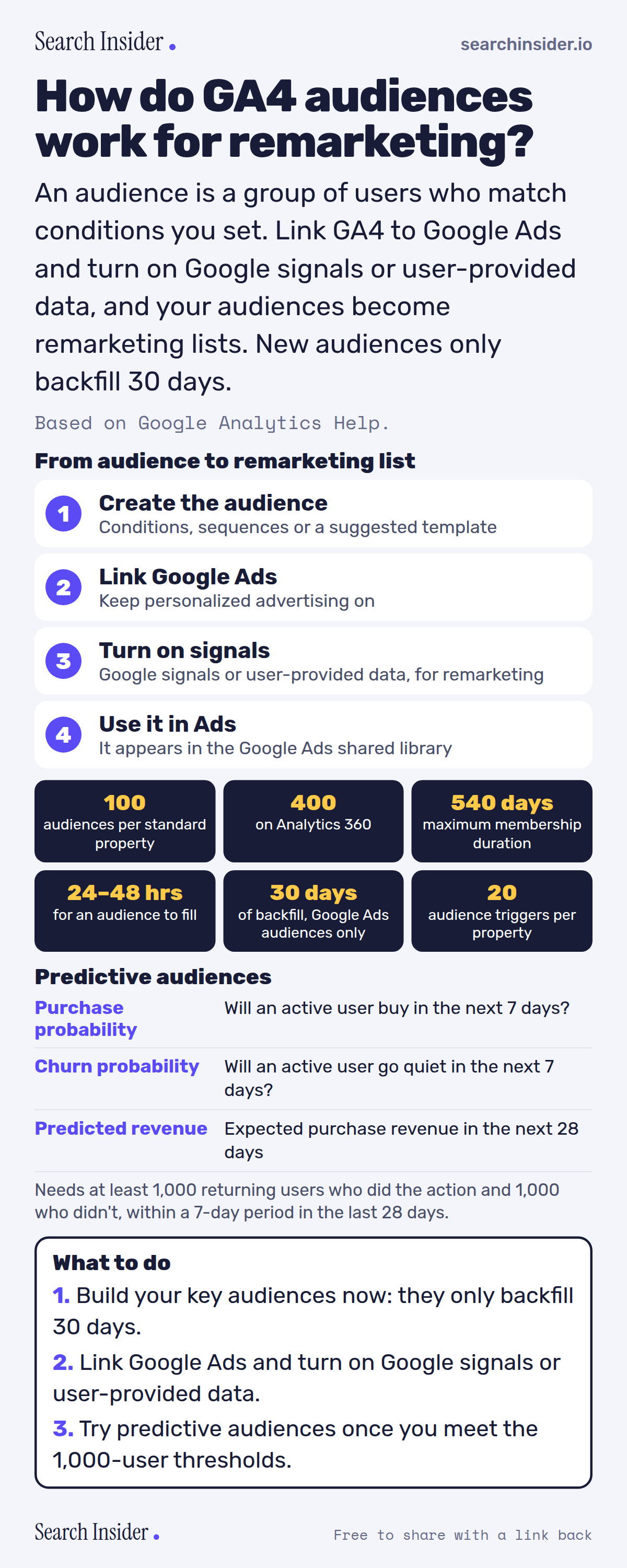
GA4 audiences infographic: four steps from creating an audience to using it in Google Ads, six limits (100 audiences, 400 on 360, 540 days, 24 to 48 hours, 30 days backfill, 20 triggers), three predictive metrics with eligibility thresholds, and three steps on what to do.

Oct 6, 2026

GA4 Audiences for Remarketing Explained (Infographic)

How GA4 audiences work: limits, membership duration, the 30-day backfill, predictive audiences, and what you need to use them for Google Ads remarketing.

Embed this infographic

Every infographic here is free to republish, on any site, with a link back to the study it comes from. Paste this code and the credit is done for you.

<a href="https://searchinsider.io/infographics/ga4-audiences"><img src="https://searchinsider.io/research/ga4-audiences/ga4-audiences-infographic.png" alt="GA4 audiences infographic: four steps from creating an audience to using it in Google Ads, six limits (100 audiences, 400 on 360, 540 days, 24 to 48 hours, 30 days backfill, 20 triggers), three predictive metrics with eligibility thresholds, and three steps on what to do." style="max-width:680px;width:100%;height:auto;" /></a><p>Source: <a href="https://searchinsider.io/infographics/ga4-audiences">GA4 audiences infographic</a> by Search Insider.</p>

How do GA4 audiences work for remarketing?

The short answer: An audience is a group of users who match conditions you set. Link GA4 to Google Ads and turn on Google signals or user-provided data, and your audiences become remarketing lists. New audiences only backfill 30 days.

Based on Google Analytics Help.

What it shows

  • Standard properties can have up to 100 audiences; Analytics 360 up to 400.
  • Membership duration can be up to 540 days.
  • New audiences add users who met the criteria in the last 30 days, for Google Ads audiences only.
  • Audiences can take 24 to 48 hours to accumulate users.
  • Remarketing requires a Google Ads link plus Google signals or user-provided data collection.
  • Predictive audiences need at least 1,000 returning users who did and 1,000 who didn't trigger the condition within a 7-day period.

What to do

  • Now: Build key audiences, since backfill is limited.
  • Setup: Link Google Ads and enable signals or user-provided data.
  • Later: Try predictive audiences when eligible.

The walkthrough

What is an audience in GA4?

Audiences let you segment users in the ways that matter to your business, based on conditions you set [1]. GA4 also offers suggested audiences, which are preconfigured templates you can use as is or modify [1].

How many audiences can a GA4 property have?

Up to 100 audiences per standard property and up to 400 per Analytics 360 property [1]. Up to 20 of a property's audiences can have audience triggers [4].

Are GA4 audiences retroactive?

Partly. When you create an audience, Analytics adds users who met the criteria in the last 30 days, but this applies to Google Ads audiences only [1]. New audiences can take 24 to 48 hours to accumulate users [1].

How long do users stay in a GA4 audience?

Membership duration can be set up to 540 days [1].

How do you use GA4 audiences for Google Ads remarketing?

Link your Analytics property to Google Ads and keep personalized advertising enabled, and audiences are shared to the Google Ads shared library [1]. For remarketing, at least one of Google signals or user-provided data collection must be activated [2].

What are predictive audiences?

Predictive audiences use metrics such as purchase probability (a purchase in the next 7 days), churn probability (inactivity in the next 7 days) and predicted revenue over the next 28 days [3]. Eligibility requires at least 1,000 returning users who triggered the condition and 1,000 who didn't within a 7-day period over the last 28 days, among other requirements [3].

More digital marketing infographics

404 errors infographic: a 404 banner with Google's view that 404s are normal, which status to return in four cases, three facts on how Google treats 4xx and soft 404s, a checklist for a good custom 404 page, and three steps on what to do.

SEO · Oct 6, 2026

Do 404 errors hurt your SEO?

Do 404 errors hurt SEO? How Google treats 404s, why soft 404s are the real problem, which status code to return, and how to build a good custom 404 page.

Embed code
<a href="https://searchinsider.io/infographics/404-errors"><img src="https://searchinsider.io/research/404-errors/404-errors-infographic.png" alt="404 errors infographic: a 404 banner with Google's view that 404s are normal, which status to return in four cases, three facts on how Google treats 4xx and soft 404s, a checklist for a good custom 404 page, and three steps on what to do." style="max-width:680px;width:100%;height:auto;" /></a><p>Source: <a href="https://searchinsider.io/infographics/404-errors">404 errors infographic</a> by Search Insider.</p>

AI-generated content infographic: a quality not method banner, a split of fine uses versus uses against Google's rules, a pre-publish checklist (accuracy, metadata, who, how, why), a Merchant Center note on labeling AI images and product data, and three steps on what to do.

AI search · Oct 6, 2026

Does Google penalize AI-generated content?

Google's stance on AI-generated content: quality over production method, what breaks the scaled content abuse policy, and a checklist before publishing AI-assisted content.

Embed code
<a href="https://searchinsider.io/infographics/ai-generated-content"><img src="https://searchinsider.io/research/ai-generated-content/ai-generated-content-infographic.png" alt="AI-generated content infographic: a quality not method banner, a split of fine uses versus uses against Google's rules, a pre-publish checklist (accuracy, metadata, who, how, why), a Merchant Center note on labeling AI images and product data, and three steps on what to do." style="max-width:680px;width:100%;height:auto;" /></a><p>Source: <a href="https://searchinsider.io/infographics/ai-generated-content">AI-generated content infographic</a> by Search Insider.</p>

Anchor text infographic: an example link with the anchor text underlined, four vague or stuffed anchors swapped for descriptive ones, four rules on image links, internal links, length and keyword stuffing, a note on Google's link spam examples, and three steps on what to do.

SEO · Oct 6, 2026

What is anchor text, and what should it say?

What anchor text is, what Google says it should say, good and bad examples, image link alt text, and which anchor practices Google lists as link spam.

Embed code
<a href="https://searchinsider.io/infographics/anchor-text"><img src="https://searchinsider.io/research/anchor-text/anchor-text-infographic.png" alt="Anchor text infographic: an example link with the anchor text underlined, four vague or stuffed anchors swapped for descriptive ones, four rules on image links, internal links, length and keyword stuffing, a note on Google's link spam examples, and three steps on what to do." style="max-width:680px;width:100%;height:auto;" /></a><p>Source: <a href="https://searchinsider.io/infographics/anchor-text">Anchor text infographic</a> by Search Insider.</p>


