
Skip to content
← Marketing Analytics Infographics
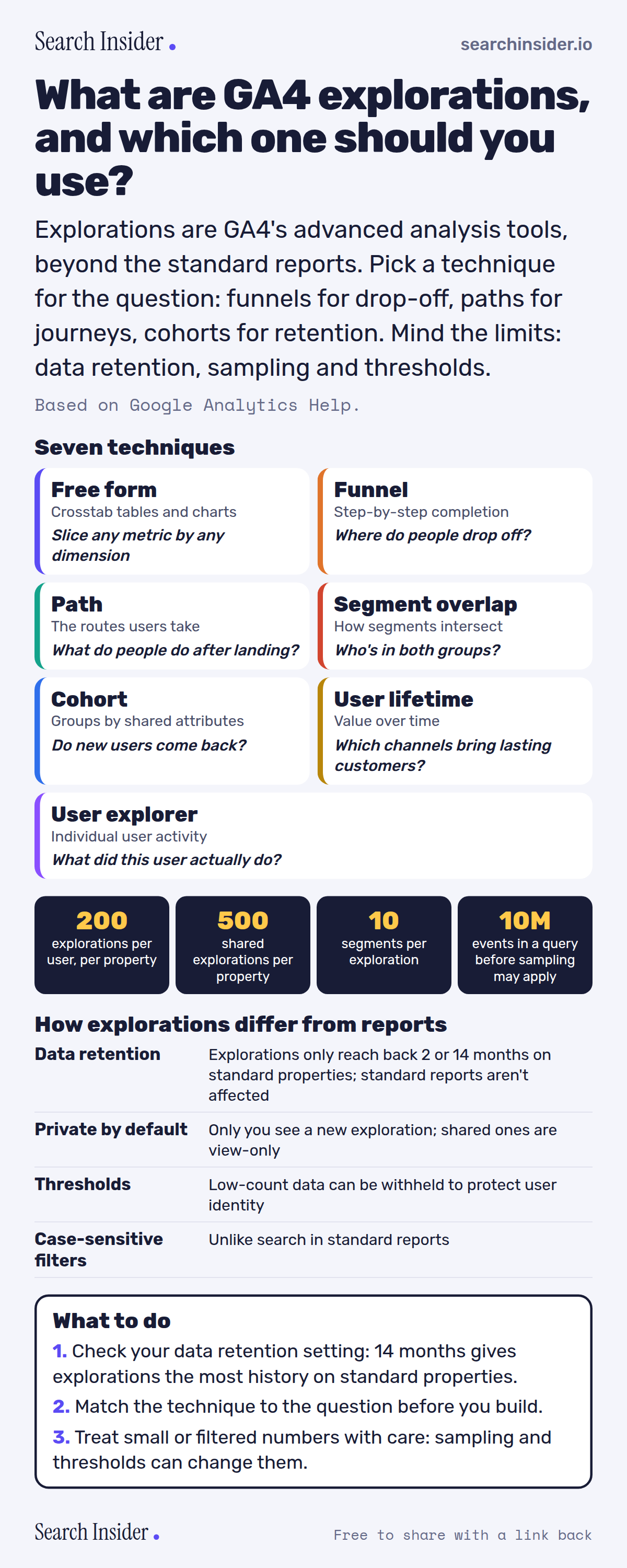
GA4 explorations infographic: seven technique cards (free form, funnel, path, segment overlap, cohort, user lifetime, user explorer) each with the question it answers, limits of 200 explorations, 500 shared, 10 segments and 10 million events before sampling, how explorations differ from reports, and three steps on what to do.

Oct 5, 2026

GA4 Explorations Explained: 7 Techniques (Infographic)

GA4 explorations explained: the seven techniques and what each answers, the limits, and how explorations differ from standard reports.

Embed this infographic

Every infographic here is free to republish, on any site, with a link back to the study it comes from. Paste this code and the credit is done for you.

<a href="https://searchinsider.io/infographics/ga4-explorations"><img src="https://searchinsider.io/research/ga4-explorations/ga4-explorations-infographic.png" alt="GA4 explorations infographic: seven technique cards (free form, funnel, path, segment overlap, cohort, user lifetime, user explorer) each with the question it answers, limits of 200 explorations, 500 shared, 10 segments and 10 million events before sampling, how explorations differ from reports, and three steps on what to do." style="max-width:680px;width:100%;height:auto;" /></a><p>Source: <a href="https://searchinsider.io/infographics/ga4-explorations">GA4 explorations infographic</a> by Search Insider.</p>

What are GA4 explorations, and which one should you use?

The short answer: Explorations are GA4's advanced analysis tools, beyond the standard reports. Pick a technique for the question: funnels for drop-off, paths for journeys, cohorts for retention. Mind the limits: data retention, sampling and thresholds.

Based on Google Analytics Help.

What it shows

  • GA4 has seven exploration techniques: free form, funnel, path, segment overlap, cohort, user lifetime and user explorer.
  • Explorations are private by default; shared explorations are view-only.
  • Limits: 200 explorations per user per property, 500 shared per property, 10 segments per exploration.
  • Explorations may use sampled data above 10 million events per query.
  • Data retention (2 or 14 months on standard properties) only affects explorations and funnel reports.
  • Data thresholds can withhold data to protect user identity.

What to do

  • Setup: Check your data retention setting.
  • Analysis: Match the technique to the question.
  • Reading: Treat small or filtered numbers with care.

The walkthrough

What are GA4 explorations?

Explorations are a collection of advanced techniques that go beyond standard reports to uncover deeper insights about customer behavior [1].

What are the GA4 exploration techniques?

Free form explores data in a crosstab layout; cohort exploration looks at groups of users with common attributes; funnel exploration visualizes the steps to complete a task; segment overlap shows how segments relate; user exploration drills into individual users; path exploration visualizes the paths users take; and user lifetime explores behavior and value over a customer's lifetime [1].

Who can see a GA4 exploration?

When you create an exploration, only you can see it [1]. Sharing requires at least the Analyst role, and shared explorations can be viewed but not edited by anyone with the Viewer role [1].

What are the limits on GA4 explorations?

You can create up to 200 explorations per user per property and up to 500 shared explorations per property, with up to 10 segments per exploration and 10 filters per tab [1]. Explorations may be sampled if more than 10 million events are part of a query [1].

How does data retention affect explorations?

Standard properties can keep data for 2 or 14 months, and the data retention setting only affects explorations and funnel reports, not standard aggregated reports [2]. Date ranges in explorations are limited to the retention setting [3].

How do explorations differ from standard reports?

Some dimensions and metrics in reports aren't supported in explorations, comparisons become segments, and filters in explorations are case-sensitive while report search is not [3]. Both can withhold data when user counts are low, because data thresholds protect user identity [3][4].

More digital marketing infographics

404 errors infographic: a 404 banner with Google's view that 404s are normal, which status to return in four cases, three facts on how Google treats 4xx and soft 404s, a checklist for a good custom 404 page, and three steps on what to do.

SEO · Oct 6, 2026

Do 404 errors hurt your SEO?

Do 404 errors hurt SEO? How Google treats 404s, why soft 404s are the real problem, which status code to return, and how to build a good custom 404 page.

Embed code
<a href="https://searchinsider.io/infographics/404-errors"><img src="https://searchinsider.io/research/404-errors/404-errors-infographic.png" alt="404 errors infographic: a 404 banner with Google's view that 404s are normal, which status to return in four cases, three facts on how Google treats 4xx and soft 404s, a checklist for a good custom 404 page, and three steps on what to do." style="max-width:680px;width:100%;height:auto;" /></a><p>Source: <a href="https://searchinsider.io/infographics/404-errors">404 errors infographic</a> by Search Insider.</p>

AI-generated content infographic: a quality not method banner, a split of fine uses versus uses against Google's rules, a pre-publish checklist (accuracy, metadata, who, how, why), a Merchant Center note on labeling AI images and product data, and three steps on what to do.

AI search · Oct 6, 2026

Does Google penalize AI-generated content?

Google's stance on AI-generated content: quality over production method, what breaks the scaled content abuse policy, and a checklist before publishing AI-assisted content.

Embed code
<a href="https://searchinsider.io/infographics/ai-generated-content"><img src="https://searchinsider.io/research/ai-generated-content/ai-generated-content-infographic.png" alt="AI-generated content infographic: a quality not method banner, a split of fine uses versus uses against Google's rules, a pre-publish checklist (accuracy, metadata, who, how, why), a Merchant Center note on labeling AI images and product data, and three steps on what to do." style="max-width:680px;width:100%;height:auto;" /></a><p>Source: <a href="https://searchinsider.io/infographics/ai-generated-content">AI-generated content infographic</a> by Search Insider.</p>

Anchor text infographic: an example link with the anchor text underlined, four vague or stuffed anchors swapped for descriptive ones, four rules on image links, internal links, length and keyword stuffing, a note on Google's link spam examples, and three steps on what to do.

SEO · Oct 6, 2026

What is anchor text, and what should it say?

What anchor text is, what Google says it should say, good and bad examples, image link alt text, and which anchor practices Google lists as link spam.

Embed code
<a href="https://searchinsider.io/infographics/anchor-text"><img src="https://searchinsider.io/research/anchor-text/anchor-text-infographic.png" alt="Anchor text infographic: an example link with the anchor text underlined, four vague or stuffed anchors swapped for descriptive ones, four rules on image links, internal links, length and keyword stuffing, a note on Google's link spam examples, and three steps on what to do." style="max-width:680px;width:100%;height:auto;" /></a><p>Source: <a href="https://searchinsider.io/infographics/anchor-text">Anchor text infographic</a> by Search Insider.</p>


