
Skip to content
← Marketing Analytics Infographics
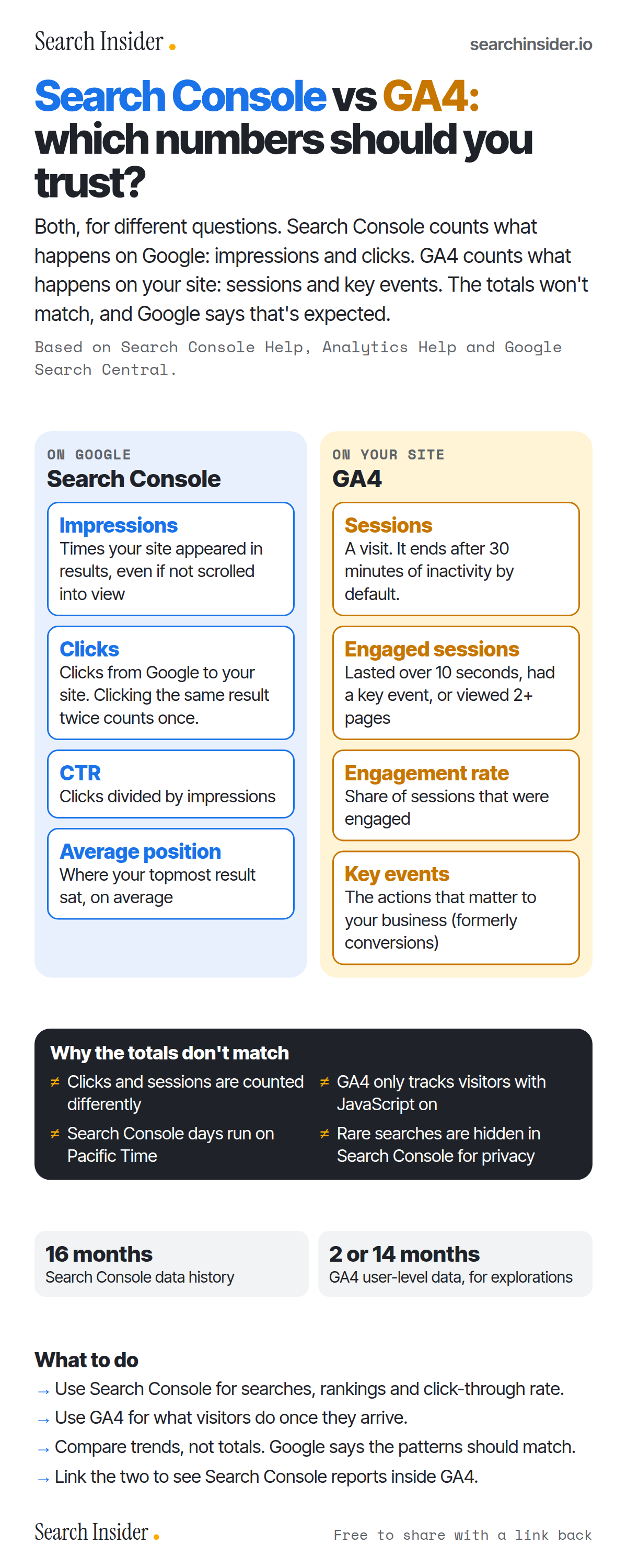
Search Console vs GA4 infographic: side-by-side columns defining Search Console's impressions, clicks, CTR and average position and GA4's sessions, engaged sessions, engagement rate and key events, then why the totals don't match, data retention and what to do.

Oct 5, 2026

Search Console vs GA4 Infographic: Which Numbers to Trust

Search Console vs GA4 for SEO: what each metric means, why clicks and sessions never match, how long each keeps data, and what to use each tool for.

Embed this infographic

Every infographic here is free to republish, on any site, with a link back to the study it comes from. Paste this code and the credit is done for you.

<a href="https://searchinsider.io/infographics/search-console-vs-ga4"><img src="https://searchinsider.io/research/search-console-vs-ga4/search-console-vs-ga4-infographic.png" alt="Search Console vs GA4 infographic: side-by-side columns defining Search Console's impressions, clicks, CTR and average position and GA4's sessions, engaged sessions, engagement rate and key events, then why the totals don't match, data retention and what to do." style="max-width:680px;width:100%;height:auto;" /></a><p>Source: <a href="https://searchinsider.io/infographics/search-console-vs-ga4">Search Console vs GA4 infographic</a> by Search Insider.</p>

Search Console vs GA4: which numbers should you trust?

The short answer: Both, for different questions. Search Console counts what happens on Google: impressions and clicks. GA4 counts what happens on your site: sessions and key events. The totals won't match, and Google says that's expected.

Based on Search Console Help, Analytics Help and Google Search Central.

What it shows

  • Search Console: impressions, clicks, CTR and average position.
  • GA4: sessions, engaged sessions, engagement rate and key events.
  • Totals differ: different counting, GA4 needs JavaScript, Search Console uses Pacific Time, rare queries are hidden.
  • Search Console keeps 16 months of data; GA4 user-level data is kept 2 or 14 months for explorations.

What to do

  • For searches and rankings: Use Search Console.
  • For visitor behavior: Use GA4.
  • Comparing: Compare trends, not totals, and link the two tools.

The walkthrough

What is the difference between Search Console and GA4?

Search Console reports how your site performs in Google Search, with clicks, impressions, CTR and average position [1]. GA4 reports what people do on your site, with metrics such as sessions, engagement rate and key events [2][3].

What counts as an impression and a click in Search Console?

An impression is counted when a link to your site appears on the current page of results, whether or not it's scrolled into view [4]. A click is any click that sends a user to a page outside Google, and clicking the same result again after returning counts as one click [4].

What is an engaged session in GA4?

A session is a group of interactions within a time frame, ending after 30 minutes of inactivity by default [2]. An engaged session lasts longer than 10 seconds, has a key event, or has two or more page views, and engagement rate is the percentage of sessions that were engaged [3]. Key events are the actions important to your business, previously called conversions [5].

Why don't Search Console clicks match GA4 sessions?

Google says clicks and sessions are calculated differently, so the numbers will differ, but the general trends should follow the same pattern [6]. GA4 only tracks visitors with JavaScript enabled, Search Console labels daily data in Pacific Time, and Search Console omits some rare queries to protect privacy [7].

How long do Search Console and GA4 keep data?

Search Console keeps data for the last 16 months [8]. Standard GA4 properties can keep user-level data for 2 or 14 months, a setting that affects explorations and funnel reports but not standard reports [9].

Should you link Search Console to GA4?

Yes. Linking adds Google Organic Search Queries and Google Organic Search Traffic reports to GA4 [8]. Search Console metrics can be combined only with Search Console dimensions and the GA4 dimensions landing page, device and country [8].

More digital marketing infographics

404 errors infographic: a 404 banner with Google's view that 404s are normal, which status to return in four cases, three facts on how Google treats 4xx and soft 404s, a checklist for a good custom 404 page, and three steps on what to do.

SEO · Oct 6, 2026

Do 404 errors hurt your SEO?

Do 404 errors hurt SEO? How Google treats 404s, why soft 404s are the real problem, which status code to return, and how to build a good custom 404 page.

Embed code
<a href="https://searchinsider.io/infographics/404-errors"><img src="https://searchinsider.io/research/404-errors/404-errors-infographic.png" alt="404 errors infographic: a 404 banner with Google's view that 404s are normal, which status to return in four cases, three facts on how Google treats 4xx and soft 404s, a checklist for a good custom 404 page, and three steps on what to do." style="max-width:680px;width:100%;height:auto;" /></a><p>Source: <a href="https://searchinsider.io/infographics/404-errors">404 errors infographic</a> by Search Insider.</p>

AI-generated content infographic: a quality not method banner, a split of fine uses versus uses against Google's rules, a pre-publish checklist (accuracy, metadata, who, how, why), a Merchant Center note on labeling AI images and product data, and three steps on what to do.

AI search · Oct 6, 2026

Does Google penalize AI-generated content?

Google's stance on AI-generated content: quality over production method, what breaks the scaled content abuse policy, and a checklist before publishing AI-assisted content.

Embed code
<a href="https://searchinsider.io/infographics/ai-generated-content"><img src="https://searchinsider.io/research/ai-generated-content/ai-generated-content-infographic.png" alt="AI-generated content infographic: a quality not method banner, a split of fine uses versus uses against Google's rules, a pre-publish checklist (accuracy, metadata, who, how, why), a Merchant Center note on labeling AI images and product data, and three steps on what to do." style="max-width:680px;width:100%;height:auto;" /></a><p>Source: <a href="https://searchinsider.io/infographics/ai-generated-content">AI-generated content infographic</a> by Search Insider.</p>

Anchor text infographic: an example link with the anchor text underlined, four vague or stuffed anchors swapped for descriptive ones, four rules on image links, internal links, length and keyword stuffing, a note on Google's link spam examples, and three steps on what to do.

SEO · Oct 6, 2026

What is anchor text, and what should it say?

What anchor text is, what Google says it should say, good and bad examples, image link alt text, and which anchor practices Google lists as link spam.

Embed code
<a href="https://searchinsider.io/infographics/anchor-text"><img src="https://searchinsider.io/research/anchor-text/anchor-text-infographic.png" alt="Anchor text infographic: an example link with the anchor text underlined, four vague or stuffed anchors swapped for descriptive ones, four rules on image links, internal links, length and keyword stuffing, a note on Google's link spam examples, and three steps on what to do." style="max-width:680px;width:100%;height:auto;" /></a><p>Source: <a href="https://searchinsider.io/infographics/anchor-text">Anchor text infographic</a> by Search Insider.</p>


