
Skip to content
← Marketing Analytics Infographics
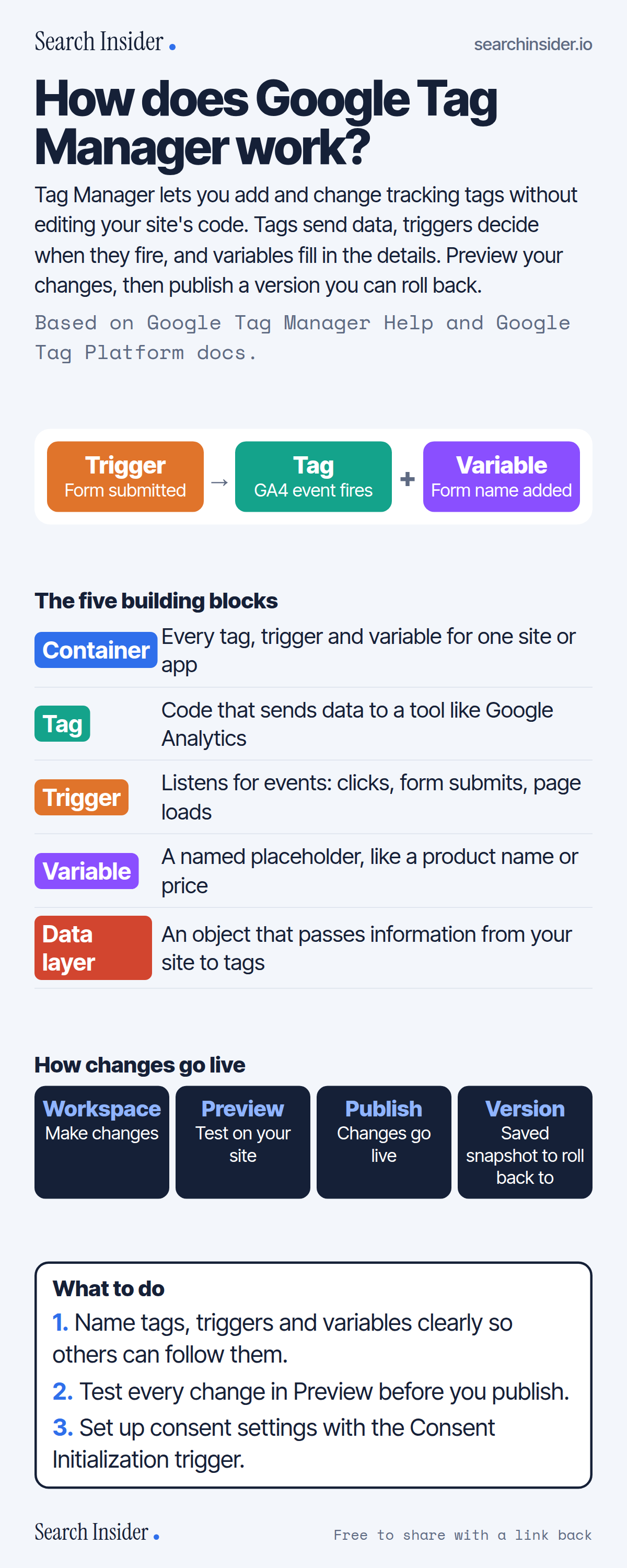
Google Tag Manager infographic: an example of a trigger firing a tag with a variable, the five building blocks (container, tag, trigger, variable, data layer), the workspace to preview to publish to version flow, and three steps on what to do.

Oct 6, 2026

Google Tag Manager Basics Explained (Infographic)

How Google Tag Manager works: containers, tags, triggers, variables and the data layer, plus workspaces, preview, publishing and versions.

Embed this infographic

Every infographic here is free to republish, on any site, with a link back to the study it comes from. Paste this code and the credit is done for you.

<a href="https://searchinsider.io/infographics/google-tag-manager"><img src="https://searchinsider.io/research/google-tag-manager/google-tag-manager-infographic.png" alt="Google Tag Manager infographic: an example of a trigger firing a tag with a variable, the five building blocks (container, tag, trigger, variable, data layer), the workspace to preview to publish to version flow, and three steps on what to do." style="max-width:680px;width:100%;height:auto;" /></a><p>Source: <a href="https://searchinsider.io/infographics/google-tag-manager">Google Tag Manager infographic</a> by Search Insider.</p>

How does Google Tag Manager work?

The short answer: Tag Manager lets you add and change tracking tags without editing your site's code. Tags send data, triggers decide when they fire, and variables fill in the details. Preview your changes, then publish a version you can roll back.

Based on Google Tag Manager Help and Google Tag Platform docs.

What it shows

  • Tag Manager lets you manage tags without changing your website's code.
  • A container holds the tags, triggers and variables for a site or app.
  • Tags send data; triggers listen for events like clicks, form submissions and page loads; variables are named placeholders.
  • The data layer passes information from your site to tags.
  • Preview mode lets you test a draft before it's live.
  • Every publish records a version you can return to.
  • Free accounts can have up to 3 workspaces at once.

What to do

  • Setup: Name tags, triggers and variables clearly.
  • Every change: Test in Preview before publishing.
  • Consent: Use the Consent Initialization trigger.

The walkthrough

What is Google Tag Manager?

Tag Manager is a tag management system that lets you set up and manage tags on your site without changing your website's code [1]. A container is the collection of tags, triggers, variables and related settings installed on a site or app [1].

What are tags, triggers and variables?

A tag is code that sends data to a system such as Google Analytics; a trigger listens for events such as clicks, form submissions or page loads; and a variable is a named placeholder for a value that changes, such as a product name or price [2].

What is the data layer?

The data layer is an object used by Tag Manager and gtag.js to pass information to tags [3]. For example, a site can push a login event to the data layer, and a trigger listening for it fires the matching tag [3].

How do you test Tag Manager changes?

Preview mode lets you browse your site as if the current container draft were live, and shows how tags fired and what data was processed [4]. It's not visible to regular visitors [4].

Can you undo a Tag Manager publish?

Yes. Every time a container is published, a version is recorded as a snapshot, and you can republish an earlier version [5].

How many workspaces does Tag Manager allow?

Free accounts get up to 3 concurrent workspaces: a default workspace and 2 custom ones; Tag Manager 360 allows unlimited workspaces [6].

What's the difference between Tag Manager and the Google tag?

gtag.js can only send data to Google products and is managed in your site's code, while Tag Manager can manage Google, third-party and custom tags from its interface [7].

More digital marketing infographics

404 errors infographic: a 404 banner with Google's view that 404s are normal, which status to return in four cases, three facts on how Google treats 4xx and soft 404s, a checklist for a good custom 404 page, and three steps on what to do.

SEO · Oct 6, 2026

Do 404 errors hurt your SEO?

Do 404 errors hurt SEO? How Google treats 404s, why soft 404s are the real problem, which status code to return, and how to build a good custom 404 page.

Embed code
<a href="https://searchinsider.io/infographics/404-errors"><img src="https://searchinsider.io/research/404-errors/404-errors-infographic.png" alt="404 errors infographic: a 404 banner with Google's view that 404s are normal, which status to return in four cases, three facts on how Google treats 4xx and soft 404s, a checklist for a good custom 404 page, and three steps on what to do." style="max-width:680px;width:100%;height:auto;" /></a><p>Source: <a href="https://searchinsider.io/infographics/404-errors">404 errors infographic</a> by Search Insider.</p>

AI-generated content infographic: a quality not method banner, a split of fine uses versus uses against Google's rules, a pre-publish checklist (accuracy, metadata, who, how, why), a Merchant Center note on labeling AI images and product data, and three steps on what to do.

AI search · Oct 6, 2026

Does Google penalize AI-generated content?

Google's stance on AI-generated content: quality over production method, what breaks the scaled content abuse policy, and a checklist before publishing AI-assisted content.

Embed code
<a href="https://searchinsider.io/infographics/ai-generated-content"><img src="https://searchinsider.io/research/ai-generated-content/ai-generated-content-infographic.png" alt="AI-generated content infographic: a quality not method banner, a split of fine uses versus uses against Google's rules, a pre-publish checklist (accuracy, metadata, who, how, why), a Merchant Center note on labeling AI images and product data, and three steps on what to do." style="max-width:680px;width:100%;height:auto;" /></a><p>Source: <a href="https://searchinsider.io/infographics/ai-generated-content">AI-generated content infographic</a> by Search Insider.</p>

Anchor text infographic: an example link with the anchor text underlined, four vague or stuffed anchors swapped for descriptive ones, four rules on image links, internal links, length and keyword stuffing, a note on Google's link spam examples, and three steps on what to do.

SEO · Oct 6, 2026

What is anchor text, and what should it say?

What anchor text is, what Google says it should say, good and bad examples, image link alt text, and which anchor practices Google lists as link spam.

Embed code
<a href="https://searchinsider.io/infographics/anchor-text"><img src="https://searchinsider.io/research/anchor-text/anchor-text-infographic.png" alt="Anchor text infographic: an example link with the anchor text underlined, four vague or stuffed anchors swapped for descriptive ones, four rules on image links, internal links, length and keyword stuffing, a note on Google's link spam examples, and three steps on what to do." style="max-width:680px;width:100%;height:auto;" /></a><p>Source: <a href="https://searchinsider.io/infographics/anchor-text">Anchor text infographic</a> by Search Insider.</p>


