
Skip to content
← Marketing Analytics Infographics
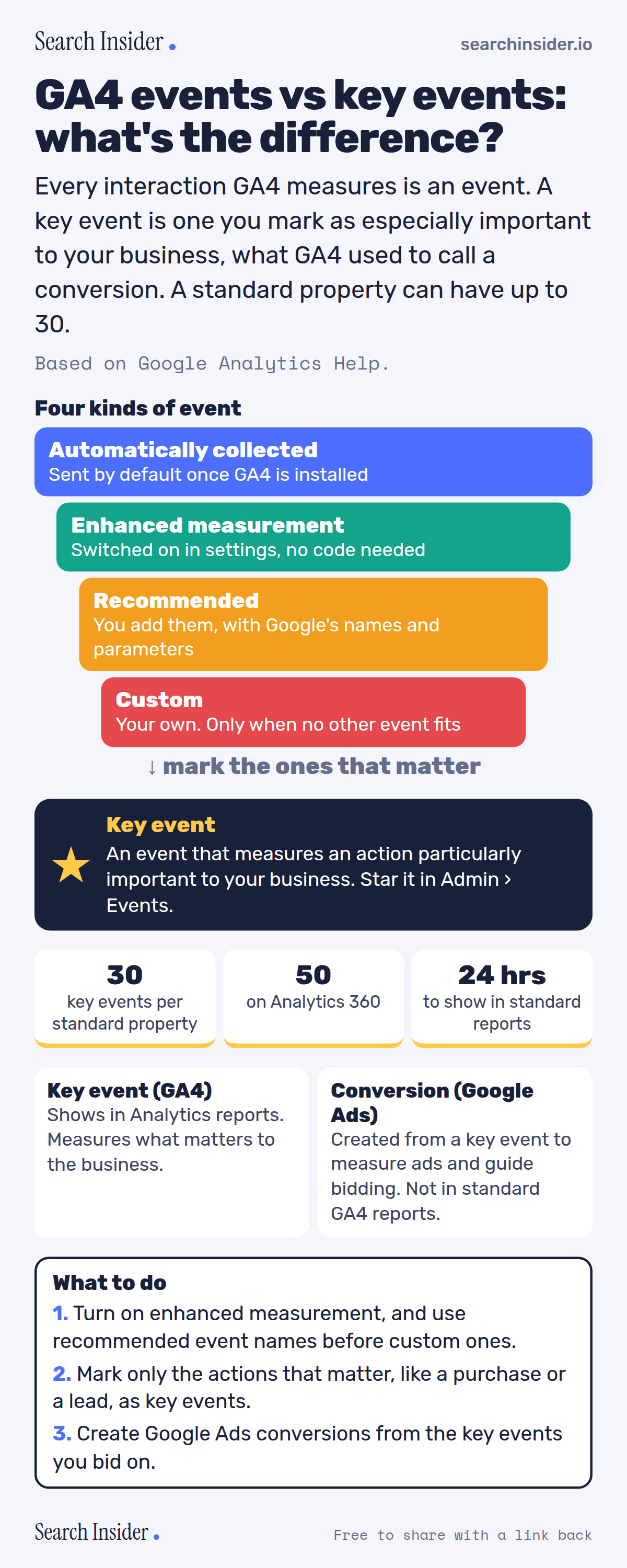
GA4 events vs key events infographic: four kinds of event stacked (automatically collected, enhanced measurement, recommended, custom), a key event star, limits of 30 key events per standard property and 50 on Analytics 360, key events vs Google Ads conversions, and three steps on what to do.

Oct 5, 2026

GA4 Events vs Key Events Explained (Infographic)

GA4 events vs key events: the four kinds of event, what a key event is, the 30 key event limit, and how key events relate to Google Ads conversions.

Embed this infographic

Every infographic here is free to republish, on any site, with a link back to the study it comes from. Paste this code and the credit is done for you.

<a href="https://searchinsider.io/infographics/ga4-key-events"><img src="https://searchinsider.io/research/ga4-key-events/ga4-key-events-infographic.png" alt="GA4 events vs key events infographic: four kinds of event stacked (automatically collected, enhanced measurement, recommended, custom), a key event star, limits of 30 key events per standard property and 50 on Analytics 360, key events vs Google Ads conversions, and three steps on what to do." style="max-width:680px;width:100%;height:auto;" /></a><p>Source: <a href="https://searchinsider.io/infographics/ga4-key-events">GA4 events vs key events infographic</a> by Search Insider.</p>

GA4 events vs key events: what's the difference?

The short answer: Every interaction GA4 measures is an event. A key event is one you mark as especially important to your business, what GA4 used to call a conversion. A standard property can have up to 30.

Based on Google Analytics Help.

What it shows

  • GA4 events come in four kinds: automatically collected, enhanced measurement, recommended and custom.
  • Create custom events only when no other event works.
  • A key event measures an action that's particularly important to your business.
  • Standard properties can mark up to 30 events as key events; Analytics 360 properties up to 50.
  • New key events can take up to 24 hours to show in standard reports.
  • Google Ads conversions can be created from key events and don't appear in standard Analytics reports.

What to do

  • Setup: Turn on enhanced measurement and prefer recommended events.
  • Key events: Mark only actions like purchases and leads.
  • Google Ads: Create conversions from the key events you bid on.

The walkthrough

What is an event in GA4?

An event lets you measure a specific interaction or occurrence on your website or app, such as a page load, a link click or a purchase [1].

What are the four kinds of GA4 events?

Automatically collected events are sent by default when you set up Google Analytics. Enhanced measurement events are collected when enhanced measurement is enabled. Recommended events are ones you implement with predefined names and parameters. Custom events are ones you define, and Google says to create them only when no other events work [1].

What does enhanced measurement track?

Enhanced measurement covers page views, scrolls (when 90% of the page becomes visible), outbound clicks, site search, YouTube video engagement, file downloads and form interactions [2].

What is a key event in GA4?

A key event is an event that measures an action that's particularly important to the success of your business [3]. Google renamed conversions in Analytics to key events to unify how conversions are defined across Google Ads and Analytics [3].

How many key events can you have?

You can mark up to 30 events as key events in a standard property, and up to 50 in an Analytics 360 property [4]. To mark an existing event, click the star next to it in Admin, then Events; new key events can take up to 24 hours to appear in standard reports [4].

What is the difference between a key event and a Google Ads conversion?

A Google Ads conversion is an important action used to measure ad campaign performance and optimize bidding, and it can be created from a key event [3]. Google Ads conversions don't appear in standard Google Analytics reports [4].

What are GA4's event limits?

Event names can be up to 40 characters, and each event can have up to 25 parameters [5]. Web data streams have no limit on the number of distinctly named events; the 500 limit applies to app data streams [5].

More digital marketing infographics

404 errors infographic: a 404 banner with Google's view that 404s are normal, which status to return in four cases, three facts on how Google treats 4xx and soft 404s, a checklist for a good custom 404 page, and three steps on what to do.

SEO · Oct 6, 2026

Do 404 errors hurt your SEO?

Do 404 errors hurt SEO? How Google treats 404s, why soft 404s are the real problem, which status code to return, and how to build a good custom 404 page.

Embed code
<a href="https://searchinsider.io/infographics/404-errors"><img src="https://searchinsider.io/research/404-errors/404-errors-infographic.png" alt="404 errors infographic: a 404 banner with Google's view that 404s are normal, which status to return in four cases, three facts on how Google treats 4xx and soft 404s, a checklist for a good custom 404 page, and three steps on what to do." style="max-width:680px;width:100%;height:auto;" /></a><p>Source: <a href="https://searchinsider.io/infographics/404-errors">404 errors infographic</a> by Search Insider.</p>

AI-generated content infographic: a quality not method banner, a split of fine uses versus uses against Google's rules, a pre-publish checklist (accuracy, metadata, who, how, why), a Merchant Center note on labeling AI images and product data, and three steps on what to do.

AI search · Oct 6, 2026

Does Google penalize AI-generated content?

Google's stance on AI-generated content: quality over production method, what breaks the scaled content abuse policy, and a checklist before publishing AI-assisted content.

Embed code
<a href="https://searchinsider.io/infographics/ai-generated-content"><img src="https://searchinsider.io/research/ai-generated-content/ai-generated-content-infographic.png" alt="AI-generated content infographic: a quality not method banner, a split of fine uses versus uses against Google's rules, a pre-publish checklist (accuracy, metadata, who, how, why), a Merchant Center note on labeling AI images and product data, and three steps on what to do." style="max-width:680px;width:100%;height:auto;" /></a><p>Source: <a href="https://searchinsider.io/infographics/ai-generated-content">AI-generated content infographic</a> by Search Insider.</p>

Anchor text infographic: an example link with the anchor text underlined, four vague or stuffed anchors swapped for descriptive ones, four rules on image links, internal links, length and keyword stuffing, a note on Google's link spam examples, and three steps on what to do.

SEO · Oct 6, 2026

What is anchor text, and what should it say?

What anchor text is, what Google says it should say, good and bad examples, image link alt text, and which anchor practices Google lists as link spam.

Embed code
<a href="https://searchinsider.io/infographics/anchor-text"><img src="https://searchinsider.io/research/anchor-text/anchor-text-infographic.png" alt="Anchor text infographic: an example link with the anchor text underlined, four vague or stuffed anchors swapped for descriptive ones, four rules on image links, internal links, length and keyword stuffing, a note on Google's link spam examples, and three steps on what to do." style="max-width:680px;width:100%;height:auto;" /></a><p>Source: <a href="https://searchinsider.io/infographics/anchor-text">Anchor text infographic</a> by Search Insider.</p>


