
Skip to content
← Marketing Analytics Infographics
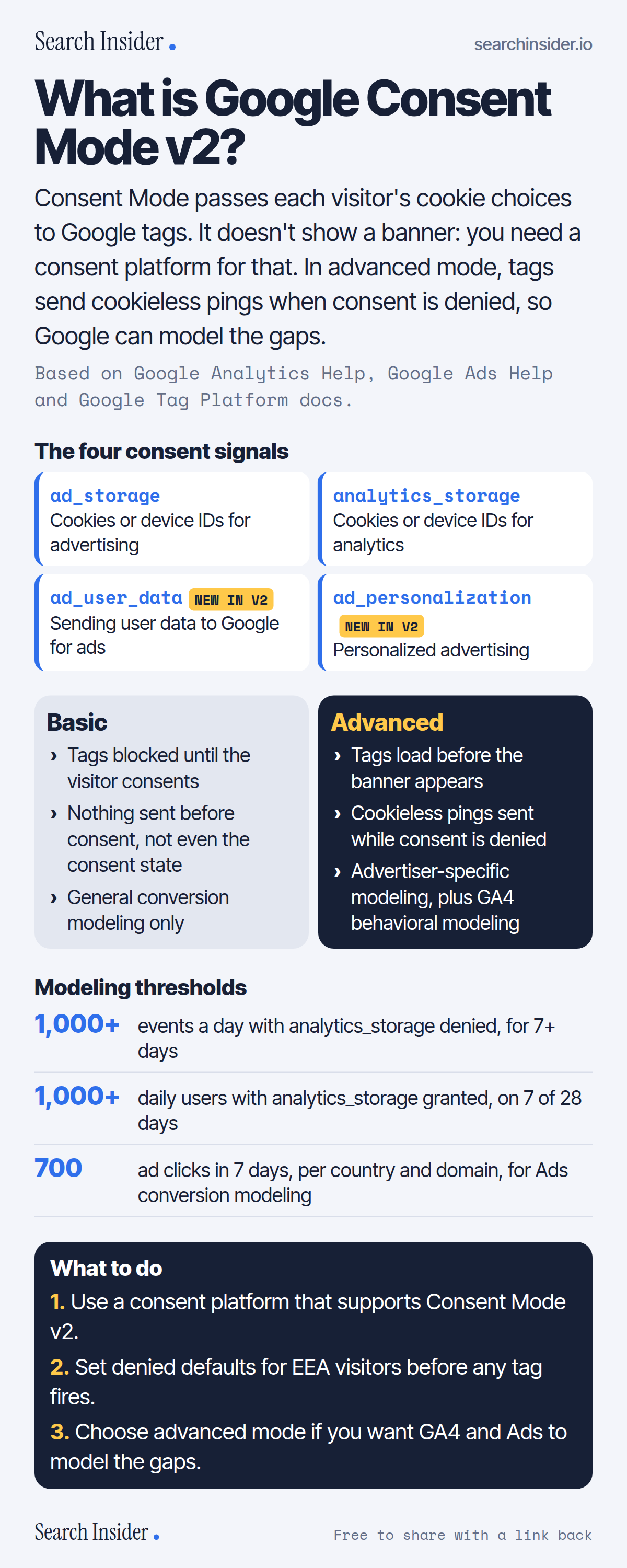
Consent Mode v2 infographic: the four consent signals ad_storage, analytics_storage, ad_user_data and ad_personalization, basic vs advanced implementation side by side, modeling thresholds for GA4 and Google Ads, and three steps on what to do.

Oct 5, 2026

Google Consent Mode v2 Explained (Infographic)

Google Consent Mode v2 explained: the four consent signals, basic vs advanced implementation, what cookieless pings are, and the thresholds for modeling in GA4 and Google Ads.

Embed this infographic

Every infographic here is free to republish, on any site, with a link back to the study it comes from. Paste this code and the credit is done for you.

What is Google Consent Mode v2?

The short answer: Consent Mode passes each visitor's cookie choices to Google tags. It doesn't show a banner: you need a consent platform for that. In advanced mode, tags send cookieless pings when consent is denied, so Google can model the gaps.

Based on Google Analytics Help, Google Ads Help and Google Tag Platform docs.

What it shows

  • Consent Mode has four signals: ad_storage, analytics_storage, ad_user_data and ad_personalization. The last two were added in version 2.
  • Consent Mode doesn't provide a banner; it works with a consent management platform.
  • Basic mode blocks Google tags until consent is granted.
  • Advanced mode loads tags first and sends cookieless pings while consent is denied.
  • GA4 behavioral modeling needs advanced mode, 1,000+ denied events a day for 7 days, and 1,000+ consenting daily users on 7 of 28 days.
  • Google Ads conversion modeling needs 700 ad clicks over 7 days per country and domain grouping.

What to do

  • Banner: Use a consent platform that supports Consent Mode v2.
  • Defaults: Set denied defaults for EEA visitors before tags fire.
  • Modeling: Choose advanced mode.

The walkthrough

What is Google Consent Mode?

Consent Mode lets Google tags adjust their behavior based on each visitor's consent choices [1]. It doesn't provide a consent banner or widget; it interacts with one, so sites use a consent management platform to collect consent [2].

What are the four Consent Mode v2 signals?

ad_storage enables storage such as cookies related to advertising; analytics_storage enables storage related to analytics; ad_user_data sets consent for sending user data to Google for advertising; and ad_personalization sets consent for personalized advertising [1]. ad_user_data and ad_personalization were added in version 2 [3].

What is the difference between basic and advanced Consent Mode?

In basic mode, Google tags are blocked until the visitor consents, and no data is sent before consent, not even the default consent status [1]. In advanced mode, tags load before the consent dialog and send consent state and cookieless measurements while consent is denied [1]. Advanced mode supports more detailed, advertiser-specific modeling [1].

What are cookieless pings?

When consent is denied in advanced mode, tags send pings without cookies containing information such as a timestamp, user agent, referrer, ad-click indicators and consent state [2]. Google says advanced consent mode doesn't send additional events to Google Analytics [4].

When does GA4 use behavioral modeling?

A property needs advanced Consent Mode, at least 1,000 events per day with analytics_storage denied for at least 7 days, and at least 1,000 daily users with analytics_storage granted for at least 7 of the previous 28 days [5]. Meeting these thresholds doesn't guarantee eligibility [5].

What does Google Ads need for conversion modeling?

Google Ads conversion modeling needs 700 ad clicks over a 7-day period per country and domain grouping [6].

Is Consent Mode required in Europe?

Google's EU user consent policy applies to ad personalization and measurement for users in the European Economic Area, and personalized advertising and remarketing require consent signals [7][8].

More digital marketing infographics

404 errors infographic: a 404 banner with Google's view that 404s are normal, which status to return in four cases, three facts on how Google treats 4xx and soft 404s, a checklist for a good custom 404 page, and three steps on what to do.

SEO · Oct 6, 2026

Do 404 errors hurt your SEO?

Do 404 errors hurt SEO? How Google treats 404s, why soft 404s are the real problem, which status code to return, and how to build a good custom 404 page.

Embed code
<a href="https://searchinsider.io/infographics/404-errors"><img src="https://searchinsider.io/research/404-errors/404-errors-infographic.png" alt="404 errors infographic: a 404 banner with Google's view that 404s are normal, which status to return in four cases, three facts on how Google treats 4xx and soft 404s, a checklist for a good custom 404 page, and three steps on what to do." style="max-width:680px;width:100%;height:auto;" /></a><p>Source: <a href="https://searchinsider.io/infographics/404-errors">404 errors infographic</a> by Search Insider.</p>

AI-generated content infographic: a quality not method banner, a split of fine uses versus uses against Google's rules, a pre-publish checklist (accuracy, metadata, who, how, why), a Merchant Center note on labeling AI images and product data, and three steps on what to do.

AI search · Oct 6, 2026

Does Google penalize AI-generated content?

Google's stance on AI-generated content: quality over production method, what breaks the scaled content abuse policy, and a checklist before publishing AI-assisted content.

Embed code
<a href="https://searchinsider.io/infographics/ai-generated-content"><img src="https://searchinsider.io/research/ai-generated-content/ai-generated-content-infographic.png" alt="AI-generated content infographic: a quality not method banner, a split of fine uses versus uses against Google's rules, a pre-publish checklist (accuracy, metadata, who, how, why), a Merchant Center note on labeling AI images and product data, and three steps on what to do." style="max-width:680px;width:100%;height:auto;" /></a><p>Source: <a href="https://searchinsider.io/infographics/ai-generated-content">AI-generated content infographic</a> by Search Insider.</p>

Anchor text infographic: an example link with the anchor text underlined, four vague or stuffed anchors swapped for descriptive ones, four rules on image links, internal links, length and keyword stuffing, a note on Google's link spam examples, and three steps on what to do.

SEO · Oct 6, 2026

What is anchor text, and what should it say?

What anchor text is, what Google says it should say, good and bad examples, image link alt text, and which anchor practices Google lists as link spam.

Embed code
<a href="https://searchinsider.io/infographics/anchor-text"><img src="https://searchinsider.io/research/anchor-text/anchor-text-infographic.png" alt="Anchor text infographic: an example link with the anchor text underlined, four vague or stuffed anchors swapped for descriptive ones, four rules on image links, internal links, length and keyword stuffing, a note on Google's link spam examples, and three steps on what to do." style="max-width:680px;width:100%;height:auto;" /></a><p>Source: <a href="https://searchinsider.io/infographics/anchor-text">Anchor text infographic</a> by Search Insider.</p>


