
Skip to content
← Content Marketing Infographics
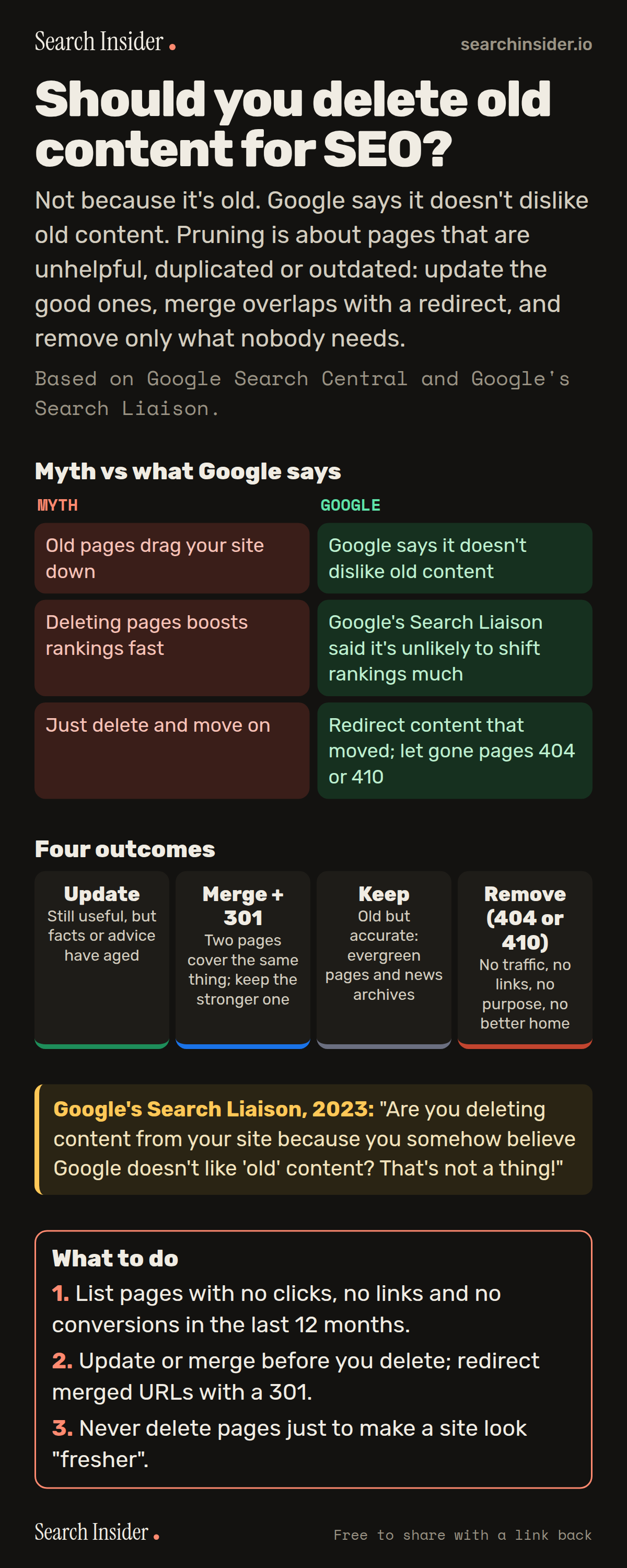
Content pruning infographic: a myth versus what Google says table, four outcomes for every page (update, merge with a 301, keep, remove with a 404 or 410), a quote from Google's Search Liaison that deleting old content is not a thing, and three steps on what to do.

Oct 6, 2026

Should You Delete Old Content for SEO? (Infographic)

Should you delete old content for SEO? What Google has said about old pages, the four choices for every page (update, merge, keep, remove), and how to redirect or remove safely.

Embed this infographic

Every infographic here is free to republish, on any site, with a link back to the study it comes from. Paste this code and the credit is done for you.

<a href="https://searchinsider.io/infographics/content-pruning"><img src="https://searchinsider.io/research/content-pruning/content-pruning-infographic.png" alt="Content pruning infographic: a myth versus what Google says table, four outcomes for every page (update, merge with a 301, keep, remove with a 404 or 410), a quote from Google's Search Liaison that deleting old content is not a thing, and three steps on what to do." style="max-width:680px;width:100%;height:auto;" /></a><p>Source: <a href="https://searchinsider.io/infographics/content-pruning">Content pruning infographic</a> by Search Insider.</p>

Should you delete old content for SEO?

The short answer: Not because it's old. Google says it doesn't dislike old content. Pruning is about pages that are unhelpful, duplicated or outdated: update the good ones, merge overlaps with a redirect, and remove only what nobody needs.

Based on Google Search Central and Google's Search Liaison.

What it shows

  • In 2023, Google's Search Liaison said deleting content because Google supposedly doesn't like old content is not a thing.
  • Google's 2022 helpful content guidance said removing unhelpful content could help the rankings of your other content.
  • Removing individual pages is unlikely to change a site's rankings much on its own, per Google's Search Liaison.
  • Use a permanent 301 redirect when content moves to a new URL.
  • Return a 404 or 410 status for content that's gone for good.

What to do

  • Audit: List pages with no clicks, links or conversions in 12 months.
  • Before deleting: Update or merge first, and 301 merged URLs.
  • Never: Delete pages just to look fresher.

The walkthrough

Does Google dislike old content?

No. In August 2023, Google's Search Liaison wrote that deleting content because Google supposedly doesn't like old content is not a thing [1].

Can removing content help SEO?

Sometimes. Google's 2022 helpful content guidance said removing unhelpful content could help the rankings of your other content [2]. Google's Search Liaison has also said removing individual pages is unlikely to make a big ranking difference on its own [1].

What should you do with outdated pages?

Update pages that are still useful, merge pages that cover the same thing into the stronger one, keep accurate evergreen pages, and remove only pages with no purpose, traffic or links. This four-way split is a common SEO practice, not a Google rule.

Should you redirect or delete merged pages?

Redirect them. Google recommends permanent server-side redirects, such as a 301, when content moves to a new URL [3].

What status code should a deleted page return?

A 404 or 410. Google treats both as signals that the page doesn't exist, and removes previously indexed URLs from the index [4].

More digital marketing infographics

404 errors infographic: a 404 banner with Google's view that 404s are normal, which status to return in four cases, three facts on how Google treats 4xx and soft 404s, a checklist for a good custom 404 page, and three steps on what to do.

SEO · Oct 6, 2026

Do 404 errors hurt your SEO?

Do 404 errors hurt SEO? How Google treats 404s, why soft 404s are the real problem, which status code to return, and how to build a good custom 404 page.

Embed code
<a href="https://searchinsider.io/infographics/404-errors"><img src="https://searchinsider.io/research/404-errors/404-errors-infographic.png" alt="404 errors infographic: a 404 banner with Google's view that 404s are normal, which status to return in four cases, three facts on how Google treats 4xx and soft 404s, a checklist for a good custom 404 page, and three steps on what to do." style="max-width:680px;width:100%;height:auto;" /></a><p>Source: <a href="https://searchinsider.io/infographics/404-errors">404 errors infographic</a> by Search Insider.</p>

AI-generated content infographic: a quality not method banner, a split of fine uses versus uses against Google's rules, a pre-publish checklist (accuracy, metadata, who, how, why), a Merchant Center note on labeling AI images and product data, and three steps on what to do.

AI search · Oct 6, 2026

Does Google penalize AI-generated content?

Google's stance on AI-generated content: quality over production method, what breaks the scaled content abuse policy, and a checklist before publishing AI-assisted content.

Embed code
<a href="https://searchinsider.io/infographics/ai-generated-content"><img src="https://searchinsider.io/research/ai-generated-content/ai-generated-content-infographic.png" alt="AI-generated content infographic: a quality not method banner, a split of fine uses versus uses against Google's rules, a pre-publish checklist (accuracy, metadata, who, how, why), a Merchant Center note on labeling AI images and product data, and three steps on what to do." style="max-width:680px;width:100%;height:auto;" /></a><p>Source: <a href="https://searchinsider.io/infographics/ai-generated-content">AI-generated content infographic</a> by Search Insider.</p>

Anchor text infographic: an example link with the anchor text underlined, four vague or stuffed anchors swapped for descriptive ones, four rules on image links, internal links, length and keyword stuffing, a note on Google's link spam examples, and three steps on what to do.

SEO · Oct 6, 2026

What is anchor text, and what should it say?

What anchor text is, what Google says it should say, good and bad examples, image link alt text, and which anchor practices Google lists as link spam.

Embed code
<a href="https://searchinsider.io/infographics/anchor-text"><img src="https://searchinsider.io/research/anchor-text/anchor-text-infographic.png" alt="Anchor text infographic: an example link with the anchor text underlined, four vague or stuffed anchors swapped for descriptive ones, four rules on image links, internal links, length and keyword stuffing, a note on Google's link spam examples, and three steps on what to do." style="max-width:680px;width:100%;height:auto;" /></a><p>Source: <a href="https://searchinsider.io/infographics/anchor-text">Anchor text infographic</a> by Search Insider.</p>


