
Skip to content
← Content Marketing Infographics
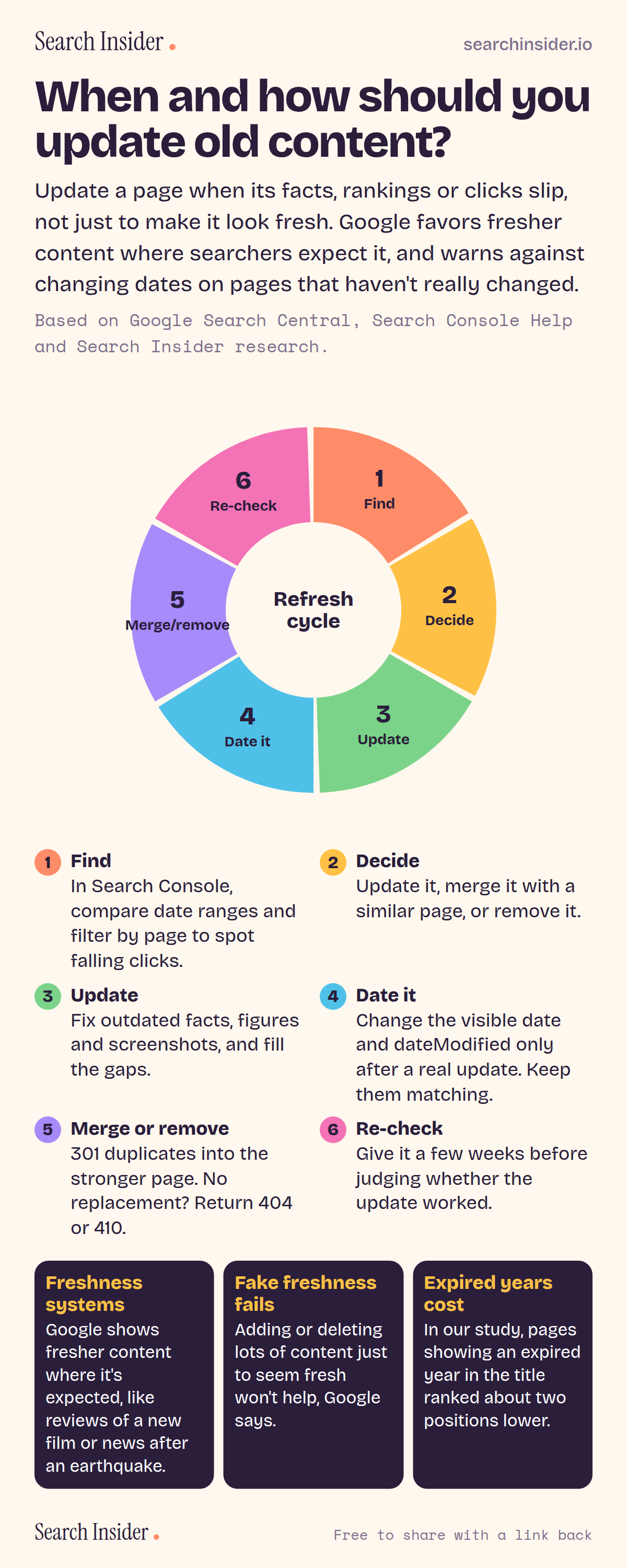
Content refresh infographic: a six-segment wheel showing find, decide, update, date it, merge or remove, and re-check, with a description of each step and three facts about freshness systems, fake freshness and expired years.

Oct 5, 2026

Content Refresh Infographic: When and How to Update Old Content

When and how to update old content: a six-step refresh cycle, the signs a page needs it, and what Google says about freshness and changing dates.

Embed this infographic

Every infographic here is free to republish, on any site, with a link back to the study it comes from. Paste this code and the credit is done for you.

<a href="https://searchinsider.io/infographics/content-refresh"><img src="https://searchinsider.io/research/content-refresh/content-refresh-infographic.png" alt="Content refresh infographic: a six-segment wheel showing find, decide, update, date it, merge or remove, and re-check, with a description of each step and three facts about freshness systems, fake freshness and expired years." style="max-width:680px;width:100%;height:auto;" /></a><p>Source: <a href="https://searchinsider.io/infographics/content-refresh">Content refresh cycle infographic</a> by Search Insider.</p>

When and how should you update old content?

The short answer: Update a page when its facts, rankings or clicks slip, not just to make it look fresh. Google favors fresher content where searchers expect it, and warns against changing dates on pages that haven't really changed.

Based on Google Search Central, Search Console Help and Search Insider research.

What it shows

  • 1. Find: compare date ranges in Search Console and filter by page.
  • 2. Decide: update, merge or remove.
  • 3. Update: fix outdated facts, figures and screenshots.
  • 4. Date it: change the visible date and dateModified only after a real update.
  • 5. Merge or remove: 301 duplicates, or return 404 or 410.
  • 6. Re-check: give it a few weeks.
  • Google's freshness systems show fresher content where it's expected.
  • In our study, an expired year in the title went with about two positions lower.

What to do

  • Every few months: Check Search Console for pages with falling clicks.
  • After a real update: Change the visible date and dateModified together.

The walkthrough

When should you update old content?

Update a page when its clicks or impressions fall, its facts or screenshots go out of date, its title shows an old year, or another page competes for the same search. Google has freshness systems designed to show fresher content for queries where it would be expected [1].

How do you find pages that need updating?

In the Search Console Performance report, compare two date ranges and filter by page or query to see which pages are losing clicks [2]. The report shows the past three months by default [3].

Should you change the date when you update content?

Only after a real update. Google's guidance asks whether you are changing the date of pages to make them seem fresh when the content has not substantially changed [4]. When you do update, show a visible date and add datePublished or dateModified in structured data, and keep the two matching [5].

Does deleting old content help SEO?

Not as a freshness tactic. Google says adding or removing a lot of content primarily to seem fresh won't help rankings [4]. If a page is gone with no replacement, return a 404 or 410 [6]; if there is a better page, use a 301 redirect [6].

What should you do with duplicate pages?

Merge them. Permanent redirects are the method Google suggests when you want to get rid of existing duplicate pages [7], and Google's systems show only the most relevant result when pages are very similar [1].

Does an old year in the title hurt rankings?

In Search Insider's study of 1,000 Google searches, pages showing an expired year in the title ranked about two positions lower on average [8].

More digital marketing infographics

404 errors infographic: a 404 banner with Google's view that 404s are normal, which status to return in four cases, three facts on how Google treats 4xx and soft 404s, a checklist for a good custom 404 page, and three steps on what to do.

SEO · Oct 6, 2026

Do 404 errors hurt your SEO?

Do 404 errors hurt SEO? How Google treats 404s, why soft 404s are the real problem, which status code to return, and how to build a good custom 404 page.

Embed code
<a href="https://searchinsider.io/infographics/404-errors"><img src="https://searchinsider.io/research/404-errors/404-errors-infographic.png" alt="404 errors infographic: a 404 banner with Google's view that 404s are normal, which status to return in four cases, three facts on how Google treats 4xx and soft 404s, a checklist for a good custom 404 page, and three steps on what to do." style="max-width:680px;width:100%;height:auto;" /></a><p>Source: <a href="https://searchinsider.io/infographics/404-errors">404 errors infographic</a> by Search Insider.</p>

AI-generated content infographic: a quality not method banner, a split of fine uses versus uses against Google's rules, a pre-publish checklist (accuracy, metadata, who, how, why), a Merchant Center note on labeling AI images and product data, and three steps on what to do.

AI search · Oct 6, 2026

Does Google penalize AI-generated content?

Google's stance on AI-generated content: quality over production method, what breaks the scaled content abuse policy, and a checklist before publishing AI-assisted content.

Embed code
<a href="https://searchinsider.io/infographics/ai-generated-content"><img src="https://searchinsider.io/research/ai-generated-content/ai-generated-content-infographic.png" alt="AI-generated content infographic: a quality not method banner, a split of fine uses versus uses against Google's rules, a pre-publish checklist (accuracy, metadata, who, how, why), a Merchant Center note on labeling AI images and product data, and three steps on what to do." style="max-width:680px;width:100%;height:auto;" /></a><p>Source: <a href="https://searchinsider.io/infographics/ai-generated-content">AI-generated content infographic</a> by Search Insider.</p>

Anchor text infographic: an example link with the anchor text underlined, four vague or stuffed anchors swapped for descriptive ones, four rules on image links, internal links, length and keyword stuffing, a note on Google's link spam examples, and three steps on what to do.

SEO · Oct 6, 2026

What is anchor text, and what should it say?

What anchor text is, what Google says it should say, good and bad examples, image link alt text, and which anchor practices Google lists as link spam.

Embed code
<a href="https://searchinsider.io/infographics/anchor-text"><img src="https://searchinsider.io/research/anchor-text/anchor-text-infographic.png" alt="Anchor text infographic: an example link with the anchor text underlined, four vague or stuffed anchors swapped for descriptive ones, four rules on image links, internal links, length and keyword stuffing, a note on Google's link spam examples, and three steps on what to do." style="max-width:680px;width:100%;height:auto;" /></a><p>Source: <a href="https://searchinsider.io/infographics/anchor-text">Anchor text infographic</a> by Search Insider.</p>


