
Skip to content
← SEO Infographics
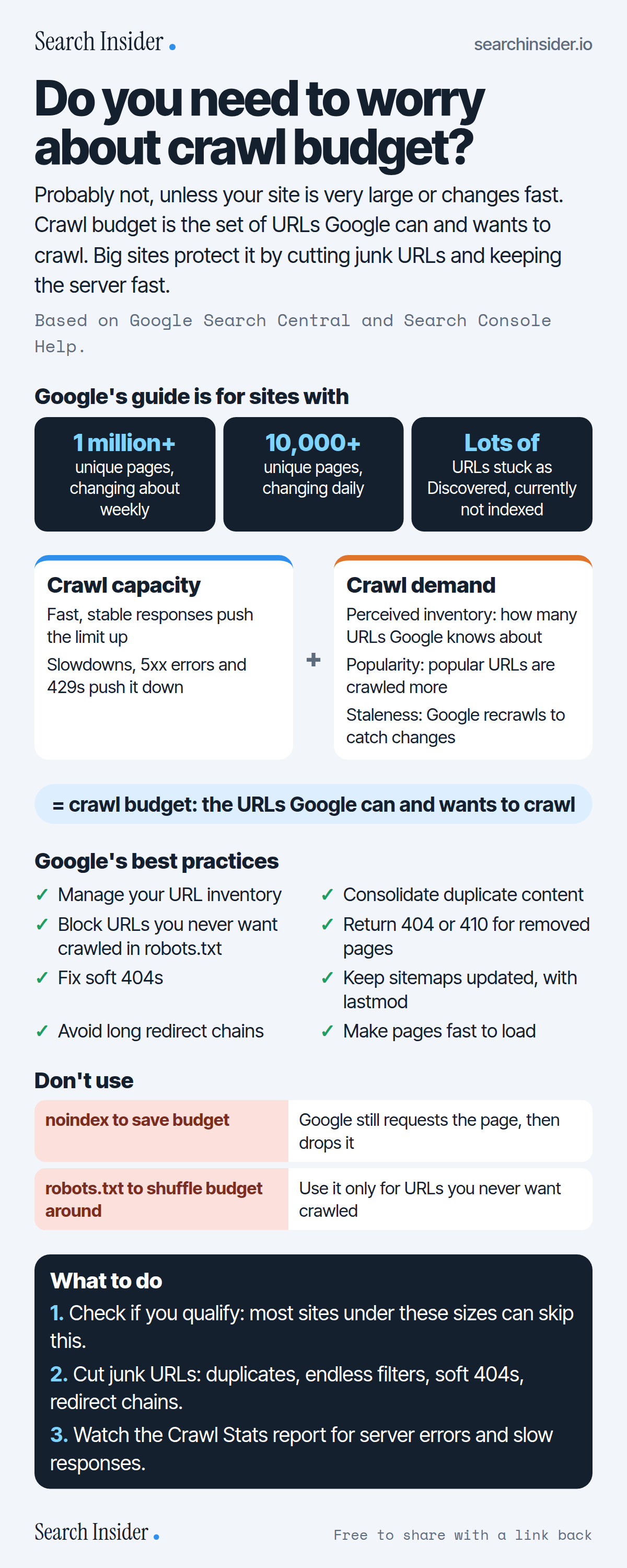
Crawl budget infographic: the three site profiles Google's crawl budget guide is for, crawl capacity plus crawl demand equals crawl budget, eight best practices, two things not to use (noindex and robots.txt to shift budget), and three steps on what to do.

Oct 5, 2026

Crawl Budget: Does Your Site Need to Care? (Infographic)

What crawl budget is, which sites Google says need to manage it, how crawl capacity and crawl demand combine, and Google's best practices and mistakes to avoid.

Embed this infographic

Every infographic here is free to republish, on any site, with a link back to the study it comes from. Paste this code and the credit is done for you.

<a href="https://searchinsider.io/infographics/crawl-budget"><img src="https://searchinsider.io/research/crawl-budget/crawl-budget-infographic.png" alt="Crawl budget infographic: the three site profiles Google's crawl budget guide is for, crawl capacity plus crawl demand equals crawl budget, eight best practices, two things not to use (noindex and robots.txt to shift budget), and three steps on what to do." style="max-width:680px;width:100%;height:auto;" /></a><p>Source: <a href="https://searchinsider.io/infographics/crawl-budget">Crawl budget infographic</a> by Search Insider.</p>

Do you need to worry about crawl budget?

The short answer: Probably not, unless your site is very large or changes fast. Crawl budget is the set of URLs Google can and wants to crawl. Big sites protect it by cutting junk URLs and keeping the server fast.

Based on Google Search Central and Search Console Help.

What it shows

  • Google's crawl budget guide is for sites with 1 million+ pages changing weekly, 10,000+ pages changing daily, or many URLs marked Discovered, currently not indexed.
  • Crawl budget is the set of URLs Google can and wants to crawl: crawl capacity plus crawl demand.
  • Fast, stable responses raise crawl capacity; slowdowns, 5xx errors and 429s lower it.
  • Crawl demand depends on perceived inventory, popularity and staleness.
  • Don't use noindex to save crawl budget: Google still requests the page.
  • Don't use robots.txt to temporarily shift crawl budget to other pages.

What to do

  • First: Check whether your site fits Google's size profiles.
  • Cleanup: Cut duplicates, endless filters, soft 404s and redirect chains.
  • Monitoring: Watch the Crawl Stats report for errors and slow responses.

The walkthrough

What is crawl budget?

Google defines a site's crawl budget as the set of URLs that Google can and wants to crawl, combining crawl capacity and crawl demand [1]. Not every page that's crawled will be indexed [1].

Which sites need to worry about crawl budget?

Google's guide is for large sites with 1 million or more unique pages that change about weekly, medium or larger sites with 10,000 or more unique pages that change daily, and sites with a large share of URLs marked Discovered, currently not indexed in Search Console [1]. Google says sites with fewer than a thousand pages shouldn't need the Crawl Stats report [3].

What is crawl capacity?

Crawl capacity limits how much time your server spends holding connections open for Google [1]. If the site responds consistently and quickly, the limit goes up; if it slows down or returns 5xx errors or 429 rate-limiting signals, the limit goes down and Google crawls less [1].

What is crawl demand?

Crawl demand depends on a site's size, update frequency, page quality and relevance [1]. The main factors you can influence are perceived inventory (how many URLs Google knows about), popularity and staleness [1].

How do you improve crawl efficiency?

Google's best practices: manage your URL inventory, consolidate duplicate content, block URLs you never want crawled with robots.txt, return 404 or 410 for permanently removed pages, eliminate soft 404s, keep sitemaps updated with lastmod, avoid long redirect chains and make pages efficient to load [1].

Should you use noindex to save crawl budget?

No. Google will still request the page and then drop it when it sees noindex, wasting crawling time [1]. Also don't use robots.txt to temporarily reallocate crawl budget; use it only for pages you never want crawled [1].

How do you slow Googlebot down in an emergency?

Google reduces crawling when it sees a significant number of 500, 503 or 429 responses [2]. Google doesn't recommend doing this for longer than 1 to 2 days, because it may affect how your site appears in Google products [2].

More digital marketing infographics

404 errors infographic: a 404 banner with Google's view that 404s are normal, which status to return in four cases, three facts on how Google treats 4xx and soft 404s, a checklist for a good custom 404 page, and three steps on what to do.

SEO · Oct 6, 2026

Do 404 errors hurt your SEO?

Do 404 errors hurt SEO? How Google treats 404s, why soft 404s are the real problem, which status code to return, and how to build a good custom 404 page.

Embed code
<a href="https://searchinsider.io/infographics/404-errors"><img src="https://searchinsider.io/research/404-errors/404-errors-infographic.png" alt="404 errors infographic: a 404 banner with Google's view that 404s are normal, which status to return in four cases, three facts on how Google treats 4xx and soft 404s, a checklist for a good custom 404 page, and three steps on what to do." style="max-width:680px;width:100%;height:auto;" /></a><p>Source: <a href="https://searchinsider.io/infographics/404-errors">404 errors infographic</a> by Search Insider.</p>

AI-generated content infographic: a quality not method banner, a split of fine uses versus uses against Google's rules, a pre-publish checklist (accuracy, metadata, who, how, why), a Merchant Center note on labeling AI images and product data, and three steps on what to do.

AI search · Oct 6, 2026

Does Google penalize AI-generated content?

Google's stance on AI-generated content: quality over production method, what breaks the scaled content abuse policy, and a checklist before publishing AI-assisted content.

Embed code
<a href="https://searchinsider.io/infographics/ai-generated-content"><img src="https://searchinsider.io/research/ai-generated-content/ai-generated-content-infographic.png" alt="AI-generated content infographic: a quality not method banner, a split of fine uses versus uses against Google's rules, a pre-publish checklist (accuracy, metadata, who, how, why), a Merchant Center note on labeling AI images and product data, and three steps on what to do." style="max-width:680px;width:100%;height:auto;" /></a><p>Source: <a href="https://searchinsider.io/infographics/ai-generated-content">AI-generated content infographic</a> by Search Insider.</p>

Anchor text infographic: an example link with the anchor text underlined, four vague or stuffed anchors swapped for descriptive ones, four rules on image links, internal links, length and keyword stuffing, a note on Google's link spam examples, and three steps on what to do.

SEO · Oct 6, 2026

What is anchor text, and what should it say?

What anchor text is, what Google says it should say, good and bad examples, image link alt text, and which anchor practices Google lists as link spam.

Embed code
<a href="https://searchinsider.io/infographics/anchor-text"><img src="https://searchinsider.io/research/anchor-text/anchor-text-infographic.png" alt="Anchor text infographic: an example link with the anchor text underlined, four vague or stuffed anchors swapped for descriptive ones, four rules on image links, internal links, length and keyword stuffing, a note on Google's link spam examples, and three steps on what to do." style="max-width:680px;width:100%;height:auto;" /></a><p>Source: <a href="https://searchinsider.io/infographics/anchor-text">Anchor text infographic</a> by Search Insider.</p>


