
Skip to content
← PPC Infographics
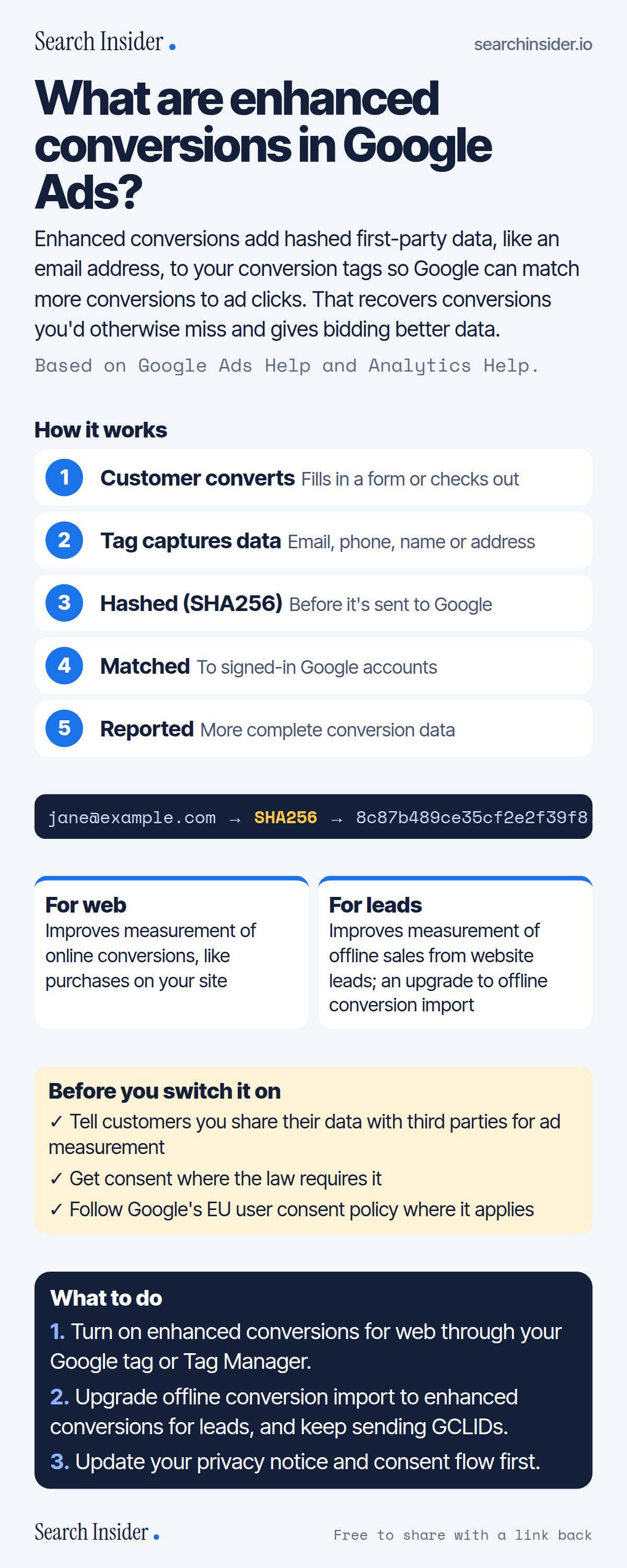
Enhanced conversions infographic: a five-step flow from customer conversion to tag capture, SHA256 hashing, matching and reporting, an example hash, cards for enhanced conversions for web and for leads, policy requirements, and three steps on what to do.

Oct 5, 2026

Enhanced Conversions in Google Ads Explained (Infographic)

How Google Ads enhanced conversions work: hashed first-party data, web vs leads, setup options, policy requirements and how it relates to offline conversion import.

Embed this infographic

Every infographic here is free to republish, on any site, with a link back to the study it comes from. Paste this code and the credit is done for you.

<a href="https://searchinsider.io/infographics/enhanced-conversions"><img src="https://searchinsider.io/research/enhanced-conversions/enhanced-conversions-infographic.png" alt="Enhanced conversions infographic: a five-step flow from customer conversion to tag capture, SHA256 hashing, matching and reporting, an example hash, cards for enhanced conversions for web and for leads, policy requirements, and three steps on what to do." style="max-width:680px;width:100%;height:auto;" /></a><p>Source: <a href="https://searchinsider.io/infographics/enhanced-conversions">Enhanced conversions infographic</a> by Search Insider.</p>

What are enhanced conversions in Google Ads?

The short answer: Enhanced conversions add hashed first-party data, like an email address, to your conversion tags so Google can match more conversions to ad clicks. That recovers conversions you'd otherwise miss and gives bidding better data.

Based on Google Ads Help and Analytics Help.

What it shows

  • Enhanced conversions can improve the accuracy of conversion measurement and unlock more powerful bidding.
  • Customer data such as email, phone, name and address is hashed with SHA256 before being sent to Google.
  • Enhanced conversions for web covers online conversions; for leads covers offline sales from website leads.
  • Setup options are the Google tag, Google Tag Manager or the Google Ads API.
  • Google calls offline conversion import a legacy feature and recommends upgrading to enhanced conversions for leads.
  • Advertisers must disclose data sharing and get consent where legally required.

What to do

  • Web: Turn it on via the Google tag or Tag Manager.
  • Leads: Upgrade offline conversion import and keep sending GCLIDs.
  • First: Update your privacy notice and consent flow.

The walkthrough

What are enhanced conversions?

Enhanced conversions is a Google Ads feature that can improve the accuracy of your conversion measurement and unlock more powerful bidding [1]. It supplements conversion tags with hashed first-party customer data such as email addresses, names, home addresses or phone numbers [1].

How do enhanced conversions work?

The data is captured in your conversion tags, hashed, sent to Google in hashed form, and matched to Google accounts [2]. Google uses SHA256 hashing [1]. Google lists the benefits as recovering conversions that otherwise wouldn't be measured, improving bidding optimization, and privacy-safe hashing of first-party data [2].

What is the difference between enhanced conversions for web and for leads?

Enhanced conversions for web improves measurement of online conversions [1]. Enhanced conversions for leads improves measurement of offline transactions that came from a website lead, and is an upgraded version of offline conversion import [1][3].

Does enhanced conversions for leads replace GCLID imports?

Google calls standard offline conversion import a legacy feature and recommends upgrading [4]. It still advises including GCLIDs with uploaded events whenever possible to maximize accuracy [4].

How do you set up enhanced conversions?

Enhanced conversions for web can be set up with the Google tag, Google Tag Manager or the Google Ads API [2].

What are the privacy requirements for enhanced conversions?

Google's customer data policies require you to disclose that you share customer information with third parties for ad measurement, obtain consent where legally required, comply with the EU user consent policy where applicable, and upload data only through Google's approved methods [5].

Does GA4 support enhanced conversions?

Yes. GA4's user-provided data collection lets you send consented first-party data to Analytics, and it enables enhanced conversions support for Google Analytics conversions [6].

More digital marketing infographics

404 errors infographic: a 404 banner with Google's view that 404s are normal, which status to return in four cases, three facts on how Google treats 4xx and soft 404s, a checklist for a good custom 404 page, and three steps on what to do.

SEO · Oct 6, 2026

Do 404 errors hurt your SEO?

Do 404 errors hurt SEO? How Google treats 404s, why soft 404s are the real problem, which status code to return, and how to build a good custom 404 page.

Embed code
<a href="https://searchinsider.io/infographics/404-errors"><img src="https://searchinsider.io/research/404-errors/404-errors-infographic.png" alt="404 errors infographic: a 404 banner with Google's view that 404s are normal, which status to return in four cases, three facts on how Google treats 4xx and soft 404s, a checklist for a good custom 404 page, and three steps on what to do." style="max-width:680px;width:100%;height:auto;" /></a><p>Source: <a href="https://searchinsider.io/infographics/404-errors">404 errors infographic</a> by Search Insider.</p>

AI-generated content infographic: a quality not method banner, a split of fine uses versus uses against Google's rules, a pre-publish checklist (accuracy, metadata, who, how, why), a Merchant Center note on labeling AI images and product data, and three steps on what to do.

AI search · Oct 6, 2026

Does Google penalize AI-generated content?

Google's stance on AI-generated content: quality over production method, what breaks the scaled content abuse policy, and a checklist before publishing AI-assisted content.

Embed code
<a href="https://searchinsider.io/infographics/ai-generated-content"><img src="https://searchinsider.io/research/ai-generated-content/ai-generated-content-infographic.png" alt="AI-generated content infographic: a quality not method banner, a split of fine uses versus uses against Google's rules, a pre-publish checklist (accuracy, metadata, who, how, why), a Merchant Center note on labeling AI images and product data, and three steps on what to do." style="max-width:680px;width:100%;height:auto;" /></a><p>Source: <a href="https://searchinsider.io/infographics/ai-generated-content">AI-generated content infographic</a> by Search Insider.</p>

Anchor text infographic: an example link with the anchor text underlined, four vague or stuffed anchors swapped for descriptive ones, four rules on image links, internal links, length and keyword stuffing, a note on Google's link spam examples, and three steps on what to do.

SEO · Oct 6, 2026

What is anchor text, and what should it say?

What anchor text is, what Google says it should say, good and bad examples, image link alt text, and which anchor practices Google lists as link spam.

Embed code
<a href="https://searchinsider.io/infographics/anchor-text"><img src="https://searchinsider.io/research/anchor-text/anchor-text-infographic.png" alt="Anchor text infographic: an example link with the anchor text underlined, four vague or stuffed anchors swapped for descriptive ones, four rules on image links, internal links, length and keyword stuffing, a note on Google's link spam examples, and three steps on what to do." style="max-width:680px;width:100%;height:auto;" /></a><p>Source: <a href="https://searchinsider.io/infographics/anchor-text">Anchor text infographic</a> by Search Insider.</p>


