
Skip to content
← SEO Infographics
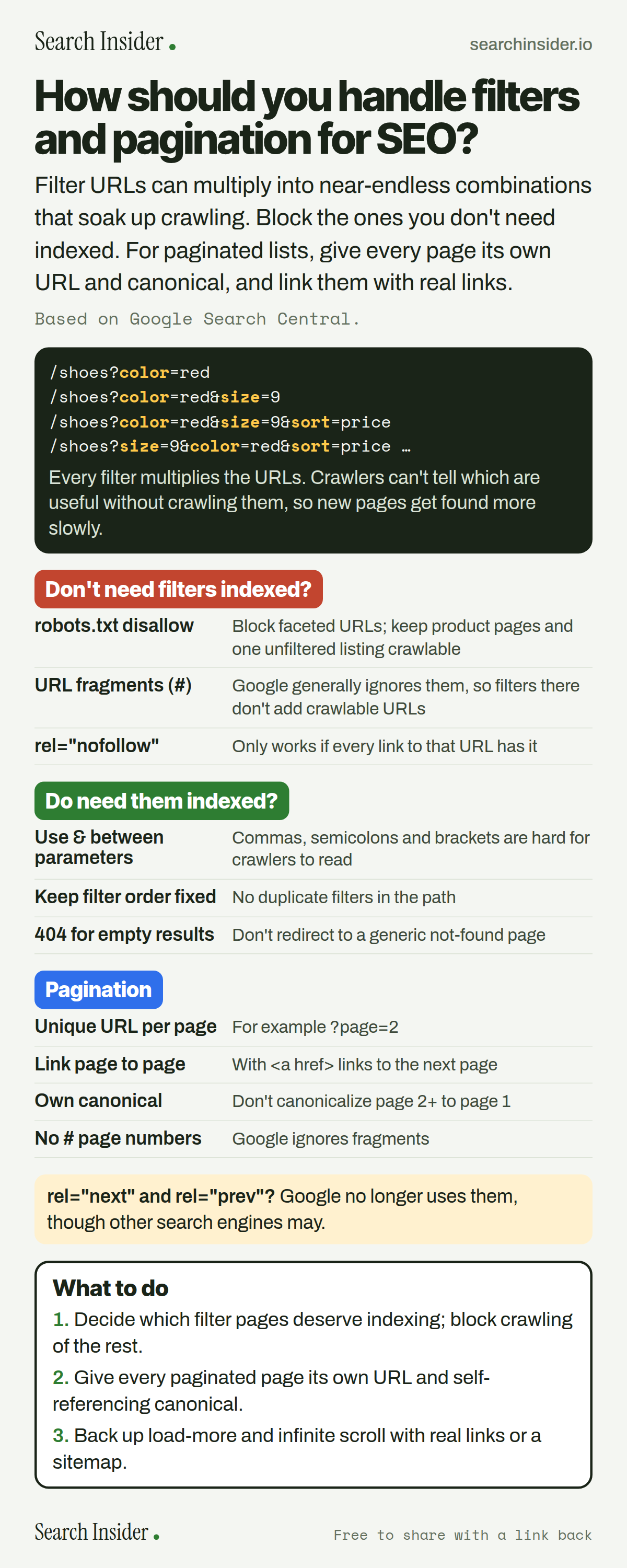
Faceted navigation and pagination infographic: example filter URLs multiplying, options when you don't need filters indexed, rules when you do, pagination rules (unique URLs, sequential links, own canonical, no fragments), a note that Google no longer uses rel next and prev, and three steps on what to do.

Oct 5, 2026

Faceted Navigation and Pagination SEO (Infographic)

How to handle faceted navigation and pagination for SEO: why filter URLs waste crawling, how to block or structure them, and Google's pagination rules.

Embed this infographic

Every infographic here is free to republish, on any site, with a link back to the study it comes from. Paste this code and the credit is done for you.

<a href="https://searchinsider.io/infographics/faceted-navigation-pagination"><img src="https://searchinsider.io/research/faceted-navigation-pagination/faceted-navigation-pagination-infographic.png" alt="Faceted navigation and pagination infographic: example filter URLs multiplying, options when you don't need filters indexed, rules when you do, pagination rules (unique URLs, sequential links, own canonical, no fragments), a note that Google no longer uses rel next and prev, and three steps on what to do." style="max-width:680px;width:100%;height:auto;" /></a><p>Source: <a href="https://searchinsider.io/infographics/faceted-navigation-pagination">Filters and pagination infographic</a> by Search Insider.</p>

How should you handle filters and pagination for SEO?

The short answer: Filter URLs can multiply into near-endless combinations that soak up crawling. Block the ones you don't need indexed. For paginated lists, give every page its own URL and canonical, and link them with real links.

Based on Google Search Central.

What it shows

  • Faceted navigation built on URL parameters can create effectively infinite URL spaces.
  • Crawlers can't tell which faceted URLs are useful without crawling them, which slows discovery of new pages.
  • If you don't need filters indexed, disallow them in robots.txt or use URL fragments.
  • If you do, use & as the separator, keep filter order consistent and return 404 for empty results.
  • Give each paginated page a unique URL and its own canonical; don't canonicalize to page 1.
  • Google no longer uses rel=next and rel=prev.

What to do

  • Filters: Decide which deserve indexing; block crawling of the rest.
  • Pagination: Unique URL and self-referencing canonical per page.
  • Load more: Back it with real links or a sitemap.

The walkthrough

Why is faceted navigation a problem for SEO?

Faceted navigation based on URL parameters can generate infinite URL spaces [1]. Crawlers can't tell whether those URLs are useful without crawling them first, so time spent on useless filter URLs leaves less for new, useful pages [1].

How do you stop filter URLs being crawled?

Use robots.txt to disallow crawling of faceted URLs, while allowing individual product pages and a listing page without filters [1]. Filters in URL fragments have no effect on crawling, because Google generally doesn't support fragments [1]. rel="nofollow" only helps if every link pointing to that URL carries it [1].

How should indexable filter URLs be structured?

Use the standard & separator between parameters, since commas, semicolons and brackets are hard for crawlers to detect [1]. Keep the order of filters consistent with no duplicates, and return a 404 when a filter combination has no results instead of redirecting to a generic not-found page [1].

How should you set up pagination for SEO?

Give each page a unique URL, such as ?page=n, and link each page to the next with a elements [2]. You can also link every page back to the first [2]. Don't use URL fragments for page numbers, because Google ignores them [2].

Should page 2 canonicalize to page 1?

No. Don't use the first page of a sequence as the canonical; give each page its own canonical URL [2].

Does Google use rel=next and rel=prev?

No. Google no longer uses these tags, although other search engines may [2].

How does Google handle load more buttons and infinite scroll?

These are usually built with JavaScript, and Google generally crawls URLs found in the href attribute of links [2]. Use a sitemap or a Merchant Center feed to help Google find all the products [2].

More digital marketing infographics

404 errors infographic: a 404 banner with Google's view that 404s are normal, which status to return in four cases, three facts on how Google treats 4xx and soft 404s, a checklist for a good custom 404 page, and three steps on what to do.

SEO · Oct 6, 2026

Do 404 errors hurt your SEO?

Do 404 errors hurt SEO? How Google treats 404s, why soft 404s are the real problem, which status code to return, and how to build a good custom 404 page.

Embed code
<a href="https://searchinsider.io/infographics/404-errors"><img src="https://searchinsider.io/research/404-errors/404-errors-infographic.png" alt="404 errors infographic: a 404 banner with Google's view that 404s are normal, which status to return in four cases, three facts on how Google treats 4xx and soft 404s, a checklist for a good custom 404 page, and three steps on what to do." style="max-width:680px;width:100%;height:auto;" /></a><p>Source: <a href="https://searchinsider.io/infographics/404-errors">404 errors infographic</a> by Search Insider.</p>

AI-generated content infographic: a quality not method banner, a split of fine uses versus uses against Google's rules, a pre-publish checklist (accuracy, metadata, who, how, why), a Merchant Center note on labeling AI images and product data, and three steps on what to do.

AI search · Oct 6, 2026

Does Google penalize AI-generated content?

Google's stance on AI-generated content: quality over production method, what breaks the scaled content abuse policy, and a checklist before publishing AI-assisted content.

Embed code
<a href="https://searchinsider.io/infographics/ai-generated-content"><img src="https://searchinsider.io/research/ai-generated-content/ai-generated-content-infographic.png" alt="AI-generated content infographic: a quality not method banner, a split of fine uses versus uses against Google's rules, a pre-publish checklist (accuracy, metadata, who, how, why), a Merchant Center note on labeling AI images and product data, and three steps on what to do." style="max-width:680px;width:100%;height:auto;" /></a><p>Source: <a href="https://searchinsider.io/infographics/ai-generated-content">AI-generated content infographic</a> by Search Insider.</p>

Anchor text infographic: an example link with the anchor text underlined, four vague or stuffed anchors swapped for descriptive ones, four rules on image links, internal links, length and keyword stuffing, a note on Google's link spam examples, and three steps on what to do.

SEO · Oct 6, 2026

What is anchor text, and what should it say?

What anchor text is, what Google says it should say, good and bad examples, image link alt text, and which anchor practices Google lists as link spam.

Embed code
<a href="https://searchinsider.io/infographics/anchor-text"><img src="https://searchinsider.io/research/anchor-text/anchor-text-infographic.png" alt="Anchor text infographic: an example link with the anchor text underlined, four vague or stuffed anchors swapped for descriptive ones, four rules on image links, internal links, length and keyword stuffing, a note on Google's link spam examples, and three steps on what to do." style="max-width:680px;width:100%;height:auto;" /></a><p>Source: <a href="https://searchinsider.io/infographics/anchor-text">Anchor text infographic</a> by Search Insider.</p>


