
Skip to content
← PPC Infographics
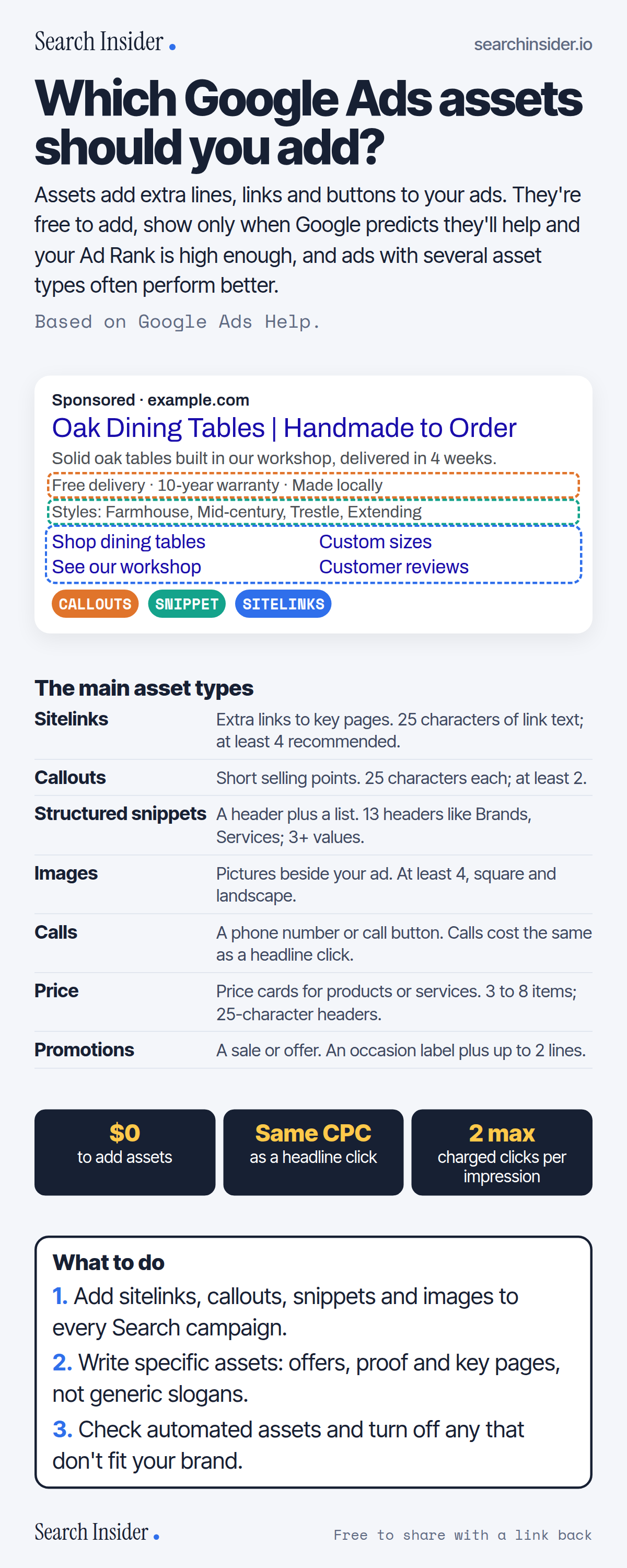
Google Ads assets infographic: an example search ad with callouts, a structured snippet and sitelinks labeled, seven main asset types with limits, three cost facts ($0 to add, same cost as a headline click, at most 2 charged clicks per impression), and three steps on what to do.

Oct 6, 2026

Google Ads Assets: Which to Add (Infographic)

Which Google Ads assets to add: sitelinks, callouts, structured snippets, images, calls, price, promotions and more, with character limits, costs and when they show.

Embed this infographic

Every infographic here is free to republish, on any site, with a link back to the study it comes from. Paste this code and the credit is done for you.

<a href="https://searchinsider.io/infographics/google-ads-assets"><img src="https://searchinsider.io/research/google-ads-assets/google-ads-assets-infographic.png" alt="Google Ads assets infographic: an example search ad with callouts, a structured snippet and sitelinks labeled, seven main asset types with limits, three cost facts ($0 to add, same cost as a headline click, at most 2 charged clicks per impression), and three steps on what to do." style="max-width:680px;width:100%;height:auto;" /></a><p>Source: <a href="https://searchinsider.io/infographics/google-ads-assets">Google Ads assets infographic</a> by Search Insider.</p>

Which Google Ads assets should you add?

The short answer: Assets add extra lines, links and buttons to your ads. They're free to add, show only when Google predicts they'll help and your Ad Rank is high enough, and ads with several asset types often perform better.

Based on Google Ads Help.

What it shows

  • Assets are free to add; clicks on them are charged as usual.
  • Assets show when they're predicted to improve performance and the ad's position and Ad Rank are high enough.
  • Sitelink and callout text is limited to 25 characters in most languages.
  • Google recommends at least 4 sitelinks, 2 callouts and 4 images.
  • Structured snippets use one of 13 headers with at least 3 values.
  • Some assets are created automatically when Google predicts they'll help.

What to do

  • Every Search campaign: Add sitelinks, callouts, snippets and images.
  • Writing: Be specific: offers, proof and key pages.
  • Automation: Review automated assets.

The walkthrough

What are Google Ads assets?

Assets are content pieces that make up your ad with useful business information, such as extra links, callouts, images or a phone number [1]. Google notes that ads with multiple types of assets often perform better [2].

When do Google Ads assets show?

Assets show when they're predicted to improve your ad's performance and when your ad's position and Ad Rank are high enough [1]. Google Ads requires a minimum Ad Rank, factoring in your assets, before showing additional assets [1].

Do assets cost extra?

No. There's no cost to add assets; clicks on them are charged as usual, and you're charged for no more than two clicks per impression for each ad and its assets [1]. A click on a sitelink costs the same as a click on the headline [3].

What are the sitelink and callout limits?

Sitelink text and callout text are each limited to 25 characters in most languages [3][4]. Google's best practices recommend at least four active sitelinks and at least two callouts [2].

What are structured snippets?

Structured snippets show a header plus a list of values. There are 13 headers, including Amenities, Brands, Courses, Destinations, Models, Service catalog, Styles and Types, and each needs at least 3 values, with 4 recommended [5].

Which other assets are available?

Others include image assets (Google suggests at least 4, square and landscape) [2], call assets [6], price assets with 3 to 8 items [7], promotion assets [8], lead form assets for eligible advertisers [9], location assets [1], and business name and logo, which aren't guaranteed to serve [10].

What are automated assets?

When predicted to improve results, Google Ads automatically creates and shows assets such as dynamic sitelinks, callouts, structured snippets and images [11]. You can turn them off in account-level automated asset settings [11].

More digital marketing infographics

404 errors infographic: a 404 banner with Google's view that 404s are normal, which status to return in four cases, three facts on how Google treats 4xx and soft 404s, a checklist for a good custom 404 page, and three steps on what to do.

SEO · Oct 6, 2026

Do 404 errors hurt your SEO?

Do 404 errors hurt SEO? How Google treats 404s, why soft 404s are the real problem, which status code to return, and how to build a good custom 404 page.

Embed code
<a href="https://searchinsider.io/infographics/404-errors"><img src="https://searchinsider.io/research/404-errors/404-errors-infographic.png" alt="404 errors infographic: a 404 banner with Google's view that 404s are normal, which status to return in four cases, three facts on how Google treats 4xx and soft 404s, a checklist for a good custom 404 page, and three steps on what to do." style="max-width:680px;width:100%;height:auto;" /></a><p>Source: <a href="https://searchinsider.io/infographics/404-errors">404 errors infographic</a> by Search Insider.</p>

AI-generated content infographic: a quality not method banner, a split of fine uses versus uses against Google's rules, a pre-publish checklist (accuracy, metadata, who, how, why), a Merchant Center note on labeling AI images and product data, and three steps on what to do.

AI search · Oct 6, 2026

Does Google penalize AI-generated content?

Google's stance on AI-generated content: quality over production method, what breaks the scaled content abuse policy, and a checklist before publishing AI-assisted content.

Embed code
<a href="https://searchinsider.io/infographics/ai-generated-content"><img src="https://searchinsider.io/research/ai-generated-content/ai-generated-content-infographic.png" alt="AI-generated content infographic: a quality not method banner, a split of fine uses versus uses against Google's rules, a pre-publish checklist (accuracy, metadata, who, how, why), a Merchant Center note on labeling AI images and product data, and three steps on what to do." style="max-width:680px;width:100%;height:auto;" /></a><p>Source: <a href="https://searchinsider.io/infographics/ai-generated-content">AI-generated content infographic</a> by Search Insider.</p>

Anchor text infographic: an example link with the anchor text underlined, four vague or stuffed anchors swapped for descriptive ones, four rules on image links, internal links, length and keyword stuffing, a note on Google's link spam examples, and three steps on what to do.

SEO · Oct 6, 2026

What is anchor text, and what should it say?

What anchor text is, what Google says it should say, good and bad examples, image link alt text, and which anchor practices Google lists as link spam.

Embed code
<a href="https://searchinsider.io/infographics/anchor-text"><img src="https://searchinsider.io/research/anchor-text/anchor-text-infographic.png" alt="Anchor text infographic: an example link with the anchor text underlined, four vague or stuffed anchors swapped for descriptive ones, four rules on image links, internal links, length and keyword stuffing, a note on Google's link spam examples, and three steps on what to do." style="max-width:680px;width:100%;height:auto;" /></a><p>Source: <a href="https://searchinsider.io/infographics/anchor-text">Anchor text infographic</a> by Search Insider.</p>


