
Skip to content
← SEO Infographics
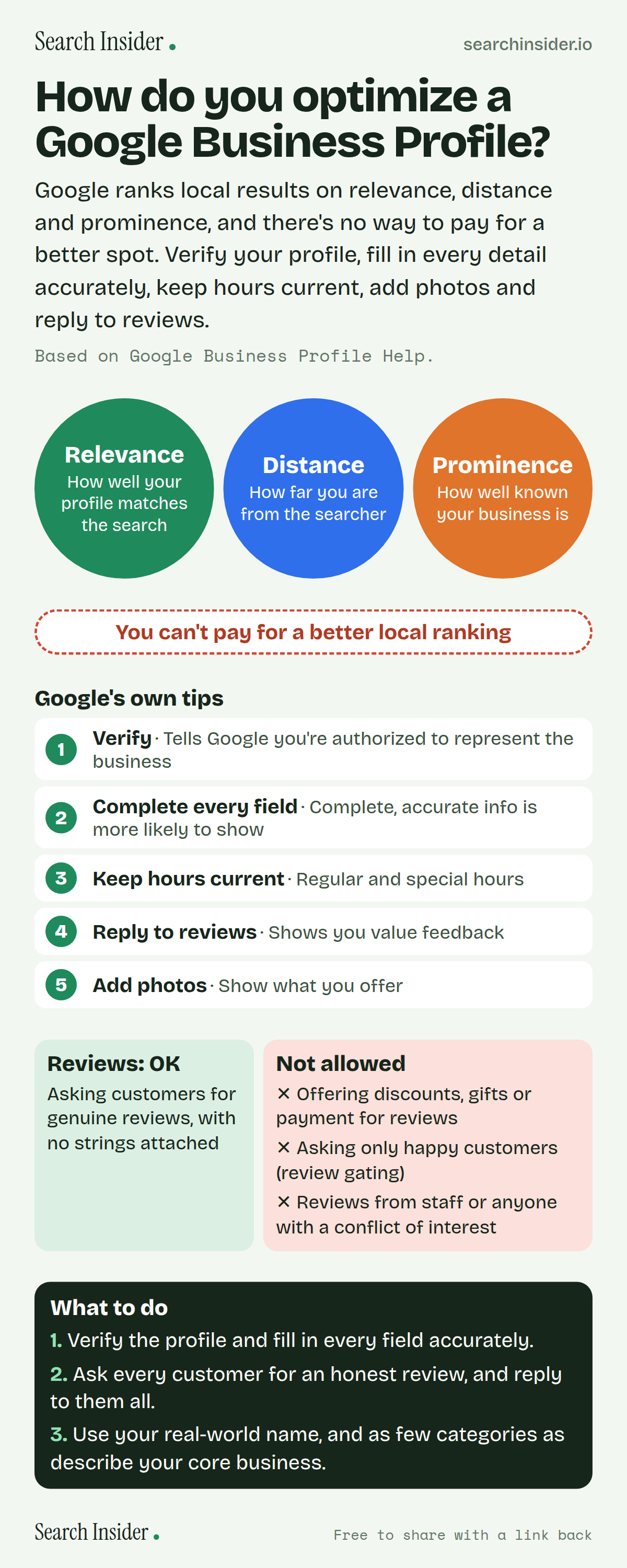
Google Business Profile infographic: three circles for relevance, distance and prominence, a note that you can't pay for better local ranking, Google's five tips (verify, complete every field, keep hours current, reply to reviews, add photos), review do's and don'ts, and three steps on what to do.

Oct 5, 2026

How to Optimize a Google Business Profile (Infographic)

How to optimize a Google Business Profile: Google's three local ranking factors, its own tips, review rules and what you can't do to rank higher.

Embed this infographic

Every infographic here is free to republish, on any site, with a link back to the study it comes from. Paste this code and the credit is done for you.

<a href="https://searchinsider.io/infographics/google-business-profile"><img src="https://searchinsider.io/research/google-business-profile/google-business-profile-infographic.png" alt="Google Business Profile infographic: three circles for relevance, distance and prominence, a note that you can't pay for better local ranking, Google's five tips (verify, complete every field, keep hours current, reply to reviews, add photos), review do's and don'ts, and three steps on what to do." style="max-width:680px;width:100%;height:auto;" /></a><p>Source: <a href="https://searchinsider.io/infographics/google-business-profile">Google Business Profile infographic</a> by Search Insider.</p>

How do you optimize a Google Business Profile?

The short answer: Google ranks local results on relevance, distance and prominence, and there's no way to pay for a better spot. Verify your profile, fill in every detail accurately, keep hours current, add photos and reply to reviews.

Based on Google Business Profile Help.

What it shows

  • Local results are based mainly on relevance, distance and prominence.
  • There's no way to request or pay for a better local ranking.
  • Verified profiles with complete, accurate info are more likely to show in local results.
  • Business names should match the real-world name, without taglines, store codes, hours or other details.
  • Offering incentives for reviews and selectively asking happy customers for reviews are not allowed.
  • Photos: JPG or PNG, 10KB to 5MB, 720 x 720 pixels recommended.

What to do

  • Setup: Verify and fill in every field accurately.
  • Reviews: Ask every customer for an honest review and reply to all.
  • Name and categories: Use the real-world name and as few categories as possible.

The walkthrough

How does Google rank local results?

Local results are based mainly on relevance, distance and prominence [1]. Relevance is how well a profile matches the search, distance is how far the business is from the searcher, and prominence is how well known the business is [1]. Google says there's no way to request or pay for a better local ranking [1].

How do you improve your local ranking on Google?

Google's tips: verify your business, enter complete and accurate information, keep your hours up to date, manage and respond to reviews, and add photos [1]. Businesses with complete and accurate info are more likely to show up in local results [1].

What should your Google Business Profile name be?

Your name should reflect your real-world business name, as used consistently on your storefront, website and stationery [2]. Don't add marketing taglines, store codes, hours, phone numbers, URLs or service and location details [2].

How should you choose Business Profile categories?

Choose categories that complete the sentence "This business IS a", use as few as possible to describe your core business, and don't use categories as keywords [2].

What are the rules for Google reviews?

Businesses may ask customers for reviews of genuine experiences [3]. They may not offer incentives such as payment, discounts or free goods for reviews, discourage negative reviews, or selectively solicit positive ones [3]. Reviews from people with a conflict of interest, such as employees, aren't allowed [3].

What size should Business Profile photos be?

Google recommends JPG or PNG files between 10KB and 5MB, at 720 by 720 pixels, with a minimum of 250 by 250 pixels [4]. Photos should be in focus and well lit, without significant alterations or excessive filters [4].

More digital marketing infographics

404 errors infographic: a 404 banner with Google's view that 404s are normal, which status to return in four cases, three facts on how Google treats 4xx and soft 404s, a checklist for a good custom 404 page, and three steps on what to do.

SEO · Oct 6, 2026

Do 404 errors hurt your SEO?

Do 404 errors hurt SEO? How Google treats 404s, why soft 404s are the real problem, which status code to return, and how to build a good custom 404 page.

Embed code
<a href="https://searchinsider.io/infographics/404-errors"><img src="https://searchinsider.io/research/404-errors/404-errors-infographic.png" alt="404 errors infographic: a 404 banner with Google's view that 404s are normal, which status to return in four cases, three facts on how Google treats 4xx and soft 404s, a checklist for a good custom 404 page, and three steps on what to do." style="max-width:680px;width:100%;height:auto;" /></a><p>Source: <a href="https://searchinsider.io/infographics/404-errors">404 errors infographic</a> by Search Insider.</p>

AI-generated content infographic: a quality not method banner, a split of fine uses versus uses against Google's rules, a pre-publish checklist (accuracy, metadata, who, how, why), a Merchant Center note on labeling AI images and product data, and three steps on what to do.

AI search · Oct 6, 2026

Does Google penalize AI-generated content?

Google's stance on AI-generated content: quality over production method, what breaks the scaled content abuse policy, and a checklist before publishing AI-assisted content.

Embed code
<a href="https://searchinsider.io/infographics/ai-generated-content"><img src="https://searchinsider.io/research/ai-generated-content/ai-generated-content-infographic.png" alt="AI-generated content infographic: a quality not method banner, a split of fine uses versus uses against Google's rules, a pre-publish checklist (accuracy, metadata, who, how, why), a Merchant Center note on labeling AI images and product data, and three steps on what to do." style="max-width:680px;width:100%;height:auto;" /></a><p>Source: <a href="https://searchinsider.io/infographics/ai-generated-content">AI-generated content infographic</a> by Search Insider.</p>

Anchor text infographic: an example link with the anchor text underlined, four vague or stuffed anchors swapped for descriptive ones, four rules on image links, internal links, length and keyword stuffing, a note on Google's link spam examples, and three steps on what to do.

SEO · Oct 6, 2026

What is anchor text, and what should it say?

What anchor text is, what Google says it should say, good and bad examples, image link alt text, and which anchor practices Google lists as link spam.

Embed code
<a href="https://searchinsider.io/infographics/anchor-text"><img src="https://searchinsider.io/research/anchor-text/anchor-text-infographic.png" alt="Anchor text infographic: an example link with the anchor text underlined, four vague or stuffed anchors swapped for descriptive ones, four rules on image links, internal links, length and keyword stuffing, a note on Google's link spam examples, and three steps on what to do." style="max-width:680px;width:100%;height:auto;" /></a><p>Source: <a href="https://searchinsider.io/infographics/anchor-text">Anchor text infographic</a> by Search Insider.</p>


