
Skip to content
← SEO Infographics
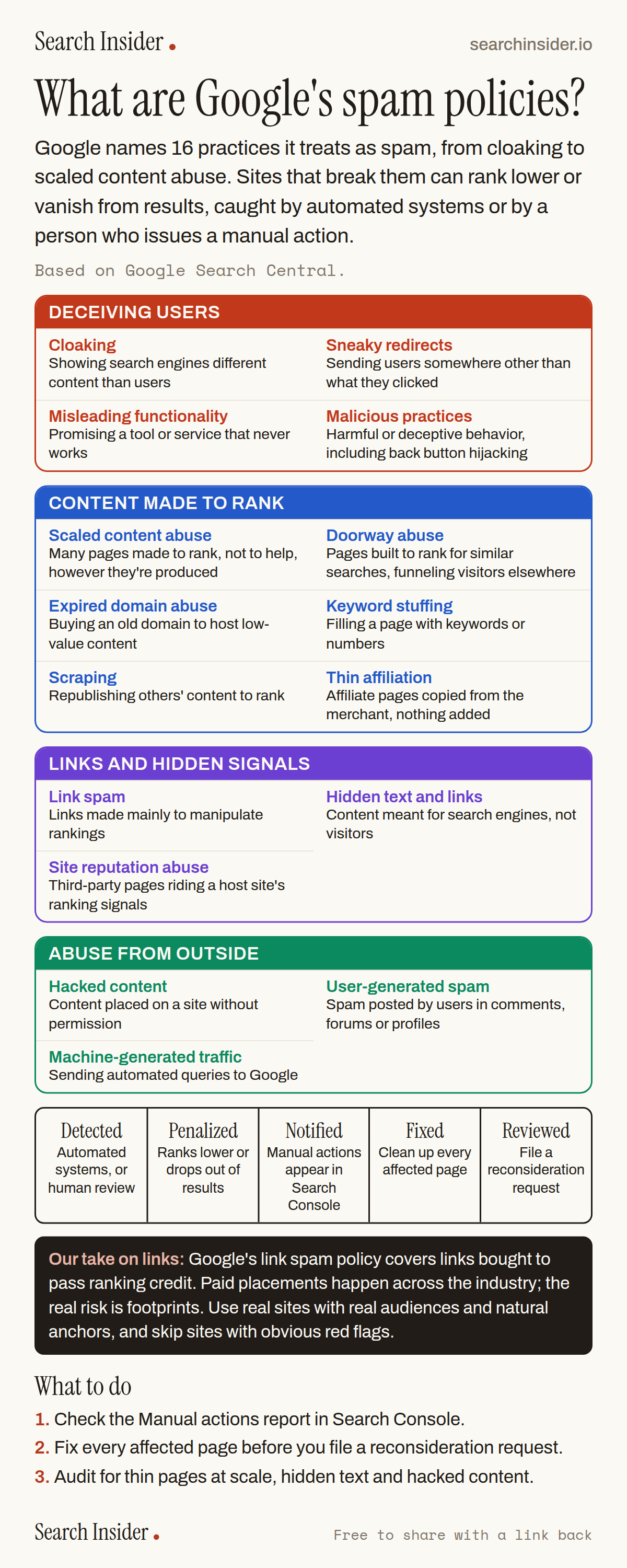
Google spam policies infographic: 16 spam policies in four groups (deceiving users, content made to rank, links and hidden signals, abuse from outside), a five-step path from detection to reconsideration, a note on link footprints, and three steps on what to do.

Oct 5, 2026

Google Spam Policies Explained: All 16 (Infographic)

All 16 of Google's spam policies in plain English, grouped by type, plus what happens when a site gets caught and how to recover from a manual action.

Embed this infographic

Every infographic here is free to republish, on any site, with a link back to the study it comes from. Paste this code and the credit is done for you.

<a href="https://searchinsider.io/infographics/google-spam-policies"><img src="https://searchinsider.io/research/google-spam-policies/google-spam-policies-infographic.png" alt="Google spam policies infographic: 16 spam policies in four groups (deceiving users, content made to rank, links and hidden signals, abuse from outside), a five-step path from detection to reconsideration, a note on link footprints, and three steps on what to do." style="max-width:680px;width:100%;height:auto;" /></a><p>Source: <a href="https://searchinsider.io/infographics/google-spam-policies">Google spam policies infographic</a> by Search Insider.</p>

What are Google's spam policies?

The short answer: Google names 16 practices it treats as spam, from cloaking to scaled content abuse. Sites that break them can rank lower or vanish from results, caught by automated systems or by a person who issues a manual action.

Based on Google Search Central.

What it shows

  • Google's spam policies name 16 practices, including cloaking, doorway abuse, expired domain abuse, link spam, scaled content abuse and site reputation abuse.
  • Back button hijacking falls under malicious practices.
  • Sites that violate the policies may rank lower or not appear in results at all.
  • Google detects spam with automated systems and human review, which can lead to a manual action.
  • Manual actions appear in the Manual actions report in Search Console, and sites can file a reconsideration request after fixing them.
  • The real risk with paid links is footprints: patterns Google can spot.

What to do

  • First: Check the Manual actions report in Search Console.
  • If you have one: Fix every affected page before filing a reconsideration request.
  • Ongoing: Audit for thin pages at scale, hidden text and hacked content.

The walkthrough

What are Google's spam policies?

Google's spam policies list practices that can cause a site to rank lower or not appear in search results at all [1]. They are cloaking, doorway abuse, expired domain abuse, hacked content, hidden text and link abuse, keyword stuffing, link spam, machine-generated traffic, malicious practices, misleading functionality, scaled content abuse, scraping, site reputation abuse, sneaky redirects, thin affiliation and user-generated spam [1].

What is scaled content abuse?

Scaled content abuse is when many pages are generated for the primary purpose of manipulating search rankings and not helping users [1]. The policy applies however the pages are produced.

What is site reputation abuse?

Site reputation abuse is publishing third-party pages on a host site mainly to benefit from that site's established ranking signals [1].

What is back button hijacking?

Back button hijacking is when a site interferes with browser navigation, manipulating history so visitors can't use the back button to return to the page they came from [1]. Google lists it under malicious practices [1].

What does Google say about link spam?

Google defines link spam as creating links to or from a site primarily to manipulate search rankings, and its policy covers buying or selling links that pass ranking credit [1]. In practice, paid placements happen across the industry. The real risk is footprints: obvious patterns and sites with red flags. Favor real sites with real audiences and natural anchors, mostly brand and URL.

How does Google catch spam?

Google detects spam with automated systems and, where needed, human review that can result in a manual action [1]. Sites are notified of manual actions in the Manual actions report in Search Console [2].

How do you recover from a manual action?

Fix the issue on every affected page, then request a review from the Manual actions report [2]. Google calls this a reconsideration request, and it checks whether the problem has been fixed [2].

More digital marketing infographics

404 errors infographic: a 404 banner with Google's view that 404s are normal, which status to return in four cases, three facts on how Google treats 4xx and soft 404s, a checklist for a good custom 404 page, and three steps on what to do.

SEO · Oct 6, 2026

Do 404 errors hurt your SEO?

Do 404 errors hurt SEO? How Google treats 404s, why soft 404s are the real problem, which status code to return, and how to build a good custom 404 page.

Embed code
<a href="https://searchinsider.io/infographics/404-errors"><img src="https://searchinsider.io/research/404-errors/404-errors-infographic.png" alt="404 errors infographic: a 404 banner with Google's view that 404s are normal, which status to return in four cases, three facts on how Google treats 4xx and soft 404s, a checklist for a good custom 404 page, and three steps on what to do." style="max-width:680px;width:100%;height:auto;" /></a><p>Source: <a href="https://searchinsider.io/infographics/404-errors">404 errors infographic</a> by Search Insider.</p>

AI-generated content infographic: a quality not method banner, a split of fine uses versus uses against Google's rules, a pre-publish checklist (accuracy, metadata, who, how, why), a Merchant Center note on labeling AI images and product data, and three steps on what to do.

AI search · Oct 6, 2026

Does Google penalize AI-generated content?

Google's stance on AI-generated content: quality over production method, what breaks the scaled content abuse policy, and a checklist before publishing AI-assisted content.

Embed code
<a href="https://searchinsider.io/infographics/ai-generated-content"><img src="https://searchinsider.io/research/ai-generated-content/ai-generated-content-infographic.png" alt="AI-generated content infographic: a quality not method banner, a split of fine uses versus uses against Google's rules, a pre-publish checklist (accuracy, metadata, who, how, why), a Merchant Center note on labeling AI images and product data, and three steps on what to do." style="max-width:680px;width:100%;height:auto;" /></a><p>Source: <a href="https://searchinsider.io/infographics/ai-generated-content">AI-generated content infographic</a> by Search Insider.</p>

Anchor text infographic: an example link with the anchor text underlined, four vague or stuffed anchors swapped for descriptive ones, four rules on image links, internal links, length and keyword stuffing, a note on Google's link spam examples, and three steps on what to do.

SEO · Oct 6, 2026

What is anchor text, and what should it say?

What anchor text is, what Google says it should say, good and bad examples, image link alt text, and which anchor practices Google lists as link spam.

Embed code
<a href="https://searchinsider.io/infographics/anchor-text"><img src="https://searchinsider.io/research/anchor-text/anchor-text-infographic.png" alt="Anchor text infographic: an example link with the anchor text underlined, four vague or stuffed anchors swapped for descriptive ones, four rules on image links, internal links, length and keyword stuffing, a note on Google's link spam examples, and three steps on what to do." style="max-width:680px;width:100%;height:auto;" /></a><p>Source: <a href="https://searchinsider.io/infographics/anchor-text">Anchor text infographic</a> by Search Insider.</p>


