
Skip to content
← SEO Infographics
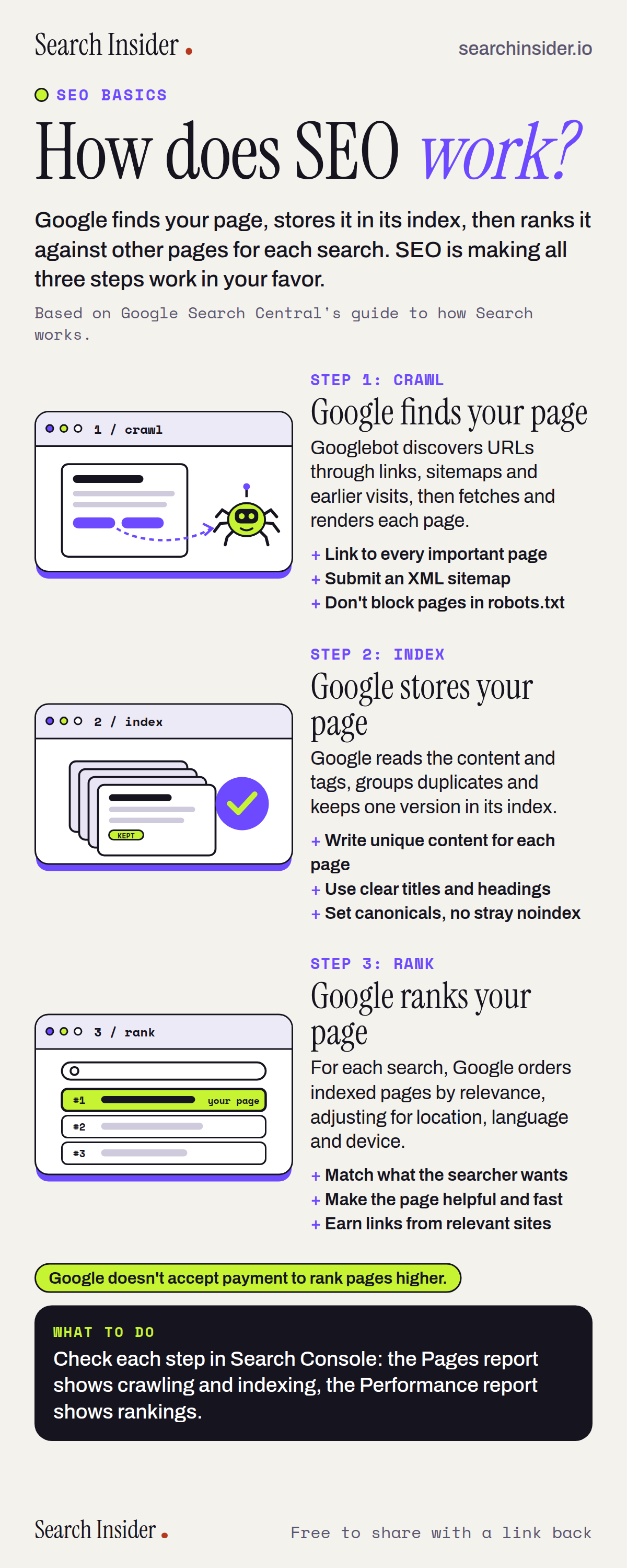
How does SEO work? Infographic showing Google's three steps: crawl (Google finds your page), index (Google stores your page) and rank (Google ranks your page), with what you control at each step.

Oct 4, 2026

How SEO Works: Infographic

How Google crawls, indexes and ranks a page, and what you control at each of the three steps, explained in one picture.

Embed this infographic

Every infographic here is free to republish, on any site, with a link back to the study it comes from. Paste this code and the credit is done for you.

<a href="https://searchinsider.io/infographics/how-seo-works"><img src="https://searchinsider.io/research/how-seo-works/how-seo-works-infographic.png" alt="How does SEO work? Infographic showing Google's three steps: crawl (Google finds your page), index (Google stores your page) and rank (Google ranks your page), with what you control at each step." style="max-width:680px;width:100%;height:auto;" /></a><p>Source: <a href="https://searchinsider.io/infographics/how-seo-works">How SEO works infographic</a> by Search Insider.</p>

How does SEO work?

The short answer: Google finds your page, stores it in its index, then ranks it against other pages for each search. SEO is making all three steps work in your favor.

Based on Google Search Central's guide to how Search works.

What it shows

  • Step 1, crawl: Googlebot discovers URLs through links, sitemaps and earlier visits, then fetches and renders each page. You control: links to every important page, an XML sitemap, and robots.txt rules that don't block important pages.
  • Step 2, index: Google reads the content and tags, groups duplicates and keeps one version in its index. You control: unique content for each page, clear titles and headings, canonical tags and no stray noindex.
  • Step 3, rank: for each search, Google orders indexed pages by relevance, adjusting for location, language and device. You control: matching what the searcher wants, a helpful and fast page, and links from relevant sites.
  • Google doesn't accept payment to rank pages higher.

What to do

  • To see how your site is doing at each step: Check Search Console: the Pages report shows crawling and indexing, the Performance report shows rankings.

The walkthrough

How does SEO work?

Google Search works in three steps: crawling, indexing and serving results [1]. Google finds a page, works out what it is about and stores it, then decides where it should appear for each search. SEO is the work of making sure your pages get through each of those steps and come out ahead of other pages for the searches you care about.

How does Google find a page?

Google finds pages by following links from pages it already knows, reading sitemaps you submit, and revisiting pages it has seen before [1]. Its crawler, Googlebot, then fetches each page and renders it, including any JavaScript [1]. You help this step by linking to every important page from elsewhere on your site, submitting an XML sitemap, and making sure robots.txt does not block pages you want found [2].

What does indexing mean in SEO?

Indexing is when Google analyzes a page's content and tags and stores what it learns in its index, the database it serves results from [1]. Where several pages are very similar, Google groups them and picks one as the canonical version to show [1]. You help by giving each page unique content, clear titles and headings, a canonical tag that points at the right URL [3], and no leftover noindex tag, which removes a page from results entirely [4].

How does Google decide rankings?

When someone searches, Google returns the indexed pages it judges most relevant, weighing hundreds of factors including the searcher's location, language and device [1]. Google states that it doesn't accept payment to rank a site higher [1]. You help by matching what the searcher wants, making the page helpful and fast to use, and earning links from relevant sites.

How can you check each step for your own site?

Google Search Console shows all three. The Pages report lists which pages Google has crawled and indexed, and why any were left out. The Performance report shows which searches your pages appear for, their average position and how many clicks they get.

More digital marketing infographics

404 errors infographic: a 404 banner with Google's view that 404s are normal, which status to return in four cases, three facts on how Google treats 4xx and soft 404s, a checklist for a good custom 404 page, and three steps on what to do.

SEO · Oct 6, 2026

Do 404 errors hurt your SEO?

Do 404 errors hurt SEO? How Google treats 404s, why soft 404s are the real problem, which status code to return, and how to build a good custom 404 page.

Embed code
<a href="https://searchinsider.io/infographics/404-errors"><img src="https://searchinsider.io/research/404-errors/404-errors-infographic.png" alt="404 errors infographic: a 404 banner with Google's view that 404s are normal, which status to return in four cases, three facts on how Google treats 4xx and soft 404s, a checklist for a good custom 404 page, and three steps on what to do." style="max-width:680px;width:100%;height:auto;" /></a><p>Source: <a href="https://searchinsider.io/infographics/404-errors">404 errors infographic</a> by Search Insider.</p>

AI-generated content infographic: a quality not method banner, a split of fine uses versus uses against Google's rules, a pre-publish checklist (accuracy, metadata, who, how, why), a Merchant Center note on labeling AI images and product data, and three steps on what to do.

AI search · Oct 6, 2026

Does Google penalize AI-generated content?

Google's stance on AI-generated content: quality over production method, what breaks the scaled content abuse policy, and a checklist before publishing AI-assisted content.

Embed code
<a href="https://searchinsider.io/infographics/ai-generated-content"><img src="https://searchinsider.io/research/ai-generated-content/ai-generated-content-infographic.png" alt="AI-generated content infographic: a quality not method banner, a split of fine uses versus uses against Google's rules, a pre-publish checklist (accuracy, metadata, who, how, why), a Merchant Center note on labeling AI images and product data, and three steps on what to do." style="max-width:680px;width:100%;height:auto;" /></a><p>Source: <a href="https://searchinsider.io/infographics/ai-generated-content">AI-generated content infographic</a> by Search Insider.</p>

Anchor text infographic: an example link with the anchor text underlined, four vague or stuffed anchors swapped for descriptive ones, four rules on image links, internal links, length and keyword stuffing, a note on Google's link spam examples, and three steps on what to do.

SEO · Oct 6, 2026

What is anchor text, and what should it say?

What anchor text is, what Google says it should say, good and bad examples, image link alt text, and which anchor practices Google lists as link spam.

Embed code
<a href="https://searchinsider.io/infographics/anchor-text"><img src="https://searchinsider.io/research/anchor-text/anchor-text-infographic.png" alt="Anchor text infographic: an example link with the anchor text underlined, four vague or stuffed anchors swapped for descriptive ones, four rules on image links, internal links, length and keyword stuffing, a note on Google's link spam examples, and three steps on what to do." style="max-width:680px;width:100%;height:auto;" /></a><p>Source: <a href="https://searchinsider.io/infographics/anchor-text">Anchor text infographic</a> by Search Insider.</p>


