
Skip to content
← SEO Infographics
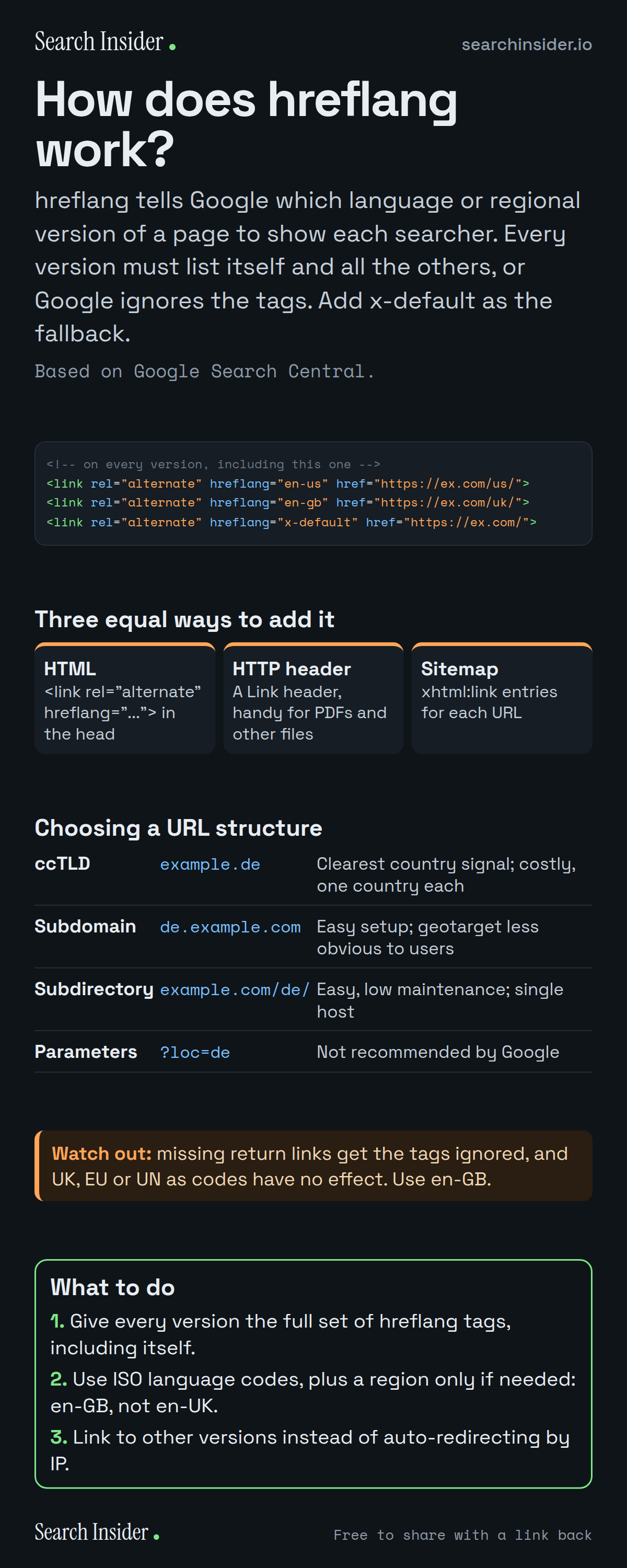
hreflang infographic: example hreflang link tags for en-us, en-gb and x-default, three equal ways to add hreflang, a comparison of ccTLDs, subdomains, subdirectories and URL parameters, a warning about return links and invalid codes, and three steps on what to do.

Oct 5, 2026

How hreflang Works: Rules and Mistakes (Infographic)

How hreflang works: the three ways to add it, return links, x-default, language and region codes, URL structure options and the most common mistakes.

Embed this infographic

Every infographic here is free to republish, on any site, with a link back to the study it comes from. Paste this code and the credit is done for you.

<a href="https://searchinsider.io/infographics/hreflang"><img src="https://searchinsider.io/research/hreflang/hreflang-infographic.png" alt="hreflang infographic: example hreflang link tags for en-us, en-gb and x-default, three equal ways to add hreflang, a comparison of ccTLDs, subdomains, subdirectories and URL parameters, a warning about return links and invalid codes, and three steps on what to do." style="max-width:680px;width:100%;height:auto;" /></a><p>Source: <a href="https://searchinsider.io/infographics/hreflang">hreflang infographic</a> by Search Insider.</p>

How does hreflang work?

The short answer: hreflang tells Google which language or regional version of a page to show each searcher. Every version must list itself and all the others, or Google ignores the tags. Add x-default as the fallback.

Based on Google Search Central.

What it shows

  • hreflang can be added with HTML link tags, HTTP headers or a sitemap. Google treats the three methods as equivalent.
  • Each language version must list itself and all other language versions.
  • If two pages don't both point to each other, Google ignores the tags.
  • Codes use an ISO 639-1 language code, optionally followed by an ISO 3166-1 Alpha 2 region code. A region code alone doesn't work.
  • x-default is the fallback for users whose language settings match no version.
  • Codes like UK, EU or UN have no effect. Use en-GB for English in the UK.
  • Google advises against automatically redirecting users to another language version.

What to do

  • Every version: Add the full set of hreflang tags, including itself.
  • Codes: Use ISO codes: en-GB, not en-UK.
  • Redirects: Link to other versions instead of redirecting by IP.

The walkthrough

What is hreflang?

hreflang is an annotation that tells Google about localized versions of a page, so it can show searchers the version in their language or for their region [1]. Google uses algorithms to detect a page's language, not hreflang or the HTML lang attribute [1].

How do you add hreflang?

There are three ways: link elements in the HTML head, HTTP headers, or entries in a sitemap [1]. Google says the three methods are equivalent, so you can choose whichever is most convenient for your site [1]. Alternate URLs must be fully qualified, including https [1].

What are hreflang return links?

Each language version must list itself as well as all other language versions [1]. If page X links to page Y, page Y must link back to page X; if two pages don't both point to each other, the tags will be ignored [1].

What is x-default in hreflang?

x-default is a reserved value used when no other language or region matches the user's browser setting [1]. Google recommends it for the fallback page for users whose language settings match none of your localized versions [1].

Which language and region codes does hreflang use?

The first code is the language in ISO 639-1 format, followed by an optional region in ISO 3166-1 Alpha 2 format, such as en-GB [1]. You can't specify a country code on its own, and codes like EU, UN or UK have no effect in Google Search [1].

Which URL structure is best for international sites?

Google compares four options [2]. Country-code domains give a clear country signal but are costly and target one country each. Subdomains and subdirectories are easy to set up, though users may not recognize the target from the URL alone. URL parameters are not recommended [2].

Should you redirect visitors by location?

No. Google advises against using IP analysis to adapt content and against automatically redirecting users to a different language version [2]. Add links to the other language versions instead [2].

More digital marketing infographics

404 errors infographic: a 404 banner with Google's view that 404s are normal, which status to return in four cases, three facts on how Google treats 4xx and soft 404s, a checklist for a good custom 404 page, and three steps on what to do.

SEO · Oct 6, 2026

Do 404 errors hurt your SEO?

Do 404 errors hurt SEO? How Google treats 404s, why soft 404s are the real problem, which status code to return, and how to build a good custom 404 page.

Embed code
<a href="https://searchinsider.io/infographics/404-errors"><img src="https://searchinsider.io/research/404-errors/404-errors-infographic.png" alt="404 errors infographic: a 404 banner with Google's view that 404s are normal, which status to return in four cases, three facts on how Google treats 4xx and soft 404s, a checklist for a good custom 404 page, and three steps on what to do." style="max-width:680px;width:100%;height:auto;" /></a><p>Source: <a href="https://searchinsider.io/infographics/404-errors">404 errors infographic</a> by Search Insider.</p>

AI-generated content infographic: a quality not method banner, a split of fine uses versus uses against Google's rules, a pre-publish checklist (accuracy, metadata, who, how, why), a Merchant Center note on labeling AI images and product data, and three steps on what to do.

AI search · Oct 6, 2026

Does Google penalize AI-generated content?

Google's stance on AI-generated content: quality over production method, what breaks the scaled content abuse policy, and a checklist before publishing AI-assisted content.

Embed code
<a href="https://searchinsider.io/infographics/ai-generated-content"><img src="https://searchinsider.io/research/ai-generated-content/ai-generated-content-infographic.png" alt="AI-generated content infographic: a quality not method banner, a split of fine uses versus uses against Google's rules, a pre-publish checklist (accuracy, metadata, who, how, why), a Merchant Center note on labeling AI images and product data, and three steps on what to do." style="max-width:680px;width:100%;height:auto;" /></a><p>Source: <a href="https://searchinsider.io/infographics/ai-generated-content">AI-generated content infographic</a> by Search Insider.</p>

Anchor text infographic: an example link with the anchor text underlined, four vague or stuffed anchors swapped for descriptive ones, four rules on image links, internal links, length and keyword stuffing, a note on Google's link spam examples, and three steps on what to do.

SEO · Oct 6, 2026

What is anchor text, and what should it say?

What anchor text is, what Google says it should say, good and bad examples, image link alt text, and which anchor practices Google lists as link spam.

Embed code
<a href="https://searchinsider.io/infographics/anchor-text"><img src="https://searchinsider.io/research/anchor-text/anchor-text-infographic.png" alt="Anchor text infographic: an example link with the anchor text underlined, four vague or stuffed anchors swapped for descriptive ones, four rules on image links, internal links, length and keyword stuffing, a note on Google's link spam examples, and three steps on what to do." style="max-width:680px;width:100%;height:auto;" /></a><p>Source: <a href="https://searchinsider.io/infographics/anchor-text">Anchor text infographic</a> by Search Insider.</p>


