
Skip to content
← SEO Infographics
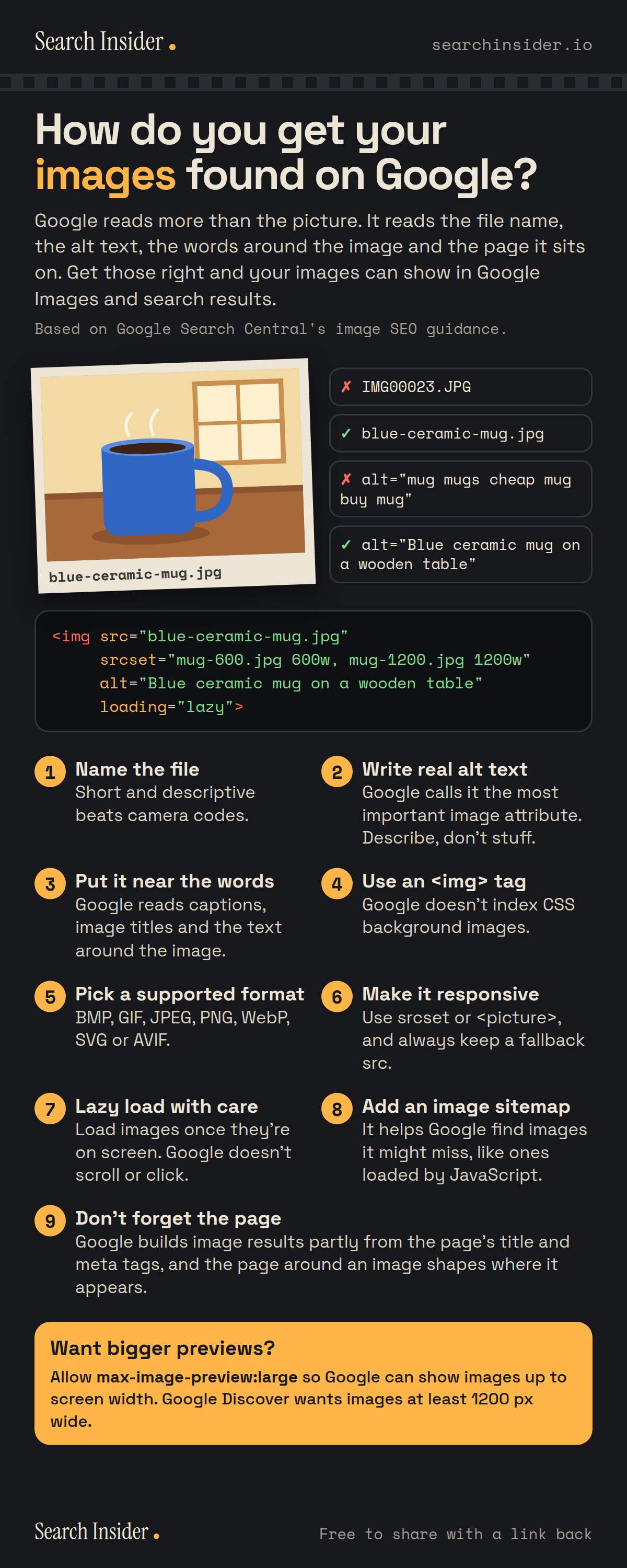
Image SEO infographic: how do you get your images found on Google? A photo of a blue mug with good and bad file names and alt text, an example img tag, and nine numbered tips from naming the file to the page around the image.

Oct 5, 2026

Image SEO Infographic: How to Get Images Found

How to get images found on Google: file names, alt text, placement, formats, responsive images, lazy loading, image sitemaps and large previews.

Embed this infographic

Every infographic here is free to republish, on any site, with a link back to the study it comes from. Paste this code and the credit is done for you.

<a href="https://searchinsider.io/infographics/image-seo"><img src="https://searchinsider.io/research/image-seo/image-seo-infographic.png" alt="Image SEO infographic: how do you get your images found on Google? A photo of a blue mug with good and bad file names and alt text, an example img tag, and nine numbered tips from naming the file to the page around the image." style="max-width:680px;width:100%;height:auto;" /></a><p>Source: <a href="https://searchinsider.io/infographics/image-seo">Image SEO checklist infographic</a> by Search Insider.</p>

How do you get your images found on Google?

The short answer: Google reads more than the picture. It reads the file name, the alt text, the words around the image and the page it sits on. Get those right and your images can show in Google Images and search results.

Based on Google Search Central's image SEO guidance.

What it shows

  • 1. Name the file: short and descriptive, like blue-ceramic-mug.jpg, not IMG00023.JPG.
  • 2. Write real alt text. Google calls it the most important image attribute. Describe, don't stuff keywords.
  • 3. Put images near relevant text. Google reads captions, image titles and surrounding content.
  • 4. Use an img element. Google doesn't index CSS background images.
  • 5. Use a supported format: BMP, GIF, JPEG, PNG, WebP, SVG or AVIF.
  • 6. Make images responsive with srcset or picture, and keep a fallback src.
  • 7. Lazy load images so they load once visible. Google doesn't scroll or click.
  • 8. Add an image sitemap so Google finds images it might miss.
  • 9. The page matters: its title and meta tags shape image results.
  • Allow max-image-preview:large for bigger previews. Google Discover wants images at least 1200 px wide.

What to do

  • Before you upload an image: Rename the file and write alt text that describes it.
  • Want larger image previews: Allow max-image-preview:large.

The walkthrough

What is image SEO?

Image SEO is the work of helping search engines find, understand and show your images. Google works out what an image shows from the image itself and from the page around it, including captions and image titles [1]. The content and metadata of the page an image sits on can strongly influence how and where it appears [1].

How should you name image files for SEO?

Use file names that are short but descriptive [1]. Google's own example is that my-new-black-kitten.jpg is better than IMG00023.JPG [1]. Rename camera files before uploading.

How do you write good alt text?

Google calls alt text the most important attribute for giving an image extra metadata [1]. Write useful, information-rich alt text that fits the content of the page [1], and avoid filling it with keywords, which Google says makes for a negative user experience [1]. Describe what the image shows, as you would to someone who can't see it.

Which image formats does Google support?

Google Search supports images in BMP, GIF, JPEG, PNG, WebP, SVG and AVIF formats [1]. Images must be in an HTML img element: Google doesn't index CSS background images [1].

How do responsive images affect SEO?

Responsive images use the srcset attribute or the picture element to serve different sizes to different screens [1]. Google recommends always including a fallback image URL in the src attribute, so the image can still be found [1].

Is lazy loading bad for image SEO?

No, if it loads images once they are visible on screen. Google Search does not interact with your page by scrolling or clicking, so lazy loading must load relevant content whenever it is in the viewport [3]. Browser built-in lazy loading for images is one of the methods Google lists [3].

Do you need an image sitemap?

An image sitemap helps Google find images it might not otherwise discover, such as images loaded by JavaScript [2]. It is most useful for sites where images matter to the business, like stores, recipes and portfolios.

How do you get large image previews in Google?

The max-image-preview robots setting controls preview size. Setting it to large allows a preview up to the width of the viewport [4]. For Google Discover, large images should be at least 1200 px wide and enabled with max-image-preview:large [5].

More digital marketing infographics

404 errors infographic: a 404 banner with Google's view that 404s are normal, which status to return in four cases, three facts on how Google treats 4xx and soft 404s, a checklist for a good custom 404 page, and three steps on what to do.

SEO · Oct 6, 2026

Do 404 errors hurt your SEO?

Do 404 errors hurt SEO? How Google treats 404s, why soft 404s are the real problem, which status code to return, and how to build a good custom 404 page.

Embed code
<a href="https://searchinsider.io/infographics/404-errors"><img src="https://searchinsider.io/research/404-errors/404-errors-infographic.png" alt="404 errors infographic: a 404 banner with Google's view that 404s are normal, which status to return in four cases, three facts on how Google treats 4xx and soft 404s, a checklist for a good custom 404 page, and three steps on what to do." style="max-width:680px;width:100%;height:auto;" /></a><p>Source: <a href="https://searchinsider.io/infographics/404-errors">404 errors infographic</a> by Search Insider.</p>

AI-generated content infographic: a quality not method banner, a split of fine uses versus uses against Google's rules, a pre-publish checklist (accuracy, metadata, who, how, why), a Merchant Center note on labeling AI images and product data, and three steps on what to do.

AI search · Oct 6, 2026

Does Google penalize AI-generated content?

Google's stance on AI-generated content: quality over production method, what breaks the scaled content abuse policy, and a checklist before publishing AI-assisted content.

Embed code
<a href="https://searchinsider.io/infographics/ai-generated-content"><img src="https://searchinsider.io/research/ai-generated-content/ai-generated-content-infographic.png" alt="AI-generated content infographic: a quality not method banner, a split of fine uses versus uses against Google's rules, a pre-publish checklist (accuracy, metadata, who, how, why), a Merchant Center note on labeling AI images and product data, and three steps on what to do." style="max-width:680px;width:100%;height:auto;" /></a><p>Source: <a href="https://searchinsider.io/infographics/ai-generated-content">AI-generated content infographic</a> by Search Insider.</p>

Anchor text infographic: an example link with the anchor text underlined, four vague or stuffed anchors swapped for descriptive ones, four rules on image links, internal links, length and keyword stuffing, a note on Google's link spam examples, and three steps on what to do.

SEO · Oct 6, 2026

What is anchor text, and what should it say?

What anchor text is, what Google says it should say, good and bad examples, image link alt text, and which anchor practices Google lists as link spam.

Embed code
<a href="https://searchinsider.io/infographics/anchor-text"><img src="https://searchinsider.io/research/anchor-text/anchor-text-infographic.png" alt="Anchor text infographic: an example link with the anchor text underlined, four vague or stuffed anchors swapped for descriptive ones, four rules on image links, internal links, length and keyword stuffing, a note on Google's link spam examples, and three steps on what to do." style="max-width:680px;width:100%;height:auto;" /></a><p>Source: <a href="https://searchinsider.io/infographics/anchor-text">Anchor text infographic</a> by Search Insider.</p>


