
Skip to content
← SEO Infographics
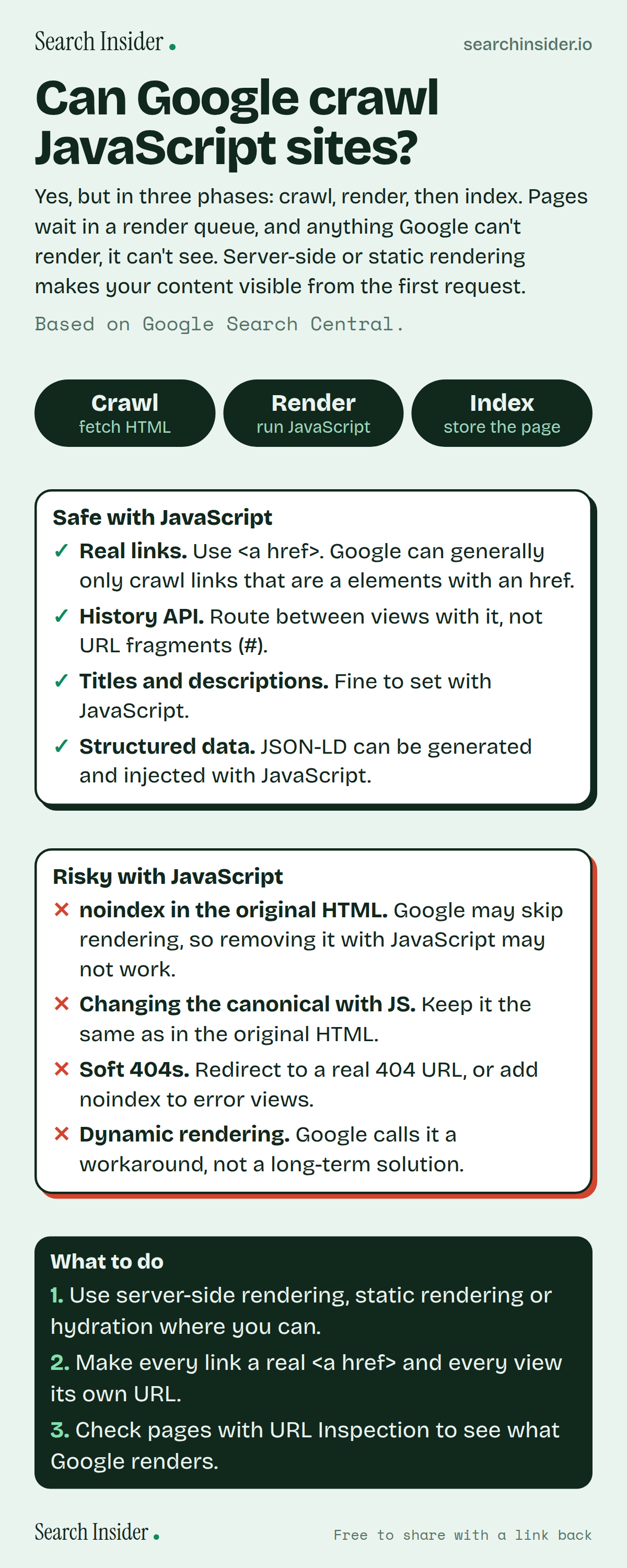
JavaScript SEO infographic: three pills for crawl, render and index, a card of things that are safe with JavaScript (real links, History API, titles, structured data), a card of risky things (noindex, canonical changes, soft 404s, dynamic rendering), and three steps on what to do.

Oct 5, 2026

JavaScript SEO: Can Google Crawl JS? (Infographic)

How Google handles JavaScript sites: crawl, render and index, what's safe to do with JavaScript, what's risky, and why server-side rendering still helps.

Embed this infographic

Every infographic here is free to republish, on any site, with a link back to the study it comes from. Paste this code and the credit is done for you.

<a href="https://searchinsider.io/infographics/javascript-seo"><img src="https://searchinsider.io/research/javascript-seo/javascript-seo-infographic.png" alt="JavaScript SEO infographic: three pills for crawl, render and index, a card of things that are safe with JavaScript (real links, History API, titles, structured data), a card of risky things (noindex, canonical changes, soft 404s, dynamic rendering), and three steps on what to do." style="max-width:680px;width:100%;height:auto;" /></a><p>Source: <a href="https://searchinsider.io/infographics/javascript-seo">JavaScript SEO infographic</a> by Search Insider.</p>

Can Google crawl JavaScript sites?

The short answer: Yes, but in three phases: crawl, render, then index. Pages wait in a render queue, and anything Google can't render, it can't see. Server-side or static rendering makes your content visible from the first request.

Based on Google Search Central.

What it shows

  • Google processes JavaScript sites in three phases: crawling, rendering and indexing.
  • Pages with a 200 status are queued for rendering, which can take a few seconds or longer. Non-200 pages may not be rendered.
  • Google renders with an evergreen version of Chromium.
  • Google can generally only crawl links that are a elements with an href attribute.
  • If the original HTML has noindex, Google may skip rendering, so removing it with JavaScript may not work.
  • Dynamic rendering is a workaround; Google recommends server-side rendering, static rendering or hydration.

What to do

  • Architecture: Use server-side rendering, static rendering or hydration.
  • Links: Make every link a real a href and every view its own URL.
  • Testing: Check pages with URL Inspection.

The walkthrough

Can Google crawl JavaScript?

Yes. Google processes JavaScript web apps in three main phases: crawling, rendering and indexing [1]. It runs JavaScript with an evergreen version of Chromium [1].

How long does Google take to render JavaScript?

Googlebot queues pages with a 200 status code for rendering unless a robots meta tag or header says not to index them [1]. A page may wait a few seconds, but it can take longer [1]. Pages with a non-200 status, such as 404 error pages, might not be rendered at all [1].

How should JavaScript sites handle links?

Google can generally only crawl a link if it's an a element with an href attribute [2]. Links built from other elements or JavaScript click handlers alone aren't recommended [2]. Use the History API for routing between views rather than URL fragments [1].

Can you set titles and structured data with JavaScript?

Yes. You can use JavaScript to set or change the title element and meta description [1], and to generate JSON-LD structured data and inject it into the page [1].

What JavaScript mistakes hurt SEO?

Putting noindex in the original HTML: Google may skip rendering, so removing it with JavaScript may not work [1]. Changing the canonical URL with JavaScript to something different from the original HTML [1]. Returning error views with a 200 status: use a JavaScript redirect to a URL that returns 404, or add noindex to error pages [1].

Is dynamic rendering still recommended?

No. Google calls dynamic rendering a workaround and not a long-term solution, and recommends server-side rendering, static rendering or hydration instead [3]. Server-side or pre-rendering also makes sites faster for users and crawlers [1].

How do you test what Google sees on a JavaScript page?

Use the URL Inspection tool in Search Console or the Rich Results Test to see the rendered page [1].

More digital marketing infographics

404 errors infographic: a 404 banner with Google's view that 404s are normal, which status to return in four cases, three facts on how Google treats 4xx and soft 404s, a checklist for a good custom 404 page, and three steps on what to do.

SEO · Oct 6, 2026

Do 404 errors hurt your SEO?

Do 404 errors hurt SEO? How Google treats 404s, why soft 404s are the real problem, which status code to return, and how to build a good custom 404 page.

Embed code
<a href="https://searchinsider.io/infographics/404-errors"><img src="https://searchinsider.io/research/404-errors/404-errors-infographic.png" alt="404 errors infographic: a 404 banner with Google's view that 404s are normal, which status to return in four cases, three facts on how Google treats 4xx and soft 404s, a checklist for a good custom 404 page, and three steps on what to do." style="max-width:680px;width:100%;height:auto;" /></a><p>Source: <a href="https://searchinsider.io/infographics/404-errors">404 errors infographic</a> by Search Insider.</p>

AI-generated content infographic: a quality not method banner, a split of fine uses versus uses against Google's rules, a pre-publish checklist (accuracy, metadata, who, how, why), a Merchant Center note on labeling AI images and product data, and three steps on what to do.

AI search · Oct 6, 2026

Does Google penalize AI-generated content?

Google's stance on AI-generated content: quality over production method, what breaks the scaled content abuse policy, and a checklist before publishing AI-assisted content.

Embed code
<a href="https://searchinsider.io/infographics/ai-generated-content"><img src="https://searchinsider.io/research/ai-generated-content/ai-generated-content-infographic.png" alt="AI-generated content infographic: a quality not method banner, a split of fine uses versus uses against Google's rules, a pre-publish checklist (accuracy, metadata, who, how, why), a Merchant Center note on labeling AI images and product data, and three steps on what to do." style="max-width:680px;width:100%;height:auto;" /></a><p>Source: <a href="https://searchinsider.io/infographics/ai-generated-content">AI-generated content infographic</a> by Search Insider.</p>

Anchor text infographic: an example link with the anchor text underlined, four vague or stuffed anchors swapped for descriptive ones, four rules on image links, internal links, length and keyword stuffing, a note on Google's link spam examples, and three steps on what to do.

SEO · Oct 6, 2026

What is anchor text, and what should it say?

What anchor text is, what Google says it should say, good and bad examples, image link alt text, and which anchor practices Google lists as link spam.

Embed code
<a href="https://searchinsider.io/infographics/anchor-text"><img src="https://searchinsider.io/research/anchor-text/anchor-text-infographic.png" alt="Anchor text infographic: an example link with the anchor text underlined, four vague or stuffed anchors swapped for descriptive ones, four rules on image links, internal links, length and keyword stuffing, a note on Google's link spam examples, and three steps on what to do." style="max-width:680px;width:100%;height:auto;" /></a><p>Source: <a href="https://searchinsider.io/infographics/anchor-text">Anchor text infographic</a> by Search Insider.</p>


