
Skip to content
← SEO Infographics
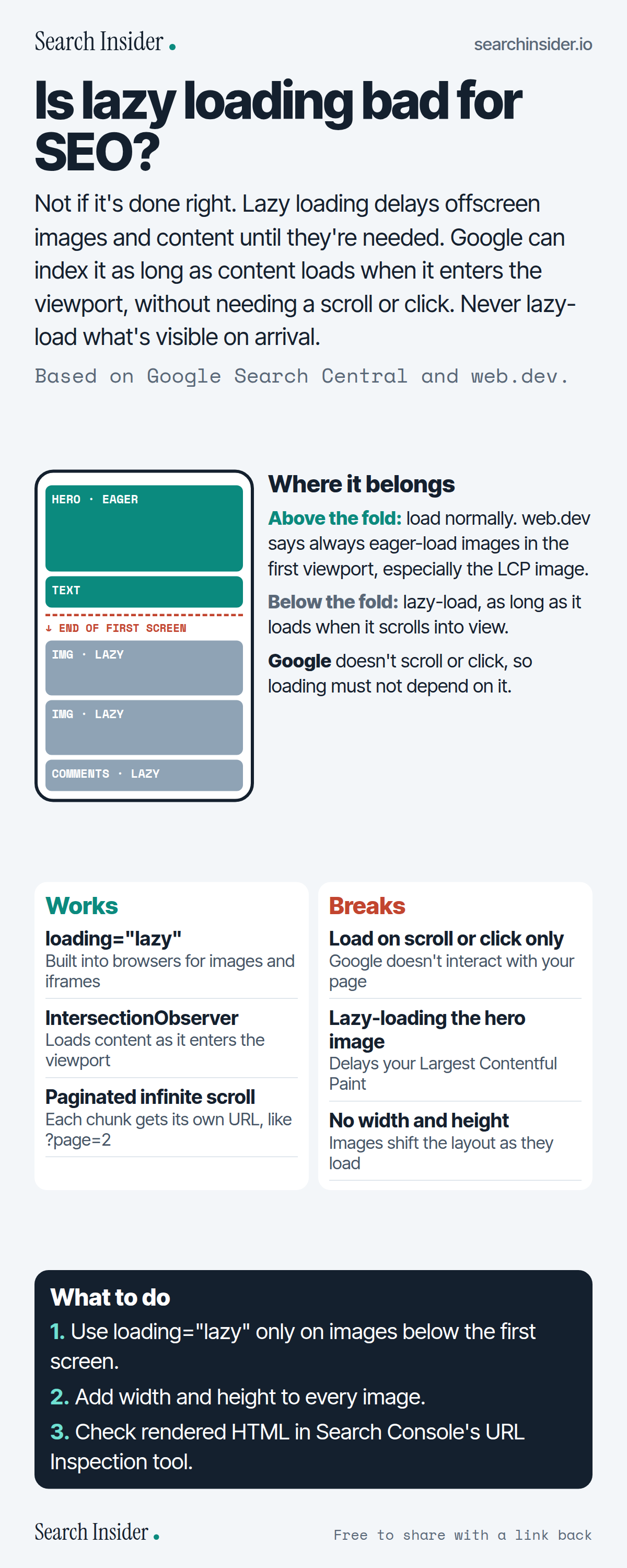
Lazy loading infographic: a phone diagram showing eager-loaded hero and text above the end of the first screen and lazy-loaded images and comments below it, a works versus breaks comparison, and three steps on what to do.

Oct 6, 2026

Is Lazy Loading Bad for SEO? (Infographic)

Is lazy loading bad for SEO? How to lazy-load images and content so Google can index them, which mistakes break it, and how to check in Search Console.

Embed this infographic

Every infographic here is free to republish, on any site, with a link back to the study it comes from. Paste this code and the credit is done for you.

<a href="https://searchinsider.io/infographics/lazy-loading"><img src="https://searchinsider.io/research/lazy-loading/lazy-loading-infographic.png" alt="Lazy loading infographic: a phone diagram showing eager-loaded hero and text above the end of the first screen and lazy-loaded images and comments below it, a works versus breaks comparison, and three steps on what to do." style="max-width:680px;width:100%;height:auto;" /></a><p>Source: <a href="https://searchinsider.io/infographics/lazy-loading">Lazy loading infographic</a> by Search Insider.</p>

Is lazy loading bad for SEO?

The short answer: Not if it's done right. Lazy loading delays offscreen images and content until they're needed. Google can index it as long as content loads when it enters the viewport, without needing a scroll or click. Never lazy-load what's visible on arrival.

Based on Google Search Central and web.dev.

What it shows

  • Google says lazy loading must load all relevant content whenever it's visible in the viewport.
  • Google Search doesn't interact with your page, so loading can't depend on scrolling or clicking.
  • Browser-native lazy loading for images and iframes and IntersectionObserver are recommended methods.
  • web.dev says always eager-load images in the first viewport, especially the LCP image.
  • Width and height attributes let the browser reserve space and avoid layout shifts.
  • For infinite scroll, give each chunk a unique, persistent URL with absolute page numbers.

What to do

  • Images: Lazy-load only below the first screen.
  • Layout: Add width and height to every image.
  • Testing: Check rendered HTML in URL Inspection.

The walkthrough

Does lazy loading hurt SEO?

Not when it's implemented correctly. Google says to make sure lazy loading loads all relevant content whenever it's visible in the viewport [1].

Which lazy-loading methods does Google recommend?

Browser built-in lazy loading for images and iframes, the IntersectionObserver API, or JavaScript libraries that load content when it enters the viewport [1]. These don't rely on scrolling or clicking, which matters because Google Search doesn't interact with your page [1].

Should you lazy-load images above the fold?

No. web.dev advises always eager-loading images visible in the first viewport, especially LCP images [2]. Google also warns that lazy-loading immediately visible content can slow how fast a page displays [1].

Why add width and height to lazy-loaded images?

Without them, the browser doesn't know an image's size until it loads, so the layout shifts; width and height let it reserve space [2].

How should infinite scroll work for SEO?

Load content in chunks that each have a unique, persistent URL, use absolute page numbers like ?page=12, and link the pages in sequence [1].

How do you check lazy loading works for Google?

Use the URL Inspection tool in Search Console. If your image or video URLs appear in the src attribute in the rendered HTML, the setup works [1].

More digital marketing infographics

404 errors infographic: a 404 banner with Google's view that 404s are normal, which status to return in four cases, three facts on how Google treats 4xx and soft 404s, a checklist for a good custom 404 page, and three steps on what to do.

SEO · Oct 6, 2026

Do 404 errors hurt your SEO?

Do 404 errors hurt SEO? How Google treats 404s, why soft 404s are the real problem, which status code to return, and how to build a good custom 404 page.

Embed code
<a href="https://searchinsider.io/infographics/404-errors"><img src="https://searchinsider.io/research/404-errors/404-errors-infographic.png" alt="404 errors infographic: a 404 banner with Google's view that 404s are normal, which status to return in four cases, three facts on how Google treats 4xx and soft 404s, a checklist for a good custom 404 page, and three steps on what to do." style="max-width:680px;width:100%;height:auto;" /></a><p>Source: <a href="https://searchinsider.io/infographics/404-errors">404 errors infographic</a> by Search Insider.</p>

AI-generated content infographic: a quality not method banner, a split of fine uses versus uses against Google's rules, a pre-publish checklist (accuracy, metadata, who, how, why), a Merchant Center note on labeling AI images and product data, and three steps on what to do.

AI search · Oct 6, 2026

Does Google penalize AI-generated content?

Google's stance on AI-generated content: quality over production method, what breaks the scaled content abuse policy, and a checklist before publishing AI-assisted content.

Embed code
<a href="https://searchinsider.io/infographics/ai-generated-content"><img src="https://searchinsider.io/research/ai-generated-content/ai-generated-content-infographic.png" alt="AI-generated content infographic: a quality not method banner, a split of fine uses versus uses against Google's rules, a pre-publish checklist (accuracy, metadata, who, how, why), a Merchant Center note on labeling AI images and product data, and three steps on what to do." style="max-width:680px;width:100%;height:auto;" /></a><p>Source: <a href="https://searchinsider.io/infographics/ai-generated-content">AI-generated content infographic</a> by Search Insider.</p>

Anchor text infographic: an example link with the anchor text underlined, four vague or stuffed anchors swapped for descriptive ones, four rules on image links, internal links, length and keyword stuffing, a note on Google's link spam examples, and three steps on what to do.

SEO · Oct 6, 2026

What is anchor text, and what should it say?

What anchor text is, what Google says it should say, good and bad examples, image link alt text, and which anchor practices Google lists as link spam.

Embed code
<a href="https://searchinsider.io/infographics/anchor-text"><img src="https://searchinsider.io/research/anchor-text/anchor-text-infographic.png" alt="Anchor text infographic: an example link with the anchor text underlined, four vague or stuffed anchors swapped for descriptive ones, four rules on image links, internal links, length and keyword stuffing, a note on Google's link spam examples, and three steps on what to do." style="max-width:680px;width:100%;height:auto;" /></a><p>Source: <a href="https://searchinsider.io/infographics/anchor-text">Anchor text infographic</a> by Search Insider.</p>


