
Skip to content
← SEO Infographics
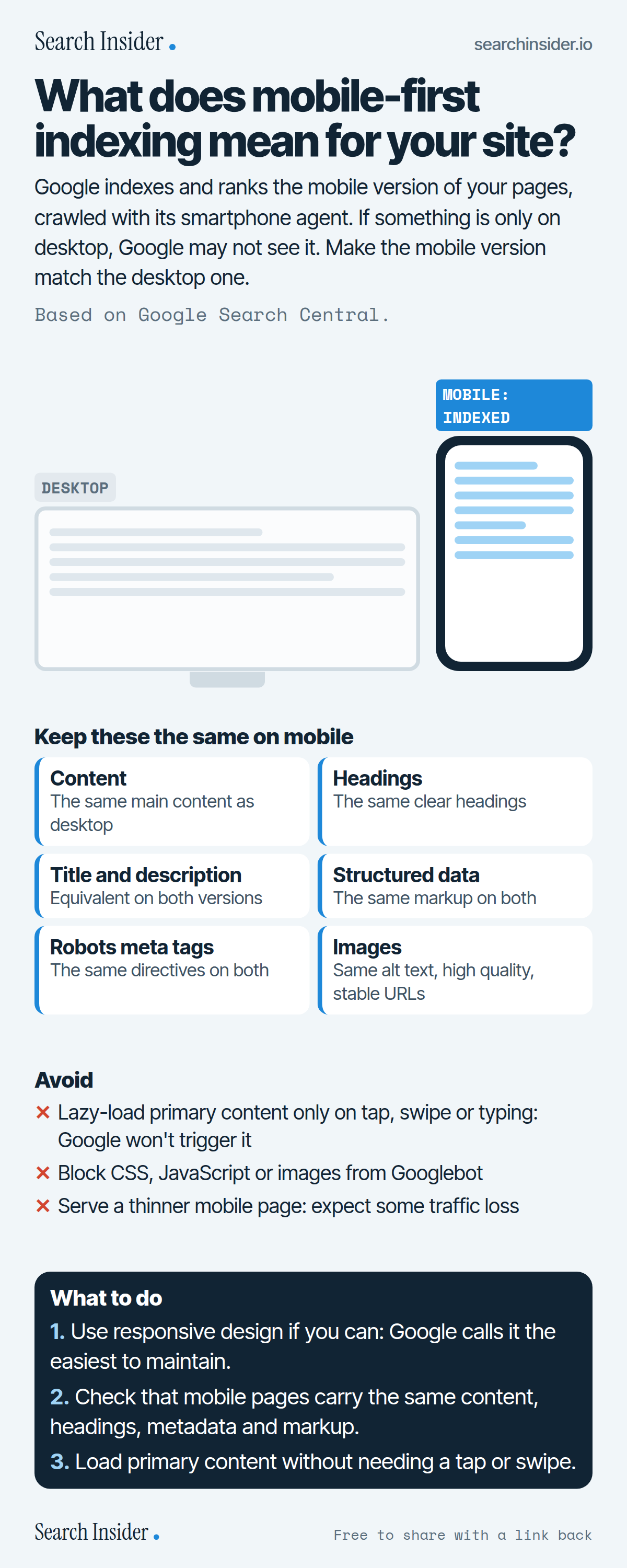
Mobile-first indexing infographic: a desktop and a phone with the phone labeled as indexed, six things to keep the same on mobile (content, headings, title and description, structured data, robots meta tags, images), three things to avoid, and three steps on what to do.

Oct 5, 2026

Mobile-First Indexing: What It Means (Infographic)

What mobile-first indexing means: Google indexes your mobile pages, so content, headings, metadata, structured data and images need to match desktop.

Embed this infographic

Every infographic here is free to republish, on any site, with a link back to the study it comes from. Paste this code and the credit is done for you.

<a href="https://searchinsider.io/infographics/mobile-first-indexing"><img src="https://searchinsider.io/research/mobile-first-indexing/mobile-first-indexing-infographic.png" alt="Mobile-first indexing infographic: a desktop and a phone with the phone labeled as indexed, six things to keep the same on mobile (content, headings, title and description, structured data, robots meta tags, images), three things to avoid, and three steps on what to do." style="max-width:680px;width:100%;height:auto;" /></a><p>Source: <a href="https://searchinsider.io/infographics/mobile-first-indexing">Mobile-first indexing infographic</a> by Search Insider.</p>

What does mobile-first indexing mean for your site?

The short answer: Google indexes and ranks the mobile version of your pages, crawled with its smartphone agent. If something is only on desktop, Google may not see it. Make the mobile version match the desktop one.

Based on Google Search Central.

What it shows

  • Google uses the mobile version of a site's content, crawled with the smartphone agent, for indexing and ranking.
  • Google recommends responsive design as the easiest to implement and maintain.
  • Mobile pages should have the same content, headings, title and meta description, structured data and robots meta tags as desktop.
  • Google won't load content that needs a tap, swipe or typing to appear.
  • Let Google crawl CSS, JavaScript and images.
  • If the mobile site has less content, expect some traffic loss.

What to do

  • Design: Use responsive design if you can.
  • Parity: Match content, headings, metadata and markup.
  • Loading: Don't hide primary content behind a tap or swipe.

The walkthrough

What is mobile-first indexing?

Google uses the mobile version of a site's content, crawled with the smartphone agent, for indexing and ranking [1]. Google says the move to mobile-first indexing was complete in 2023, and that content not accessible on a mobile device at all would no longer be indexable after July 5, 2024, as reported by Search Engine Land [2][3].

Which mobile setup does Google recommend?

There are three configurations: responsive design (same HTML on the same URL), dynamic serving (same URL, different HTML by device) and separate URLs [1]. Google recommends responsive design because it's the easiest to implement and maintain [1].

What has to match between mobile and desktop?

Google says the mobile site should contain the same content as desktop, use the same clear headings, have equivalent title elements and meta descriptions, carry the same structured data and use the same robots meta tags [1]. Images should be high quality with the same alt text and stable URLs [1].

Does lazy loading affect mobile-first indexing?

It can. Don't lazy-load primary content upon user interaction: Google won't load content that requires swiping, clicking or typing [1].

What happens if your mobile site has less content?

Google indexes the mobile version, so if it has less content than desktop, you can expect some traffic loss [1]. Also let Googlebot crawl your CSS, JavaScript and images rather than blocking them [1].

More digital marketing infographics

404 errors infographic: a 404 banner with Google's view that 404s are normal, which status to return in four cases, three facts on how Google treats 4xx and soft 404s, a checklist for a good custom 404 page, and three steps on what to do.

SEO · Oct 6, 2026

Do 404 errors hurt your SEO?

Do 404 errors hurt SEO? How Google treats 404s, why soft 404s are the real problem, which status code to return, and how to build a good custom 404 page.

Embed code
<a href="https://searchinsider.io/infographics/404-errors"><img src="https://searchinsider.io/research/404-errors/404-errors-infographic.png" alt="404 errors infographic: a 404 banner with Google's view that 404s are normal, which status to return in four cases, three facts on how Google treats 4xx and soft 404s, a checklist for a good custom 404 page, and three steps on what to do." style="max-width:680px;width:100%;height:auto;" /></a><p>Source: <a href="https://searchinsider.io/infographics/404-errors">404 errors infographic</a> by Search Insider.</p>

AI-generated content infographic: a quality not method banner, a split of fine uses versus uses against Google's rules, a pre-publish checklist (accuracy, metadata, who, how, why), a Merchant Center note on labeling AI images and product data, and three steps on what to do.

AI search · Oct 6, 2026

Does Google penalize AI-generated content?

Google's stance on AI-generated content: quality over production method, what breaks the scaled content abuse policy, and a checklist before publishing AI-assisted content.

Embed code
<a href="https://searchinsider.io/infographics/ai-generated-content"><img src="https://searchinsider.io/research/ai-generated-content/ai-generated-content-infographic.png" alt="AI-generated content infographic: a quality not method banner, a split of fine uses versus uses against Google's rules, a pre-publish checklist (accuracy, metadata, who, how, why), a Merchant Center note on labeling AI images and product data, and three steps on what to do." style="max-width:680px;width:100%;height:auto;" /></a><p>Source: <a href="https://searchinsider.io/infographics/ai-generated-content">AI-generated content infographic</a> by Search Insider.</p>

Anchor text infographic: an example link with the anchor text underlined, four vague or stuffed anchors swapped for descriptive ones, four rules on image links, internal links, length and keyword stuffing, a note on Google's link spam examples, and three steps on what to do.

SEO · Oct 6, 2026

What is anchor text, and what should it say?

What anchor text is, what Google says it should say, good and bad examples, image link alt text, and which anchor practices Google lists as link spam.

Embed code
<a href="https://searchinsider.io/infographics/anchor-text"><img src="https://searchinsider.io/research/anchor-text/anchor-text-infographic.png" alt="Anchor text infographic: an example link with the anchor text underlined, four vague or stuffed anchors swapped for descriptive ones, four rules on image links, internal links, length and keyword stuffing, a note on Google's link spam examples, and three steps on what to do." style="max-width:680px;width:100%;height:auto;" /></a><p>Source: <a href="https://searchinsider.io/infographics/anchor-text">Anchor text infographic</a> by Search Insider.</p>


