
Skip to content
← SEO Infographics
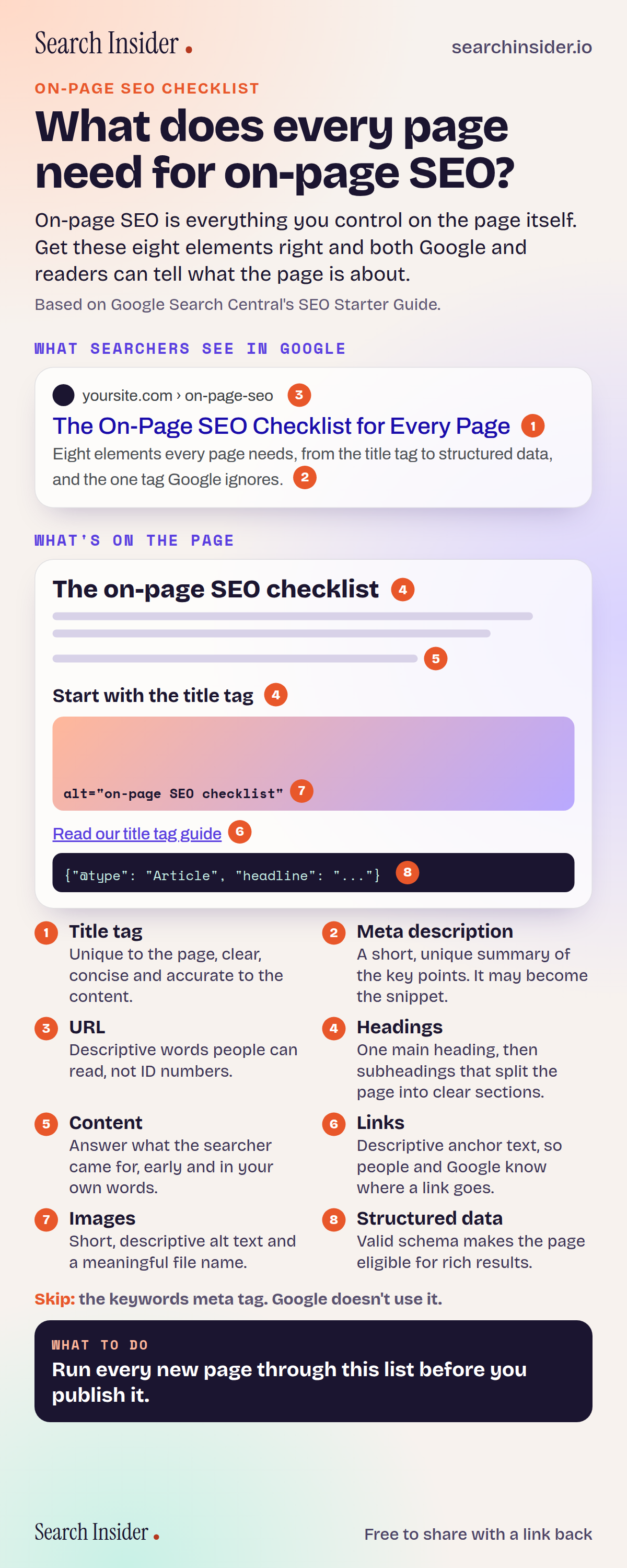
On-page SEO checklist infographic: what does every page need for on-page SEO? A Google result showing the title tag, URL and meta description, and a page showing headings, content, links, image alt text and structured data, numbered 1 to 8.

Oct 4, 2026

On-Page SEO Checklist Infographic

The eight on-page SEO elements every page needs, from the title tag to structured data, shown where they appear in Google and on the page.

Embed this infographic

Every infographic here is free to republish, on any site, with a link back to the study it comes from. Paste this code and the credit is done for you.

<a href="https://searchinsider.io/infographics/on-page-seo"><img src="https://searchinsider.io/research/on-page-seo/on-page-seo-infographic.png" alt="On-page SEO checklist infographic: what does every page need for on-page SEO? A Google result showing the title tag, URL and meta description, and a page showing headings, content, links, image alt text and structured data, numbered 1 to 8." style="max-width:680px;width:100%;height:auto;" /></a><p>Source: <a href="https://searchinsider.io/infographics/on-page-seo">On-page SEO checklist infographic</a> by Search Insider.</p>

What does every page need for on-page SEO?

The short answer: On-page SEO is everything you control on the page itself. Get these eight elements right and both Google and readers can tell what the page is about.

Based on Google Search Central's SEO Starter Guide.

What it shows

  • 1. Title tag: unique to the page, clear, concise and accurate to the content.
  • 2. Meta description: a short, unique summary of the key points. It may become the snippet.
  • 3. URL: descriptive words people can read, not ID numbers.
  • 4. Headings: one main heading, then subheadings that split the page into clear sections.
  • 5. Content: answer what the searcher came for, early and in your own words.
  • 6. Links: descriptive anchor text, so people and Google know where a link goes.
  • 7. Images: short, descriptive alt text and a meaningful file name.
  • 8. Structured data: valid schema makes the page eligible for rich results.
  • Skip the keywords meta tag. Google doesn't use it.

What to do

  • Before you publish any page: Run it through all eight elements on this list.

The walkthrough

What is on-page SEO?

On-page SEO is everything you control on the page itself: its title tag, meta description, URL, headings, content, links, images and structured data. These elements tell Google what the page is about and shape how it appears in search results. Off-page SEO, by contrast, covers signals from elsewhere, such as links from other sites.

What makes a good title tag?

A good title tag is unique to the page, clear and concise, and describes what the page contains [1]. Google often uses it for the clickable headline in search results, so lead with the topic the page covers and keep it readable for a person scanning a list of results.

Does the meta description affect rankings?

The meta description is a short summary of the page that Google may show as the snippet under the headline [1]. Google's guidance is to make it short, unique to that page and focused on the most relevant points [1]. Treat it as the pitch that earns the click rather than a place to repeat keywords.

What should a URL look like for SEO?

Use descriptive words in the URL that would be useful to a person reading it, rather than ID numbers or random strings [1]. Grouping similar pages in the same directory also helps people and Google understand how the site fits together [1].

Do headings need to be in a strict order?

Use headings to break the page into clear sections, with one main heading for the page topic. A logical order helps screen reader users, but Google's guidance says it does not penalize headings that are out of order [1].

How should you write links and image alt text?

Link text should describe the page it points to, so people and Google can tell what they will find there [1]. Image alt text should be short but descriptive, explaining how the image relates to the content around it [1], and the file name should describe the image too.

What does structured data do?

Structured data is code, usually schema.org markup, that labels what a page contains, such as an article, product or recipe. Valid structured data can make a page eligible for special features in Google's results [1]. Eligibility is not a guarantee that Google will show them.

Do you still need a keywords meta tag?

No. Google does not use the keywords meta tag in its ranking [1], so time spent on it is better spent on the title, the content and the links.

More digital marketing infographics

404 errors infographic: a 404 banner with Google's view that 404s are normal, which status to return in four cases, three facts on how Google treats 4xx and soft 404s, a checklist for a good custom 404 page, and three steps on what to do.

SEO · Oct 6, 2026

Do 404 errors hurt your SEO?

Do 404 errors hurt SEO? How Google treats 404s, why soft 404s are the real problem, which status code to return, and how to build a good custom 404 page.

Embed code
<a href="https://searchinsider.io/infographics/404-errors"><img src="https://searchinsider.io/research/404-errors/404-errors-infographic.png" alt="404 errors infographic: a 404 banner with Google's view that 404s are normal, which status to return in four cases, three facts on how Google treats 4xx and soft 404s, a checklist for a good custom 404 page, and three steps on what to do." style="max-width:680px;width:100%;height:auto;" /></a><p>Source: <a href="https://searchinsider.io/infographics/404-errors">404 errors infographic</a> by Search Insider.</p>

AI-generated content infographic: a quality not method banner, a split of fine uses versus uses against Google's rules, a pre-publish checklist (accuracy, metadata, who, how, why), a Merchant Center note on labeling AI images and product data, and three steps on what to do.

AI search · Oct 6, 2026

Does Google penalize AI-generated content?

Google's stance on AI-generated content: quality over production method, what breaks the scaled content abuse policy, and a checklist before publishing AI-assisted content.

Embed code
<a href="https://searchinsider.io/infographics/ai-generated-content"><img src="https://searchinsider.io/research/ai-generated-content/ai-generated-content-infographic.png" alt="AI-generated content infographic: a quality not method banner, a split of fine uses versus uses against Google's rules, a pre-publish checklist (accuracy, metadata, who, how, why), a Merchant Center note on labeling AI images and product data, and three steps on what to do." style="max-width:680px;width:100%;height:auto;" /></a><p>Source: <a href="https://searchinsider.io/infographics/ai-generated-content">AI-generated content infographic</a> by Search Insider.</p>

Anchor text infographic: an example link with the anchor text underlined, four vague or stuffed anchors swapped for descriptive ones, four rules on image links, internal links, length and keyword stuffing, a note on Google's link spam examples, and three steps on what to do.

SEO · Oct 6, 2026

What is anchor text, and what should it say?

What anchor text is, what Google says it should say, good and bad examples, image link alt text, and which anchor practices Google lists as link spam.

Embed code
<a href="https://searchinsider.io/infographics/anchor-text"><img src="https://searchinsider.io/research/anchor-text/anchor-text-infographic.png" alt="Anchor text infographic: an example link with the anchor text underlined, four vague or stuffed anchors swapped for descriptive ones, four rules on image links, internal links, length and keyword stuffing, a note on Google's link spam examples, and three steps on what to do." style="max-width:680px;width:100%;height:auto;" /></a><p>Source: <a href="https://searchinsider.io/infographics/anchor-text">Anchor text infographic</a> by Search Insider.</p>


