
Skip to content
← SEO Infographics
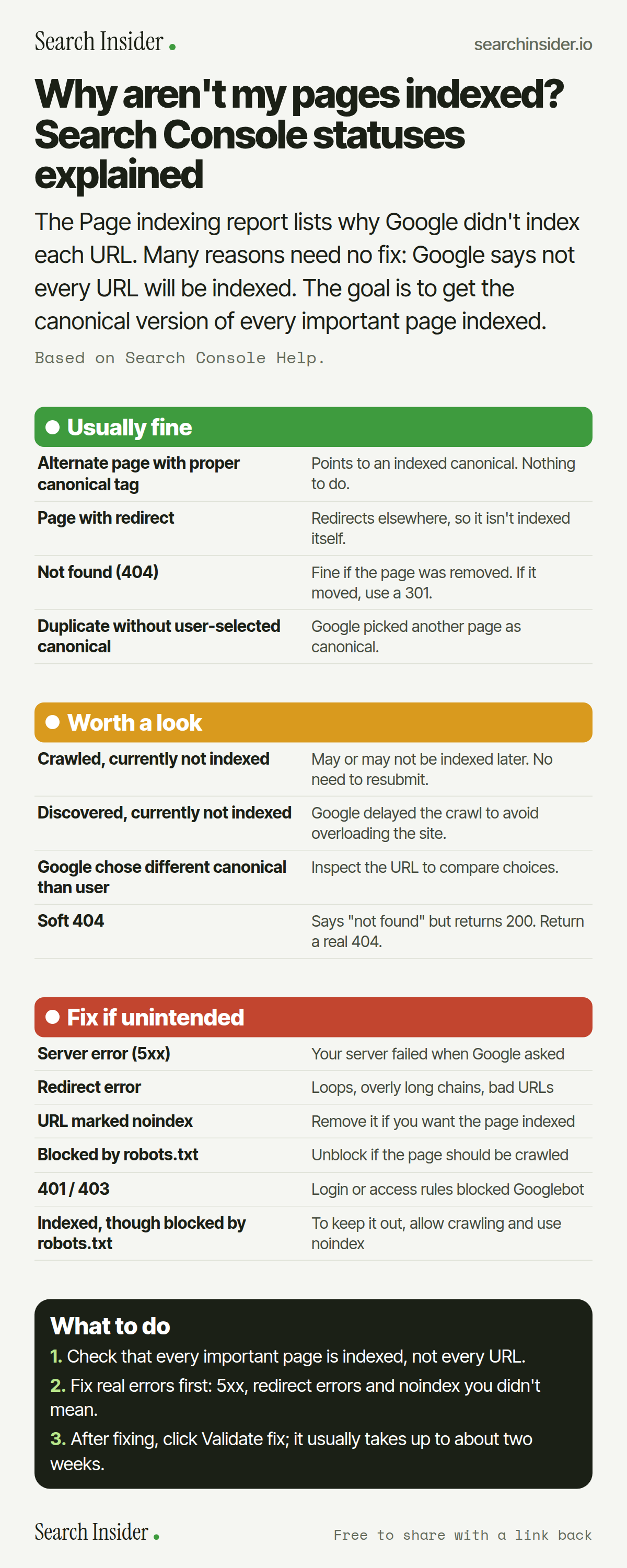
Page indexing statuses infographic: Search Console reasons grouped into usually fine (alternate page with canonical, page with redirect, 404, duplicate), worth a look (crawled or discovered not indexed, Google chose different canonical, soft 404) and fix if unintended (5xx, redirect error, noindex, robots.txt, 401 and 403, indexed though blocked), and three steps on what to do.

Oct 6, 2026

Why Pages Aren't Indexed: Search Console Statuses (Infographic)

Every Page indexing status in Google Search Console explained: which are usually fine, which are worth a look, and which to fix, plus how Validate fix works.

Embed this infographic

Every infographic here is free to republish, on any site, with a link back to the study it comes from. Paste this code and the credit is done for you.

<a href="https://searchinsider.io/infographics/page-indexing-statuses"><img src="https://searchinsider.io/research/page-indexing-statuses/page-indexing-statuses-infographic.png" alt="Page indexing statuses infographic: Search Console reasons grouped into usually fine (alternate page with canonical, page with redirect, 404, duplicate), worth a look (crawled or discovered not indexed, Google chose different canonical, soft 404) and fix if unintended (5xx, redirect error, noindex, robots.txt, 401 and 403, indexed though blocked), and three steps on what to do." style="max-width:680px;width:100%;height:auto;" /></a><p>Source: <a href="https://searchinsider.io/infographics/page-indexing-statuses">Page indexing statuses infographic</a> by Search Insider.</p>

Why aren't my pages indexed? Search Console statuses explained

The short answer: The Page indexing report lists why Google didn't index each URL. Many reasons need no fix: Google says not every URL will be indexed. The goal is to get the canonical version of every important page indexed.

Based on Search Console Help.

What it shows

  • Google says not to expect every URL on a site to be indexed; the goal is the canonical version of every important page.
  • Alternate page with proper canonical tag needs no action.
  • 404s aren't necessarily a problem if a page was removed without a replacement.
  • Crawled, currently not indexed pages may or may not be indexed later, with no need to resubmit.
  • Discovered, currently not indexed usually means Google rescheduled the crawl to avoid overloading the site.
  • Validate fix typically takes up to about two weeks.

What to do

  • Goal: Get every important page's canonical indexed.
  • Priority: Fix 5xx, redirect errors and unintended noindex first.
  • After fixing: Click Validate fix and wait up to two weeks.

The walkthrough

What does the Page indexing report show?

It shows which pages Google can find and index on your site and the reasons others weren't indexed [1]. Google says not to expect every URL to be indexed, because some are duplicates or lack meaningful information; the goal is to get the canonical version of every important page indexed [1].

Which Page indexing statuses need no action?

Alternate page with proper canonical tag means the page correctly points to an indexed canonical, so there's nothing to do [1]. Page with redirect is a non-canonical URL that redirects elsewhere [1]. Not found (404) isn't necessarily a problem if the page was removed without a replacement; if it moved, use a 301 [1].

What does Crawled, currently not indexed mean?

Google crawled the page but didn't index it. It may or may not be indexed in the future, and there's no need to resubmit the URL [1].

What does Discovered, currently not indexed mean?

Typically Google wanted to crawl the URL but expected that to overload the site, so it rescheduled the crawl; that's why the last crawl date is empty [1].

What is a soft 404 in Search Console?

A soft 404 is a page that shows a user-friendly not found message but doesn't return a 404 status code [1]. Return a real 404 for pages that don't exist.

Which indexing errors should you fix?

Server errors (5xx), redirect errors such as loops or overly long chains, an unintended noindex, an unintended robots.txt block, and 401 or 403 responses that block Googlebot [1]. Indexed, though blocked by robots.txt means the page was indexed because others link to it; to keep it out of results, allow crawling and use noindex instead [1].

How does Validate fix work?

Fix all instances of the issue, open the issue details page and click Validate fix, then don't click it again until validation succeeds or fails [1]. Validation typically takes up to about two weeks [1].

More digital marketing infographics

404 errors infographic: a 404 banner with Google's view that 404s are normal, which status to return in four cases, three facts on how Google treats 4xx and soft 404s, a checklist for a good custom 404 page, and three steps on what to do.

SEO · Oct 6, 2026

Do 404 errors hurt your SEO?

Do 404 errors hurt SEO? How Google treats 404s, why soft 404s are the real problem, which status code to return, and how to build a good custom 404 page.

Embed code
<a href="https://searchinsider.io/infographics/404-errors"><img src="https://searchinsider.io/research/404-errors/404-errors-infographic.png" alt="404 errors infographic: a 404 banner with Google's view that 404s are normal, which status to return in four cases, three facts on how Google treats 4xx and soft 404s, a checklist for a good custom 404 page, and three steps on what to do." style="max-width:680px;width:100%;height:auto;" /></a><p>Source: <a href="https://searchinsider.io/infographics/404-errors">404 errors infographic</a> by Search Insider.</p>

AI-generated content infographic: a quality not method banner, a split of fine uses versus uses against Google's rules, a pre-publish checklist (accuracy, metadata, who, how, why), a Merchant Center note on labeling AI images and product data, and three steps on what to do.

AI search · Oct 6, 2026

Does Google penalize AI-generated content?

Google's stance on AI-generated content: quality over production method, what breaks the scaled content abuse policy, and a checklist before publishing AI-assisted content.

Embed code
<a href="https://searchinsider.io/infographics/ai-generated-content"><img src="https://searchinsider.io/research/ai-generated-content/ai-generated-content-infographic.png" alt="AI-generated content infographic: a quality not method banner, a split of fine uses versus uses against Google's rules, a pre-publish checklist (accuracy, metadata, who, how, why), a Merchant Center note on labeling AI images and product data, and three steps on what to do." style="max-width:680px;width:100%;height:auto;" /></a><p>Source: <a href="https://searchinsider.io/infographics/ai-generated-content">AI-generated content infographic</a> by Search Insider.</p>

Anchor text infographic: an example link with the anchor text underlined, four vague or stuffed anchors swapped for descriptive ones, four rules on image links, internal links, length and keyword stuffing, a note on Google's link spam examples, and three steps on what to do.

SEO · Oct 6, 2026

What is anchor text, and what should it say?

What anchor text is, what Google says it should say, good and bad examples, image link alt text, and which anchor practices Google lists as link spam.

Embed code
<a href="https://searchinsider.io/infographics/anchor-text"><img src="https://searchinsider.io/research/anchor-text/anchor-text-infographic.png" alt="Anchor text infographic: an example link with the anchor text underlined, four vague or stuffed anchors swapped for descriptive ones, four rules on image links, internal links, length and keyword stuffing, a note on Google's link spam examples, and three steps on what to do." style="max-width:680px;width:100%;height:auto;" /></a><p>Source: <a href="https://searchinsider.io/infographics/anchor-text">Anchor text infographic</a> by Search Insider.</p>


