
Skip to content
← PPC Infographics
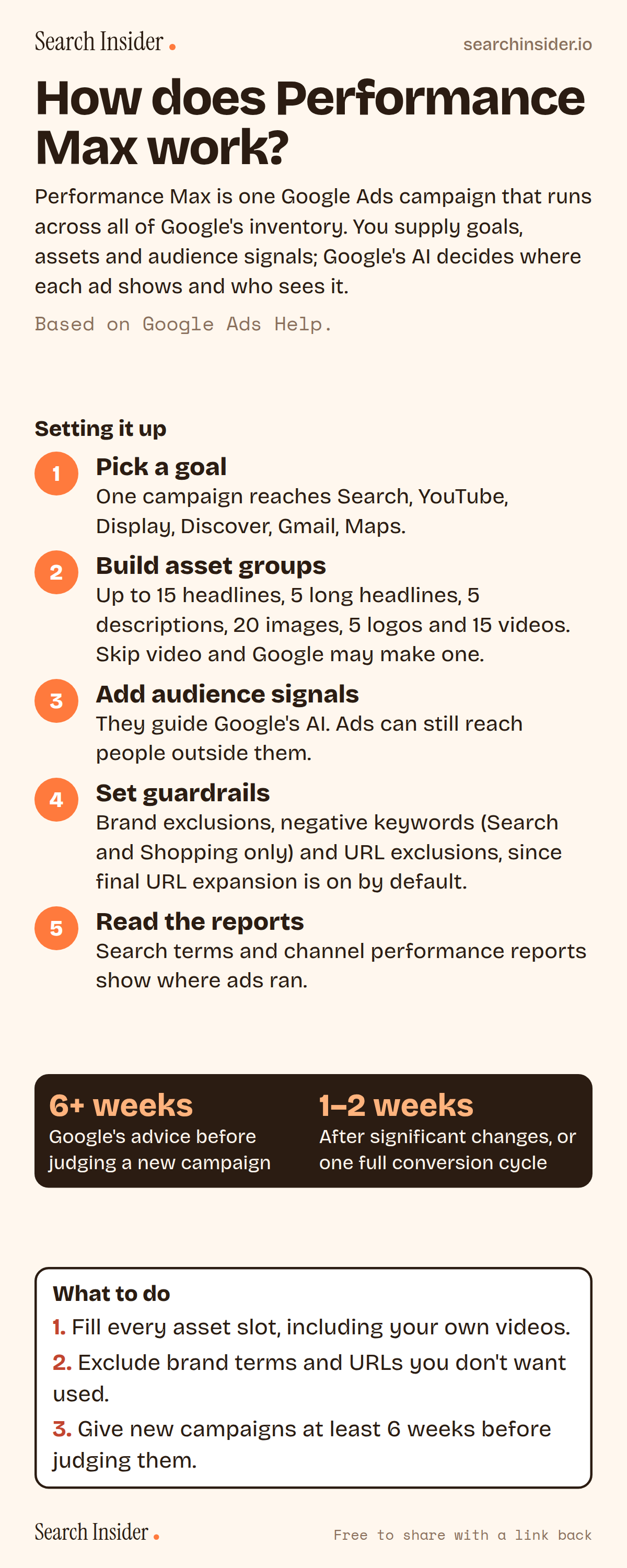
Performance Max infographic: five setup steps (pick a goal, build asset groups, add audience signals, set guardrails, read the reports), Google's 6-week and 1 to 2 week learning guidance, and three steps on what to do.

Oct 5, 2026

How Performance Max Works in Google Ads (Infographic)

How Google Ads Performance Max campaigns work: the channels they cover, asset group limits, audience signals, brand exclusions, negative keywords, URL expansion and how long to wait.

Embed this infographic

Every infographic here is free to republish, on any site, with a link back to the study it comes from. Paste this code and the credit is done for you.

<a href="https://searchinsider.io/infographics/performance-max"><img src="https://searchinsider.io/research/performance-max/performance-max-infographic.png" alt="Performance Max infographic: five setup steps (pick a goal, build asset groups, add audience signals, set guardrails, read the reports), Google's 6-week and 1 to 2 week learning guidance, and three steps on what to do." style="max-width:680px;width:100%;height:auto;" /></a><p>Source: <a href="https://searchinsider.io/infographics/performance-max">Performance Max infographic</a> by Search Insider.</p>

How does Performance Max work?

The short answer: Performance Max is one Google Ads campaign that runs across all of Google's inventory. You supply goals, assets and audience signals; Google's AI decides where each ad shows and who sees it.

Based on Google Ads Help.

What it shows

  • Performance Max runs across YouTube, Display, Search, Discover, Gmail and Maps from one campaign.
  • Asset groups take up to 15 headlines, 5 long headlines, 5 descriptions, 20 images, 5 logos and 15 videos.
  • If you don't add a video, one may be auto-generated.
  • Audience signals are suggestions; ads can reach people outside them.
  • Brand exclusions cover Search, Shopping and YouTube search inventory; negative keywords cover Search and Shopping only.
  • Final URL expansion is on by default.
  • Google advises running new campaigns at least 6 weeks before judging them.

What to do

  • Assets: Fill every slot, including your own videos.
  • Guardrails: Exclude brand terms and URLs you don't want used.
  • Patience: Give new campaigns 6+ weeks.

The walkthrough

What is Performance Max?

Performance Max is a goal-based campaign type that gives access to all Google Ads inventory from a single campaign, covering YouTube, Display, Search, Discover, Gmail and Maps [1]. Creative is organized into asset groups: collections of images, text, logos and videos around a theme [1].

What assets does Performance Max need?

Each asset group can take 3 to 15 headlines of up to 30 characters (at least one of 15 characters or fewer), 1 to 5 long headlines and 2 to 5 descriptions of up to 90 characters, up to 20 images including at least 4 landscape and 4 square, up to 5 logos and up to 15 videos of 10 to 60 seconds [2]. If you don't add a video, one or more may be auto-generated [2].

Are Performance Max audience signals targeting?

No. Audience signals are suggestions that help Google's AI optimize, and Performance Max may show ads to relevant audiences outside your signals if they're likely to convert [3].

Can you exclude brand terms and keywords in Performance Max?

Brand exclusions apply to Search, Shopping and YouTube search inventory [4]. Negative keywords can be set at campaign or account level and apply to Search and Shopping inventory only [5].

What is final URL expansion?

Final URL expansion is on by default for Performance Max and may replace your final URL with a more relevant landing page from your domain based on search intent [6]. You can exclude specific URLs or set URL rules [6].

Which reports show where Performance Max ads ran?

The search terms report shows the searches that triggered your ads [7], and the channel performance report breaks results out across Search, Display, YouTube, Discover, Maps, Gmail and search partners [8].

How long does Performance Max take to learn?

Google recommends running new campaigns for at least 6 weeks, and allowing 1 to 2 weeks or one full conversion cycle after significant changes [9].

More digital marketing infographics

404 errors infographic: a 404 banner with Google's view that 404s are normal, which status to return in four cases, three facts on how Google treats 4xx and soft 404s, a checklist for a good custom 404 page, and three steps on what to do.

SEO · Oct 6, 2026

Do 404 errors hurt your SEO?

Do 404 errors hurt SEO? How Google treats 404s, why soft 404s are the real problem, which status code to return, and how to build a good custom 404 page.

Embed code
<a href="https://searchinsider.io/infographics/404-errors"><img src="https://searchinsider.io/research/404-errors/404-errors-infographic.png" alt="404 errors infographic: a 404 banner with Google's view that 404s are normal, which status to return in four cases, three facts on how Google treats 4xx and soft 404s, a checklist for a good custom 404 page, and three steps on what to do." style="max-width:680px;width:100%;height:auto;" /></a><p>Source: <a href="https://searchinsider.io/infographics/404-errors">404 errors infographic</a> by Search Insider.</p>

AI-generated content infographic: a quality not method banner, a split of fine uses versus uses against Google's rules, a pre-publish checklist (accuracy, metadata, who, how, why), a Merchant Center note on labeling AI images and product data, and three steps on what to do.

AI search · Oct 6, 2026

Does Google penalize AI-generated content?

Google's stance on AI-generated content: quality over production method, what breaks the scaled content abuse policy, and a checklist before publishing AI-assisted content.

Embed code
<a href="https://searchinsider.io/infographics/ai-generated-content"><img src="https://searchinsider.io/research/ai-generated-content/ai-generated-content-infographic.png" alt="AI-generated content infographic: a quality not method banner, a split of fine uses versus uses against Google's rules, a pre-publish checklist (accuracy, metadata, who, how, why), a Merchant Center note on labeling AI images and product data, and three steps on what to do." style="max-width:680px;width:100%;height:auto;" /></a><p>Source: <a href="https://searchinsider.io/infographics/ai-generated-content">AI-generated content infographic</a> by Search Insider.</p>

Anchor text infographic: an example link with the anchor text underlined, four vague or stuffed anchors swapped for descriptive ones, four rules on image links, internal links, length and keyword stuffing, a note on Google's link spam examples, and three steps on what to do.

SEO · Oct 6, 2026

What is anchor text, and what should it say?

What anchor text is, what Google says it should say, good and bad examples, image link alt text, and which anchor practices Google lists as link spam.

Embed code
<a href="https://searchinsider.io/infographics/anchor-text"><img src="https://searchinsider.io/research/anchor-text/anchor-text-infographic.png" alt="Anchor text infographic: an example link with the anchor text underlined, four vague or stuffed anchors swapped for descriptive ones, four rules on image links, internal links, length and keyword stuffing, a note on Google's link spam examples, and three steps on what to do." style="max-width:680px;width:100%;height:auto;" /></a><p>Source: <a href="https://searchinsider.io/infographics/anchor-text">Anchor text infographic</a> by Search Insider.</p>


