
Skip to content
← PPC Infographics
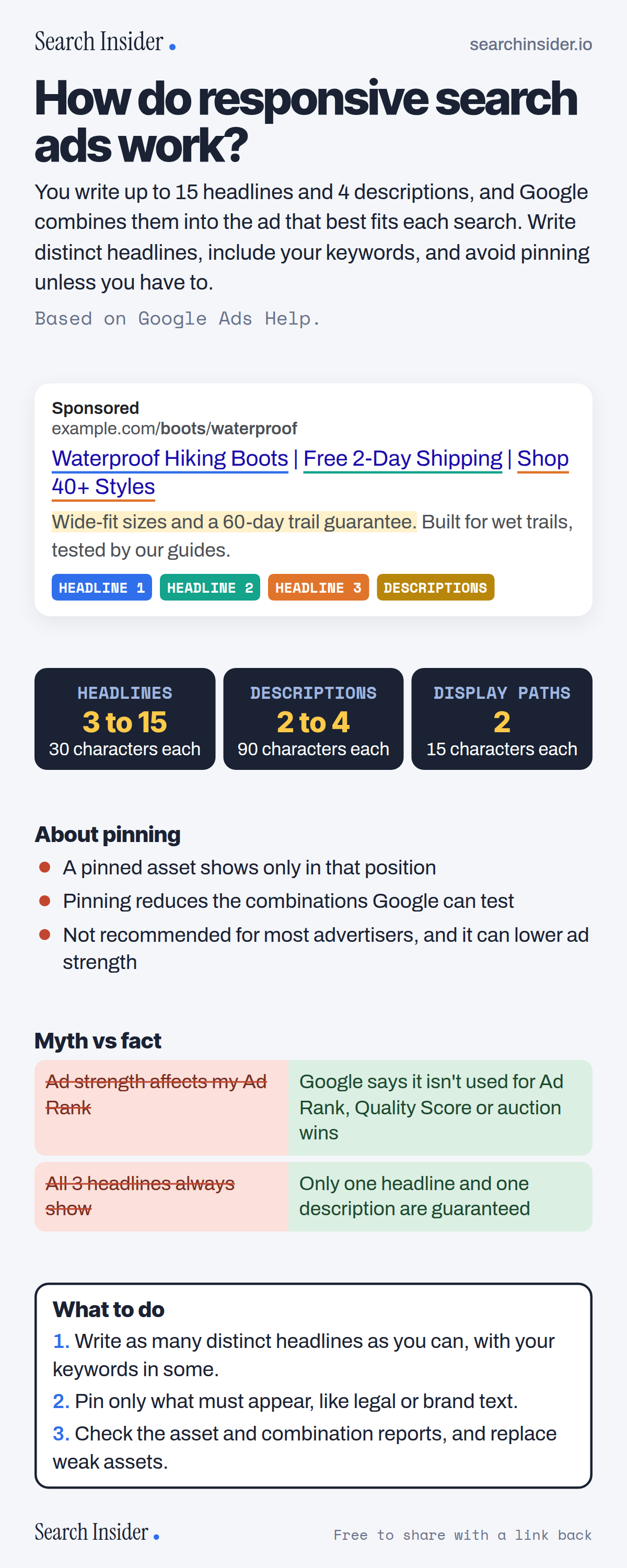
Responsive search ads infographic: an example search ad with headlines and descriptions labeled, limits of 3 to 15 headlines, 2 to 4 descriptions and 2 display paths, notes on pinning, a myth vs fact table about ad strength and headlines, and three steps on what to do.

Oct 5, 2026

Responsive Search Ads Explained (Infographic)

How Google's responsive search ads work: headline and description limits, how combinations are chosen, pinning, ad strength and what it doesn't affect.

Embed this infographic

Every infographic here is free to republish, on any site, with a link back to the study it comes from. Paste this code and the credit is done for you.

<a href="https://searchinsider.io/infographics/responsive-search-ads"><img src="https://searchinsider.io/research/responsive-search-ads/responsive-search-ads-infographic.png" alt="Responsive search ads infographic: an example search ad with headlines and descriptions labeled, limits of 3 to 15 headlines, 2 to 4 descriptions and 2 display paths, notes on pinning, a myth vs fact table about ad strength and headlines, and three steps on what to do." style="max-width:680px;width:100%;height:auto;" /></a><p>Source: <a href="https://searchinsider.io/infographics/responsive-search-ads">Responsive search ads infographic</a> by Search Insider.</p>

How do responsive search ads work?

The short answer: You write up to 15 headlines and 4 descriptions, and Google combines them into the ad that best fits each search. Write distinct headlines, include your keywords, and avoid pinning unless you have to.

Based on Google Ads Help.

What it shows

  • Responsive search ads take 3 to 15 headlines of up to 30 characters and 2 to 4 descriptions of up to 90 characters.
  • Display path fields support up to 15 characters each.
  • Up to 3 headlines can show, but only one headline and one description are guaranteed.
  • Pinning shows an asset only in its pinned position, reduces combinations and isn't recommended for most advertisers.
  • Ad strength rates ads from Poor to Excellent. Google says it isn't used for Ad Rank, Quality Score or auction wins.
  • Google recommends at least one Good or Excellent responsive search ad per ad group.

What to do

  • Writing: Add as many distinct headlines as you can, with keywords in some.
  • Pinning: Pin only legal or brand text that must appear.
  • Reviewing: Check asset and combination reports.

The walkthrough

How many headlines and descriptions can a responsive search ad have?

You need at least 3 headlines and can add up to 15, and at least 2 descriptions with up to 4 [1]. Headlines support up to 30 characters, descriptions up to 90, and display path fields up to 15 each [1].

How does Google choose which headlines to show?

Google mixes your headlines and descriptions into combinations suited to each search [1]. Up to 3 headlines can show in the headline position, and at least one headline and one description are selected; the second and third headlines and second description aren't guaranteed to appear [1].

Should you pin headlines in responsive search ads?

Usually not. Pinning makes an asset show only in that position, reduces the number of combinations that can be matched to a search, isn't recommended for most advertisers and can affect ad strength [1]. Google suggests avoiding it unless necessary [2].

What is ad strength?

Ad strength rates how well your assets follow best practices, from Incomplete and Poor through Average and Good to Excellent [2]. Google says advertisers who improve from Poor to Excellent see 15% more clicks and conversions on average [1].

Does ad strength affect Ad Rank or Quality Score?

No. Google says ad strength doesn't directly influence serving eligibility and isn't used to calculate Ad Rank, Quality Score or auction wins; it's a feedback tool for asset variety [2].

How do you write better responsive search ads?

Include at least one of your keywords in your headlines, write as many unique headlines as you can, and avoid repeating words, phrases or ideas [1][2]. Google recommends having at least one Good or Excellent responsive search ad in each ad group [3].

More digital marketing infographics

404 errors infographic: a 404 banner with Google's view that 404s are normal, which status to return in four cases, three facts on how Google treats 4xx and soft 404s, a checklist for a good custom 404 page, and three steps on what to do.

SEO · Oct 6, 2026

Do 404 errors hurt your SEO?

Do 404 errors hurt SEO? How Google treats 404s, why soft 404s are the real problem, which status code to return, and how to build a good custom 404 page.

Embed code
<a href="https://searchinsider.io/infographics/404-errors"><img src="https://searchinsider.io/research/404-errors/404-errors-infographic.png" alt="404 errors infographic: a 404 banner with Google's view that 404s are normal, which status to return in four cases, three facts on how Google treats 4xx and soft 404s, a checklist for a good custom 404 page, and three steps on what to do." style="max-width:680px;width:100%;height:auto;" /></a><p>Source: <a href="https://searchinsider.io/infographics/404-errors">404 errors infographic</a> by Search Insider.</p>

AI-generated content infographic: a quality not method banner, a split of fine uses versus uses against Google's rules, a pre-publish checklist (accuracy, metadata, who, how, why), a Merchant Center note on labeling AI images and product data, and three steps on what to do.

AI search · Oct 6, 2026

Does Google penalize AI-generated content?

Google's stance on AI-generated content: quality over production method, what breaks the scaled content abuse policy, and a checklist before publishing AI-assisted content.

Embed code
<a href="https://searchinsider.io/infographics/ai-generated-content"><img src="https://searchinsider.io/research/ai-generated-content/ai-generated-content-infographic.png" alt="AI-generated content infographic: a quality not method banner, a split of fine uses versus uses against Google's rules, a pre-publish checklist (accuracy, metadata, who, how, why), a Merchant Center note on labeling AI images and product data, and three steps on what to do." style="max-width:680px;width:100%;height:auto;" /></a><p>Source: <a href="https://searchinsider.io/infographics/ai-generated-content">AI-generated content infographic</a> by Search Insider.</p>

Anchor text infographic: an example link with the anchor text underlined, four vague or stuffed anchors swapped for descriptive ones, four rules on image links, internal links, length and keyword stuffing, a note on Google's link spam examples, and three steps on what to do.

SEO · Oct 6, 2026

What is anchor text, and what should it say?

What anchor text is, what Google says it should say, good and bad examples, image link alt text, and which anchor practices Google lists as link spam.

Embed code
<a href="https://searchinsider.io/infographics/anchor-text"><img src="https://searchinsider.io/research/anchor-text/anchor-text-infographic.png" alt="Anchor text infographic: an example link with the anchor text underlined, four vague or stuffed anchors swapped for descriptive ones, four rules on image links, internal links, length and keyword stuffing, a note on Google's link spam examples, and three steps on what to do." style="max-width:680px;width:100%;height:auto;" /></a><p>Source: <a href="https://searchinsider.io/infographics/anchor-text">Anchor text infographic</a> by Search Insider.</p>


