
Skip to content
← SEO Infographics
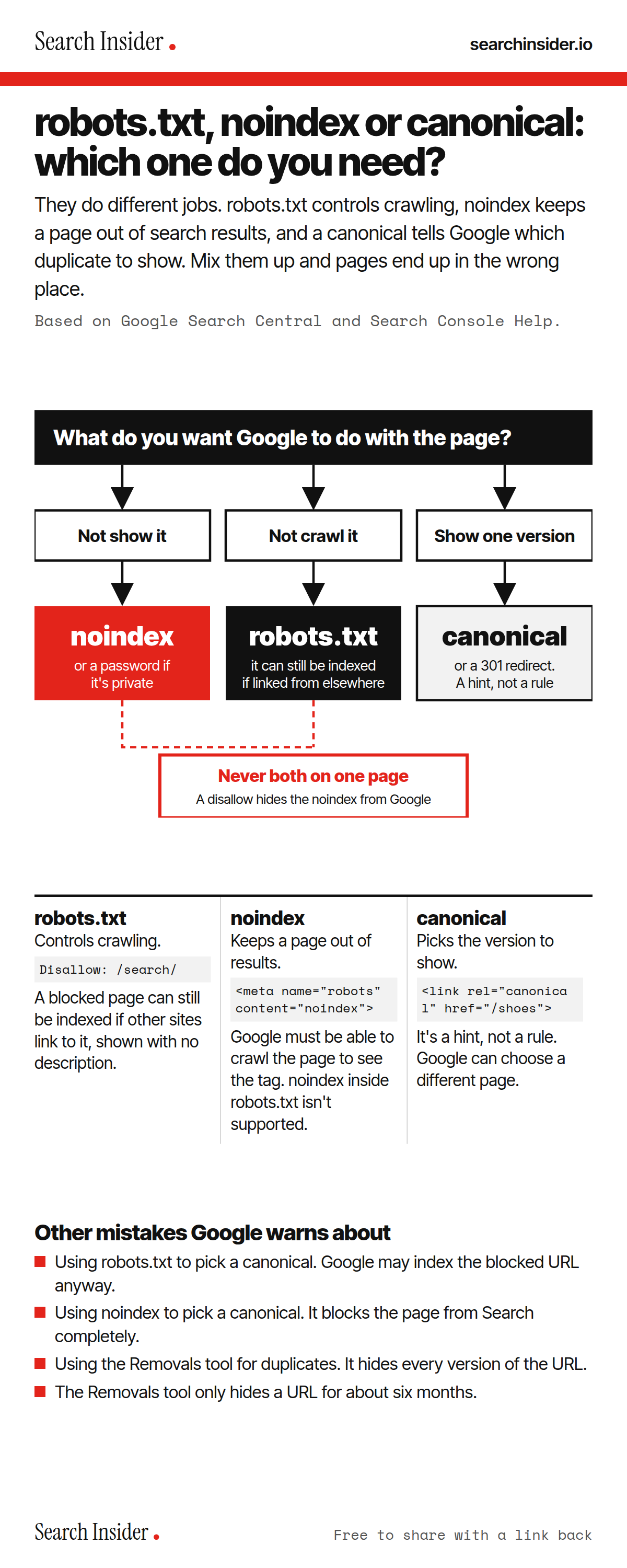
robots.txt vs noindex vs canonical infographic: a red and black flowchart from what you want Google to do with a page to the right tool, a warning never to combine disallow and noindex, a comparison of all three with example code, and other mistakes Google warns about.

Oct 5, 2026

robots.txt vs noindex vs canonical: Which Do You Need?

robots.txt, noindex and canonical compared: what each one controls, which to use, and the mistakes Google warns about when they're mixed up.

Embed this infographic

Every infographic here is free to republish, on any site, with a link back to the study it comes from. Paste this code and the credit is done for you.

<a href="https://searchinsider.io/infographics/robots-txt-vs-noindex-vs-canonical"><img src="https://searchinsider.io/research/robots-txt-vs-noindex-vs-canonical/robots-txt-vs-noindex-vs-canonical-infographic.png" alt="robots.txt vs noindex vs canonical infographic: a red and black flowchart from what you want Google to do with a page to the right tool, a warning never to combine disallow and noindex, a comparison of all three with example code, and other mistakes Google warns about." style="max-width:680px;width:100%;height:auto;" /></a><p>Source: <a href="https://searchinsider.io/infographics/robots-txt-vs-noindex-vs-canonical">robots.txt vs noindex vs canonical infographic</a> by Search Insider.</p>

robots.txt, noindex or canonical: which one do you need?

The short answer: They do different jobs. robots.txt controls crawling, noindex keeps a page out of search results, and a canonical tells Google which duplicate to show. Mix them up and pages end up in the wrong place.

Based on Google Search Central and Search Console Help.

What it shows

  • robots.txt controls crawling, not indexing. A blocked page can still be indexed if linked from elsewhere.
  • noindex keeps a page out of results. Google must be able to crawl the page to see it.
  • A canonical picks which duplicate to show. It's a hint, not a rule.
  • Never disallow and noindex the same page: Google never sees the noindex.
  • Don't use robots.txt or noindex to pick a canonical.
  • The Removals tool only hides a URL for about six months.

What to do

  • Keep a page out of Google: Use noindex, or a password if it's private.
  • Stop crawling a section: Use robots.txt.
  • Duplicate versions: Use a 301 redirect or rel=canonical.

The walkthrough

What is the difference between robots.txt, noindex and canonical?

robots.txt controls which URLs Google can crawl, but it is not a mechanism for keeping a page out of Google [1]. noindex blocks a page from being indexed [2]. A canonical tells Google which of several duplicate pages you prefer it to show [3].

Does robots.txt stop a page from being indexed?

No. A page that's disallowed in robots.txt can still be indexed if other sites link to it, and its URL can appear in results without a description [1]. To keep a page out of Google, block indexing with noindex or password-protect the page [1].

How do you add noindex?

noindex can be added as a meta tag or as an X-Robots-Tag HTTP response header [2]. For it to work, the page must not be blocked by robots.txt and must be accessible to the crawler [2]. Putting noindex inside robots.txt is not supported by Google [2].

Can you use robots.txt and noindex together?

Not on the same page. If the page is blocked by robots.txt, the crawler never sees the noindex rule, and the page can still appear in search results if other pages link to it [2].

Is rel=canonical a directive?

No. Indicating a canonical preference is a hint, not a rule, and Google may choose a different page [4]. Redirects and rel=canonical are both strong signals, while listing a URL in a sitemap is a weak one [3]. Google advises against using robots.txt, noindex or the URL removal tool to pick a canonical [3].

How do you remove a page from Google quickly?

The Search Console Removals tool provides only a temporary removal of about six months [5]. For a permanent fix, delete the page, require a password, or add noindex [5]. Private content should be password protected [6].

More digital marketing infographics

404 errors infographic: a 404 banner with Google's view that 404s are normal, which status to return in four cases, three facts on how Google treats 4xx and soft 404s, a checklist for a good custom 404 page, and three steps on what to do.

SEO · Oct 6, 2026

Do 404 errors hurt your SEO?

Do 404 errors hurt SEO? How Google treats 404s, why soft 404s are the real problem, which status code to return, and how to build a good custom 404 page.

Embed code
<a href="https://searchinsider.io/infographics/404-errors"><img src="https://searchinsider.io/research/404-errors/404-errors-infographic.png" alt="404 errors infographic: a 404 banner with Google's view that 404s are normal, which status to return in four cases, three facts on how Google treats 4xx and soft 404s, a checklist for a good custom 404 page, and three steps on what to do." style="max-width:680px;width:100%;height:auto;" /></a><p>Source: <a href="https://searchinsider.io/infographics/404-errors">404 errors infographic</a> by Search Insider.</p>

AI-generated content infographic: a quality not method banner, a split of fine uses versus uses against Google's rules, a pre-publish checklist (accuracy, metadata, who, how, why), a Merchant Center note on labeling AI images and product data, and three steps on what to do.

AI search · Oct 6, 2026

Does Google penalize AI-generated content?

Google's stance on AI-generated content: quality over production method, what breaks the scaled content abuse policy, and a checklist before publishing AI-assisted content.

Embed code
<a href="https://searchinsider.io/infographics/ai-generated-content"><img src="https://searchinsider.io/research/ai-generated-content/ai-generated-content-infographic.png" alt="AI-generated content infographic: a quality not method banner, a split of fine uses versus uses against Google's rules, a pre-publish checklist (accuracy, metadata, who, how, why), a Merchant Center note on labeling AI images and product data, and three steps on what to do." style="max-width:680px;width:100%;height:auto;" /></a><p>Source: <a href="https://searchinsider.io/infographics/ai-generated-content">AI-generated content infographic</a> by Search Insider.</p>

Anchor text infographic: an example link with the anchor text underlined, four vague or stuffed anchors swapped for descriptive ones, four rules on image links, internal links, length and keyword stuffing, a note on Google's link spam examples, and three steps on what to do.

SEO · Oct 6, 2026

What is anchor text, and what should it say?

What anchor text is, what Google says it should say, good and bad examples, image link alt text, and which anchor practices Google lists as link spam.

Embed code
<a href="https://searchinsider.io/infographics/anchor-text"><img src="https://searchinsider.io/research/anchor-text/anchor-text-infographic.png" alt="Anchor text infographic: an example link with the anchor text underlined, four vague or stuffed anchors swapped for descriptive ones, four rules on image links, internal links, length and keyword stuffing, a note on Google's link spam examples, and three steps on what to do." style="max-width:680px;width:100%;height:auto;" /></a><p>Source: <a href="https://searchinsider.io/infographics/anchor-text">Anchor text infographic</a> by Search Insider.</p>


