
Skip to content
← SEO Infographics
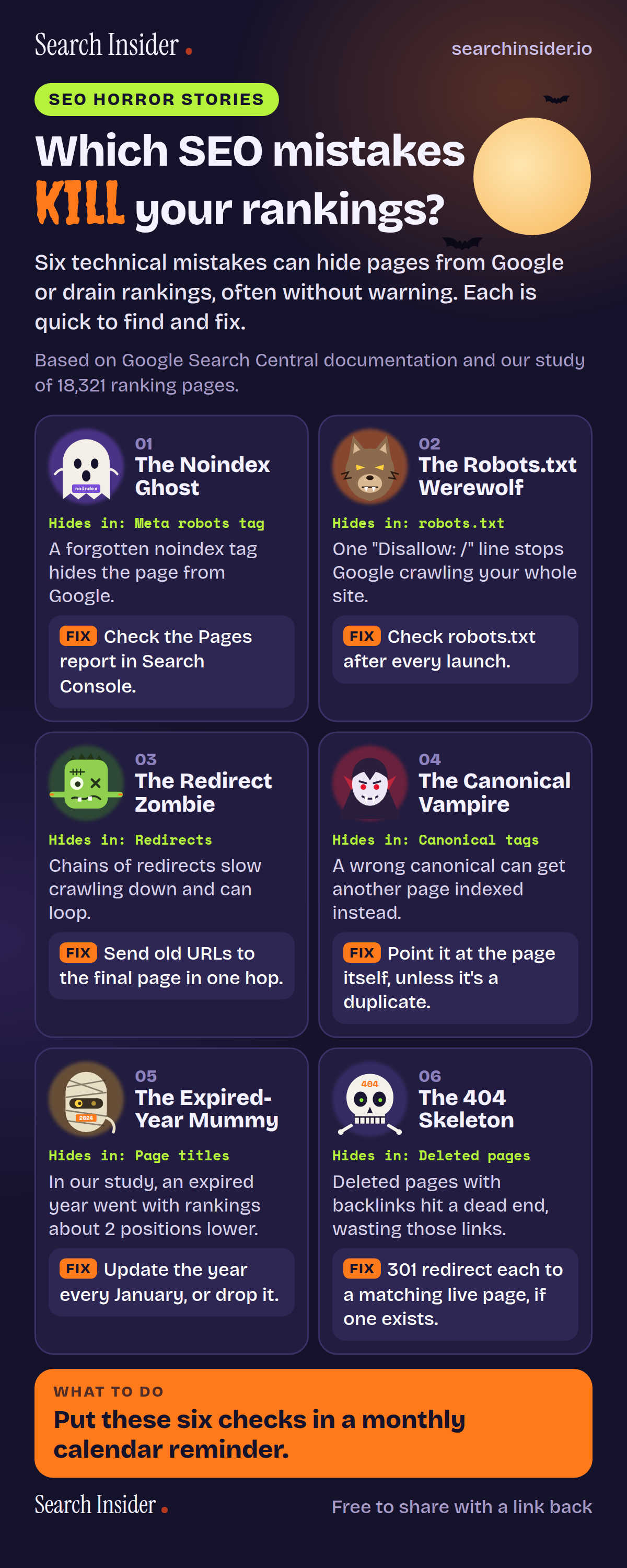
SEO horror stories infographic: which SEO mistakes kill your rankings? The Noindex Ghost, the Robots.txt Werewolf, the Redirect Zombie, the Canonical Vampire, the Expired-Year Mummy and the 404 Skeleton, each with what it does and how to fix it.

Oct 4, 2026

SEO Horror Stories Infographic

Six technical SEO mistakes, drawn as Halloween monsters, that can hide pages from Google or drain rankings, with the fix for each one.

Embed this infographic

Every infographic here is free to republish, on any site, with a link back to the study it comes from. Paste this code and the credit is done for you.

<a href="https://searchinsider.io/infographics/seo-horror-stories"><img src="https://searchinsider.io/research/seo-horror-stories/seo-horror-stories-infographic.png" alt="SEO horror stories infographic: which SEO mistakes kill your rankings? The Noindex Ghost, the Robots.txt Werewolf, the Redirect Zombie, the Canonical Vampire, the Expired-Year Mummy and the 404 Skeleton, each with what it does and how to fix it." style="max-width:680px;width:100%;height:auto;" /></a><p>Source: <a href="https://searchinsider.io/infographics/seo-horror-stories">SEO horror stories infographic</a> by Search Insider.</p>

Which SEO mistakes kill your rankings?

The short answer: Six technical mistakes can hide pages from Google or drain rankings, often without warning. Each is quick to find and fix.

Based on Google Search Central documentation and our study of 18,321 ranking pages.

What it shows

  • The Noindex Ghost (meta robots tag): a forgotten noindex tag hides the page from Google. Fix: check the Pages report in Search Console.
  • The Robots.txt Werewolf (robots.txt): one "Disallow: /" line stops Google crawling your whole site. Fix: check robots.txt after every launch.
  • The Redirect Zombie (redirects): chains of redirects slow crawling down and can loop. Fix: send old URLs to the final page in one hop.
  • The Canonical Vampire (canonical tags): a wrong canonical can get another page indexed instead. Fix: point it at the page itself, unless it's a duplicate.
  • The Expired-Year Mummy (page titles): in our study, an expired year went with rankings about 2 positions lower. Fix: update the year every January, or drop it.
  • The 404 Skeleton (deleted pages): deleted pages with backlinks hit a dead end, wasting those links. Fix: 301 redirect each to a matching live page, if one exists.

What to do

  • Every month, and after every launch or migration: Run all six checks.

The walkthrough

What does a forgotten noindex tag do?

A noindex rule tells Google to drop a page from its search results entirely, even when other sites link to it [1]. Developers often add it to a staging site and forget to remove it at launch, so a new page or a whole site disappears from Google. Check the Pages report in Search Console for pages listed as "Excluded by noindex tag". Note that noindex only works if Google can crawl the page: a page blocked in robots.txt never shows Google the tag [1].

How can robots.txt block a whole site?

A robots.txt file tells crawlers which URLs they may visit, and a single "Disallow: /" line under a user agent stops that crawler from visiting any page on the site [2]. The common cause is a staging site's robots.txt being copied to the live site. Open yoursite.com/robots.txt after every launch and make sure nothing important is disallowed.

Why are redirect chains a problem?

Google can follow up to 10 redirects in a chain, but it advises redirecting old URLs straight to their final destination [3]. Chains build up when a site moves more than once and each move redirects to the last one, and every extra hop adds delay. When you migrate, map every old URL directly to its final page, and update older redirects so none of them point at another redirect.

What happens when a canonical tag points at the wrong page?

A canonical tag tells Google which URL you prefer when several pages show the same content, so pointing it at the wrong URL can lead Google to index that other page instead [4]. Typical mistakes include every page in a paginated series pointing at page one, or a template that points every page at the homepage [5]. Give each unique page a canonical that points at itself, and point true duplicates at the original.

Does an expired year in a title hurt rankings?

In our study of 18,321 ranking pages, titles carrying an expired year went with rankings about 2 positions lower than titles carrying no year, while the current year went with about half a position higher [6]. The study is observational, so it shows what ranks alongside what, not the cause. If you put a year in a title, update the page and the year every January, or leave the year out.

What should you do with deleted pages that have backlinks?

When a page that other sites link to is deleted, those links lead to a 404 and stop pointing at anything useful on your site. If a closely matching live page exists, 301 redirect the old URL to it. If none exists, Google recommends returning a 404 or 410 rather than redirecting to an unrelated page such as the homepage [3].

How often should you check for these mistakes?

Check all six every month, and again after every launch, redesign or migration, because that is when most of them appear. Set a calendar reminder and work through the list: the Pages report, robots.txt, your redirect map, canonical tags, titles with years in them, and deleted pages that still have backlinks.

More digital marketing infographics

404 errors infographic: a 404 banner with Google's view that 404s are normal, which status to return in four cases, three facts on how Google treats 4xx and soft 404s, a checklist for a good custom 404 page, and three steps on what to do.

SEO · Oct 6, 2026

Do 404 errors hurt your SEO?

Do 404 errors hurt SEO? How Google treats 404s, why soft 404s are the real problem, which status code to return, and how to build a good custom 404 page.

Embed code
<a href="https://searchinsider.io/infographics/404-errors"><img src="https://searchinsider.io/research/404-errors/404-errors-infographic.png" alt="404 errors infographic: a 404 banner with Google's view that 404s are normal, which status to return in four cases, three facts on how Google treats 4xx and soft 404s, a checklist for a good custom 404 page, and three steps on what to do." style="max-width:680px;width:100%;height:auto;" /></a><p>Source: <a href="https://searchinsider.io/infographics/404-errors">404 errors infographic</a> by Search Insider.</p>

AI-generated content infographic: a quality not method banner, a split of fine uses versus uses against Google's rules, a pre-publish checklist (accuracy, metadata, who, how, why), a Merchant Center note on labeling AI images and product data, and three steps on what to do.

AI search · Oct 6, 2026

Does Google penalize AI-generated content?

Google's stance on AI-generated content: quality over production method, what breaks the scaled content abuse policy, and a checklist before publishing AI-assisted content.

Embed code
<a href="https://searchinsider.io/infographics/ai-generated-content"><img src="https://searchinsider.io/research/ai-generated-content/ai-generated-content-infographic.png" alt="AI-generated content infographic: a quality not method banner, a split of fine uses versus uses against Google's rules, a pre-publish checklist (accuracy, metadata, who, how, why), a Merchant Center note on labeling AI images and product data, and three steps on what to do." style="max-width:680px;width:100%;height:auto;" /></a><p>Source: <a href="https://searchinsider.io/infographics/ai-generated-content">AI-generated content infographic</a> by Search Insider.</p>

Anchor text infographic: an example link with the anchor text underlined, four vague or stuffed anchors swapped for descriptive ones, four rules on image links, internal links, length and keyword stuffing, a note on Google's link spam examples, and three steps on what to do.

SEO · Oct 6, 2026

What is anchor text, and what should it say?

What anchor text is, what Google says it should say, good and bad examples, image link alt text, and which anchor practices Google lists as link spam.

Embed code
<a href="https://searchinsider.io/infographics/anchor-text"><img src="https://searchinsider.io/research/anchor-text/anchor-text-infographic.png" alt="Anchor text infographic: an example link with the anchor text underlined, four vague or stuffed anchors swapped for descriptive ones, four rules on image links, internal links, length and keyword stuffing, a note on Google's link spam examples, and three steps on what to do." style="max-width:680px;width:100%;height:auto;" /></a><p>Source: <a href="https://searchinsider.io/infographics/anchor-text">Anchor text infographic</a> by Search Insider.</p>


