
Skip to content
← SEO Infographics
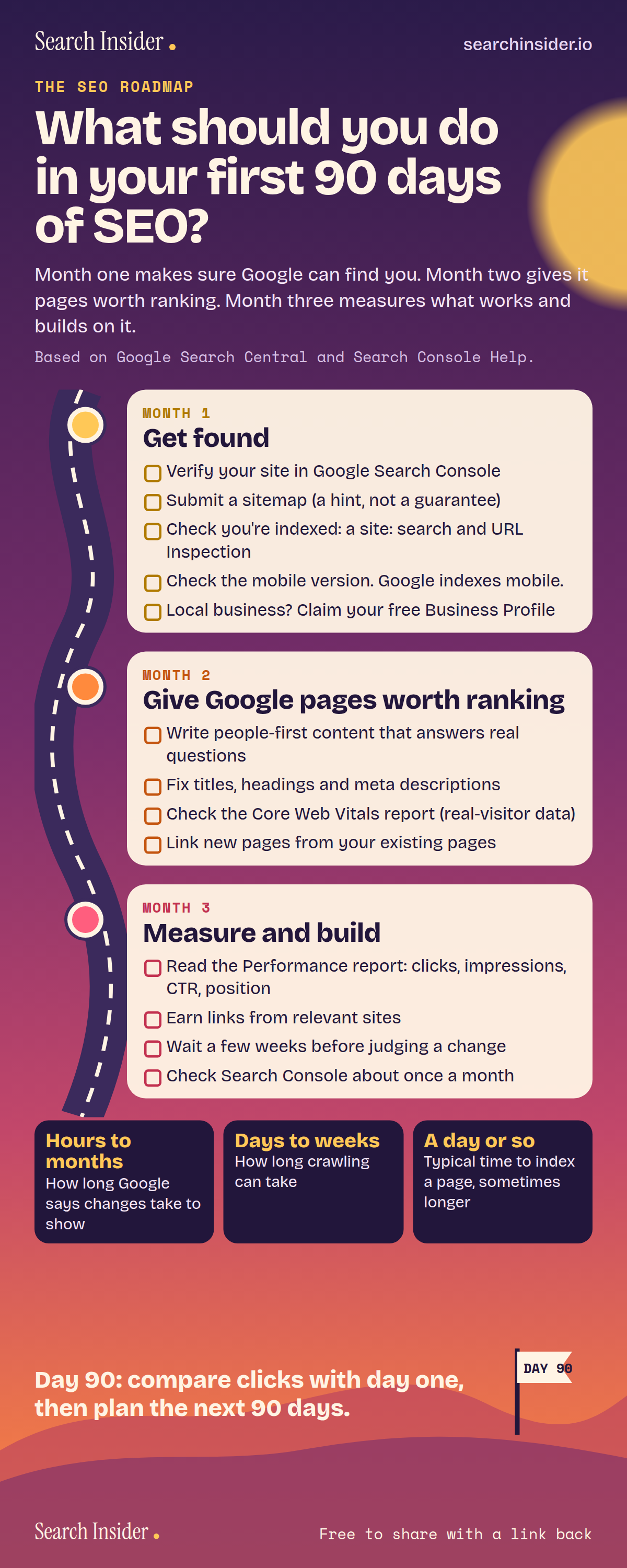
SEO roadmap infographic: what should you do in your first 90 days of SEO? A winding road with three monthly stops of checklist tasks, from verifying Search Console to reading the Performance report, plus how long Google says changes, crawling and indexing take.

Oct 5, 2026

SEO Roadmap Infographic: Your First 90 Days

A 90-day SEO roadmap: month one gets Google able to find you, month two builds pages worth ranking, month three measures and builds on what works.

Embed this infographic

Every infographic here is free to republish, on any site, with a link back to the study it comes from. Paste this code and the credit is done for you.

<a href="https://searchinsider.io/infographics/seo-roadmap"><img src="https://searchinsider.io/research/seo-roadmap/seo-roadmap-infographic.png" alt="SEO roadmap infographic: what should you do in your first 90 days of SEO? A winding road with three monthly stops of checklist tasks, from verifying Search Console to reading the Performance report, plus how long Google says changes, crawling and indexing take." style="max-width:680px;width:100%;height:auto;" /></a><p>Source: <a href="https://searchinsider.io/infographics/seo-roadmap">SEO roadmap: first 90 days infographic</a> by Search Insider.</p>

What should you do in your first 90 days of SEO?

The short answer: Month one makes sure Google can find you. Month two gives it pages worth ranking. Month three measures what works and builds on it.

Based on Google Search Central and Search Console Help.

What it shows

  • Month 1: verify your site in Search Console, submit a sitemap, check you're indexed, check the mobile version, and claim a Business Profile if you're local.
  • Month 2: write people-first content, fix titles, headings and meta descriptions, check Core Web Vitals, and link new pages from existing ones.
  • Month 3: read the Performance report, earn links from relevant sites, wait a few weeks before judging a change, and check Search Console about once a month.
  • Google says changes can take a few hours to several months to show.
  • Crawling can take a few days to a few weeks. Indexing a page typically takes a day or so.

What to do

  • Day 90: Compare clicks with day one, then plan the next 90 days.

The walkthrough

What is an SEO roadmap?

An SEO roadmap is a plan that puts SEO tasks in order, so the work that unlocks everything else comes first. This 90-day version starts with making sure Google can find and index the site, then improves the pages, then measures results and builds on what works.

What should you do in the first month of SEO?

Start by verifying your site in Google Search Console [1]. Then submit a sitemap, which can speed up discovery but is only a hint, not a guarantee [2][3]. Check that pages are indexed with a site: search [4] and the URL Inspection tool [5]. Review the mobile version, since Google uses it for indexing and ranking [6]. Local businesses should add or claim a free Business Profile [7].

What should you do in the second month of SEO?

Focus on the pages themselves. Google's ranking systems are designed to prioritize helpful, reliable information created to benefit people [8]. Fix titles, headings and meta descriptions, check the Core Web Vitals report, which uses real visitor data [9], and link new pages from existing ones, because Google finds most pages through links from pages it already crawled [4].

What should you do in the third month of SEO?

Measure. The Search Console Performance report shows clicks, impressions, average CTR and average position [10]. Earn links from relevant sites, wait a few weeks before judging whether a change worked [4], and check Search Console about once a month [2].

How long does SEO take to work?

Google says some changes might take effect in a few hours while others could take several months [4]. Crawling can take anywhere from a few days to a few weeks [11], and indexing a page typically takes a day or so, though it can take longer [5].

What should you do after 90 days of SEO?

Compare clicks and impressions in the Performance report with where you started [10], keep what worked, and plan the next 90 days around the pages and searches that are gaining ground.

More digital marketing infographics

404 errors infographic: a 404 banner with Google's view that 404s are normal, which status to return in four cases, three facts on how Google treats 4xx and soft 404s, a checklist for a good custom 404 page, and three steps on what to do.

SEO · Oct 6, 2026

Do 404 errors hurt your SEO?

Do 404 errors hurt SEO? How Google treats 404s, why soft 404s are the real problem, which status code to return, and how to build a good custom 404 page.

Embed code
<a href="https://searchinsider.io/infographics/404-errors"><img src="https://searchinsider.io/research/404-errors/404-errors-infographic.png" alt="404 errors infographic: a 404 banner with Google's view that 404s are normal, which status to return in four cases, three facts on how Google treats 4xx and soft 404s, a checklist for a good custom 404 page, and three steps on what to do." style="max-width:680px;width:100%;height:auto;" /></a><p>Source: <a href="https://searchinsider.io/infographics/404-errors">404 errors infographic</a> by Search Insider.</p>

AI-generated content infographic: a quality not method banner, a split of fine uses versus uses against Google's rules, a pre-publish checklist (accuracy, metadata, who, how, why), a Merchant Center note on labeling AI images and product data, and three steps on what to do.

AI search · Oct 6, 2026

Does Google penalize AI-generated content?

Google's stance on AI-generated content: quality over production method, what breaks the scaled content abuse policy, and a checklist before publishing AI-assisted content.

Embed code
<a href="https://searchinsider.io/infographics/ai-generated-content"><img src="https://searchinsider.io/research/ai-generated-content/ai-generated-content-infographic.png" alt="AI-generated content infographic: a quality not method banner, a split of fine uses versus uses against Google's rules, a pre-publish checklist (accuracy, metadata, who, how, why), a Merchant Center note on labeling AI images and product data, and three steps on what to do." style="max-width:680px;width:100%;height:auto;" /></a><p>Source: <a href="https://searchinsider.io/infographics/ai-generated-content">AI-generated content infographic</a> by Search Insider.</p>

Anchor text infographic: an example link with the anchor text underlined, four vague or stuffed anchors swapped for descriptive ones, four rules on image links, internal links, length and keyword stuffing, a note on Google's link spam examples, and three steps on what to do.

SEO · Oct 6, 2026

What is anchor text, and what should it say?

What anchor text is, what Google says it should say, good and bad examples, image link alt text, and which anchor practices Google lists as link spam.

Embed code
<a href="https://searchinsider.io/infographics/anchor-text"><img src="https://searchinsider.io/research/anchor-text/anchor-text-infographic.png" alt="Anchor text infographic: an example link with the anchor text underlined, four vague or stuffed anchors swapped for descriptive ones, four rules on image links, internal links, length and keyword stuffing, a note on Google's link spam examples, and three steps on what to do." style="max-width:680px;width:100%;height:auto;" /></a><p>Source: <a href="https://searchinsider.io/infographics/anchor-text">Anchor text infographic</a> by Search Insider.</p>


