
Skip to content
← PPC Infographics
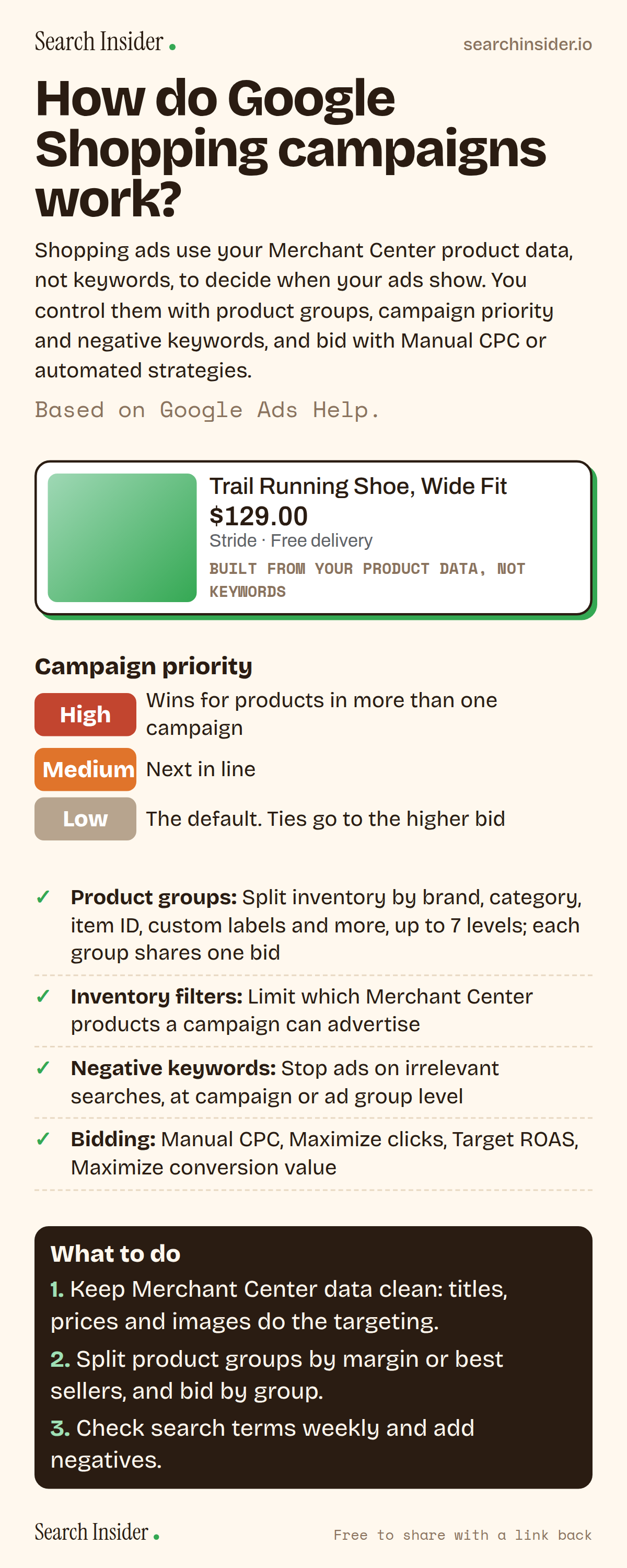
Shopping campaigns infographic: an example Shopping ad built from product data, a campaign priority ladder (high, medium, low), controls including product groups, inventory filters, negative keywords and bidding options, and three steps on what to do.

Oct 6, 2026

How Google Shopping Campaigns Work (Infographic)

How Google Shopping campaigns work: product data instead of keywords, product groups, campaign priority, inventory filters, negative keywords and bid strategies.

Embed this infographic

Every infographic here is free to republish, on any site, with a link back to the study it comes from. Paste this code and the credit is done for you.

<a href="https://searchinsider.io/infographics/shopping-campaigns"><img src="https://searchinsider.io/research/shopping-campaigns/shopping-campaigns-infographic.png" alt="Shopping campaigns infographic: an example Shopping ad built from product data, a campaign priority ladder (high, medium, low), controls including product groups, inventory filters, negative keywords and bidding options, and three steps on what to do." style="max-width:680px;width:100%;height:auto;" /></a><p>Source: <a href="https://searchinsider.io/infographics/shopping-campaigns">Shopping campaigns infographic</a> by Search Insider.</p>

How do Google Shopping campaigns work?

The short answer: Shopping ads use your Merchant Center product data, not keywords, to decide when your ads show. You control them with product groups, campaign priority and negative keywords, and bid with Manual CPC or automated strategies.

Based on Google Ads Help.

What it shows

  • Shopping ads use Merchant Center product data, not keywords, to decide how and where to show.
  • Standard Shopping ads can show on the Shopping tab, Google Search, Google Images and search partners.
  • Product groups can be subdivided up to 7 levels; every product in a group shares one bid.
  • Campaign priority (Low, Medium, High) decides which campaign serves a product in several campaigns; ties go to the higher bid.
  • Shopping campaigns support Manual CPC, Maximize clicks, Target ROAS and Maximize conversion value.
  • Negative keywords can be added at campaign or ad group level.

What to do

  • Data: Keep Merchant Center titles, prices and images clean.
  • Structure: Split product groups by margin or best sellers.
  • Weekly: Review search terms and add negatives.

The walkthrough

How do Google Shopping ads work?

Shopping ads use your existing Merchant Center product data, not keywords, to decide how and where to show your ads [1]. They show a product photo, title, price, store name and more [1].

Where do Shopping ads appear?

Standard Shopping campaigns can show on the Shopping tab, Google Search next to search results, Google Images and Google search partner sites [1]. Performance Max adds the Display Network, YouTube, Gmail, Demand Gen surfaces and Maps [1].

What are product groups?

A product group is a subset of your inventory where every product uses the same bid [2]. You can subdivide groups up to 7 levels by attributes like item ID, brand, category, product type, condition and custom labels, and you can't bid on a group that's been subdivided [2].

What is Shopping campaign priority?

Priority (Low, Medium or High) decides which campaign serves when the same product is in more than one Shopping campaign for the same country [3]. The default is Low, and if priorities tie, the campaign with the higher bid enters the auction [3].

Can you use negative keywords in Shopping campaigns?

Yes. You can add negative keywords at campaign or ad group level to stop Shopping ads showing for unwanted searches [4]. Inventory filters can also limit which products a campaign advertises [5].

Which bid strategies work for Shopping?

Shopping campaigns support Target ROAS, Maximize clicks and Maximize conversion value, plus Manual CPC [1].

Does Performance Max override Standard Shopping?

Not automatically anymore. Since October 2024, Google says normal auction dynamics apply and the campaign with the higher Ad Rank serves, as reported by Search Engine Roundtable [6].

More digital marketing infographics

404 errors infographic: a 404 banner with Google's view that 404s are normal, which status to return in four cases, three facts on how Google treats 4xx and soft 404s, a checklist for a good custom 404 page, and three steps on what to do.

SEO · Oct 6, 2026

Do 404 errors hurt your SEO?

Do 404 errors hurt SEO? How Google treats 404s, why soft 404s are the real problem, which status code to return, and how to build a good custom 404 page.

Embed code
<a href="https://searchinsider.io/infographics/404-errors"><img src="https://searchinsider.io/research/404-errors/404-errors-infographic.png" alt="404 errors infographic: a 404 banner with Google's view that 404s are normal, which status to return in four cases, three facts on how Google treats 4xx and soft 404s, a checklist for a good custom 404 page, and three steps on what to do." style="max-width:680px;width:100%;height:auto;" /></a><p>Source: <a href="https://searchinsider.io/infographics/404-errors">404 errors infographic</a> by Search Insider.</p>

AI-generated content infographic: a quality not method banner, a split of fine uses versus uses against Google's rules, a pre-publish checklist (accuracy, metadata, who, how, why), a Merchant Center note on labeling AI images and product data, and three steps on what to do.

AI search · Oct 6, 2026

Does Google penalize AI-generated content?

Google's stance on AI-generated content: quality over production method, what breaks the scaled content abuse policy, and a checklist before publishing AI-assisted content.

Embed code
<a href="https://searchinsider.io/infographics/ai-generated-content"><img src="https://searchinsider.io/research/ai-generated-content/ai-generated-content-infographic.png" alt="AI-generated content infographic: a quality not method banner, a split of fine uses versus uses against Google's rules, a pre-publish checklist (accuracy, metadata, who, how, why), a Merchant Center note on labeling AI images and product data, and three steps on what to do." style="max-width:680px;width:100%;height:auto;" /></a><p>Source: <a href="https://searchinsider.io/infographics/ai-generated-content">AI-generated content infographic</a> by Search Insider.</p>

Anchor text infographic: an example link with the anchor text underlined, four vague or stuffed anchors swapped for descriptive ones, four rules on image links, internal links, length and keyword stuffing, a note on Google's link spam examples, and three steps on what to do.

SEO · Oct 6, 2026

What is anchor text, and what should it say?

What anchor text is, what Google says it should say, good and bad examples, image link alt text, and which anchor practices Google lists as link spam.

Embed code
<a href="https://searchinsider.io/infographics/anchor-text"><img src="https://searchinsider.io/research/anchor-text/anchor-text-infographic.png" alt="Anchor text infographic: an example link with the anchor text underlined, four vague or stuffed anchors swapped for descriptive ones, four rules on image links, internal links, length and keyword stuffing, a note on Google's link spam examples, and three steps on what to do." style="max-width:680px;width:100%;height:auto;" /></a><p>Source: <a href="https://searchinsider.io/infographics/anchor-text">Anchor text infographic</a> by Search Insider.</p>


