
Skip to content
← SEO Infographics
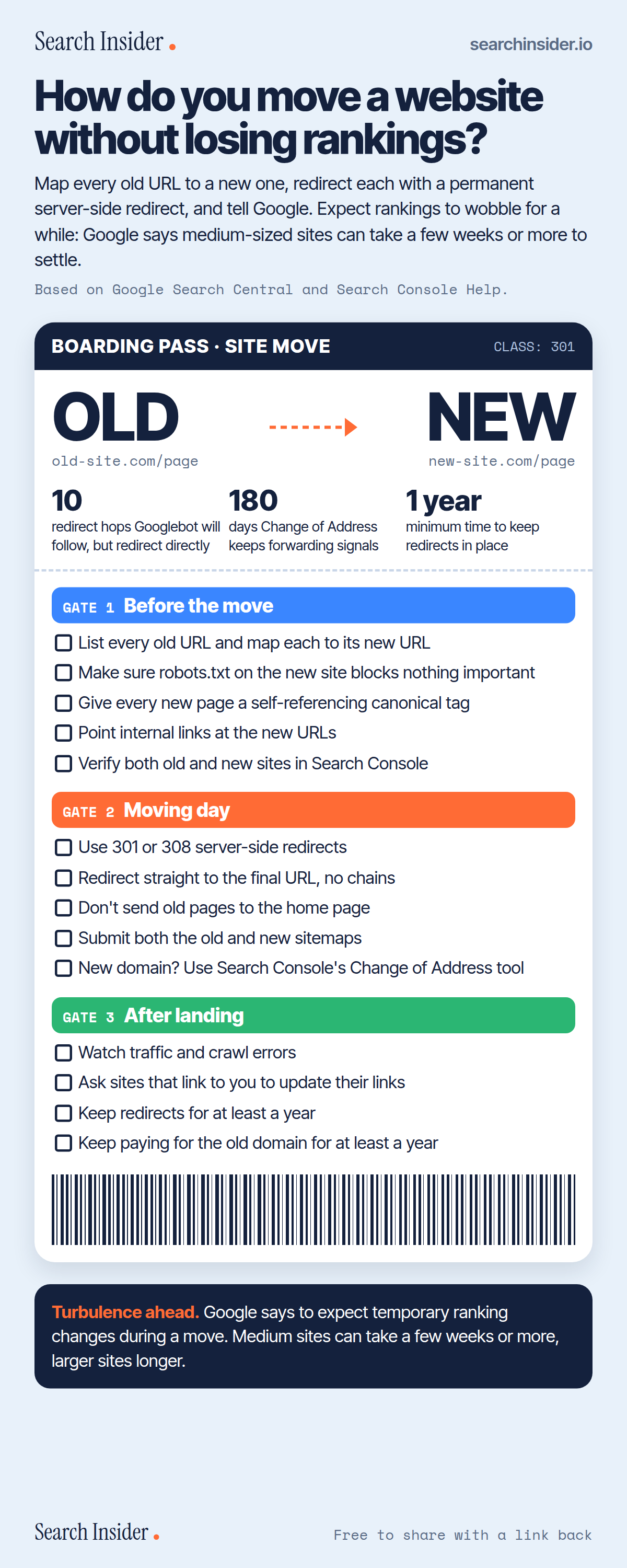
Site migration checklist infographic styled as a boarding pass from an old site to a new site: key numbers for redirect hops, Change of Address days and how long to keep redirects, then three gates of checklist tasks for before the move, moving day and after landing.

Oct 5, 2026

Site Migration Checklist Infographic: Move Without Losing Rankings

A site migration checklist for moving a website without losing rankings: what to do before the move, on moving day and after launch, with Google's timings.

Embed this infographic

Every infographic here is free to republish, on any site, with a link back to the study it comes from. Paste this code and the credit is done for you.

<a href="https://searchinsider.io/infographics/site-migration-checklist"><img src="https://searchinsider.io/research/site-migration-checklist/site-migration-checklist-infographic.png" alt="Site migration checklist infographic styled as a boarding pass from an old site to a new site: key numbers for redirect hops, Change of Address days and how long to keep redirects, then three gates of checklist tasks for before the move, moving day and after landing." style="max-width:680px;width:100%;height:auto;" /></a><p>Source: <a href="https://searchinsider.io/infographics/site-migration-checklist">Site migration checklist infographic</a> by Search Insider.</p>

How do you move a website without losing rankings?

The short answer: Map every old URL to a new one, redirect each with a permanent server-side redirect, and tell Google. Expect rankings to wobble for a while: Google says medium-sized sites can take a few weeks or more to settle.

Based on Google Search Central and Search Console Help.

What it shows

  • Before: map every old URL to a new URL, check robots.txt, add self-referencing canonicals, update internal links, verify both sites in Search Console.
  • Moving day: use 301 or 308 server-side redirects straight to the final URL, don't redirect everything to the home page, submit old and new sitemaps, use Change of Address for a new domain.
  • After: watch traffic and crawl errors, ask linking sites to update links, keep redirects and the old domain for at least a year.
  • Googlebot follows up to 10 redirect hops, but Google advises redirecting directly.
  • Change of Address forwards signals for 180 days.

What to do

  • Before the move: Build the old-to-new URL map.
  • After launch: Keep redirects in place for at least a year.

The walkthrough

How do you migrate a website without losing rankings?

Decide where each old URL should redirect [1], set up server-side permanent redirects from old URLs to new ones [1], and tell Google about the move through Search Console. Google says to expect temporary fluctuation in rankings during a move [1].

What should you do before a site migration?

List the old URLs and map each to its new URL [1]. Make sure the new site's robots.txt doesn't block crawling, give each new URL a self-referencing canonical tag, and change internal links to point at the new URLs [1]. Verify both the old and new sites in Search Console, including all variants [1].

Which redirects should you use for a site move?

Use permanent redirects, such as 301 or 308, which tell Google a page has permanently moved [2]. JavaScript redirects are a last resort [2]. Googlebot can follow up to 10 hops in a redirect chain, but Google advises redirecting to the final destination directly [1]. Don't redirect many old URLs to one irrelevant page, such as the home page, which can be treated as a soft 404 [1].

Should you use the Change of Address tool?

Use it when moving from one domain or subdomain to another, not for an HTTP to HTTPS change or moving pages within a site [3]. You must own both properties in Search Console and have a 301 redirect from the old homepage to the new one, and signals are forwarded for 180 days [3].

What should you do after migrating a site?

Monitor user and crawler traffic on the new site and check for unexpected crawl errors [1]. Submit both the old and new sitemaps [1], and ask sites that link to you to update their links [1]. Keep redirects for as long as possible, generally at least a year [1], and keep paying for the old domain for at least a year [3].

How long does a site migration take to settle?

For medium-sized websites, Google says it can take a few weeks or more to start showing the new URLs instead of the old ones, and larger sites can take longer [1].

More digital marketing infographics

404 errors infographic: a 404 banner with Google's view that 404s are normal, which status to return in four cases, three facts on how Google treats 4xx and soft 404s, a checklist for a good custom 404 page, and three steps on what to do.

SEO · Oct 6, 2026

Do 404 errors hurt your SEO?

Do 404 errors hurt SEO? How Google treats 404s, why soft 404s are the real problem, which status code to return, and how to build a good custom 404 page.

Embed code
<a href="https://searchinsider.io/infographics/404-errors"><img src="https://searchinsider.io/research/404-errors/404-errors-infographic.png" alt="404 errors infographic: a 404 banner with Google's view that 404s are normal, which status to return in four cases, three facts on how Google treats 4xx and soft 404s, a checklist for a good custom 404 page, and three steps on what to do." style="max-width:680px;width:100%;height:auto;" /></a><p>Source: <a href="https://searchinsider.io/infographics/404-errors">404 errors infographic</a> by Search Insider.</p>

AI-generated content infographic: a quality not method banner, a split of fine uses versus uses against Google's rules, a pre-publish checklist (accuracy, metadata, who, how, why), a Merchant Center note on labeling AI images and product data, and three steps on what to do.

AI search · Oct 6, 2026

Does Google penalize AI-generated content?

Google's stance on AI-generated content: quality over production method, what breaks the scaled content abuse policy, and a checklist before publishing AI-assisted content.

Embed code
<a href="https://searchinsider.io/infographics/ai-generated-content"><img src="https://searchinsider.io/research/ai-generated-content/ai-generated-content-infographic.png" alt="AI-generated content infographic: a quality not method banner, a split of fine uses versus uses against Google's rules, a pre-publish checklist (accuracy, metadata, who, how, why), a Merchant Center note on labeling AI images and product data, and three steps on what to do." style="max-width:680px;width:100%;height:auto;" /></a><p>Source: <a href="https://searchinsider.io/infographics/ai-generated-content">AI-generated content infographic</a> by Search Insider.</p>

Anchor text infographic: an example link with the anchor text underlined, four vague or stuffed anchors swapped for descriptive ones, four rules on image links, internal links, length and keyword stuffing, a note on Google's link spam examples, and three steps on what to do.

SEO · Oct 6, 2026

What is anchor text, and what should it say?

What anchor text is, what Google says it should say, good and bad examples, image link alt text, and which anchor practices Google lists as link spam.

Embed code
<a href="https://searchinsider.io/infographics/anchor-text"><img src="https://searchinsider.io/research/anchor-text/anchor-text-infographic.png" alt="Anchor text infographic: an example link with the anchor text underlined, four vague or stuffed anchors swapped for descriptive ones, four rules on image links, internal links, length and keyword stuffing, a note on Google's link spam examples, and three steps on what to do." style="max-width:680px;width:100%;height:auto;" /></a><p>Source: <a href="https://searchinsider.io/infographics/anchor-text">Anchor text infographic</a> by Search Insider.</p>


