
Skip to content
← SEO Infographics
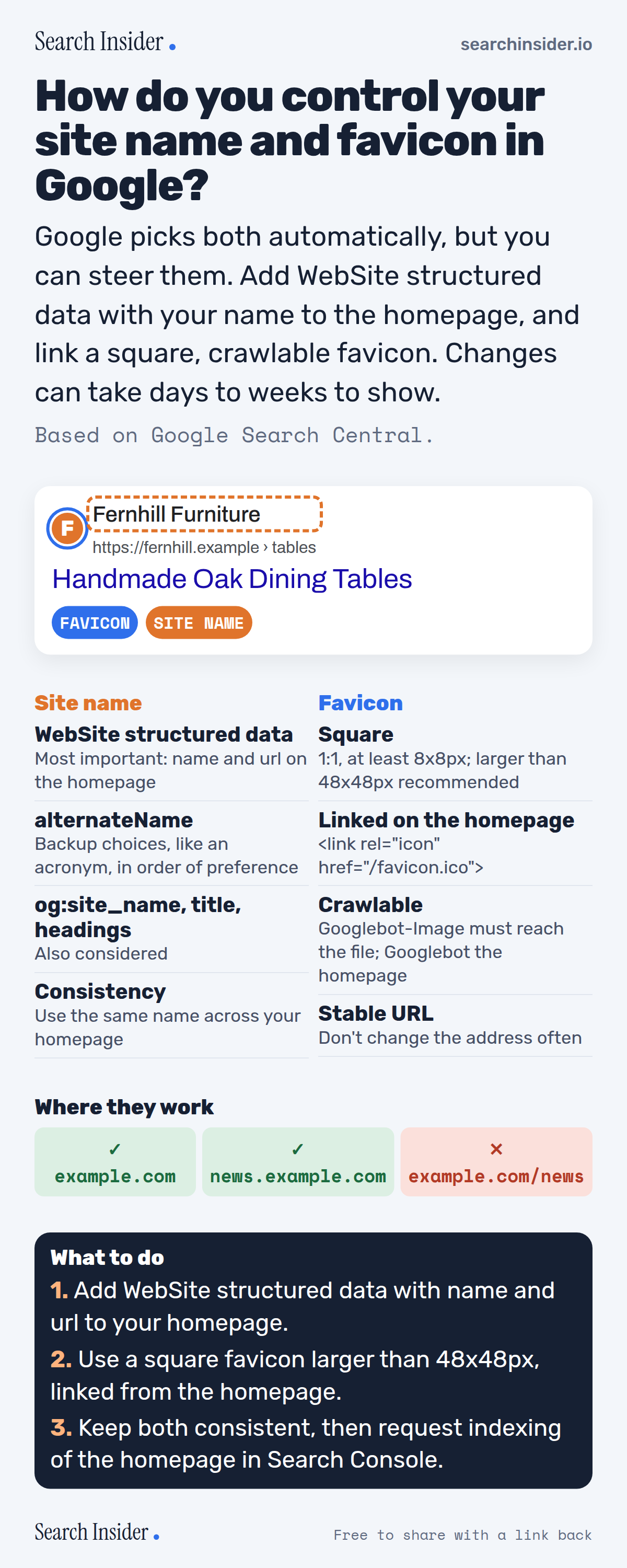
Site names and favicons infographic: a Google result with the favicon and site name labeled, site name signals (WebSite structured data, alternateName, og:site_name and title, consistency), favicon rules, supported levels (domain and subdomain yes, subdirectory no), and three steps on what to do.

Oct 6, 2026

Control Your Site Name and Favicon in Google (Infographic)

How Google picks the site name and favicon shown in search results, the structured data and favicon rules that influence them, and where they're supported.

Embed this infographic

Every infographic here is free to republish, on any site, with a link back to the study it comes from. Paste this code and the credit is done for you.

<a href="https://searchinsider.io/infographics/site-names-favicons"><img src="https://searchinsider.io/research/site-names-favicons/site-names-favicons-infographic.png" alt="Site names and favicons infographic: a Google result with the favicon and site name labeled, site name signals (WebSite structured data, alternateName, og:site_name and title, consistency), favicon rules, supported levels (domain and subdomain yes, subdirectory no), and three steps on what to do." style="max-width:680px;width:100%;height:auto;" /></a><p>Source: <a href="https://searchinsider.io/infographics/site-names-favicons">Site names and favicons infographic</a> by Search Insider.</p>

How do you control your site name and favicon in Google?

The short answer: Google picks both automatically, but you can steer them. Add WebSite structured data with your name to the homepage, and link a square, crawlable favicon. Changes can take days to weeks to show.

Based on Google Search Central.

What it shows

  • Site names are generated automatically from homepage content and references on the web.
  • WebSite structured data on the homepage is the most important site name signal; og:site_name, title and headings are also considered.
  • alternateName lets Google consider other options, like an acronym.
  • Favicons must be square, at least 8x8px; larger than 48x48px is recommended.
  • Googlebot-Image must be able to crawl the favicon, and the URL should be stable.
  • Site names and favicons work for domains and subdomains, not subdirectories.

What to do

  • Site name: Add WebSite structured data with name and url.
  • Favicon: Use a square icon over 48x48px linked from the homepage.
  • Speed up: Request indexing of the homepage.

The walkthrough

How does Google choose a site name?

Google's site name generation is completely automated and uses content from a site's homepage and references to it on the web [1]. To show your preference, add WebSite structured data to your homepage; Google also considers og:site_name, the title element, headings and other homepage text, but WebSite structured data is most important [1].

What structured data sets the site name?

WebSite structured data on the homepage with the required name and url properties [1]. You can add alternateName for a recognized acronym or shorter name, listed in order of preference, so Google can consider it if your first choice isn't selected [1].

Do site names work for subfolders?

No. Site names are supported for domains and subdomains, but Google Search doesn't support them at the subdirectory level [1]. Favicons work the same way: one per hostname [2].

What are Google's favicon requirements?

Add a link rel icon tag to your homepage, make the favicon square and at least 8x8px, and Google recommends larger than 48x48px [2]. Googlebot-Image must be able to crawl the favicon and Googlebot the homepage, and the favicon URL should be stable [2]. Supported formats include BMP, GIF, ICO, PNG, JPEG, PPM and TIFF [2].

Can Google replace your favicon?

Yes. Google won't show favicons it deems inappropriate, such as pornography or hate symbols, and replaces them with a default icon [2].

How long do site name and favicon changes take?

Google says crawling can take several days to several weeks [1][2]. You can ask Google to recrawl your homepage with the URL Inspection tool [2].

More digital marketing infographics

404 errors infographic: a 404 banner with Google's view that 404s are normal, which status to return in four cases, three facts on how Google treats 4xx and soft 404s, a checklist for a good custom 404 page, and three steps on what to do.

SEO · Oct 6, 2026

Do 404 errors hurt your SEO?

Do 404 errors hurt SEO? How Google treats 404s, why soft 404s are the real problem, which status code to return, and how to build a good custom 404 page.

Embed code
<a href="https://searchinsider.io/infographics/404-errors"><img src="https://searchinsider.io/research/404-errors/404-errors-infographic.png" alt="404 errors infographic: a 404 banner with Google's view that 404s are normal, which status to return in four cases, three facts on how Google treats 4xx and soft 404s, a checklist for a good custom 404 page, and three steps on what to do." style="max-width:680px;width:100%;height:auto;" /></a><p>Source: <a href="https://searchinsider.io/infographics/404-errors">404 errors infographic</a> by Search Insider.</p>

AI-generated content infographic: a quality not method banner, a split of fine uses versus uses against Google's rules, a pre-publish checklist (accuracy, metadata, who, how, why), a Merchant Center note on labeling AI images and product data, and three steps on what to do.

AI search · Oct 6, 2026

Does Google penalize AI-generated content?

Google's stance on AI-generated content: quality over production method, what breaks the scaled content abuse policy, and a checklist before publishing AI-assisted content.

Embed code
<a href="https://searchinsider.io/infographics/ai-generated-content"><img src="https://searchinsider.io/research/ai-generated-content/ai-generated-content-infographic.png" alt="AI-generated content infographic: a quality not method banner, a split of fine uses versus uses against Google's rules, a pre-publish checklist (accuracy, metadata, who, how, why), a Merchant Center note on labeling AI images and product data, and three steps on what to do." style="max-width:680px;width:100%;height:auto;" /></a><p>Source: <a href="https://searchinsider.io/infographics/ai-generated-content">AI-generated content infographic</a> by Search Insider.</p>

Anchor text infographic: an example link with the anchor text underlined, four vague or stuffed anchors swapped for descriptive ones, four rules on image links, internal links, length and keyword stuffing, a note on Google's link spam examples, and three steps on what to do.

SEO · Oct 6, 2026

What is anchor text, and what should it say?

What anchor text is, what Google says it should say, good and bad examples, image link alt text, and which anchor practices Google lists as link spam.

Embed code
<a href="https://searchinsider.io/infographics/anchor-text"><img src="https://searchinsider.io/research/anchor-text/anchor-text-infographic.png" alt="Anchor text infographic: an example link with the anchor text underlined, four vague or stuffed anchors swapped for descriptive ones, four rules on image links, internal links, length and keyword stuffing, a note on Google's link spam examples, and three steps on what to do." style="max-width:680px;width:100%;height:auto;" /></a><p>Source: <a href="https://searchinsider.io/infographics/anchor-text">Anchor text infographic</a> by Search Insider.</p>


