
Skip to content
← SEO Infographics
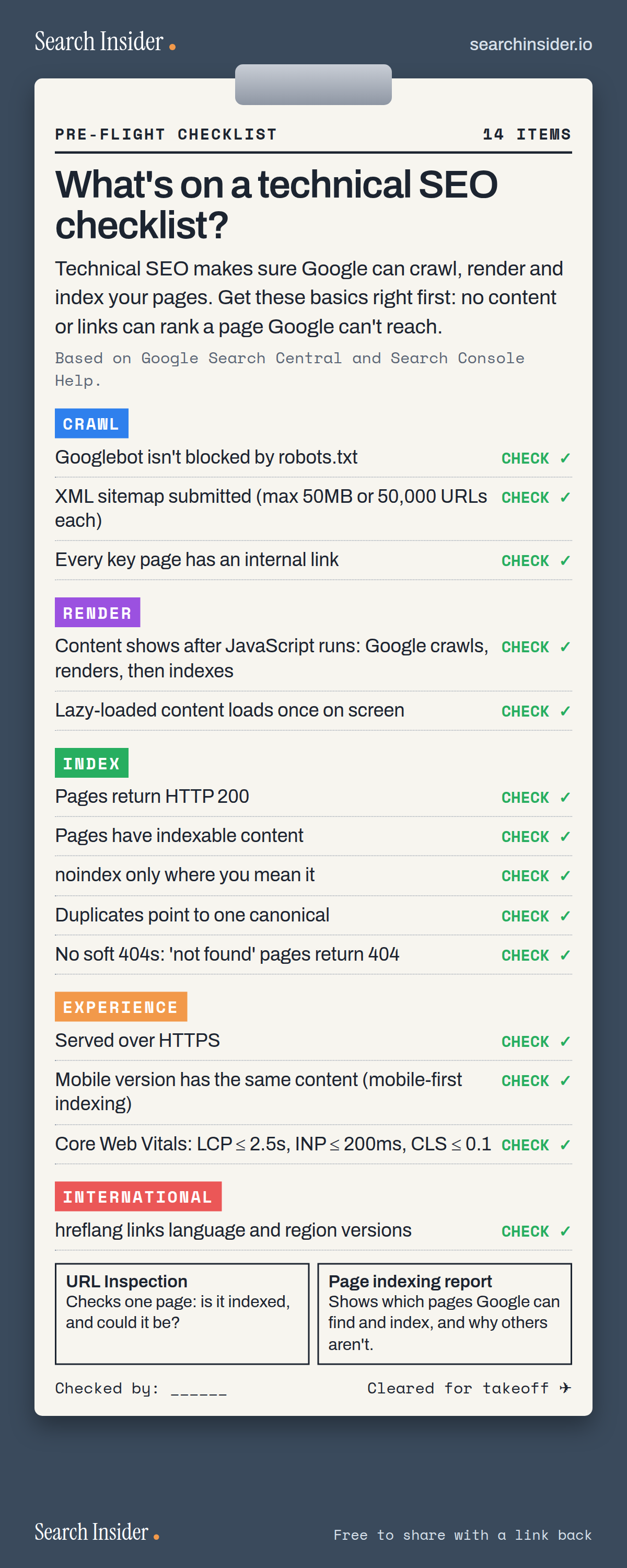
Technical SEO checklist infographic styled as a pilot's pre-flight checklist on a clipboard: 14 checks grouped into crawl, render, index, experience and international, with URL Inspection and the Page indexing report as the tools to check them.

Oct 5, 2026

Technical SEO Checklist Infographic: 14 Checks

A technical SEO checklist in five groups: crawl, render, index, experience and international, plus the two Search Console tools to check them.

Embed this infographic

Every infographic here is free to republish, on any site, with a link back to the study it comes from. Paste this code and the credit is done for you.

<a href="https://searchinsider.io/infographics/technical-seo-checklist"><img src="https://searchinsider.io/research/technical-seo-checklist/technical-seo-checklist-infographic.png" alt="Technical SEO checklist infographic styled as a pilot's pre-flight checklist on a clipboard: 14 checks grouped into crawl, render, index, experience and international, with URL Inspection and the Page indexing report as the tools to check them." style="max-width:680px;width:100%;height:auto;" /></a><p>Source: <a href="https://searchinsider.io/infographics/technical-seo-checklist">Technical SEO checklist infographic</a> by Search Insider.</p>

What's on a technical SEO checklist?

The short answer: Technical SEO makes sure Google can crawl, render and index your pages. Get these basics right first: no content or links can rank a page Google can't reach.

Based on Google Search Central and Search Console Help.

What it shows

  • Crawl: Googlebot isn't blocked; sitemaps submitted (50MB or 50,000 URLs each); every key page linked.
  • Render: content shows after JavaScript; lazy-loaded content loads on screen.
  • Index: HTTP 200; indexable content; noindex only where intended; one canonical; no soft 404s.
  • Experience: HTTPS; mobile version has the same content; Core Web Vitals in the good range.
  • International: hreflang for language and region versions.
  • Tools: URL Inspection and the Page indexing report.

What to do

  • Monthly: Check the Page indexing report for new problems.
  • After launching a page: Run it through URL Inspection.

The walkthrough

What are Google's technical requirements?

Google lists three: Googlebot isn't blocked, the page works, and the page has indexable content [1]. Google only indexes pages served with an HTTP 200 status code [1].

How do sitemaps help technical SEO?

A sitemap helps Google crawl a site more efficiently [2]. Each sitemap is limited to 50MB uncompressed or 50,000 URLs [3]. Every page you care about should also have a link from at least one other page on your site [4].

How does Google handle JavaScript?

Google processes JavaScript web apps in three main phases: crawling, rendering and indexing [5]. Make sure important content appears once the page renders, and that lazy-loaded content loads when it becomes visible [6].

What is a soft 404?

A soft 404 is a URL that shows a page telling the user it doesn't exist while returning a 200 success status code [7]. Pages that are gone should return a real 404 or 410.

Does HTTPS and mobile matter for SEO?

Google's page experience guidance includes serving pages over HTTPS [8]. Google uses the mobile version of a site's content for indexing and ranking, called mobile-first indexing [9].

When do you need hreflang?

If you have multiple versions of a page for different languages or regions, tell Google about them using hreflang in HTML, HTTP headers or sitemaps [10].

How do you check technical SEO in Search Console?

The URL Inspection tool shows Google's indexed version of a specific page and tests whether it can be indexed [11]. The Page indexing report shows which pages Google can find and index across your site, and any problems it found [12].

More digital marketing infographics

404 errors infographic: a 404 banner with Google's view that 404s are normal, which status to return in four cases, three facts on how Google treats 4xx and soft 404s, a checklist for a good custom 404 page, and three steps on what to do.

SEO · Oct 6, 2026

Do 404 errors hurt your SEO?

Do 404 errors hurt SEO? How Google treats 404s, why soft 404s are the real problem, which status code to return, and how to build a good custom 404 page.

Embed code
<a href="https://searchinsider.io/infographics/404-errors"><img src="https://searchinsider.io/research/404-errors/404-errors-infographic.png" alt="404 errors infographic: a 404 banner with Google's view that 404s are normal, which status to return in four cases, three facts on how Google treats 4xx and soft 404s, a checklist for a good custom 404 page, and three steps on what to do." style="max-width:680px;width:100%;height:auto;" /></a><p>Source: <a href="https://searchinsider.io/infographics/404-errors">404 errors infographic</a> by Search Insider.</p>

AI-generated content infographic: a quality not method banner, a split of fine uses versus uses against Google's rules, a pre-publish checklist (accuracy, metadata, who, how, why), a Merchant Center note on labeling AI images and product data, and three steps on what to do.

AI search · Oct 6, 2026

Does Google penalize AI-generated content?

Google's stance on AI-generated content: quality over production method, what breaks the scaled content abuse policy, and a checklist before publishing AI-assisted content.

Embed code
<a href="https://searchinsider.io/infographics/ai-generated-content"><img src="https://searchinsider.io/research/ai-generated-content/ai-generated-content-infographic.png" alt="AI-generated content infographic: a quality not method banner, a split of fine uses versus uses against Google's rules, a pre-publish checklist (accuracy, metadata, who, how, why), a Merchant Center note on labeling AI images and product data, and three steps on what to do." style="max-width:680px;width:100%;height:auto;" /></a><p>Source: <a href="https://searchinsider.io/infographics/ai-generated-content">AI-generated content infographic</a> by Search Insider.</p>

Anchor text infographic: an example link with the anchor text underlined, four vague or stuffed anchors swapped for descriptive ones, four rules on image links, internal links, length and keyword stuffing, a note on Google's link spam examples, and three steps on what to do.

SEO · Oct 6, 2026

What is anchor text, and what should it say?

What anchor text is, what Google says it should say, good and bad examples, image link alt text, and which anchor practices Google lists as link spam.

Embed code
<a href="https://searchinsider.io/infographics/anchor-text"><img src="https://searchinsider.io/research/anchor-text/anchor-text-infographic.png" alt="Anchor text infographic: an example link with the anchor text underlined, four vague or stuffed anchors swapped for descriptive ones, four rules on image links, internal links, length and keyword stuffing, a note on Google's link spam examples, and three steps on what to do." style="max-width:680px;width:100%;height:auto;" /></a><p>Source: <a href="https://searchinsider.io/infographics/anchor-text">Anchor text infographic</a> by Search Insider.</p>


