
Skip to content
← Content Marketing Infographics
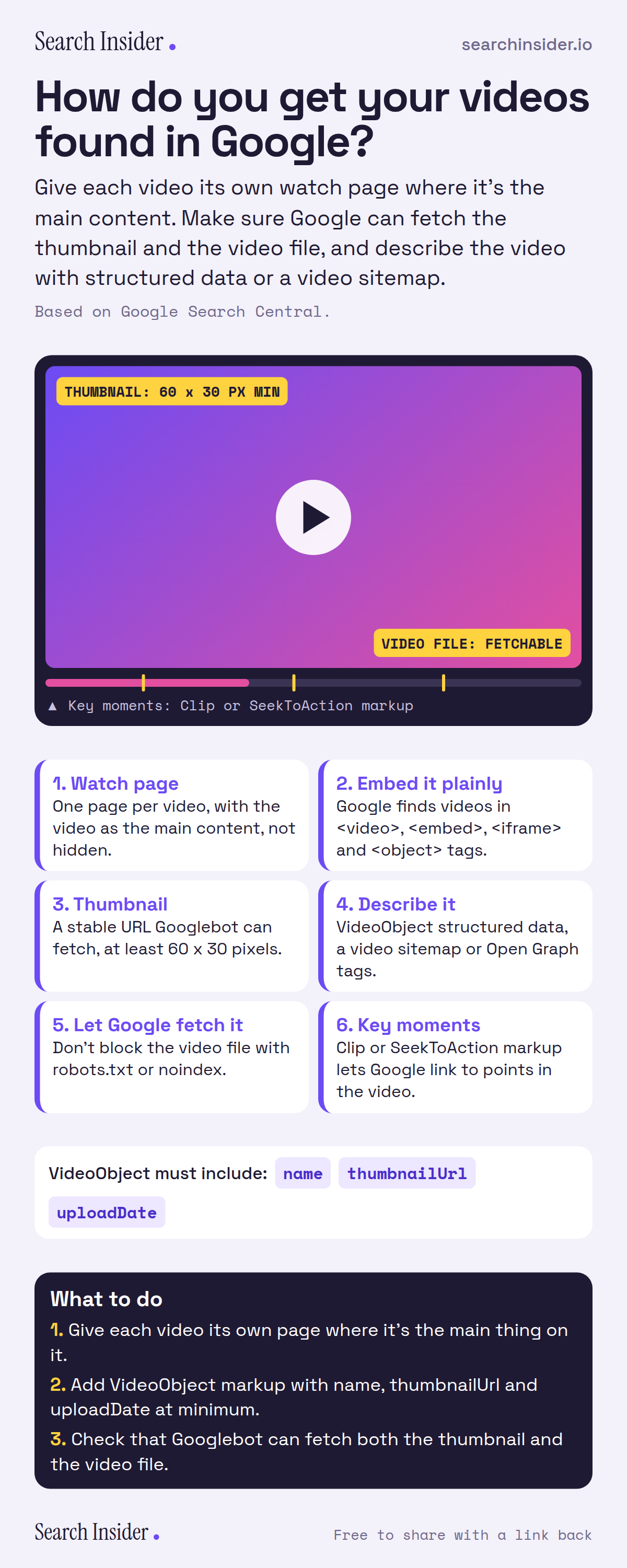
Video SEO infographic: a video player labeled with thumbnail and video file rules and key moment markers, six steps from watch page to key moments, the three required VideoObject properties, and three steps on what to do.

Oct 5, 2026

Video SEO: How to Get Videos Found in Google (Infographic)

How to get videos found in Google: watch pages, embeds, thumbnails, VideoObject structured data, video sitemaps, fetchable video files and key moments.

Embed this infographic

Every infographic here is free to republish, on any site, with a link back to the study it comes from. Paste this code and the credit is done for you.

<a href="https://searchinsider.io/infographics/video-seo"><img src="https://searchinsider.io/research/video-seo/video-seo-infographic.png" alt="Video SEO infographic: a video player labeled with thumbnail and video file rules and key moment markers, six steps from watch page to key moments, the three required VideoObject properties, and three steps on what to do." style="max-width:680px;width:100%;height:auto;" /></a><p>Source: <a href="https://searchinsider.io/infographics/video-seo">Video SEO infographic</a> by Search Insider.</p>

How do you get your videos found in Google?

The short answer: Give each video its own watch page where it's the main content. Make sure Google can fetch the thumbnail and the video file, and describe the video with structured data or a video sitemap.

Based on Google Search Central.

What it shows

  • Create a dedicated watch page for each video, where showing that video is the page's main purpose.
  • Google finds videos in video, embed, iframe and object elements.
  • Thumbnails need a stable URL Googlebot can fetch and must be at least 60 x 30 pixels.
  • Describe videos with VideoObject structured data, a video sitemap or Open Graph tags.
  • Don't block the video file with robots.txt or noindex if you want previews and key moments.
  • VideoObject requires name, thumbnailUrl and uploadDate.

What to do

  • Publishing: Give each video its own page where it's the main thing on it.
  • Markup: Add VideoObject with name, thumbnailUrl and uploadDate.
  • Checks: Make sure Googlebot can fetch the thumbnail and the video file.

The walkthrough

What is a video watch page?

A watch page is a page whose main purpose is to show a single video [1]. Google recommends creating a dedicated watch page for each video, and making sure the video is visible rather than hidden or hard to find on the page [1].

How does Google find videos on a page?

Google looks for videos embedded with HTML elements such as video, embed, iframe and object tags [1].

What are the thumbnail requirements for video SEO?

The thumbnail must be accessible to Googlebot at a stable URL and be at least 60 x 30 pixels [1]. Supported formats are BMP, GIF, JPEG, PNG, WebP, SVG and AVIF [1].

How do you tell Google about your videos?

Google reads video details from VideoObject structured data, video sitemaps and Open Graph Protocol tags [1]. VideoObject structured data requires the name, thumbnailUrl and uploadDate properties [2].

Should Google be able to fetch the video file?

Yes. Google needs to fetch the video file itself to show features like video previews and key moments, so don't block it with robots.txt or noindex [1].

How do key moments work?

Key moments let searchers jump to points in a video. You can mark them with Clip structured data, or use SeekToAction markup to let Google identify them automatically [2].

More digital marketing infographics

404 errors infographic: a 404 banner with Google's view that 404s are normal, which status to return in four cases, three facts on how Google treats 4xx and soft 404s, a checklist for a good custom 404 page, and three steps on what to do.

SEO · Oct 6, 2026

Do 404 errors hurt your SEO?

Do 404 errors hurt SEO? How Google treats 404s, why soft 404s are the real problem, which status code to return, and how to build a good custom 404 page.

Embed code
<a href="https://searchinsider.io/infographics/404-errors"><img src="https://searchinsider.io/research/404-errors/404-errors-infographic.png" alt="404 errors infographic: a 404 banner with Google's view that 404s are normal, which status to return in four cases, three facts on how Google treats 4xx and soft 404s, a checklist for a good custom 404 page, and three steps on what to do." style="max-width:680px;width:100%;height:auto;" /></a><p>Source: <a href="https://searchinsider.io/infographics/404-errors">404 errors infographic</a> by Search Insider.</p>

AI-generated content infographic: a quality not method banner, a split of fine uses versus uses against Google's rules, a pre-publish checklist (accuracy, metadata, who, how, why), a Merchant Center note on labeling AI images and product data, and three steps on what to do.

AI search · Oct 6, 2026

Does Google penalize AI-generated content?

Google's stance on AI-generated content: quality over production method, what breaks the scaled content abuse policy, and a checklist before publishing AI-assisted content.

Embed code
<a href="https://searchinsider.io/infographics/ai-generated-content"><img src="https://searchinsider.io/research/ai-generated-content/ai-generated-content-infographic.png" alt="AI-generated content infographic: a quality not method banner, a split of fine uses versus uses against Google's rules, a pre-publish checklist (accuracy, metadata, who, how, why), a Merchant Center note on labeling AI images and product data, and three steps on what to do." style="max-width:680px;width:100%;height:auto;" /></a><p>Source: <a href="https://searchinsider.io/infographics/ai-generated-content">AI-generated content infographic</a> by Search Insider.</p>

Anchor text infographic: an example link with the anchor text underlined, four vague or stuffed anchors swapped for descriptive ones, four rules on image links, internal links, length and keyword stuffing, a note on Google's link spam examples, and three steps on what to do.

SEO · Oct 6, 2026

What is anchor text, and what should it say?

What anchor text is, what Google says it should say, good and bad examples, image link alt text, and which anchor practices Google lists as link spam.

Embed code
<a href="https://searchinsider.io/infographics/anchor-text"><img src="https://searchinsider.io/research/anchor-text/anchor-text-infographic.png" alt="Anchor text infographic: an example link with the anchor text underlined, four vague or stuffed anchors swapped for descriptive ones, four rules on image links, internal links, length and keyword stuffing, a note on Google's link spam examples, and three steps on what to do." style="max-width:680px;width:100%;height:auto;" /></a><p>Source: <a href="https://searchinsider.io/infographics/anchor-text">Anchor text infographic</a> by Search Insider.</p>


