
Skip to content
← SEO Infographics
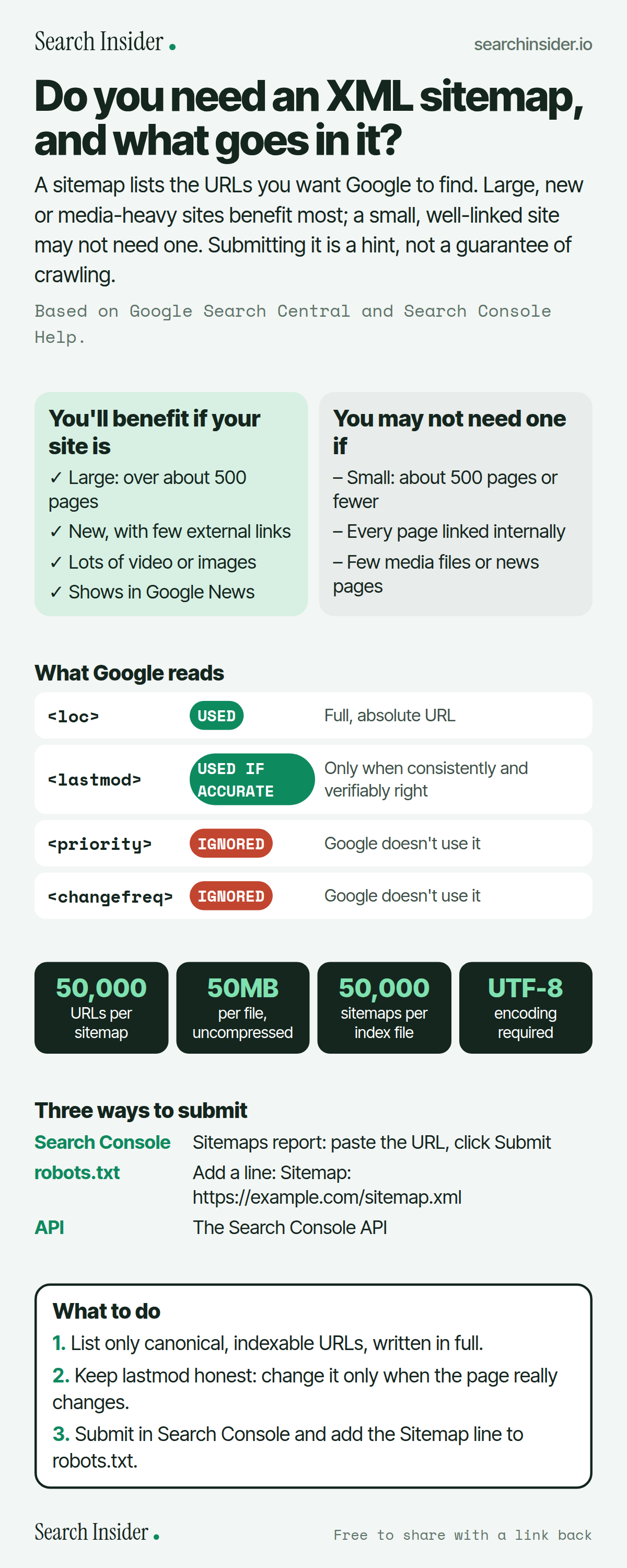
XML sitemaps infographic: who benefits from a sitemap and who may not need one, a table showing Google uses loc and accurate lastmod but ignores priority and changefreq, limits of 50,000 URLs and 50MB, three ways to submit, and three steps on what to do.

Oct 5, 2026

XML Sitemaps: Do You Need One? (Infographic)

Do you need an XML sitemap? Who benefits, what Google reads and ignores (lastmod, priority, changefreq), the 50,000 URL and 50MB limits, and how to submit one.

Embed this infographic

Every infographic here is free to republish, on any site, with a link back to the study it comes from. Paste this code and the credit is done for you.

<a href="https://searchinsider.io/infographics/xml-sitemaps"><img src="https://searchinsider.io/research/xml-sitemaps/xml-sitemaps-infographic.png" alt="XML sitemaps infographic: who benefits from a sitemap and who may not need one, a table showing Google uses loc and accurate lastmod but ignores priority and changefreq, limits of 50,000 URLs and 50MB, three ways to submit, and three steps on what to do." style="max-width:680px;width:100%;height:auto;" /></a><p>Source: <a href="https://searchinsider.io/infographics/xml-sitemaps">XML sitemaps infographic</a> by Search Insider.</p>

Do you need an XML sitemap, and what goes in it?

The short answer: A sitemap lists the URLs you want Google to find. Large, new or media-heavy sites benefit most; a small, well-linked site may not need one. Submitting it is a hint, not a guarantee of crawling.

Based on Google Search Central and Search Console Help.

What it shows

  • Sitemaps help most on large sites (over about 500 pages), new sites with few external links, and sites with lots of rich media or news content.
  • A small site of about 500 pages or fewer that's well linked internally may not need one, though most sites benefit.
  • A single sitemap is limited to 50,000 URLs or 50MB uncompressed.
  • Google ignores priority and changefreq, and uses lastmod only when it's consistently and verifiably accurate.
  • Sitemaps must be UTF-8 encoded and use fully qualified, absolute URLs.
  • Submitting a sitemap is a hint and doesn't guarantee crawling or indexing.

What to do

  • Building: List only canonical, indexable URLs in full.
  • Updating: Change lastmod only when the page really changes.
  • Submitting: Use Search Console and a Sitemap line in robots.txt.

The walkthrough

Do you need an XML sitemap?

You might need one if your site is large, new with few external links, or has a lot of rich media or news content [1]. Google says a site may not need one if it's small, about 500 pages or fewer, and comprehensively linked internally, but adds that in most cases a site will benefit from having a sitemap [1].

How many URLs can a sitemap hold?

All sitemap formats are limited to 50MB uncompressed or 50,000 URLs per file [2]. Larger sites must split their URLs across multiple sitemaps and can list them in a sitemap index file, which can reference up to 50,000 sitemaps [2][3].

Does Google use lastmod, priority and changefreq?

Google ignores priority and changefreq [2]. It uses lastmod if the value is consistently and verifiably accurate, for example when it matches the page's last real modification [2].

What URLs should go in a sitemap?

Use fully qualified, absolute URLs [2] and list the canonical version of each page you want in search results. Post the sitemap at the site root so it can cover every file on the site [2]. The file must be UTF-8 encoded [2].

How do you submit a sitemap to Google?

There are three ways: the Sitemaps report in Search Console, a Sitemap line in your robots.txt file pointing to the sitemap URL, or the Search Console API [2]. Submitting through the Sitemaps report requires owner permissions on the property [4].

Does a sitemap guarantee Google will index your pages?

No. A sitemap helps Google discover URLs, but it doesn't guarantee that every URL will be crawled and indexed [1]. Google calls submitting a sitemap merely a hint [2].

More digital marketing infographics

404 errors infographic: a 404 banner with Google's view that 404s are normal, which status to return in four cases, three facts on how Google treats 4xx and soft 404s, a checklist for a good custom 404 page, and three steps on what to do.

SEO · Oct 6, 2026

Do 404 errors hurt your SEO?

Do 404 errors hurt SEO? How Google treats 404s, why soft 404s are the real problem, which status code to return, and how to build a good custom 404 page.

Embed code
<a href="https://searchinsider.io/infographics/404-errors"><img src="https://searchinsider.io/research/404-errors/404-errors-infographic.png" alt="404 errors infographic: a 404 banner with Google's view that 404s are normal, which status to return in four cases, three facts on how Google treats 4xx and soft 404s, a checklist for a good custom 404 page, and three steps on what to do." style="max-width:680px;width:100%;height:auto;" /></a><p>Source: <a href="https://searchinsider.io/infographics/404-errors">404 errors infographic</a> by Search Insider.</p>

AI-generated content infographic: a quality not method banner, a split of fine uses versus uses against Google's rules, a pre-publish checklist (accuracy, metadata, who, how, why), a Merchant Center note on labeling AI images and product data, and three steps on what to do.

AI search · Oct 6, 2026

Does Google penalize AI-generated content?

Google's stance on AI-generated content: quality over production method, what breaks the scaled content abuse policy, and a checklist before publishing AI-assisted content.

Embed code
<a href="https://searchinsider.io/infographics/ai-generated-content"><img src="https://searchinsider.io/research/ai-generated-content/ai-generated-content-infographic.png" alt="AI-generated content infographic: a quality not method banner, a split of fine uses versus uses against Google's rules, a pre-publish checklist (accuracy, metadata, who, how, why), a Merchant Center note on labeling AI images and product data, and three steps on what to do." style="max-width:680px;width:100%;height:auto;" /></a><p>Source: <a href="https://searchinsider.io/infographics/ai-generated-content">AI-generated content infographic</a> by Search Insider.</p>

Anchor text infographic: an example link with the anchor text underlined, four vague or stuffed anchors swapped for descriptive ones, four rules on image links, internal links, length and keyword stuffing, a note on Google's link spam examples, and three steps on what to do.

SEO · Oct 6, 2026

What is anchor text, and what should it say?

What anchor text is, what Google says it should say, good and bad examples, image link alt text, and which anchor practices Google lists as link spam.

Embed code
<a href="https://searchinsider.io/infographics/anchor-text"><img src="https://searchinsider.io/research/anchor-text/anchor-text-infographic.png" alt="Anchor text infographic: an example link with the anchor text underlined, four vague or stuffed anchors swapped for descriptive ones, four rules on image links, internal links, length and keyword stuffing, a note on Google's link spam examples, and three steps on what to do." style="max-width:680px;width:100%;height:auto;" /></a><p>Source: <a href="https://searchinsider.io/infographics/anchor-text">Anchor text infographic</a> by Search Insider.</p>


