
Skip to content
← PPC Infographics
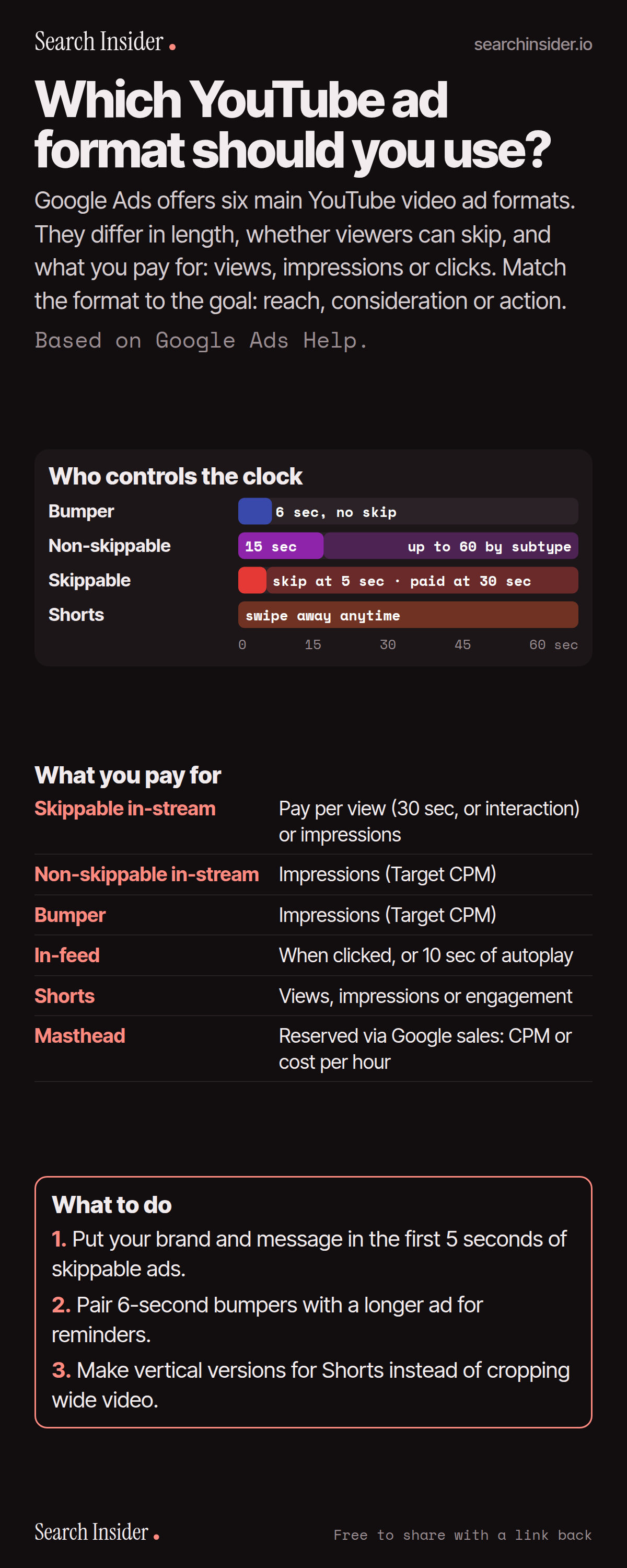
YouTube ad formats infographic: a timeline showing bumper (6 seconds, no skip), non-skippable (15 to 60 seconds by subtype), skippable (skip at 5 seconds, paid at 30) and Shorts (swipe away anytime), a table of what you pay for with each format, and three steps on what to do.

Oct 6, 2026

YouTube Ad Formats: Lengths, Skips and Costs (Infographic)

The six YouTube ad formats in Google Ads: skippable and non-skippable in-stream, bumper, in-feed, Shorts and masthead, with lengths, skip rules and what you pay for.

Embed this infographic

Every infographic here is free to republish, on any site, with a link back to the study it comes from. Paste this code and the credit is done for you.

<a href="https://searchinsider.io/infographics/youtube-ad-formats"><img src="https://searchinsider.io/research/youtube-ad-formats/youtube-ad-formats-infographic.png" alt="YouTube ad formats infographic: a timeline showing bumper (6 seconds, no skip), non-skippable (15 to 60 seconds by subtype), skippable (skip at 5 seconds, paid at 30) and Shorts (swipe away anytime), a table of what you pay for with each format, and three steps on what to do." style="max-width:680px;width:100%;height:auto;" /></a><p>Source: <a href="https://searchinsider.io/infographics/youtube-ad-formats">YouTube ad formats infographic</a> by Search Insider.</p>

Which YouTube ad format should you use?

The short answer: Google Ads offers six main YouTube video ad formats. They differ in length, whether viewers can skip, and what you pay for: views, impressions or clicks. Match the format to the goal: reach, consideration or action.

Based on Google Ads Help.

What it shows

  • Skippable in-stream ads can be skipped after 5 seconds.
  • With CPV bidding, you pay when someone watches 30 seconds (or the whole ad if shorter) or interacts, whichever comes first.
  • Non-skippable in-stream ads run 15 to 60 seconds depending on campaign subtype, bought on Target CPM.
  • Bumper ads are up to 6 seconds and can't be skipped.
  • In-feed ads charge when someone clicks to watch, or after 10 seconds of autoplay in Video View campaigns.
  • Masthead ads are only available on a reservation basis through a Google sales representative.

What to do

  • Skippable: Put brand and message in the first 5 seconds.
  • Reminders: Pair bumpers with a longer ad.
  • Shorts: Make vertical versions.

The walkthrough

How do skippable in-stream ads work?

They play before, during or after videos and can be skipped after 5 seconds [1]. With CPV bidding, you pay when a viewer watches 30 seconds, or the whole ad if it's shorter, or interacts, whichever comes first [1].

How long can non-skippable ads be?

Non-skippable in-stream ads run 15 to 60 seconds depending on the campaign subtype, and you pay based on impressions with Target CPM bidding [1].

What are bumper ads?

Bumper ads are short, non-skippable ads of up to 6 seconds, bought on Target CPM [1].

How are in-feed video ads charged?

In-feed ads appear in places like YouTube search results, Watch Next and the home feed [1]. You're charged when someone clicks to watch, or, with Video View campaigns, when it autoplays for at least 10 seconds [1].

How do YouTube Shorts ads work?

Shorts ads appear between Shorts, and viewers can skip immediately by swiping [1]. Google recommends keeping them under 60 seconds [1].

How do you buy a YouTube masthead?

Masthead ads are only available on a reservation basis through a Google sales representative, priced on CPM or cost per hour [1].

More digital marketing infographics

404 errors infographic: a 404 banner with Google's view that 404s are normal, which status to return in four cases, three facts on how Google treats 4xx and soft 404s, a checklist for a good custom 404 page, and three steps on what to do.

SEO · Oct 6, 2026

Do 404 errors hurt your SEO?

Do 404 errors hurt SEO? How Google treats 404s, why soft 404s are the real problem, which status code to return, and how to build a good custom 404 page.

Embed code
<a href="https://searchinsider.io/infographics/404-errors"><img src="https://searchinsider.io/research/404-errors/404-errors-infographic.png" alt="404 errors infographic: a 404 banner with Google's view that 404s are normal, which status to return in four cases, three facts on how Google treats 4xx and soft 404s, a checklist for a good custom 404 page, and three steps on what to do." style="max-width:680px;width:100%;height:auto;" /></a><p>Source: <a href="https://searchinsider.io/infographics/404-errors">404 errors infographic</a> by Search Insider.</p>

AI-generated content infographic: a quality not method banner, a split of fine uses versus uses against Google's rules, a pre-publish checklist (accuracy, metadata, who, how, why), a Merchant Center note on labeling AI images and product data, and three steps on what to do.

AI search · Oct 6, 2026

Does Google penalize AI-generated content?

Google's stance on AI-generated content: quality over production method, what breaks the scaled content abuse policy, and a checklist before publishing AI-assisted content.

Embed code
<a href="https://searchinsider.io/infographics/ai-generated-content"><img src="https://searchinsider.io/research/ai-generated-content/ai-generated-content-infographic.png" alt="AI-generated content infographic: a quality not method banner, a split of fine uses versus uses against Google's rules, a pre-publish checklist (accuracy, metadata, who, how, why), a Merchant Center note on labeling AI images and product data, and three steps on what to do." style="max-width:680px;width:100%;height:auto;" /></a><p>Source: <a href="https://searchinsider.io/infographics/ai-generated-content">AI-generated content infographic</a> by Search Insider.</p>

Anchor text infographic: an example link with the anchor text underlined, four vague or stuffed anchors swapped for descriptive ones, four rules on image links, internal links, length and keyword stuffing, a note on Google's link spam examples, and three steps on what to do.

SEO · Oct 6, 2026

What is anchor text, and what should it say?

What anchor text is, what Google says it should say, good and bad examples, image link alt text, and which anchor practices Google lists as link spam.

Embed code
<a href="https://searchinsider.io/infographics/anchor-text"><img src="https://searchinsider.io/research/anchor-text/anchor-text-infographic.png" alt="Anchor text infographic: an example link with the anchor text underlined, four vague or stuffed anchors swapped for descriptive ones, four rules on image links, internal links, length and keyword stuffing, a note on Google's link spam examples, and three steps on what to do." style="max-width:680px;width:100%;height:auto;" /></a><p>Source: <a href="https://searchinsider.io/infographics/anchor-text">Anchor text infographic</a> by Search Insider.</p>


