
Skip to content
← Content Marketing Infographics
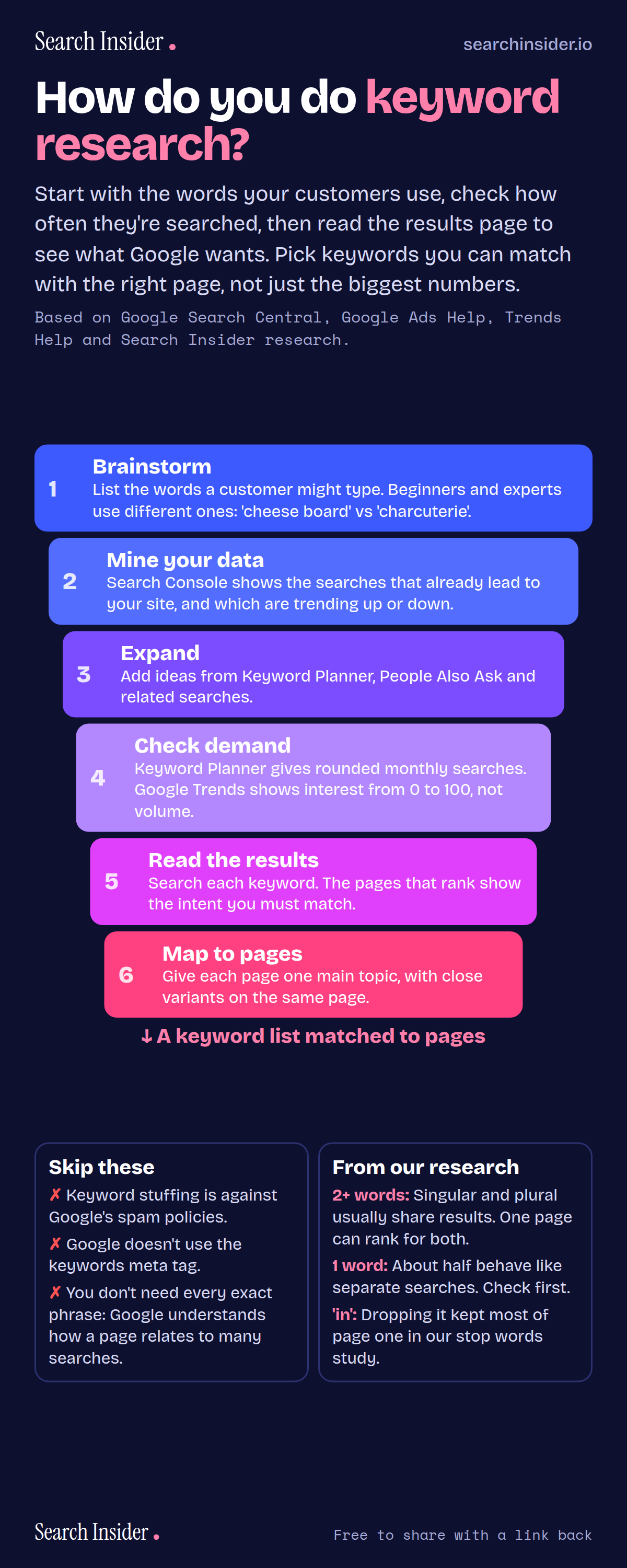
Keyword research infographic: a narrowing funnel of six steps, brainstorm, mine your data, expand, check demand, read the results and map to pages, ending in a keyword list matched to pages, plus mistakes to skip and findings from Search Insider research.

Oct 5, 2026

Keyword Research Infographic: A 6-Step Process

How to do keyword research in six steps: brainstorm, mine your own data, expand, check demand, read the results page and map keywords to pages.

Embed this infographic

Every infographic here is free to republish, on any site, with a link back to the study it comes from. Paste this code and the credit is done for you.

<a href="https://searchinsider.io/infographics/keyword-research"><img src="https://searchinsider.io/research/keyword-research/keyword-research-infographic.png" alt="Keyword research infographic: a narrowing funnel of six steps, brainstorm, mine your data, expand, check demand, read the results and map to pages, ending in a keyword list matched to pages, plus mistakes to skip and findings from Search Insider research." style="max-width:680px;width:100%;height:auto;" /></a><p>Source: <a href="https://searchinsider.io/infographics/keyword-research">How to do keyword research infographic</a> by Search Insider.</p>

How do you do keyword research?

The short answer: Start with the words your customers use, check how often they're searched, then read the results page to see what Google wants. Pick keywords you can match with the right page, not just the biggest numbers.

Based on Google Search Central, Google Ads Help, Trends Help and Search Insider research.

What it shows

  • 1. Brainstorm the words customers use. Beginners and experts search differently.
  • 2. Mine Search Console for searches that already lead to your site.
  • 3. Expand with Keyword Planner, People Also Ask and related searches.
  • 4. Check demand: Keyword Planner volumes are rounded; Google Trends is relative, 0 to 100.
  • 5. Read the results page to see the intent.
  • 6. Map each page to one main topic.
  • Keyword stuffing is against Google's spam policies, and Google doesn't use the keywords meta tag.
  • Our research: one-word singular and plural keywords behave like separate searches about half the time.

What to do

  • Before writing: Search each keyword and match the page type that ranks.
  • Mapping: Give each page one main topic, with close variants on the same page.

The walkthrough

How do you start keyword research?

Start by listing the words a customer might use. Google's SEO Starter Guide advises thinking about the words a user might search for, noting that people who know a topic well may use different words from newcomers, like charcuterie versus cheese board [1].

Where do you find keyword ideas?

Begin with your own data: the Search Console Performance report shows the search terms that led to your site [2], and the Insights report groups them into top, trending up and trending down [3]. Then expand with Google's Keyword Planner [4] and the People Also Ask and related searches features on results pages [5].

How do you check keyword search volume?

Keyword Planner shows estimates of how many searches a keyword gets each month [4], and those statistics are rounded [6]. Google Trends shows relative interest on a scale of 0 to 100, not absolute volume [7], so use it to compare terms and spot seasonal changes.

How do you find the intent behind a keyword?

Search the keyword and look at what ranks. The types of pages on page one show what Google has learned searchers want, so build the same type of page.

Do you need a page for every keyword variation?

No. Google says its language matching systems can understand how a page relates to many queries, even without the exact terms [1]. In Search Insider's study of 690 searches, singular and plural keywords of two or more words usually returned the same results, while one-word pairs behaved like separate searches about half the time [8].

What keyword mistakes should you avoid?

Don't stuff keywords: Google defines keyword stuffing as filling a page with keywords to manipulate rankings, and it's against Google's spam policies [9]. Google Search also doesn't use the keywords meta tag [1].

More digital marketing infographics

404 errors infographic: a 404 banner with Google's view that 404s are normal, which status to return in four cases, three facts on how Google treats 4xx and soft 404s, a checklist for a good custom 404 page, and three steps on what to do.

SEO · Oct 6, 2026

Do 404 errors hurt your SEO?

Do 404 errors hurt SEO? How Google treats 404s, why soft 404s are the real problem, which status code to return, and how to build a good custom 404 page.

Embed code
<a href="https://searchinsider.io/infographics/404-errors"><img src="https://searchinsider.io/research/404-errors/404-errors-infographic.png" alt="404 errors infographic: a 404 banner with Google's view that 404s are normal, which status to return in four cases, three facts on how Google treats 4xx and soft 404s, a checklist for a good custom 404 page, and three steps on what to do." style="max-width:680px;width:100%;height:auto;" /></a><p>Source: <a href="https://searchinsider.io/infographics/404-errors">404 errors infographic</a> by Search Insider.</p>

AI-generated content infographic: a quality not method banner, a split of fine uses versus uses against Google's rules, a pre-publish checklist (accuracy, metadata, who, how, why), a Merchant Center note on labeling AI images and product data, and three steps on what to do.

AI search · Oct 6, 2026

Does Google penalize AI-generated content?

Google's stance on AI-generated content: quality over production method, what breaks the scaled content abuse policy, and a checklist before publishing AI-assisted content.

Embed code
<a href="https://searchinsider.io/infographics/ai-generated-content"><img src="https://searchinsider.io/research/ai-generated-content/ai-generated-content-infographic.png" alt="AI-generated content infographic: a quality not method banner, a split of fine uses versus uses against Google's rules, a pre-publish checklist (accuracy, metadata, who, how, why), a Merchant Center note on labeling AI images and product data, and three steps on what to do." style="max-width:680px;width:100%;height:auto;" /></a><p>Source: <a href="https://searchinsider.io/infographics/ai-generated-content">AI-generated content infographic</a> by Search Insider.</p>

Anchor text infographic: an example link with the anchor text underlined, four vague or stuffed anchors swapped for descriptive ones, four rules on image links, internal links, length and keyword stuffing, a note on Google's link spam examples, and three steps on what to do.

SEO · Oct 6, 2026

What is anchor text, and what should it say?

What anchor text is, what Google says it should say, good and bad examples, image link alt text, and which anchor practices Google lists as link spam.

Embed code
<a href="https://searchinsider.io/infographics/anchor-text"><img src="https://searchinsider.io/research/anchor-text/anchor-text-infographic.png" alt="Anchor text infographic: an example link with the anchor text underlined, four vague or stuffed anchors swapped for descriptive ones, four rules on image links, internal links, length and keyword stuffing, a note on Google's link spam examples, and three steps on what to do." style="max-width:680px;width:100%;height:auto;" /></a><p>Source: <a href="https://searchinsider.io/infographics/anchor-text">Anchor text infographic</a> by Search Insider.</p>


